使用数据字符串列表进行邮件合并(文档列表) Power Automate
PDF4me 使用数据字符串列表进行邮件合并文档 是一个 Power Automate 将一个词或 PDF 模板加一个 JSON 只需一次调用,即可将数据数组合并成一批个性化文档。使用此功能,您可以为整个收件人列表生成录取通知书、证书或账户通知,而无需逐条记录地循环使用合并模板。
此操作的作用
PDF4me 使用数据字符串列表进行邮件合并文档 映射一个单词或 PDF 合并模板加上一个 JSON 数据数组,并返回一个生成的文档数组,每个文档对应一行数据。支持数组嵌套数组和对象嵌套数组两种数据字符串格式。
相关博客文章
目前尚无关于此功能的博客文章——敬请期待。
在此期间,您可以浏览 PDF4me 博客,查看适用于各平台的教程和工作流程。
访问博客 →
验证您的身份 API 要求
要访问 PDF4me 网站 API 通过 Power Automate每个请求都必须包含一个有效的 API 密钥。身份验证用于验证您的身份,并使连接器能够访问。 PDF4me从您的流程中调用邮件合并服务。
您不容错过的重要事实
一次调用,每行数据对应一个文档
一次操作调用即可返回完整的输出文档数组,无需为每个收件人循环遍历模板映射。
支持两种数据字符串形状
使用带有标题行的数组的数组,或者字段/值对象数组,以更容易从先前操作的输出中构建的方式为准。
模板可以是 Word 文档或 PDF
模板文件数据接受 .docx 或 .pdf 文件,只要它包含与数据字符串的列名或字段名匹配的合并字段即可。
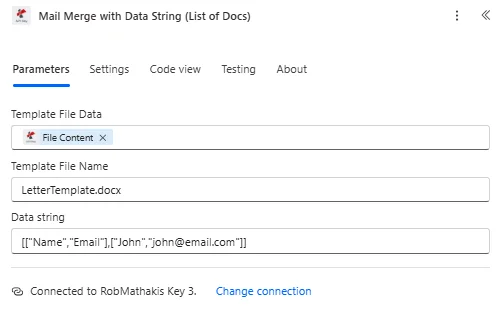
映射模板文件数据和模板文件名,然后构建数据字符串。 JSON 生成一个数组,每个文档对应一个条目。
参数
必需的: 要运行此操作,必须提供所有三个字段:模板文件数据、模板文件名和数据字符串。
| 范围 | 必需的 | 它的作用 | 例子 |
|---|---|---|---|
| Template File Data | Required | Content of the merge template, mapped from a prior action such as SharePoint or OneDrive Get File Content. Must be a .docx or .pdf file containing merge fields. | [Template Content] |
| Template File Name | Required | Name of the template file including its extension, used for processing identification. | LetterTemplate.docx |
| Data string | Required | JSON data to merge into the template. Accepts an array-of-arrays with a header row followed by value rows, or an array of field/value objects. Each row or object after the header generates one document. | [["Name","Email"],["John","[email protected]"]] |
使用数据字符串进行邮件合并会返回什么?
| 场地 | 类型 | 它包含什么 |
|---|---|---|
Output Documents | Array of Objects | One entry per generated document, directly iterable with Apply to each. |
File Content | Binary | Binary content of each generated document, nested inside each Output Documents entry. |
File Name | String | File name of each generated document, nested inside each Output Documents entry. |
{
  "Output Documents": [
    { "File Content": "[Binary Content]", "File Name": "Letter_001.pdf" },
    { "File Content": "[Binary Content]", "File Name": "Letter_002.pdf" }
  ]
}
如何在邮件合并中使用数据字符串? Power Automate?
- 添加 PDF4me → 使用数据字符串列表进行邮件合并文档 致你 Power Automate 流动。
- 地图 模板文件数据 和 模板文件名 来自存储在……的模板 SharePoint 或者 OneDrive,其中包含与您的数据列匹配的合并字段。
- 建造 数据字符串 作为一个 JSON 数组,可以是标题行后跟值行,也可以是字段/值对象数组,每个文档一个条目。
- 运行流程。 PDF4me 返回 输出文件一个数组,其中每行数据对应一个生成的文档。
- 添加一个 适用于每个 对输出文档执行操作,以电子邮件、上传或存档的方式单独处理每个生成的文档。
我应该使用哪种数据字符串格式?
使用 数组的数组 格式为:标题行后跟值行,当源数据已经来自……时 Excel 或者使用表格形状的连接器作为并行数组,因为它直接映射到行和列。使用 对象数组 当源数据来自类似这样的系统时,格式如下: CRM 或者形成连接器,自然地为每个记录返回命名字段,因为每个对象的键已经与模板的合并字段名称一致。
典型配置
工作流程示例Common Power Automate flow patterns using Mail Merge with Data String List of Docs.
批量生成证书
- 当 LMS 中将培训课程标记为完成时,就会触发一个流程。
- 获取学员列表,检索所有课程完成者的姓名和完成日期。
- Compose 操作会将数据字符串构建为名称/课程/日期对象的数组。
- 使用数据字符串进行邮件合并,一次调用即可为每个参与者生成一个证书,而“应用到每个”循环会将每个证书通过电子邮件发送给其收件人。
个性化录用通知书
- 招聘经理在 ATS 系统中批准了一批候选人,从而触发了招聘流程。
- 获取候选人数据,检索每位已批准候选人的姓名、职位和薪资。
- 使用数据字符串进行邮件合并,映射录用通知书模板,并为每位候选人生成一封通知书。
- 输出文档数组在单独交付之前会发送给人力资源部进行审核。
定期账户通知
- 循环触发器会运行每月账单通知流程。
- 获取客户数据查询计费系统,以获取当月每个到期账户的通知。
- 使用数据字符串进行邮件合并,可以根据单个通知模板为每个帐户生成个性化通知。
- “应用到每个循环”会将每个通知上传到客户的…… SharePoint 文件夹并发送摘要邮件。
实用技巧
Match merge field names to Data string keys exactly
The template's merge fields must line up with the Data string's column headers or object keys, character for character, or those fields render blank in the output.
Pick one Data string shape and stick with it
Mixing array-of-arrays and array-of-objects rows in the same request is not supported. Choose whichever shape your upstream data source already produces to avoid an extra transform step.
Use Compose to build the Data string before the action
Building the JSON array in a Compose action makes it easy to inspect and debug the exact payload before it reaches Mail Merge with Data String.
Always follow with Apply to each
Output Documents is an array by design, so downstream email, SharePoint, or archive steps need an Apply to each loop rather than a single-item reference.
Keep the template in the same PDF4me account you authenticate with
A template that renders correctly when tested manually can still fail from a flow if the connection used to run the flow points at a different PDF4me account than the one that owns the template file.
速查表
| 场地 | 价值 |
|---|---|
| Action | Mail Merge with Data String List of Docs |
| Template File Data | .docx or .pdf, mapped from a prior action |
| Template File Name | e.g. LetterTemplate.docx |
| Data string | Array-of-arrays (header + rows) or array-of-objects |
| Documents generated | One per data row/object |
| Output | Output Documents array, each with File Content + File Name |
| Next step | Apply to each over Output Documents |
常见问题
行业应用案例及应用
- Human Resources & Payroll
- Finance & Banking
- Education & Training
- Marketing & Communications
人力资源与薪资管理应用案例
- 录用通知书一次通话即可为整个招聘批次生成个性化的录用通知
- 入职文件一次性为所有新员工创建入职文件。
- 绩效考核:从单个考核周期中生成所有员工的考核文档
- 福利声明为开放注册期创建个性化福利摘要
金融与银行业应用案例
- 账户报表为每个客户生成计费周期内的账单。
- 税务文件在申报截止日期前为所有客户创建税务汇总表
- 投资报告为存档的每位投资者生成投资组合报告。
- 通知信一次性为客户群创建帐户通知
教育与培训应用案例
- 证书为班级中的每位学生生成结业证书
- 成绩单学期末为所有学员创建进度报告
- 成绩单一次性生成毕业班所有学生的成绩单
- 家长信为全班学生创建个性化的家长沟通渠道
市场营销与传播应用案例
- 竞选信为目标客户群生成个性化营销信函
- 客户须知为受影响的客户创建服务更新通知
- 活动邀请函根据注册者列表生成个性化活动邀请
- 感谢信为客户群体撰写感谢信
相关操作
生成单个文档
当只需要一个个性化文档而不是完整的文档集时,将一个模板与一个记录合并。
生成多个文档
一次调用即可从多个不同的模板生成文档,而不是将一个模板合并到多个数据行中。
合并多个 PDF 文件合并到单个文件夹 PDF
将生成的文档合并回一个文件中,便于将整批文档作为一个整体进行归档。 PDF。