在 Power Automate 中使用模板生成文档
使用模板生成文档 这是一个 Power Automate 操作,它将已保存的 PDF4me 模板与 JSON、XML 或 CSV 数据合并,并返回生成的文档。当模板已存在于 PDF4me 存储库中,而非以文件形式映射时,可以使用此操作。按名称选择模板,粘贴或上传数据,并将输出映射到下游。
验证您的 API 请求
Power Automate 中的每个 PDF4me 操作都需要有效的连接。请创建或选择一个包含您的 PDF4me API 密钥的连接。
您不容错过的重要事实
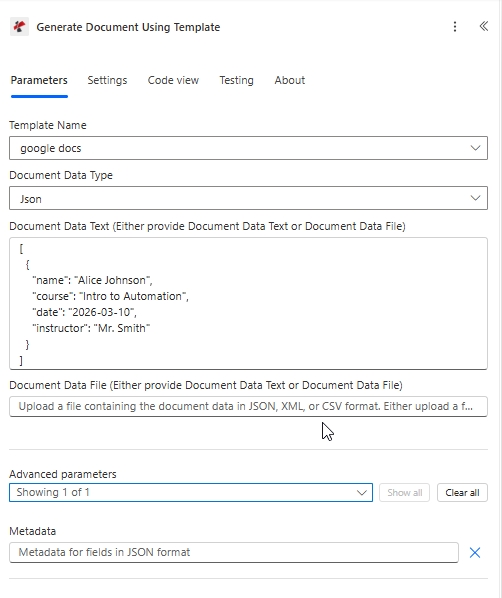
目标配置:已保存的模板,已在以下位置选中: 模板名称, 文档数据类型 设置为 JSON 格式,并将有效负载粘贴到 文档数据文本。
Power Automate 中的“使用模板生成文档”是什么?
“使用模板生成文档”是 Power Automate 的 PDF4me 操作,用于将 PDF4me 帐户中已有的模板与数据有效负载合并。它接受模板名称以及 JSON、XML 或 CSV 格式,并返回生成的动态文档。与“生成单个文档”不同,此操作无需映射模板文件或选择输出类型。
参数
| 范围 | 必需的 | 它的作用 | 例子 |
|---|---|---|---|
| Connection | Required | PDF4me connection for the flow. Create one with your API key, then reuse it across every PDF4me action. | My PDF4me connection |
| Template Name | Required | The saved template to merge, selected by name from your PDF4me templates. Upload the .docx first so it appears in the list. | google docs |
| Document Data Type | Required | Format of the data payload. Json maps cleanly from SharePoint columns and Forms. Xml is for XML source systems. | Json |
| Document Data Text | Conditional | Inline data payload built from dynamic content. Required when Document Data File is empty. | [{ "name": "Alice Johnson" }] |
| Document Data File | Conditional | A JSON, XML, or CSV data file mapped from a prior step. Required when Document Data Text is empty. | 1. Data |
| Metadata | Optional | Document metadata for fields in JSON format, for templates that reference metadata at render time. Leave empty for most cases. | {"title":"Certificate"} |
下面的示例有效载荷与占位符匹配 google-docs-template.docx将其粘贴到“文档数据文本”中,或将匹配的 JSON 作为“文档数据文件”上传。
[
  {
    "name": "Alice Johnson",
    "course": "Intro to Automation",
    "date": "2026-03-10",
    "instructor": "Mr. Smith"
  }
]
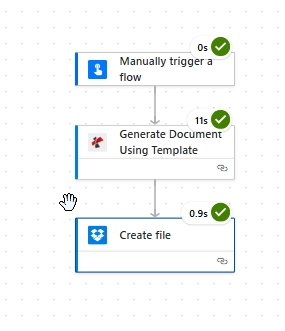
最简流程:触发器,使用模板生成文档,然后保存生成的文件。
输出
该操作会将生成的文档作为动态内容返回。将其映射到任何接受文件内容的下游步骤。
| 场地 | 类型 | 它包含什么 |
|---|---|---|
| Generated document | Binary | The merged document produced from the saved template and your data. Map it into File Content of Create file (Dropbox, OneDrive, SharePoint) or into an Outlook attachment. |
| File Name | String | Output filename derived from the template. Combine it with an expression such as guid() when you want unique filenames per run. |
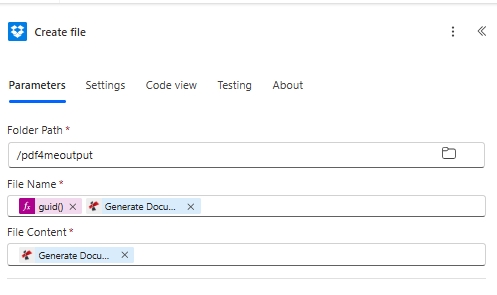
保存结果:将生成的文档映射到 文件内容并使用 guid() 在 文件名 用于生成唯一的输出名称。
Power Automate 中的“使用模板生成文档”功能是如何工作的?
Power Automate 会将选定的模板名称和数据有效负载发送到 PDF4me。PDF4me 会加载已保存的模板,并合并类似 Mustache 样式的占位符。 {{name}} 通过 Word 模板引擎,并将生成的文件作为动态内容返回。根据 Power Automate表达式参考您可以将输出文件名用……包裹起来。 guid() 因此,每次运行都会写入一个唯一的文件。有关占位符语法,请参阅 Aspose Words for .NET 文档。