更新行 Excel 在 Power Automate
PDF4me Excel - 更新行 是一个 Power Automate 直接修改工作簿中现有单元格的操作,匹配 JSON 将属性名称转换为列标题。用于同步数据库更改、刷新 CRM 记录,或更新状态列 Excel 生成报表,不插入或删除任何行。
此操作的作用
PDF4me Excel - 更新行 写 JSON 将对象数组填充到现有行中,从起始行开始,并将每个属性名称与一个列标题匹配。“转换数值和日期”、“日期格式”、“数值格式”和“区域性名称”控制值的输入和格式化方式。此操作不会插入或删除行,只会更改匹配的单元格。
相关博客文章
目前尚无关于此功能的博客文章——敬请期待。
在此期间,您可以浏览 PDF4me 博客,查看适用于各平台的教程和工作流程。
访问博客 →
我如何验证我的身份 Power Automate 流动?
每一个 PDF4me 行动 Power Automate 需要有效的连接。创建或选择一个包含您数据的连接。 PDF4me API 关键在于流程能够进行身份验证 Excel 安全地执行行更新请求。
您不容错过的重要事实
此操作会更新行,而不是插入行。
JSON 更新数据中的对象会从起始行开始,按顺序应用于现有行。没有基于键的查找,如果行尚不存在,请先使用“添加行”功能。
数据字段已标记 JSON 更新数据
它必须始终是一个 JSON 即使只有一行数据,也必须使用数组。不带数组括号的裸对象会返回“JsonData 必须是数组”错误。
类型转换需要启用该开关
日期格式、数字格式和区域性名称仅在启用“转换数字和日期”选项时生效。如果禁用此选项,所有值都将以纯文本形式写入。
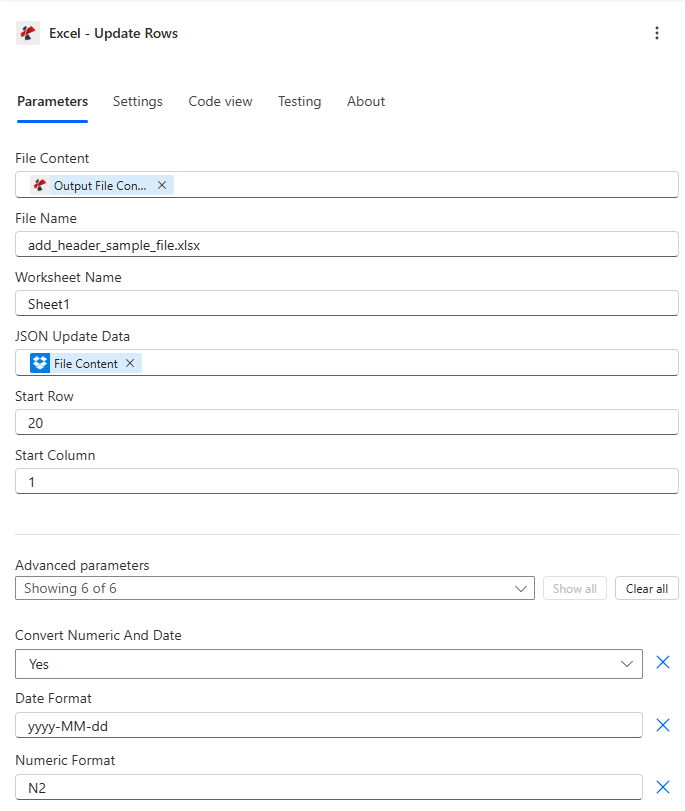
映射文件内容和文件名,设置 JSON 更新数据和起始行,然后展开高级参数以进行类型转换和格式化。
参数
必需的: 文件内容、文件名和 JSON 必须始终提供更新数据。 JSON 更新数据必须是 JSON 数组,裸对象会被拒绝。
| 范围 | 必需的 | 它的作用 | 例子 |
|---|---|---|---|
| File Content | Required | Base64 content of the source Excel workbook, mapped from SharePoint, OneDrive, or another prior action. | [File Content from Get File] |
| File Name | Required | Excel filename including extension (.xlsx or .xls), used for processing and output identification. | data.xlsx |
| JSON Update Data | Required | JSON array of objects to update. Each object updates one row sequentially starting at Start Row. Must be an array, a bare single object is rejected. | [{"Name":"John","Age":31}] |
| Worksheet Name | Optional | Name of the worksheet to update. Defaults to the first worksheet if left blank. | Sheet1 |
| Start Row | Optional | 1-based row number to start updating. Default 1, typically set to 2 or higher to skip a header row. | 2 |
| Start Column | Optional | 1-based column offset for header matching. Default 1 (column A). | 1 |
| Convert Numeric And Date | Optional | Enables automatic conversion of JSON numbers to Excel numeric values and date-like strings to Excel dates. Default true. | true |
| Date Format | Optional | Excel date format applied when Convert Numeric And Date is enabled. Default yyyy-MM-dd. | MM/dd/yyyy |
| Numeric Format | Optional | Excel numeric format applied when Convert Numeric And Date is enabled. Default N2. | #,##0.00 |
| Ignore Null Values | Optional | Skips updating a cell for any JSON property that is null when enabled. Default false, which writes nulls as empty cells. | false |
| Ignore Attribute Titles | Optional | Makes JSON property name matching case-insensitive against column headers when enabled. Default false. | true |
| Culture Name | Optional | Culture code used to parse incoming date and number strings before conversion. Default empty (system default). | en-US |
输出字段
| 场地 | 类型 | 它包含什么 |
|---|---|---|
document | Base64 | The Excel workbook with the matched rows updated. |
Success | Boolean | true if the update completed, false if the action failed. |
ErrorMessage | String | Error description, null when Success is true. |
Errors | Array | Detailed error objects with Code and Message, empty when Success is true. |
常见错误信息是什么意思?
| 错误信息 | 原因 | 解决方案 |
|---|---|---|
| Request is empty | The request object is null. | Provide a valid request object. |
| Document is empty | File Content is null or empty. | Map a valid Excel document into File Content. |
| Invalid worksheet selection | The named worksheet does not exist. | Use an existing worksheet name or leave it blank for the first sheet. |
| No headers found in worksheet | The target row (or Start Row minus one) has no headers. | Ensure the header row exists directly above the rows you are updating. |
| JsonData must be an array | A bare single object was provided instead of an array. | Wrap the object in array brackets, for example [{"Name":"John"}]. |
如何在代码中设置更新行 Power Automate?
- 添加 PDF4me → Excel - 更新行 致你 Power Automate 流动。
- 地图 文件内容 和 文件名 来自之前的操作(SharePoint, OneDrive(或数据库连接器)。
- 放 JSON 更新数据 一个 JSON 对象数组,每行一个对象,需要更新。
- 放 起始行 更新到第一行(跳过标题行) 起始列 用于头部偏移。
- 扩张 高级参数 以便能够 转换数值和日期 并设置格式。运行流程后,更新后的工作簿将返回如下内容 文档。
典型配置
工作流程示例Common Power Automate flow patterns using Update Rows.
每日库存同步
- 系统会定期触发程序查询数据库以获取最新的库存水平。
- 结果被转换成 JSON 与库存表列标题匹配的数组。
- 获取文件内容从中检索主库存工作簿 SharePoint。
- 更新行应用从第 2 行开始的数组,并启用“转换数值和日期”以处理整数库存计数。
- 更新后的库存工作簿已保存回 SharePoint。
订单状态刷新
- 当订单管理系统中的订单状态发生变化时,就会触发一个流程。
- 该场景构建了一个 JSON 包含受影响行的已更新状态字段的数组。
- 获取文件内容以检索订单跟踪日志。
- 更新行操作会应用更改,并启用“忽略空值”选项,因此其他排序列保持不变。
- 更新后的日志已保存。 SharePoint。
CRM联系人刷新
- 每周触发查询 Dynamics 365 表示过去 7 天内修改过的联系人。
- 记录被转换成 JSON 包含联系人和最后修改日期字段的数组。
- 更新行时,会启用“忽略属性标题”选项,以实现不区分大小写的标题匹配。
- 更新后的联系人列表会以时间戳的形式存档。
实用技巧
This is not a lookup-and-match update
Rows are updated sequentially from Start Row, there is no key column matching. Sort or filter your JSON array to match the row order in the workbook before calling this action.
JSON Update Data must be an array, always
Even a single-row update needs array brackets: [{"Name":"John"}], not {"Name":"John"}. Omitting the brackets returns a JsonData must be an array error.
Start Row usually skips the header
Row 1 typically holds column headers, so most flows set Start Row to 2 or higher to begin updating actual data rows.
Culture Name affects parsing, not just display
Set Culture Name to match how your source data formats dates and decimals (for example de-DE for comma decimals), otherwise conversion can misread values.
Ignore Attribute Titles solves case-mismatch headaches
If your JSON property names differ in case from the Excel column headers, enable Ignore Attribute Titles instead of renaming every header or every JSON key.
速查表
| 场地 | 价值 |
|---|---|
| Action | Excel - Update Rows |
| Required fields | File Content, File Name, JSON Update Data (array) |
| Default start row | 1 (set to 2+ to skip headers) |
| Default start column | 1 (column A) |
| Type conversion toggle | Convert Numeric And Date = true (default) |
| Default date/numeric format | yyyy-MM-dd / N2 |
| Output | document (Base64 workbook) + Success + ErrorMessage + Errors |
常见问题
行业应用案例及应用
- Sales & Marketing
- Finance & Accounting
- Human Resources
- Operations & Manufacturing
- Retail & E-Commerce
- Project Management
- 销售线索状态更新更新 Excel 跟踪表中的潜在客户资格状态
- 营销活动指标从分析平台刷新广告系列效果指标
- 客户记录将客户联系信息从 CRM 同步到 Excel
- 销售配额更新Excel仪表盘中的月度销售目标和实际数据
- 账户余额从会计系统更新客户账户余额
- 预算与实际更新预算跟踪 Excel 中的实际支出数据
- 发票状态更新 Excel 日志中发票的付款状态
- 汇率更新财务模板中的货币转换率
- 员工身份在 Excel 中更新员工状态(在职、休假、离职)。
- 薪资更新年度考核后更新薪资信息
- 培训完成更新培训状态和完成日期
- PTO余额从人力资源系统同步假期和病假余额
- 生产状态更新Excel生产计划中的工单状态
- 设备状态更新设备状况和维护日期
- 质量指标更新质量控制系统中的缺陷率和质量评分
- 供应商状态更新供应商审批状态和评级
- 库存水平更新 Excel 库存表中的产品可用性
- 价格更新从定价管理系统中刷新产品价格
- 订单履行更新订单发货状态和跟踪号
- 产品信息同步产品描述和规格
- 任务状态更新任务完成状态和进度百分比
- 里程碑日期从项目系统中刷新项目里程碑日期
- 资源分配更新团队成员分配和利用情况
- 预算跟踪同步项目支出和预算利用率
相关操作
添加行
首先插入新行,当工作表中尚不存在数据时,请使用此功能而不是更新行。
删除行
从工作表中删除过时的行,与“更新行”配合使用,实现完整的行生命周期管理。
解析 CSV 文件
转换 CSV 导出到 JSON 首先,将结果直接传递给 Update Rows。
在其他平台上执行相同任务
Make更新行
原地相同 Excel 行修饰符 Make 场景。
n8n更新行
原地相同 Excel 行修改器节点 n8n 工作流程,自托管或云端。
Zapier更新行
原地相同 Excel 行修改步骤 Zapier将其连接到 Zap 中已有的数据库或表单触发器。
PDF4me API更新行
直接通过以下方式调用相同的行更新端点 REST 对于外部的自定义集成 Power Automate。