Excel 单独的工作表 Power Automate
此操作的作用
PDF4me Excel - 单独的工作表 将多工作表 XLSX 工作簿拆分为单独的单工作表工作簿。 Power Automate 流程。映射源文件 SharePoint, OneDriveDropbox、Dataverse 或 Outlook 附件,并且该操作返回一个 输出文档 数组,每个工作表对应一个文件(文件名与工作表名称相同)。包装单个 适用于每个 围绕它展开写入操作,将内容分散到您选择的任何目标位置。此操作是动态的:它不关心工作簿有 2 个工作表还是 200 个工作表。
相关博客文章(1)
验证您的身份 API 要求
这 PDF4me 将连接器连接到 Power Automate 需要有效 联系 握着你的 PDF4me API 关键在于:在流程设计时创建一次连接,然后每次都创建连接。 PDF4me 租户中的操作会重用它。
您不容错过的重要事实
输入一本工作簿,输出一系列工作簿。
输出位于
输出文档 数组。每个元素都有自己的 文件名 和 文件内容始终循环遍历结果 适用于每个请勿直接引用单个文件,因为计数是动态的。工作表名称将变为文件名
每个输出文件都以其源文件命名,并带有一个
.xlsx 扩大。 表格5 变成 Sheet5.xlsx自定义名称,例如 2025年第一季度 变得 2025年第一季度.xlsx可以直接在“创建文件”中使用它,或者先使用“组合”步骤对其进行转换。跨工作表公式的设计初衷就是为了打破这种僵局。
将单独的工作表拆分成独立的工作簿,因此任何
=Sheet2!A1 Sheet1 中的引用会丢失其目标。工作表内的公式(位于同一工作表中的所有内容)将被保留。如果您的工作簿涉及跨工作表的值链接,请提前做好规划。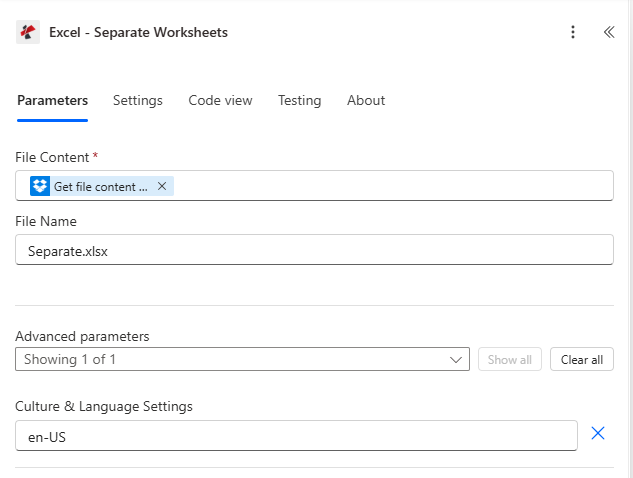
操作配置。文件内容映射自 Dropbox 获取文件内容步骤,文件名 Separate.xlsx,区域和语言设置 en-US。
参数
必需的: 文件内容。 受到推崇的: 文件名。 先进的: 文化和语言设置(默认为) 美国英语)。
| 范围 | 必需的 | 它的作用 | 例子 |
|---|---|---|---|
| File Content | Yes | Multi-sheet XLSX workbook as binary dynamic content from a prior step (SharePoint Get file content, OneDrive Get file content, Dataverse Download file, Dropbox Get file content using path, Outlook Get attachments). | @triggerOutputs()?['body'] |
| File Name | No | Source filename including .xlsx extension. Defaults to Separate.xlsx. Used for tracking and error messages. | Separate.xlsx |
| Culture & Language Settings | No | Standard culture name controlling how locale-sensitive cell values are interpreted during the split. Defaults to en-US. Use fr-FR, de-DE, ja-JP, etc. when your sheet content uses non-US formats. | en-US |
输出
该操作返回一个文件数组以及错误字段。 Power Automate 动态内容选择器会显示以下名称:
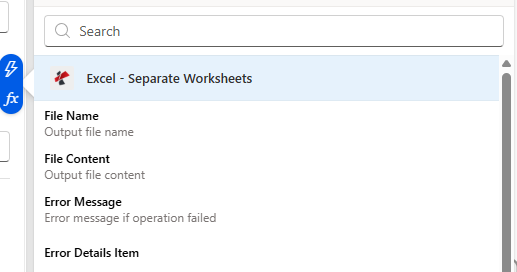
动态内容选择器会显示 outputDocuments 中每个项目的文件名和文件内容,以及失败时的错误消息/错误详情。
| 动态内容字段 | 类型 | 它包含什么 |
|---|---|---|
outputDocuments | Array | One entry per source sheet. Loop with Apply to each. |
File Name (item) | String | Sheet name plus .xlsx extension. Pass directly into Create file File Name. |
File Content (item) | Binary | The single-sheet workbook. Pass directly into Create file File Content. |
Error Message | String | Short error description on failure. Empty when the action succeeds. |
Error Details Item | Array | Itemised error messages when multiple issues were encountered. Empty when the action succeeds. |
原始响应形状
供参考(或在调用底层时) REST 直接跳转到端点),5 页拆分后返回的内容如下所示:
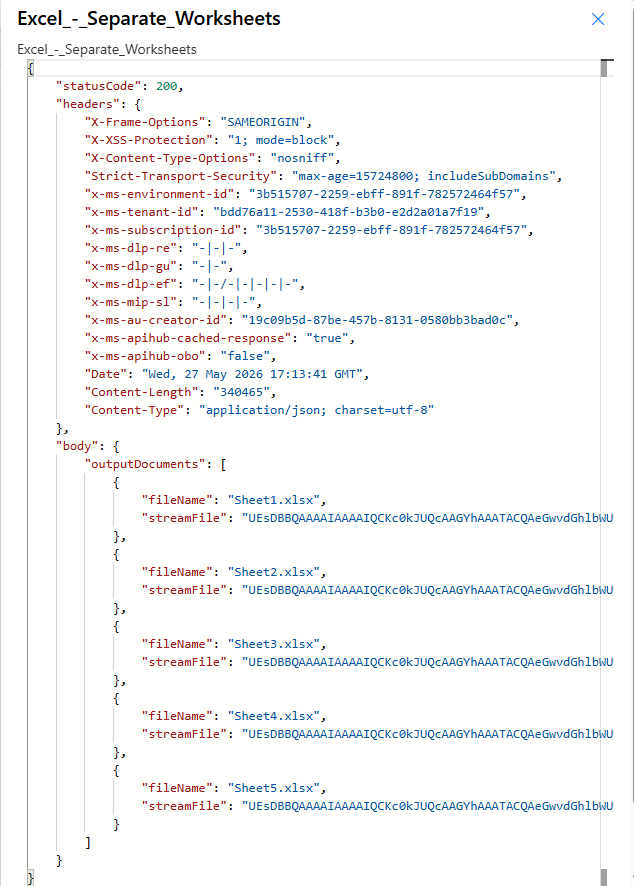
状态码 200,内容类型 application/json。 输出文档 携带一个 {文件名,流文件} 每张纸上放置一个物体。
示例文件
separate.xlsx(输入)
本次运行中使用的 5 页示例工作簿。
sheet1.xlsx (output)
One of the 5 single-sheet outputs.
sheet2.xlsx (output)
One of the 5 single-sheet outputs.
sheet3.xlsx (output)
One of the 5 single-sheet outputs.
sheet4.xlsx (output)
One of the 5 single-sheet outputs.
sheet5.xlsx (output)
One of the 5 single-sheet outputs.
流程示例
常见的 Power Automate 流程模式Typical ways to chain Excel - Separate Worksheets into a flow.
SharePoint 上传到单页库
- SharePoint 创建文件时 触发器在 /Documents/InboundWorkbooks 上触发。
- SharePoint 获取文件内容会加载 XLSX 二进制文件。
- Excel - 将工作表拆分成一个文件,每个工作表对应一个文件。
- 对每个输出文档应用 → SharePoint 使用“文件名”和“文件内容”在 /Documents/ByDepartment 中创建文件。
通过电子邮件发送工作簿,即可收到表格。
- Outlook 当收到新邮件时 触发路由收件箱中带有 .xlsx 附件的邮件。
- 对每个附件应用 → Excel - 单独的工作表会将工作簿拆分。
- 内部应用到每个输出文档 → Outlook 将每张表格作为单独的附件发送电子邮件。
Dataverse批量导出到OneDrive
- 重复触发时间为每周一早上 6:00。
- Dataverse 将合并报表生成为一个工作簿。
- Excel - 单独的工作表按地区或部门划分。
- 应用于每个 → OneDrive 在 /Reports/Weekly/[YYYY-MM-DD]/ 下创建文件。
常见问题解答
相关行动
Excel - 填充
前往 JSON 有效载荷进入 Excel 使用 Aspose Smart Markers 并返回填充的 .xlsx 文件的模板。
Excel 合并文件
反向操作。将多个工作簿合并到一个包含多个工作表的 XLSX 文件中。
Excel - 提取工作表
从工作簿中提取特定名称的工作表(而不是每个工作表)。