Excel 填充 Power Automate
PDF4me Excel - 填充 合并 JSON 有效载荷进入 Excel 包含的模板 Aspose 智能标记 字段并返回一个填充的内容 .xlsx 准备附加、存储或发送。映射模板 SharePoint, OneDrive或者 Dataverse,粘贴或构建 JSON 从动态内容中提取信息,并将填充后的工作簿通过管道传输到 SharePoint 创建文件, Outlook 发送电子邮件, OneDrive 创建文件, Dataverse 添加新行, 或者 团队发布消息.多工作表工作簿、公式重新计算和区域设置相关的数字/日期格式设置均可通过一次操作完成。
执行此操作之前: 作者 Excel 带有智能标记字段的模板,例如 &=Items.ItemName完整的语法(修饰语、多页布局、嵌套) JSON 路径、公式处理、文化格式化)以及可下载的示例模板和 JSON 有效载荷在 Excel 填充模板语法 参考页。
验证您的身份 API 要求
这 PDF4me 将连接器连接到 Power Automate 需要有效 联系 握着你的 PDF4me API 关键在于:在流程设计时创建一次连接,然后每次都创建连接。 PDF4me 租户中的操作会重用它。
您不容错过的重要事实
&=Items.ItemName 需要 JSON 包含一个 项目 包含一个对象的数组 物品名称 属性。字段名称区分大小写(物品名称 不匹配 物品名称)。2 仅填充第二个工作表,或者 1,3 用于填充第一页和第三页。适用于多工作表模板,其中一个上游系统仅拥有工作簿的一部分。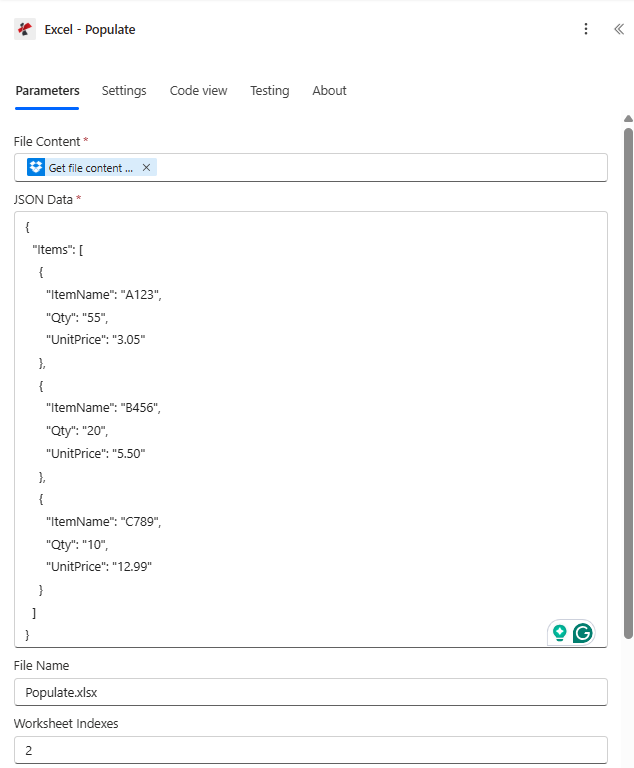
这 Excel - 填充在 a 中配置的操作 Power Automate 从映射的文件流 SharePoint一个内联 JSON 项目数组和工作表索引将合并限制在工作表 2 中。
参数
必需的: 文件内容, JSON 数据。 受到推崇的: 文件名(默认为) 填充.xlsx)以及当模板包含多个工作表时的工作表索引。 先进的: 严格的 JSON 字符串、文化和语言设置、计算公式、引用前缀样式。
| 范围 | 必需的 | 它的作用 | 例子 |
|---|---|---|---|
| File Content | Yes | Excel template (.xlsx) as binary dynamic content from a prior step: SharePoint Get file content, OneDrive Get file content, Dataverse Download file, Outlook Get attachments. The template must contain Smart Marker cells. | @triggerOutputs()?['body'] |
| File Name | No | Template filename including .xlsx extension. Defaults to Populate.xlsx. Used for tracking and as the basis for Output File Name. | Populate.xlsx |
| JSON Data | Yes | JSON object whose top-level keys match the data source names in your markers. May be pasted inline, built from a Compose step, or mapped from a Parse JSON / HTTP step. | {"Items":[{"ItemName":"A123","Qty":"55","UnitPrice":"3.05"}]} |
| Worksheet Indexes | No | Comma-separated 1-based sheet indexes to populate. Empty = all sheets. Pass 2 for sheet 2 only, 1,3 for sheets 1 and 3. | 2 |
| Strict JSON Strings | No | Yes (default) preserves quoted JSON string primitives as text in the Excel cell. No coerces quoted numeric-looking strings into typed numeric values during merge. | Yes |
| Culture & Language Settings | No | Standard culture name controlling number, date, and currency formatting written into cells. Defaults to en-US. Examples: fr-FR, de-DE, ja-JP. | en-US |
| Calculate Formulas | No | Yes (default) recalculates the workbook after the merge so totals are accurate on open. No skips recalculation to save time when a downstream step will recalc. | Yes |
| Quote Prefix To Style | No | Applies the Excel quote-prefix flag to styled values so cells that look numeric but should stay text (account numbers, ZIP codes with leading zeros) render as text. | Yes |
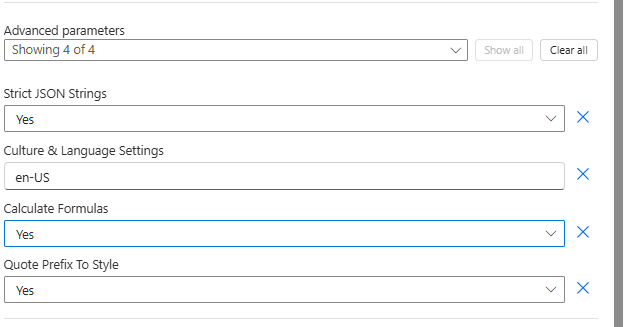
高级参数面板 Excel - 填充暴露严格 JSON 字符串、文化和语言设置、计算公式和引用前缀样式。
输出
| 动态内容字段 | 类型 | 它包含什么 |
|---|---|---|
Output File Content | Binary | The populated Excel workbook. Pass into SharePoint Create file, OneDrive Create file, Outlook Send an email with attachment, Dataverse Add a new row, or Teams Post a message with file. |
Output File Name | String | The output filename, based on File Name with the .xlsx extension. |
Success | Boolean | true on successful population, false on failure. Use in a Condition step for retry / branching logic. |
Error Message | String | Short error description on failure. Empty when Success is true. |
Error Details Item | Array | Itemised error messages when the engine encountered multiple issues. Empty when Success is true. |
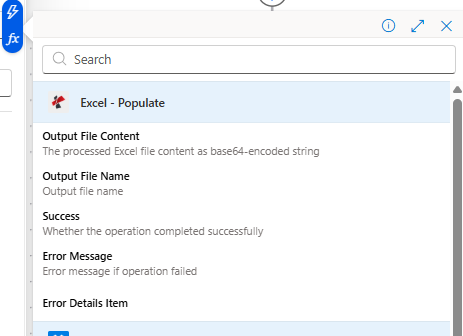
从 Excel 输出动态内容 - 填充操作,准备映射到下游 Microsoft 365 行动。
原始响应形状
供参考(或在调用底层时) REST 直接跳转到端点),成功后的操作主体如下所示:
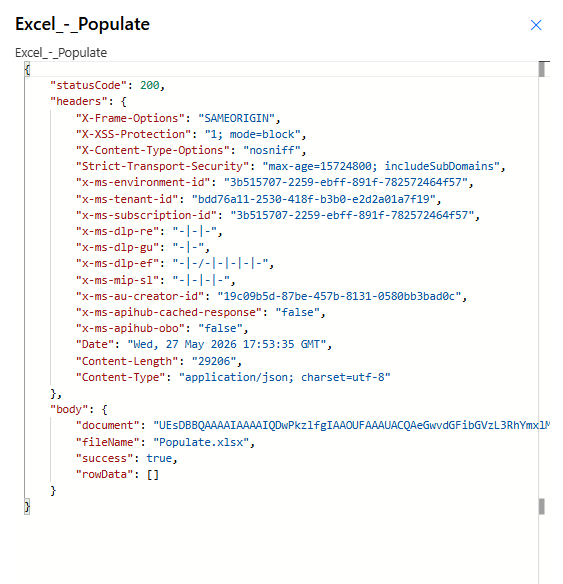
状态码 200,内容类型 application/json身体携带 文档 (Base64 XLSX), 文件名, 和 成功。 错误信息 以及 错误 数组仅在运行失败时存在。
快速试用(3分钟内即可完成)
以上截图对应的是两个可直接运行的组合。下载每对文件,将 XLSX 文件拖放到“文件内容”文件夹中,然后粘贴以下内容: JSON 进入 JSON 数据,然后运行。
用途 模板.xlsx 和 工作表索引 = 2 (Sheet2 包含参数屏幕截图中使用的简单项目标记)。与配套的平面项目配对。 JSON。
模板.xlsx(文件内容)sheet23-data.json(JSON 数据)- 放 工作表索引 到
2
使用发票单 模板.xlsx 嵌套 &=RootData.Items.* 标记物,结构化参考公式 简易发票 表格,小计+税+总计计算。
模板.xlsx(文件内容)sheet1-data.json(JSON 数据)- 放 工作表索引 到
1发票单
这是一个三页模板,每页展示不同的数据源。文件中的表格顺序是: 物品、员工、产品。
template-3-sheets.xlsx- 将 Items / Employees / Products 数组合并为一个数组 JSON 对象(见 多页部分)
- 离开 工作表索引 空置以填充所有三个
流程示例
常见的 Power Automate 流程模式Typical ways to chain Excel - Populate into a flow.
- SharePoint 当订单列表中创建项目时,会触发事件。
- SharePoint 获取项目从订单行列表中提取匹配的行项目。
- Compose 构建 JSON 包含来自行项目的 Items 数组的数据有效负载。
- SharePoint 获取文件内容加载发票 Excel 模板。
- Excel - 填充合并模板 JSON。
- Outlook 向客户发送一封包含输出文件内容的电子邮件附件。
- 重复触发条件为每月1日09:00。
- Dataverse List 行提取当前库存。
- 组合操作会将结果塑造成…… JSON 包含 Products 数组的对象。
- SharePoint 获取文件内容会加载 3 页模板。
- Excel - 将工作表索引设置为 2 填充到运行中(仅限产品工作表)。
- OneDrive 创建文件存档报告;Teams 发布消息时会添加指向该文件的链接。
- Microsoft Forms 当提交新回复时,触发器会触发。
- Dataverse List 行提取相关的员工和部门。
- Compose 构建 JSON 包含员工数组的数据。
- Excel - 将合并数据填充到 HR 名册模板中,文化设置为表单响应中的区域设置。
- Outlook 发送电子邮件会将填写好的工作簿发送给人力资源经理。