解析 CSV 到 JSON 在 Power Automate 和 PDF4me
PDF4me CSV 解析为 JSON 是一个 Power Automate 将以下操作转换为 CSV 文件整理成结构化格式。 JSON 具有三级头部优先级系统和可配置分隔符的数组。可用于馈送 CSV 导出到数据库, REST API或者无需在流程中编写自定义解析器即可使用 Excel。
此操作的作用
PDF4me CSV 解析为 JSON 读到 CSV 文件并返回一个 Base64编码 JSON 对象数组,其中列标题、跳过首行和区域性名称控制行和标题的解释方式。任何分隔符均有效,并且会优雅地处理格式错误的行,而不会导致流程失败。
相关博客文章
目前尚无关于此功能的博客文章——敬请期待。
在此期间,您可以浏览 PDF4me 博客,查看适用于各平台的教程和工作流程。
访问博客 →
我如何验证我的身份 Power Automate 流动?
每一个 PDF4me 行动 Power Automate 需要有效的连接。创建或选择一个包含您数据的连接。 PDF4me API 关键在于流程能够进行身份验证 CSV 安全地解析请求。
您不容错过的重要事实
头部处理严格遵循三级优先级原则。
如果提供列标题,则列标题优先显示(每个)。 CSV 行成为数据)。否则,“跳过第一行”设置为 true 时使用第一行。 CSV 将行作为标题。如果两行都为空,则标题会自动生成为 Column1、Column2 等。
文化名称是一个容易被忽略的高级参数
“区域名称”隐藏在“高级参数”下,与“列标题”和“跳过首行”并列,用于设置解释特定区域的数字和日期格式的语言环境。 CSV。
解析是宽松的,而非严格的。
值少于标题的行将返回空字符串,值多于标题的行将忽略多余的值,格式错误的数据将返回一个空数组而不是抛出错误。
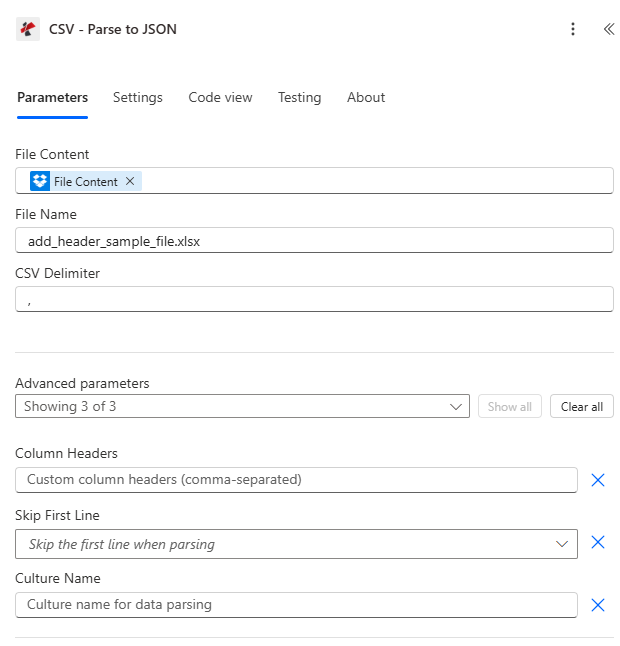
映射文件内容和文件名,设置 CSV 选择分隔符,然后展开“列标题”、“跳过首行”和“区域名称”等高级参数。
参数
必需的: 文件内容、文件名和 CSV 必须提供分隔符。“列标题”、“跳过首行”和“区域性名称”是可选的高级参数。
| 范围 | 必需的 | 它的作用 | 例子 |
|---|---|---|---|
| File Content | Required | Base64 content of the source CSV file, mapped from SharePoint, OneDrive, or an email attachment. | [File Content from Get File] |
| File Name | Required | CSV filename including extension, used for processing and output identification. | data.csv |
| CSV Delimiter | Required | Character or short string separating columns. Comma, semicolon, tab, and pipe are all supported, as are multi-character delimiters. | , |
| Column Headers | Optional | Comma-separated custom header names. When provided, every CSV line including the first is treated as data and Skip First Line is ignored. | FullName,Age,Email |
| Skip First Line | Optional | When true and Column Headers is empty, uses the first CSV line as headers and starts data from the second line. Default false. | true |
| Culture Name | Optional | Locale used to interpret region-specific number and date formats in the CSV content. | en-US |
输出字段
| 场地 | 类型 | 它包含什么 |
|---|---|---|
document | Base64 | The parsed JSON array, UTF-8 encoded and Base64 wrapped. |
FileName | String | Fixed output filename, "parsed_data.json". |
Success | Boolean | true if parsing completed, false if the action failed. |
ErrorMessage | String | Error description, null when Success is true. |
Errors | Array | Detailed error objects with Code and Message, empty when Success is true. |
常见错误信息是什么意思?
| 错误信息 | 原因 | 解决方案 |
|---|---|---|
| Request is empty | Request object is null. | Provide a valid request object. |
| Document is empty | Document object is null or CSV content is null. | Provide valid CSV file content. |
| Encoding exceptions | CSV content is not UTF-8 encoded. | Re-save or export the CSV file as UTF-8. |
| Empty array output | CSV content is empty or contains only a header row. | Provide a CSV file with at least one data row. |
如何设置解析 CSV 在 Power Automate?
- 添加 PDF4me → CSV 解析为 JSON 致你 Power Automate 流动。
- 地图 文件内容 和 文件名 来自之前的操作(SharePoint, OneDrive或电子邮件附件)。
- 放 CSV分隔符 与源文件匹配(逗号、分号、制表符或竖线)。
- 扩张 高级参数 并设置 列标题 用于自定义名称,或 跳过第一行 使用文件自身的标题行。
- 运行流程,解码 文档 Base64 输出结果,并循环遍历这些结果。 JSON 数组 适用于每个。
典型配置
工作流程示例Common Power Automate flow patterns using Parse CSV.
CSV 导入数据库
- A CSV 文件落入 SharePoint “导入”文件夹,触发流程。
- 解析 CSV 将其转换为 JSON 和 CSV 分隔符设置为逗号,并启用“跳过首行”功能。
- 文档输出被解码并解析成各个部分。 JSON 物体。
- 对每个记录进行循环,并通过 SQL 连接器插入记录。
- 处理后的 CSV 已移至“存档”文件夹。
欧洲出口到 REST API
- 源系统通过电子邮件发送以分号分隔的内容 CSV 出口。
- 解析 CSV 运行 CSV 分隔符设置为分号,并启用“跳过首行”功能。
- 每个解析后的记录都会被发布到 REST API 以终点结束 HTTP。
- 收集响应代码以标记任何失败的记录。
- 循环结束后,系统会通过电子邮件发送摘要。
将带有自定义标题的 CSV 文件转换为 Excel 文件
- 旧版报表以制表符分隔符的形式送达。 CSV 没有标题行。
- 解析 CSV 运行 CSV 分隔符设置为制表符,列标题已明确设置。
- 由此产生的 JSON 数组馈入 PDF4me 使用“添加行”操作填充 Excel 模板。
- 格式化后的Excel工作簿将通过电子邮件发送给利益相关者。
实用技巧
Column Headers overrides Skip First Line completely
If you set Column Headers, Skip First Line is ignored and every CSV row, including what looks like a header row, is treated as data. Do not set both expecting them to combine.
Match the delimiter exactly to the export locale
European CSV exports commonly use a semicolon instead of a comma, especially when the source system uses comma as the decimal separator. Check a sample row before hardcoding the delimiter.
Decode document before parsing further
The document output is Base64-encoded JSON text, not a ready-to-use object. Decode it first, then use Parse JSON to expose individual fields for Apply to each.
Set Culture Name for non-US number formats
If the CSV uses comma as a decimal separator or day-first dates, set Culture Name to match (for example de-DE or en-GB) so downstream conversions do not misread values.
Treat empty output as a signal, not a crash
An empty array back from Parse CSV usually means the file only had a header row or was empty, not that the flow failed. Check Success and Errors before assuming the source file is fine.
速查表
| 场地 | 价值 |
|---|---|
| Action | CSV - Parse to JSON |
| Header priority | Column Headers > Skip First Line > auto-generated |
| Common delimiters | , (comma) / ; (semicolon) / \t (tab) / | (pipe) |
| Output filename | parsed_data.json (fixed) |
| Output format | document (Base64 JSON array) |
| Malformed data behavior | Returns empty array, does not error |
常见问题
行业应用案例及应用
- IT & System Integration
- Finance & Accounting
- Sales & Marketing
- Human Resources
- Operations & Supply Chain
- 遗留系统集成将旧系统中导出的 CSV 文件解析为 JSON 文件
- API 数据源将 CSV 数据转换为 JSON 格式,以便 REST API 调用。
- 数据库迁移解析 CSV 文件以进行数据库导入操作
- 日志文件处理解析 CSV 格式的日志文件以进行分析
- 银行对账单导入将 CSV 银行对账单解析为 JSON 格式以进行处理
- 交易处理将 CSV 交易导出数据转换为结构化 JSON
- 总账数据导入解析用于ERP导入的会计科目表CSV导出文件
- 发票处理将 CSV 发票数据转换为 JSON 格式以实现自动化
- 铅进口解析来自营销平台的 CSV 潜在客户列表
- 活动数据将 CSV 格式的营销活动结果转换为 JSON 格式以进行分析
- 联系导入解析来自各种来源的 CSV 联系人导出文件
- 销售数据集成将 CSV 销售报告转换为 JSON 格式以便导入 CRM 系统
- 工资数据解析 CSV 格式的工时表以导入工资系统
- 员工导入将 CSV 格式的员工数据转换为 JSON 格式,以便用于人力资源信息系统 (HRIS)。
- 福利登记解析 CSV 格式的注册数据以进行处理
- 考勤记录将 CSV 格式的考勤导出数据转换为结构化的 JSON 格式。
- 库存导入将 CSV 格式的库存导出文件解析为 JSON 格式,以便导入系统。
- 订单处理将 CSV 订单数据转换为 JSON 格式以进行处理
- 航运数据解析物流系统的 CSV 格式货运清单
- 供应商数据将 CSV 供应商列表转换为 JSON 格式以进行采购
相关操作
添加行
写出已解析的内容 JSON 将数组直接导入到新的 Excel 工作表中,这是解析 CSV 之后的自然下一步。
提取行
读取现有 Excel 行 JSON,与解析 CSV 的方向相反。
合并文件
合并多个已解析的 CSV 导出到单个 Excel 工作簿。
在其他平台上执行相同任务
Make解析 CSV 文件
相同的 CSV-到-JSON 转换模块 Make 场景。
n8n解析 CSV 文件
相同的 CSV-到-JSON 用于转换节点的节点 n8n 工作流程,将其连接到自托管或云平台 n8n 实例。
Zapier解析 CSV 文件
相同的 CSV-到-JSON 转换步骤 Zapier将其连接到 Zap 中已有的 Google Sheets 或数据库触发器。
PDF4me API解析 CSV 文件
同名 CSV-到-JSON 直接通过端点 REST 对于外部的自定义集成 Power Automate。