合并行 Excel 在 Power Automate
PDF4me 合并行 是一个 Power Automate 操作将重复项分组 Excel 按一个或多个键列对行进行分组,并将剩余值合并到单个合并行中。使用此功能可以将重复的客户、类别或交易条目合并为每个键一行,或者将键列留空以直接删除完全相同的重复行。
此操作的作用
PDF4me 合并行 读一个 Excel 文件加上一组键列编号,将具有相同键值的行分组,并在删除组内重复值后,用分号分隔符连接每个组中的非键值。如果未指定键列,则所有列值都相同的行将被视为完全相同的重复项。
相关博客文章
目前尚无关于此功能的博客文章——敬请期待。
在此期间,您可以浏览 PDF4me 博客,查看适用于各平台的教程和工作流程。
访问博客 →
验证您的身份 API 要求
要访问 PDF4me 网站 API 通过 Power Automate每个请求都必须包含一个有效的 API 密钥。身份验证用于验证您的身份,并使连接器能够访问。 PDF4me的 Excel 从您的流程中合并行服务。
您不容错过的重要事实
合并键列决定哪些内容要分组。
列名中的键用于识别重复行,并保留其首次出现的值。其他所有列都被视为值列,并进行合并。
数值之间用分号分隔。
从匹配的行中收集非空值,删除该集合中的重复值,并将剩余部分用“;”连接起来。
空合并键列仅删除完全重复项
如果没有指定关键列,则每一列都算作一个键,因此只有所有列都相同的行才会被折叠,并且不会发生值合并。
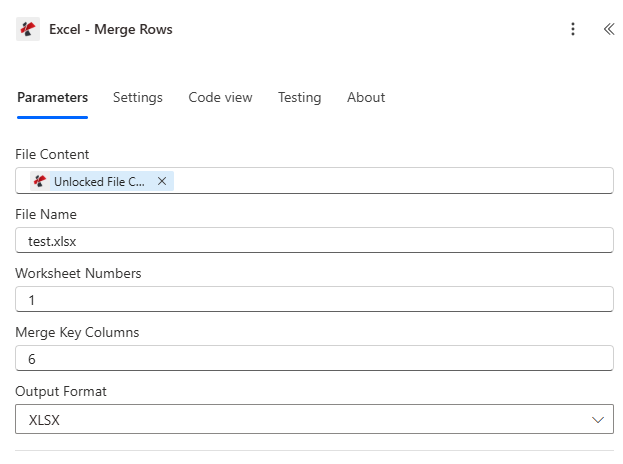
从先前的操作映射文件内容和文件名,设置工作表编号和合并键列,然后选择输出格式。
参数
必需的: 文件内容、文件名和工作表编号必须始终提供。合并键列和输出格式是条件性的,留空时均有相应的备用方案。
| 范围 | 必需的 | 它的作用 | 例子 |
|---|---|---|---|
| File Content | Required | Base64 or buffer content of the source Excel file, typically mapped from a prior action like SharePoint Get File Content or OneDrive. | [File Content from Get File] |
| File Name | Required | Name of the Excel file including its extension, used for processing and naming the output. | test.xlsx |
| Worksheet Numbers | Required | Comma-separated list of 1-based worksheet numbers to process, for example "1,3" targets the first and third worksheets. | 1 |
| Merge Key Columns | Conditional | Comma-separated 1-based column numbers used to group duplicate rows. Leave blank to treat all columns as keys, which removes exact duplicate rows without merging any values. | 6 |
| Output Format | Conditional | Output file format: XLSX, XLS, XLSB, or CSV, matched case-insensitively. Defaults to XLSX when left blank. | XLSX |
合并行会返回什么?
| 场地 | 类型 | 它包含什么 |
|---|---|---|
document | Base64 | The Excel document with duplicate rows merged, in the requested Output Format. |
FileName | String | Output filename, for example "merged_rows.xlsx", with the extension matching Output Format. |
Success | Boolean | true when the merge completed, false if the request failed validation or processing. |
Error Message | String | Description of what went wrong, null when Success is true. |
Errors | Array | Detailed error entries with Code and Message, empty when Success is true. |
常见错误信息
| 错误信息 | 原因 | 解决方案 |
|---|---|---|
Request is empty | Request object is null. | Provide a valid request object. |
Document is empty | Document object is null. | Provide a valid Excel document. |
Invalid worksheet selection | Worksheet number is out of range or in an invalid format. | Use valid 1-based worksheet numbers within the workbook. |
Available worksheets in workbook ({X} total) | Informational detail returned alongside a worksheet validation failure. | Use worksheet numbers from 1 to the reported total. |
Worksheet {number} not found | Worksheet number exceeds the workbook's total worksheet count. | Use a valid worksheet number from 1 to the total count. |
Error processing file: {message} | Generic processing error during the merge operation. | Check file integrity, data structure, and parameter values. |
如何在数据库中设置合并行? Power Automate?
- 添加 PDF4me → 合并行 致你 Power Automate 流动。
- 地图 文件内容 和 文件名 源自之前的操作,例如 SharePoint 或者 OneDrive 获取文件内容。
- 进入 工作表编号 例如,以逗号分隔的从 1 开始的工作表索引列表的形式。
1或者1,3。 - 进入 合并关键列 例如,使用从 1 开始的列编号进行分组。
6或者留空,仅删除完全重复的行。 - 放 输出格式 转换为 XLSX、XLS、XLSB 或 CSV或者留空以使用默认的 XLSX 文件。
- 运行流程。重复行将被分组并合并,合并后的文件将返回为
document。
何时应该将合并键列留空?
离开 合并关键列 当目标仅是删除所有列完全相同的行时,例如清理导入数据时重复导入了同一条记录,则此操作为空。因为在此模式下,每一列都被视为键的一部分,所以没有非键列需要合并,因此该操作表现为直接的完全重复项删除,而不是值合并。
典型配置
工作流程示例Common Power Automate flow patterns using Merge Rows.
客户订单合并
- 每日订单导出完成后,会触发重复事件。
- 获取文件内容从中检索当天的订单工作簿。 SharePoint。
- “合并行”操作将“合并键列”设置为 CustomerID 列,“工作表编号”设置为“1”。
- 合并后的文件(每行包含一位客户和订单详情)将通过电子邮件发送给销售团队。
导入清理(精确删除重复项)
- 当新文件进入“清理”流程时,流程开始。 SharePoint 文件夹。
- 获取文件内容以检索已上传的文件。 Excel 文件可能包含重复行。
- “合并行”功能默认将“合并键列”留空,因此只有每列都相同的行才会被合并。
- 清理后的文件保存回“已清理数据”文件夹。
类别级库存汇总
- 每周的重复触发事件会启动库存报告。
- 获取文件内容从记录系统中检索详细的库存工作簿。
- 合并行时,合并键列设置为类别和子类别列号。
- 将匹配行中的产品 ID 和数量合并到每个类别的一行中,然后归档到每周汇总库中。
实用技巧
Pick key columns deliberately
Any column not listed in Merge Key Columns becomes a value column that gets merged. Double-check the column numbers against the worksheet before running the flow on production data.
Merged values lose their original row context
Once several rows are combined with a semicolon separator, you can no longer tell which merged value came from which original row unless a key column preserves that link.
Column numbers are 1-based, not 0-based
Column 1 is column A, column 2 is column B, and so on. Passing a 0-based index will target the wrong column.
Duplicate values within a merge group are removed once
If three duplicate rows share the same value in a non-key column, that value appears only once in the merged cell rather than being repeated three times.
Worksheet Numbers applies the same merge logic per sheet
When multiple worksheet numbers are listed, each worksheet is merged independently using the same Merge Key Columns setting.
速查表
| 场地 | 价值 |
|---|---|
| Action | Merge Rows |
| File Content | Mapped from a prior file-retrieval action |
| File Name | e.g. test.xlsx |
| Worksheet Numbers | 1-based, comma-separated: "1" or "1,3,5" |
| Merge Key Columns | 1-based column numbers to group on, e.g. "6"; blank = exact duplicates only |
| Value merge separator | "; " between deduplicated non-key values |
| Output Format | XLSX (default), XLS, XLSB, or CSV |
| Output | document (Base64), FileName, Success, Error Message, Errors |
常见问题解答
行业应用案例及应用
- Sales & E-Commerce
- Finance & Accounting
- Human Resources
- Operations & Supply Chain
- Customer Service & Support
- Healthcare & Medical
销售和电子商务应用案例
- 客户订单合并将每个客户的多个订单合并为单行
- 产品销售聚合:将多个交易中的产品销售额合并
- 区域汇总按地区或区域合并销售数据
- 重复线索删除从营销列表中删除完全相同的重复潜在客户
财务与会计应用案例
- 交易合并按账户或供应商合并交易
- 总账条目汇总按科目代码合并总账分录
- 费用汇总按员工或部门合并费用条目
- 删除重复发票删除完全相同的重复发票条目
人力资源应用案例
- 工时表合并按员工和工资期合并工时表条目
- 培训记录汇总汇总员工培训完成情况
- 福利登记按员工 ID 合并注册选择
- 重复员工清理删除重复的员工记录
运营与供应链应用案例
- 库存整合按地点和产品合并库存记录
- 供应商订单汇总按供应商合并采购订单
- 货物追踪按跟踪号合并货运条目
- 质量控制汇总按批次或批号汇总质量控制结果
客户服务与支持用例
- 票务合并按客户和问题类别合并支持工单
- 反馈聚合按产品汇总客户反馈
- 联系去重删除重复的联系人条目
- 互动历史按客户 ID 合并客户互动
医疗保健应用案例
- 患者就诊整合按患者 ID 和日期合并患者就诊记录
- 实验室结果汇总按患者和检测类型汇总实验室结果
- 预约汇总按患者和提供者合并预约
- 处方史按患者 ID 合并处方
相关操作
添加行
插入新行 JSON 数据输入到 Excel 在对合并数据运行合并操作之前,先查看工作表。
更新行
直接修改现有行的值,适用于更正单行数据,而不是将多行数据合并为一行。
提取行
将特定行范围提取到新文件中,这对于在合并过程之前或之后隔离子集非常有用。
在其他平台上执行相同任务
Make合并行
相同的键列行合并模块 Make 适用于与 Dropbox 和 Google Drive 模块配合使用的各种场景。
n8n合并行
同行合并节点,适用于自托管或云端 n8n 工作流程。
Zapier合并行
同样的操作 Zapier将其连接到 Google 表格或 CRM Zap 中已包含触发器。