添加图像页眉页脚 Excel 在 Power Automate
PDF4me 添加图像页眉页脚 Excel 是一个 Power Automate 将徽标、水印或品牌图像插入到……中的操作 Excel 工作表的页眉或页脚部分。无需打开文件,即可在周报上添加公司徽标、用安全图像标记机密文件或为客户交付物添加联合品牌标识。 Excel 手动操作。
此操作的作用
PDF4me 添加图像页眉页脚 Excel 将图像文件映射到工作簿的页眉或页脚,可选择左对齐、居中或右对齐,并可应用于特定工作表或整个文件。图像周围的页面边距可通过“高级参数”以厘米为单位进行配置。
相关博客文章
目前尚无关于此功能的博客文章——敬请期待。
在此期间,您可以浏览 PDF4me 博客,查看适用于各平台的教程和工作流程。
访问博客 →
我如何验证我的身份 Power Automate 流动?
每一个 PDF4me 行动 Power Automate 需要有效的连接。创建或选择一个包含您数据的连接。 PDF4me API 关键在于流程能够进行身份验证 Excel 安全地处理图像格式化请求。
您不容错过的重要事实
IsHeader 是一个“是/否”下拉菜单,而不是自由文本。
连接器面板将“是否为标题”显示为“是/否”下拉菜单(默认为“是”),将“图像位置”显示为“左/中/右”下拉菜单(默认为“中”)。这两个选项在实时显示中均为下拉菜单。 UI不是布尔字段或自由文本字段。
7 个用于利润率和目标定位的高级参数
高级参数面板显示“显示 5/7”:确认可见上边距、下边距、左边距和右边距(均以厘米为单位),以及此连接器通用的目标字段,包括工作表名称、工作表索引和区域性名称。 Excel 行动。
空白工作表选择器表示所有工作表
如果工作表名称和工作表索引都留空,则图像将在一次运行中应用于工作簿中的每个工作表。
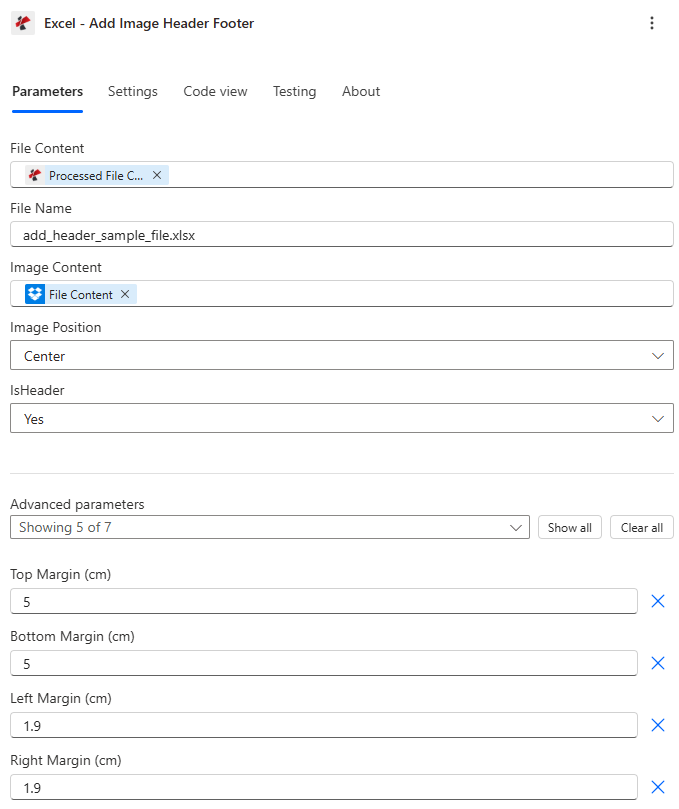
映射文件内容、文件名和图像内容,然后选择图像位置和 IsHeader 放置位置。
参数
必需的: 文件内容、文件名和图像内容。图像位置和是否为页眉均有默认值。页边距和工作表定位是条件性高级参数。
| 范围 | 必需的 | 它的作用 | 例子 |
|---|---|---|---|
| File Content | Required | Base64 content of the source Excel workbook, mapped from SharePoint, OneDrive, or another prior action. | [File Content from Get file content] |
| File Name | Required | Excel filename including extension (.xlsx or .xls), used for processing and output identification. | add_header_sample_file.xlsx |
| Image Content | Required | Base64 content of the logo or branding image, mapped from SharePoint, OneDrive, or an email attachment. PNG, JPG, JPEG, or GIF. | [File Content from Get file content] |
| Image Position | Optional | Horizontal alignment within the header/footer zone: Left, Center, or Right. Defaults to Center. | Center |
| IsHeader | Optional | Yes places the image in the header, No places it in the footer. Defaults to Yes. | Yes |
| Top Margin | Conditional | Advanced parameter. Top page margin in centimeters, controls spacing from the top edge and affects header placement. | 5 |
| Bottom Margin | Conditional | Advanced parameter. Bottom page margin in centimeters, controls spacing from the bottom edge and affects footer placement. | 5 |
| Left Margin | Conditional | Advanced parameter. Left page margin in centimeters, controls overall page layout spacing. | 1.9 |
| Right Margin | Conditional | Advanced parameter. Right page margin in centimeters, controls overall page layout spacing. | 1.9 |
| Worksheet Names | Conditional | Advanced parameter. List of worksheet names to target. Leave empty along with Worksheet Indexes to apply to every sheet. | ["Sheet1", "Report"] |
| Worksheet Indexes | Conditional | Advanced parameter. List of 1-based worksheet indexes to target. Combines with Worksheet Names if both are set. | [1, 2] |
| Culture Name | Conditional | Advanced parameter. Culture/locale code for processing, for example en-US or de-DE. Blank uses the invariant culture. | en-US |
笔记: 如果工作表名称和工作表索引均为空或 null,则图像将应用于工作簿中的每个工作表。
输出字段
| 场地 | 类型 | 它包含什么 |
|---|---|---|
document | Base64 | The Excel workbook with the image header/footer applied. |
Success | Boolean | true if the action completed, false if it failed. |
ErrorMessage | String | Error description, null when Success is true. |
Errors | Array | Detailed error objects, empty when Success is true. |
常见错误信息是什么意思?
| 错误信息 | 原因 | 解决方案 |
|---|---|---|
| Request is empty | The request object is null. | Provide a valid request object. |
| Document is empty | File Content is null or empty. | Provide a valid Excel document in File Content. |
| Image content is empty | Image Content is null or empty. | Provide valid image content from a prior action. |
| Invalid worksheet selection | Worksheet names or indexes don't exist or are out of range. | Use existing worksheet names or valid 1-based indexes. |
| Available worksheets in workbook (X total) | Informational message shown when worksheet selection validation fails. | Review worksheet names/indexes and use a valid value from the X available worksheets. |
如何在网页上设置添加图片页眉页脚? Power Automate?
- 添加 PDF4me → Excel - 添加图像页眉页脚 致你 Power Automate 流动。
- 地图 文件内容 和 文件名 来自之前的操作(SharePoint, OneDrive,或获取文件内容)。
- 地图 图片内容 来自徽标、水印或品牌图像文件。
- 放 IsHeader 到 是的 标题或 不 选择页脚。 图像位置: 左边, 中心, 或者 正确的。
- 扩张 高级参数 设置 顶部, 底部, 左边, 和 右边距或针对特定目标 工作表名称/工作表索引运行流程后,品牌工作簿将返回。 文档。
典型配置
工作流程示例Common Power Automate flow patterns using Add Image Header Footer.
周报标志品牌
- 预定流程会在每周一早上触发。
- 获取文件内容,从中检索每周绩效报告。 SharePoint。
- 添加图像页眉页脚,插入公司徽标,IsHeader 为 Yes,图像位置居中,工作表名称和工作表索引留空,以覆盖每个工作表。
- 这份带有品牌标识的报告将通过电子邮件发送给管理层并存档。
机密水印页脚
- 当敏感信号触发时,流量就会被触发。 Excel 文件落入受限区域。 SharePoint 文件夹。
- 获取文件内容会检索工作簿,并从资产中获取“机密”印章图像。
- 添加图像页眉页脚设置 IsHeader 为 No,图像位置居中,仅针对工作表名称 ["Sheet1", "Summary"]。
- 盖章后的文件只会通过电子邮件发送给授权的审阅者。
客户联合品牌交付物
- 当项目交付成果被标记为“最终版”时,流程就会触发。
- 添加图像页眉页脚插入公司内部徽标,图像位置为右,是否为页眉为是。
- 第二次调用“添加图像页眉页脚”会将客户的徽标插入到同一工作表中,图像位置为左侧。
- 双品牌工作手册已发送给客户利益相关者。
实用技巧
IsHeader and footer share the same margin controls
Top and Bottom Margin affect header and footer placement respectively regardless of the IsHeader setting, so adjust both if you plan to add separate header and footer images in sequence.
Chain two calls for both header and footer
One action call places the image in either the header or the footer, not both. Chain two Add Image Header Footer actions, one with IsHeader Yes and one with IsHeader No, to brand both zones in a single flow.
Worksheet Names and Indexes combine, not replace
If you set values in both Worksheet Names and Worksheet Indexes, the action processes the union of both lists, so a name typo will not silently exclude a sheet if its index is also listed.
Test margin values on a copy first
Margins that are too small can cause the image to overlap the first row of data. Test with representative worksheet content before deploying to a production report.
Branch on Success before continuing
Add a Condition on Success after this action so a failed image insertion does not pass a partially branded workbook further down the flow.
速查表
| 场地 | 价值 |
|---|---|
| Action | Excel - Add Image Header Footer |
| Required fields | File Content, File Name, Image Content |
| Placement fields | Image Position (Left/Center/Right, default Center), IsHeader (Yes/No, default Yes) |
| Advanced parameters | 7 total: Top/Bottom/Left/Right Margin (cm), Worksheet Names, Worksheet Indexes, Culture Name |
| Output | document (Base64 workbook) + Success + ErrorMessage + Errors |
常见问题
行业应用案例及应用
- Finance & Accounting
- Sales & Marketing
- Operations & Manufacturing
- Legal & Professional Services
- 财务报表在季度报告中添加公司徽标标题
- 审计文件在页脚添加审计公司标志水印
- 费用报告:在费用报销单上添加公司标志页眉
- 销售报告在每周销售报告中插入公司品牌标识
- 客户演示在交付成果中添加客户联合品牌标识
- 库存报告在库存清单上插入仓库位置标识
- 质量报告在页眉中应用质量认证标志
- 客户报告在客户交付物上插入律师事务所标志标题
- 账单在法律账单报告上插入公司徽标
相关操作
添加文本页眉页脚
在页眉/页脚区域中插入文字,而不是图片。
移除页眉页脚
应用新品牌标识之前,请清除现有的页眉/页脚图片或文字。
添加文字水印
在纸张正文上叠加斜向水印文字,而不是在页眉/页脚边距放置徽标图像。
在其他平台上执行相同任务
Make添加图片页眉页脚
相同的 Excel 图片页眉/页脚模块 Make 场景。
n8n添加图片页眉页脚
相同的 Excel 图像头部/尾部节点 n8n 工作流程,自托管或云端。
Zapier添加图片页眉页脚
相同的 Excel 图片页眉/页脚步骤 Zapier连接到 Zap 的文件存储触发器。
PDF4me API添加图片页眉页脚
直接调用相同的图像头部/尾部端点 REST 对于外部的自定义集成 Power Automate。