数字登录 Power Automate
PDF4me 数字标牌 该操作允许将加密数字签名应用于 PDF 文件 Power Automate 使用证书文件进行身份验证和不可否认性。这项企业级签名功能支持自定义证书位置、可见性控制、签名者信息、签名原因和位置详情,为合同、协议和官方文件提供具有法律约束力的签名和防篡改印章。 Microsoft 365 工作流程。
相关博客文章
目前尚无关于此功能的博客文章——敬请期待。
在此期间,您可以浏览 PDF4me 博客,查看适用于各平台的教程和工作流程。
访问博客 →
验证您的身份 API 要求
要访问 PDF4me 网站 API 通过 Power Automate每个请求都必须包含正确的身份验证凭据。身份验证可确保通信安全,并验证您作为授权用户的身份,从而实现与您的系统之间的无缝集成。 Power Automate 流量和 PDF4me强大的数字签名服务。
主要特点
- 基于证书的签名使用 X.509 证书进行加密签名
- 自定义定位:通过 X/Y 坐标控制签名位置
- 可视性控制创建可见或不可见的数字签名
- 签署人信息请提供签署人姓名、签署理由和地点详情
- 防篡改检测:如果文件在签署后被修改,则自动失效
参数
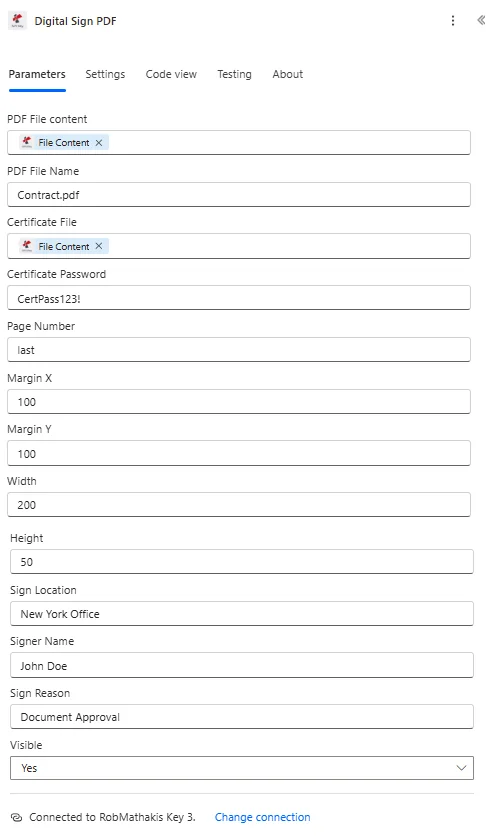
数字签名操作的完整参数列表。配置这些参数以控制数字签名应用程序。
| 范围 | 必需的 | 它的作用 | 例子 |
|---|---|---|---|
| PDF File content | Required | Content of the PDF to sign. Map it from the file content returned by a previous action, such as SharePoint or OneDrive Get file content. | @{body('Get_file_content')?['$content']} |
| PDF File Name | Required | Name of the PDF to sign, including its extension (for example `invoice.pdf`). Map it from the file name returned by a previous action. | invoice.pdf |
| Certificate File | Required | Content of the certificate file to sign with. Map it from the file content returned by a previous action. | @{body('Get_file_content')?['$content']} |
| Certificate Password | Required | Password of the certificate file. The field is a plain text field, so the value is visible in the action card and in the run history; store it in Azure Key Vault or a secure environment variable and turn on Secure Inputs for the action. | your-password |
| Page Number | Optional | Page on which the signature is placed. Defaults to `1`. | 1 |
| Margin X | Optional | Position of the signature on the page. The connector describes it as the position from the bottom of the page, although the field is labelled Margin X. Defaults to `0`. | 0 |
| Margin Y | Optional | Position of the signature on the page. The connector describes it as the position from the left of the page, although the field is labelled Margin Y. Defaults to `0`. | 0 |
| Width | Optional | Width of the visible signature. Defaults to `100`. | 100 |
| Height | Optional | Height of the visible signature. Defaults to `100`. | 100 |
| Sign Location | Optional | Signing location recorded in the signature. | your value |
| Signer Name | Optional | Name of the signer recorded in the signature. | your value |
| Sign Reason | Optional | Reason for signing, recorded in the signature. | your value |
| Visible | Optional | If Yes, the signature is visible on the page. Defaults to `Yes`. | Yes |
输出
这 PDF4me 数字标牌 操作返回全面的输出数据,以实现无缝连接。 Power Automate 流量整合:
- Table
- JSON
- Flow Integration
表格视图
以结构化表格格式呈现的响应数据:
| 场地 | 类型 | 它包含什么 |
|---|---|---|
| File Content | File content | Content of the digitally signed PDF. Map it into the next action, for example the File Content field of SharePoint or OneDrive Create file. |
| File Name | Text | File name of the digitally signed PDF, as returned by PDF4me. Use it as the file name when saving the file. |
| Page Count | Text | Page count reported by PDF4me for the processed document. Returned as text; wrap it in int() to use it as a number. |
JSON 回复格式
{
  "File Content": "[Binary Content of Digitally Signed PDF]"
}
Power Automate 流量使用情况
使用数字签名 PDF 在后续行动中:
- 电子邮件分发发送具有法律效力的已签署文件
- SharePoint 存档:将已签署的合同存储在合规库中
- OneDrive 贮存保存已签署的文件,并启用防篡改功能
- 外部交付将签署的文件分发给合作伙伴
- 审计追踪:妥善保管已签署的文件,以符合法律规定
- 确认使用以下方式验证签名 PDF 读者
工作流程示例
这 PDF4me 数字标牌 行动 Power Automate 提供专为实际业务场景设计的全面工作流程模板:
- Contract Signing
- Document Approval
- Compliance Signing
- Batch Signing
自动化合同数字签名工作流程
利用自动化数字签名革新您的合同执行方式:
完整工作流程步骤:
- 扳机合同已通过审批流程,并获得各方批准
- 获取合同获取最终批准的合同 PDF
- 获取证书从以下位置获取公司证书 Azure Key Vault
- 应用数字签名:请在最后一页底部签署合同。
- 添加签名人信息:请注明首席执行官姓名,并在理由栏注明“最终批准”。
- 验证签名验证签名是否正确应用
- 电子邮件派对向所有利益相关者发送电子签名合同
- 档案签名:将已签署的合同存储在法律合规库中
商业优势:
- 每月使用公司电子签名签署 75 份以上合同
- 提供具有法律约束力的自动签名
- 消除湿签名延误,缩短周期 5 天
- 维护真实性和完整性的加密证明
自动化文档审批签署工作流程
利用自动化数字签名应用程序简化审批流程:
完整工作流程步骤:
- 扳机经理在审批流程中批准文档
- 获取文档:检索已批准的文件 PDF
- 获取经理证书从保险库中获取经理证书
- 添加签名:在显眼位置签名,注明经理姓名
- 设置位置:在签名元数据中包含办公地点
- 设置理由:请将“经理批准”指定为签名理由
- 电子邮件请求者:将签字的批准文件发送给文件所有者
- 更新系统:将文件标记为正式批准
商业优势:
- 每月处理超过150笔电子签名审批申请
- 创建不可撤销的审批记录
- 实现自动化审批工作流程完成
- 维护包含签名元数据的完整审计跟踪
自动化合规文件签署工作流程
利用自动数字签名优化官方文件的合规性:
完整工作流程步骤:
- 扳机合规性报告生成完成
- 生成报告创建合规性报告 PDF
- 获取合规官认证:获取官员证明
- 签署请在报告上签名,并确保签名清晰可见。
- 添加认证:将“合规认证”列为原因
- 设置日期在元数据中捕获签名时间戳
- 提交给监管机构:将已签署的报告上传至监管门户网站
- 官方档案馆:将已签署的报告存储在合规档案中
商业优势:
- 每季度自动签署 20 多份合规报告。
- 提供官方认证的加密证明
- 符合监管数字签名要求
- 取消人工签字流程,每季度节省 10 小时。
自动化批量文档签名工作流程
利用批量数字签名应用程序提高工作效率:
完整工作流程步骤:
- 扳机:计划触发 - 日末文件签署批次
- 获取文档:检索所有待签名文件
- 适用于每个遍历每个文档
- 获取证书获取授权签名者证书
- 签署为每份文档添加数字签名
- 设置批次信息:在元数据中包含批次 ID 和时间戳
- 电子邮件收件人分发所有已签署的文件
- 归档批次:将已签署的文件存放在按日期排序的批次文件夹中
商业优势:
- 每天自动批量签署 100 多份文件
- 取消了单独签署文件的工作流程
- 将每日签名时间从2小时减少到10分钟。
- 在所有文档中保持一致的签名方式
行业应用案例及应用
- Legal & Professional Services
- Finance & Banking
- Healthcare & Medical
- Corporate & Business
法律及专业服务用例
- 合同执行对最终合同应用数字签名
- 法律文件认证签署法律意见书和简报
- 授权书对授权委托书进行数字签名
- 和解协议在结算文件上签字
金融与银行业应用案例
- 贷款文件签署:以电子方式签署贷款协议
- 账户文件签署开户文件
- 财务认证在审计报告上签名
- 合规文件签署监管文件和报告
医疗保健应用案例
- 医疗审批签署治疗授权文件
- 研究审批对研究方案进行数字签名
- 处方签字在处方单上签名
- 合规认证签署 HIPAA 合规文件
企业及商业应用案例
- 行政审批在文件上添加首席执行官/首席财务官的签名
- 政策审批签署公司正式政策
- 财务文件对财务报表进行数字签名
- 授权表格签署批准和授权文件