创建 SwissQR 账单 Power Automate
PDF4me 条形码 - 创建 SwissQR 账单 在发票上附加符合瑞士支付标准的二维码付款单。 PDF 在 Power Automate 流程,或仅根据支付数据生成独立的二维码账单。管道文件内容来自 SharePoint, OneDrive, Dropbox, 数据宇宙, 或者 Outlook 附件; 供应 IBAN +债权人+债务人+参考字段;选择输出格式(PDF, PNG, JPEG, 蒂芙);并且该操作返回一个可供瑞士银行扫描的文件,以便进行下游的创建文件、发送电子邮件或 Teams 消息操作。 ISO 20022 符合规范;自 2022 年起被所有瑞士银行应用程序接受。
验证您的身份 API 要求
这 PDF4me 将连接器连接到 Power Automate 需要有效 联系 握着你的 PDF4me API 关键在于:在流程设计时创建一次连接,然后每次都创建连接。 PDF4me 租户中的操作会重用它。
您不容错过的重要事实
PDF (混合方式,附加到您的原始发票上) PNG, JPEG, 或者 蒂芙 (独立图像) QR (例如,单页)。使用图像格式进行电子邮件内嵌或网页预览;使用 PDF 提交完整发票时。风俗 + 填写页码以结束 QR-账单位于特定页面(从 1 开始)。仅当输出格式类型为 PDF。参数
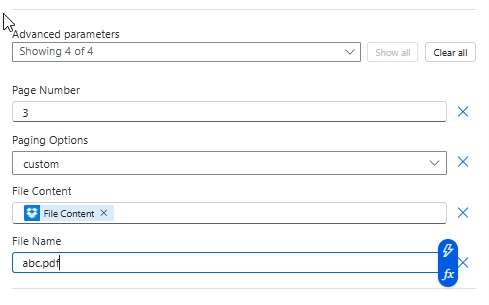
这一行动暴露了…… 付款 + 债权人 + 债务人 + 参考 主面板中的字段和下方的 4 个字段 高级参数 控制输入文件和页面位置。下面的屏幕截图反映了字段的确切顺序。 Power Automate 用户界面。
必填项(用户界面中以红色星号标记): IBAN, 数量。 强烈推荐用于符合SPS标准的单据: 输出格式类型、债权人名称、债权人地址类型、地址行 + 邮政编码 + 城市、最终债务人块、货币、参考类型、语言类型、分隔符行。 条件(高级参数): 页码(分页选项为) 风俗; 文件内容 + 文件名(追加时) QR 滑入现有 PDF (如果单独使用,则两者都跳过) QR-滑)。
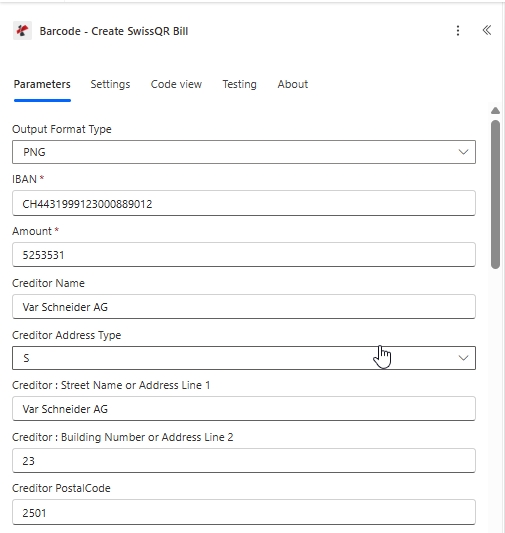
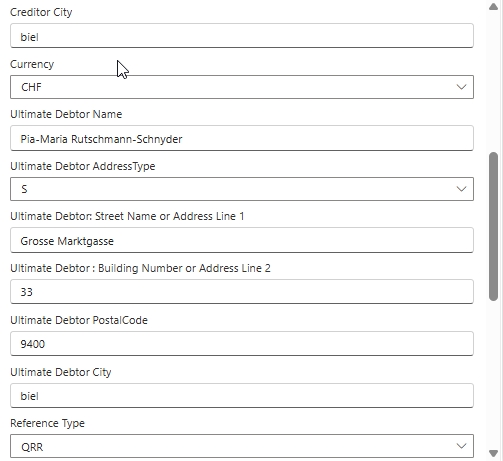
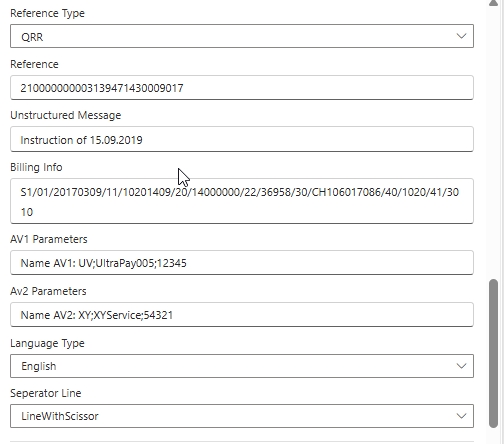
| 范围 | 必需的 | 它的作用 | 例子 |
|---|---|---|---|
| Output Format Type | No | Container of the populated output. PDF (hybrid; appended to source invoice), PNG / JPEG / Tiff (standalone raster image of the QR slip). See the reference card below. | PNG |
| IBAN | Yes | IBAN or QR-IBAN of the creditor. Maximum 21 characters with CH or LI country codes only. QR-IBAN required when Reference Type is QRR. | CH4431999123000889012 |
| Amount | Yes | Payment amount with up to 2 decimal places, no leading zeros. Maximum 12 digits total. | 5253531 |
| Creditor Name | No | Creditor name or company according to the bank account. Maximum 70 characters. | Var Schneider AG |
| Creditor Address Type | No | Address format for the creditor. S (Structured, separate PostalCode and City fields) or K (Combined, two free-text address lines). | S |
| Creditor: Street Name or Address Line 1 | No | Creditor primary address line. Maximum 70 characters. | Var Schneider AG |
| Creditor: Building Number or Address Line 2 | No | Creditor secondary address line (building number for S, free-text for K). 16 chars (S) or 70 chars (K). | 23 |
| Creditor PostalCode | No | Creditor postal code. Maximum 16 characters. | 2501 |
| Creditor City | No | Creditor town or city. Maximum 35 characters. | biel |
| Currency | No | Payment currency. Only CHF and EUR are permitted by Swiss Payment Standards. | CHF |
| Ultimate Debtor Name | No | Debtor name or company. Maximum 70 characters. | Pia-Maria Rutschmann-Schnyder |
| Ultimate Debtor AddressType | No | Same rules as Creditor Address Type. S (Structured) or K (Combined). | S |
| Ultimate Debtor: Street Name or Address Line 1 | No | Debtor primary address line. Maximum 70 characters. | Grosse Marktgasse |
| Ultimate Debtor: Building Number or Address Line 2 | No | Debtor secondary address line. 16 chars (S) or 70 chars (K). | 33 |
| Ultimate Debtor PostalCode | No | Debtor postal code. Maximum 16 characters. | 9400 |
| Ultimate Debtor City | No | Debtor town or city. Maximum 35 characters. | biel |
| Reference Type | No | Reference format. QRR (Swiss 27-digit numeric, requires QR-IBAN), SCOR (ISO 11649 creditor reference), NON (no reference shown). | QRR |
| Reference | No | Payment reference value. Format depends on Reference Type. Maximum 27 characters for QRR. | 210000000003139471430009017 |
| Unstructured Message | No | Free-text payment description shown in the Additional information block. Maximum 140 characters. | Instruction of 15.09.2019 |
| Billing Info | No | Structured billing information (Swico, etc) shown alongside the Unstructured Message. Maximum 140 characters. | S1/01/20170309/11/10201409/20/14000000/22/36958/30/CH106017086/40/1020/41/3010 |
| AV1 Parameters | No | Alternative scheme parameter 1 (e.g. eBill identifier). Maximum 100 characters. Convention: Name AV1: UV;... | Name AV1: UV;UltraPay005;12345 |
| Av2 Parameters | No | Alternative scheme parameter 2. Maximum 100 characters. Same convention as AV1 when a second alternative scheme is required. | Name AV2: XY;XYService;54321 |
| Language Type | No | Language for the printed QR-bill labels. German, French, Italian, English. | English |
| Seperator Line | No | Separator line style. LineWithScissor (line + scissor pictogram, standard print), OnlyLine (line, no pictogram), or NoLine (eBill / e-invoice). The Power Automate UI labels this field with the legacy "Seperator" spelling. | LineWithScissor |
| Paging Options | No (Advanced) | Where the QR-bill page is inserted (PDF Output Format Type only). Options: first, last, add at end, custom. See the reference card below. | custom |
| Page Number | Conditional (Advanced) | The 1-based page number where the QR-bill is inserted. Required when Paging Options is custom; ignored for every other value. | 3 |
| File Content | No (Advanced) | Source PDF as dynamic content from a prior Microsoft 365 action (SharePoint Get file content, OneDrive Get file content, Dropbox Get file content using path, Outlook Get attachments). Skip for a standalone QR-slip from payment data. | File Content |
| File Name | No (Advanced) | Source filename including .pdf extension. Required when File Content is supplied. | abc.pdf |
输出格式类型选项
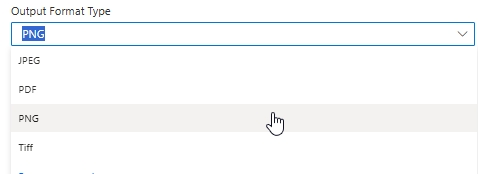
PDFPNGJPEGTiff分页选项参考(高级参数)
仅当输出格式类型为 PDF。 图像格式类型(PNG、JPEG、TIFF)忽略分页选项,因为输出是独立的。 QR 图片仅供参考,并非多页文档。
firstlastadd at endcustom输出
| 场地 | 类型 | 它包含什么 |
|---|---|---|
File Content | 二进制 | 人口稠密的瑞士 QR-以选定的输出格式类型输出账单。传递到 SharePoint 创建文件, OneDrive 创建文件, Outlook 发送电子邮件,或在 Teams 中发布消息。 |
File Name | String | 根据输入文件名(如果没有提供源文件,则使用默认值)输出文件名。 |
示例文件
快速设置
- 添加 PDF4me 到 条形码 - 创建 SwissQR 账单 你的 Power Automate 流动。
- 登录 PDF4me 连接 与您的连接器 API 钥匙。
- 放 输出格式类型 到
PDF(或者PNG/JPEG/Tiff用于图像输出)。 - 填写付款信息: IBAN (中文或中文,最多 21 个字符) 数量, 货币 (
CHF或者EUR), 参考类型 (QRR,SCOR, 或者NON), 语言类型, 分离线。 - 填写 债权人 块(名称、地址类型、地址行、邮政编码、城市) 最终债务人 堵塞。
- (可选) 参考, 非结构化消息, 账单信息, AV1 / AV2 参数。
- 点击 显示全部 在 高级参数。 地图 文件内容 和 文件名 先前的行为(SharePoint, OneDriveDropbox, Outlook)。 放 分页选项 到
first/last/add at end/custom。 如果custom, 充满 页码 使用从 1 开始的页面索引,将纸条放置到该索引位置(例如:3)。 - 保存并运行。操作返回 文件内容 人口稠密 PDF 或图像。管道输入 SharePoint 创建文件, OneDrive 创建文件, Outlook 发送电子邮件,或在 Teams 中发布消息。
流程示例
常见的 Power Automate 流程模式Three ways to chain Create SwissQR Bill into a flow.
- SharePoint 创建文件时 触发器在 /Documents/Invoices 上触发。
- SharePoint 获取文件内容加载 PDF 二进制。
- 创建 SwissQR 账单时,会附加付款单(输出格式类型)。 PDF(分页选项最后)。
- Outlook 发送电子邮件时,附件中包含已填写的内容。 PDF 对客户而言。
- 手动触发流程(或 Dropbox 在创建文件时触发)。
- Dropbox 使用路径读取获取文件内容
/pdf4metest/sample/10页.pdf。 - 创建 SwissQR 账单时,会在账单上附加分页选项。
风俗页码3。 - Dropbox 创建文件写入
/pdf4me输出具有由以下方式构建的唯一文件名guid()+ 来源名称。
- 重复触发机制每日触发。
- Dataverse List 列出逾期发票。
- 对每项应用:创建 SwissQR 账单 没有 文件内容(跳过高级文件字段),使用行中的支付数据。输出格式类型 PNG。
- Outlook 发送电子邮件时会嵌入以下内容 QR PNG 与付款提醒同时进行。