解锁 PDF 在 n8n
解锁 PDF 是一个 PDF4me 节点操作 n8n 这会移除密码保护。 PDF 输入正确的密码后,即可使用此功能。它可以让后续工作流程步骤读取受保护的文件,清除您拥有的存档中的加密,或者无需逐个打开即可解锁供应商发送的所有报表。
此节点的功能
PDF4me解锁 PDF 需要保护 PDF 来自二进制数据, Base64 String或者 URL它会应用你提供的密码,并返回一个无需提示即可打开的副本。 密码 此字段为必填项,因此它解锁的是您已获得授权打开的文档,而不是找回丢失的密码。它通常位于流程的前端,因为提取和转换步骤无法读取加密文件。
相关博客文章
目前尚无关于此功能的博客文章——敬请期待。
在此期间,您可以浏览 PDF4me 博客,查看适用于各平台的教程和工作流程。
访问博客 →
验证您的身份 API 要求
每一个 PDF4me 节点 n8n 需要有效 用于连接的凭证创建或选择一个可以容纳您的 PDF4me API 关键在于确保工作流程能够安全地验证解锁请求。
您不容错过的重要事实
需要密码
这不是密码恢复工具。没有正确的密码,无法通过此操作解锁文档。
解压前请先解锁
文本、表格和表单提取功能无法读取加密内容。 PDF因此,该节点通常位于工作流程的最开始。
请勿将密码包含在工作流程文件中
引用凭据或环境变量,而不是手动输入密钥,这样密钥就不会被包含在导出的工作流中。 JSON。
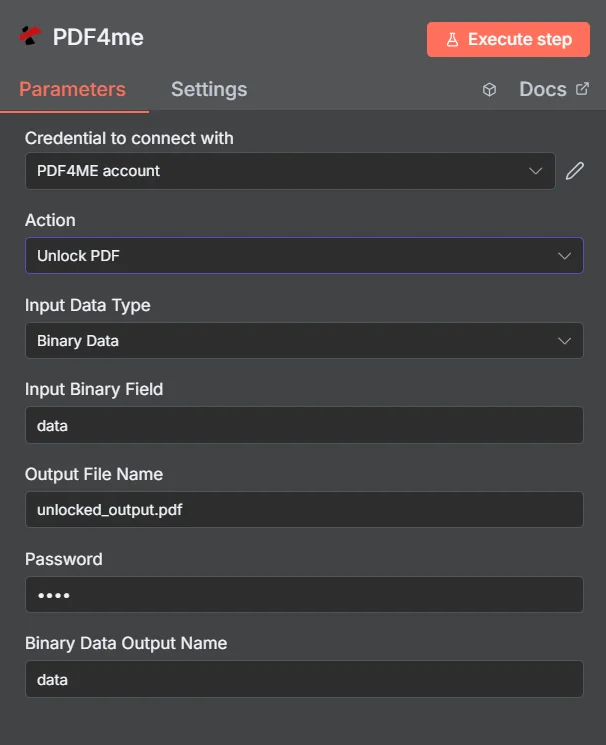
PDF4me 解锁 PDF 参数面板 n8n
解锁 PDF 与保护文档
这两个操作是相反的,工作流程中经常会同时使用这两个操作:解锁传入的文件进行读取,然后在将结果发送出去之前重新保护它。
| 方面 | 解锁 PDF | 保护文档 |
|---|---|---|
| What it does | Removes existing password protection | Applies password protection |
| Password you supply | The current password on the document | The new password you want to set |
| Typical position | First step, so later nodes can read the file | Last step, before the file is sent or stored |
| Prerequisite | You must already know the password | None beyond the source document |
解锁需要哪些参数? PDF 需要?
必需的: 操作、输入数据类型、与该输入类型匹配的字段、输出文件名和密码。二进制数据输出名称和自定义配置文件具有可用的默认值。
| 范围 | 必需的 | 它的作用 | 例子 |
|---|---|---|---|
| Action | Required | Selects the PDF4me node action to run. Choose Unlock PDF. | Unlock PDF |
| Input Data Type | Required | Format of the source PDF input. Choose Binary Data (from a previous node), Base64 String, or URL. | Binary Data |
| Input Binary Field | Conditional | Name of the binary property on the incoming n8n item that holds the protected PDF. Required when Input Data Type is Binary Data. Defaults to data. | data |
| Base64 Document Content | Conditional | Base64-encoded content of the protected PDF. Required when Input Data Type is Base64 String. | JVBERi0xLjQK... |
| File URL | Conditional | Publicly reachable HTTPS URL to the protected PDF. Required when Input Data Type is URL. | https://example.com/statement.pdf |
| Output File Name | Required | Filename for the unlocked PDF returned by the node. Include the .pdf extension. | unlocked_output.pdf |
| Password | Required | The current password on the document. Shown masked in the panel. Reference a credential or environment variable rather than typing the secret into a saved workflow. | {{ $env.PDF_PASSWORD }} |
| Binary Data Output Name | Optional | Name of the binary property the output item exposes. Defaults to data. | data |
| Custom Profiles | Optional | Advanced Options field for extra processing settings, supplied in a JSON-like format. Leave blank unless you have a specific profile to apply. | { "preserveMetadata": true } |
输出字段
一次成功的运行返回一个 n8n 携带已解锁物品 PDF。
| 场地 | 类型 | 它包含什么 |
|---|---|---|
Binary (data) | Binary | The unlocked PDF, under Binary Data Output Name (default data). |
fileName | String | Generated filename, matching Output File Name. |
docName | String | Name of the processed document, for reference and tracking. |
mimeType | String | MIME type of the output, always application/pdf. |
fileSize | Number | Size of the returned PDF in bytes. |
isUnlocked | Boolean | Confirms the document was unlocked. A useful assertion before handing the file to an extraction step. |
securityRemoved | Boolean | Confirms password protection and access restrictions were removed. |
success | Boolean | True when the unlock completed, false on failure such as a wrong password. Use it to branch error handling. |
message | String | Human-readable status message, carrying success confirmation or error detail. |
如何设置解锁 PDF 在 n8n?
- 添加 PDF4me 致你 n8n 工作流程并选择 解锁 PDF 行动。
- 在 用于连接的凭证请选择您的 PDF4me 凭证或点击 创建新凭证 并粘贴你的 API 钥匙。
- 放 输入数据类型 到 二进制数据 (默认), Base64 String, 或者 URL 并提供匹配的来源 PDF 场地。
- 放 输出文件名 对于已解锁的文件,以……结尾
.pdf。 - 输入文档 密码理想情况下,应该使用读取凭据或环境变量的表达式。
- 离开 二进制数据输出名称 作为
data除非后面的节点期望不同的属性。 - 执行节点并路由已解锁的流量 PDF 进入下一步,例如提取、转化或存储。
典型配置
工作流程示例Common n8n workflow patterns using Unlock PDF.
阅读受保护的银行对账单
- 账单会以电子邮件形式发送,并设有已知密码保护。
- 解锁 PDF 使用存储的密钥移除保护。
- 表格提取步骤将交易记录读取到工作表中。
来自自有存档的清晰加密
- 共享驱动器中的旧文档都使用相同的旧密码。
- 解锁 PDF 在迁移批次期间遍历每个文件。
- 未受保护的副本将进入新的文档系统,可供搜索。
解锁、处理,然后重新保护
- 解锁 PDF 打开一个受保护的传入文档。
- 工作流程会对可读文件进行盖章、合并或编辑。
- 在将文档重新发送之前,保护文档会应用一个新的密码。
用……保护管道 success 查看
- 解锁 PDF 尝试对每个到达的文件使用已存储的密码。
- IF 节点测试返回值 success 以及 isUnlocked 字段。
- 故障会发出警报,以便立即注意到密码已轮换。
实用技巧
Never hardcode the password
Use an expression that reads an n8n credential or environment variable, so the secret does not travel inside exported workflow JSON.
Put the unlock first
Extraction and conversion nodes cannot read an encrypted PDF, so unlocking early avoids confusing downstream failures.
Alert on a failed unlock
A rotated password will fail every run. Branch on success so it surfaces as an alert rather than a pile of stuck items.
Assert on isUnlocked before extracting
Checking the flag is cheaper than debugging an extraction node that received a file it could not open.
Only unlock what you are authorised to
The action needs the real password by design. Confirm you have the right to remove protection before automating it across an archive.
re-protect before sending outward
If the document leaves your systems again, add Protect Document at the end so the unlocked copy is not what gets distributed.
速查表
| 场地 | 价值 |
|---|---|
| Action | Unlock PDF |
| Input Data Type | Binary Data |
| Input Binary Field | data |
| Output File Name | unlocked_output.pdf |
| Password | {{ $env.PDF_PASSWORD }} |
| Binary Data Output Name | data |
| Credentials | PDF4me API credential |
常见问题
相关操作
保护文档
反向操作,即在文件离开系统之前重新应用密码。
从表格中提取 PDF
受保护语句变为可读后通常的下一步。
解锁 Excel
对于在同一工作流程中到达的受保护电子表格,也应遵循同样的原则。
从 PDF
只需拉动 pages 你需要从新解锁的文档中获取信息。
在其他平台上执行相同任务
从 PDF 在 Make
与 a 相同的解锁引擎 Make 模块,连接到 Make 场景。
解锁 PDF 在 Zapier
从数千个 SaaS 应用和 Webhook 中触发密码删除。
解锁 PDF 在 Power Automate
Microsoft 365 与……流动 SharePoint, OutlookTeams 和 Dataverse 集成。
解锁 PDF REST API
原始 PDF4me 用于自定义后端代码或 Postman 测试的端点。