如何在 Word 中更新页眉和页脚 n8n
此节点的功能
PDF4me - 更新 Word 文档中的页眉和页脚 在任何文本中添加或替换页眉和页脚。 DOCX 文件在您的 n8n 工作流程。供应 HTML 或者所有页面、首页或单独的奇偶页都使用纯文本内容。使用内置标记(例如 PAGE 和 NUMPAGES)可以自动插入页码。该节点返回一个更新后的内容。 DOCX 应用新的页眉和页脚后,正文内容将完全保留。您可以将输出路由到云存储、电子邮件或任何其他文档处理步骤。
相关博客文章
目前尚无关于此功能的博客文章——敬请期待。
在此期间,您可以浏览 PDF4me 博客,查看适用于各平台的教程和工作流程。
访问博客 →
验证您的 API 请求
每一个 PDF4me 节点 n8n 需要有效 证书创建或选择包含您的凭据 PDF4me API 密钥,以便节点能够安全地验证文档格式请求。
您不容错过的重要事实
PAGE 和 NUMPAGES 插入实时页码
写出原文
页 和 页数 在页眉或页脚内容中的任何位置。Word 会在文档打开时将其替换为实际页码和总页数。 页码 PAGE 共 NUMPAGES 页 渲染结果为 第 3 页,共 12 页 在十二页文件的第三页——无需手动更新。当两个字段都设置时,所有页面字段将覆盖页面特定的字段。
如果您同时填写了“所有页面页眉”和“奇数页页眉”,则“所有页面页眉”的内容将优先显示在整个文档中。要使奇数页和偶数页使用不同的页眉,请将“所有页面页眉”留空,仅填写“偶数页页眉”和“奇数页页眉”字段。要设置独特的首页页眉,请单独填写“首页页眉”,而无需考虑其他页面的页眉设置。
正文内容不会改变——只有页眉和页脚区域会更新。
该节点仅修改页眉和页脚部分。 DOCX XML段落、表格、图像、样式、修订痕迹以及所有其他正文内容都将与源文档中的原样完全一致。您可以安全地将此节点应用于复杂的品牌模板,而无需担心会更改正文内容。
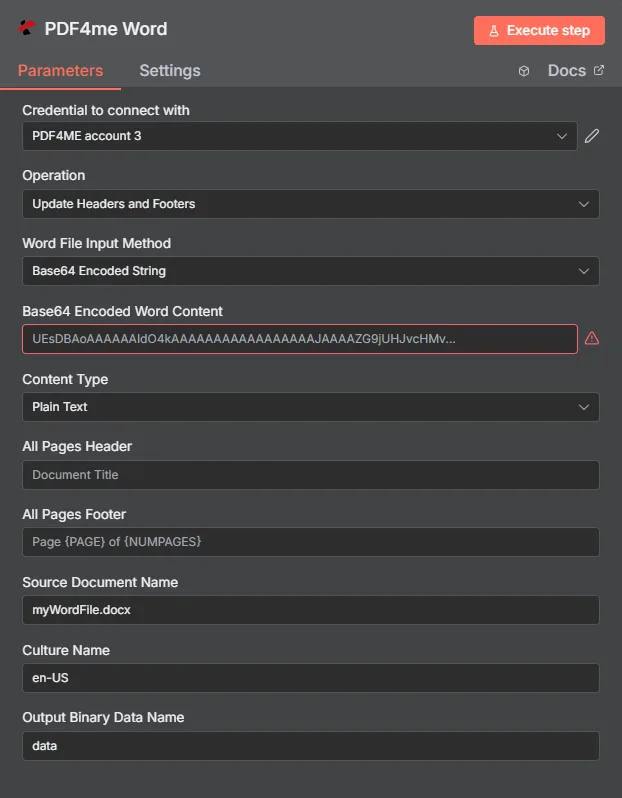
设置输入源,输入 HTML 或者在页眉和页脚字段中使用纯文本,使用 PAGE/NUMPAGES 标记表示页码,然后执行。更新后的版本 DOCX 可通过二进制输出获取。
参数
必需的: 输入数据类型,与该类型匹配的文档源字段(输入二进制字段, Base64 Word 内容,或 Word 文档 URL),以及 Word 文档名称。所有页眉和页脚内容字段均为可选 - 只需填写您需要的字段即可。
| 范围 | 必需的 | 它的作用 | 例子 |
|---|---|---|---|
| Input Data Type | Yes | Format of the source DOCX. Binary Data maps the file from a prior node; Base64 String accepts encoded content; URL fetches from a public address. | Binary Data |
| Input Binary Field | Yes (Binary) | Binary property name from the prior node holding the DOCX. | data |
| Base64 Word Content | Yes (Base64) | Base64-encoded DOCX string to process. | UEsDBBQABgAI... |
| Word Document URL | Yes (URL) | Publicly accessible URL to the source DOCX. | https://example.com/report.docx |
| Word Document Name | Yes | Filename of the input DOCX including .docx extension. Used for format detection. | report.docx |
| All Pages Header | No | Header content applied to every page. Accepts HTML with inline styles or plain text. Supports PAGE, NUMPAGES, SECTION, SECTIONPAGES tokens. | <div style='text-align:center'>Acme Corp</div> |
| All Pages Footer | No | Footer content applied to every page. Accepts HTML or plain text with the same token support. | Page PAGE of NUMPAGES |
| First Page Header | No | Header used only on the first page - useful for title pages and cover sheets. Leave All Pages Header empty when using this for a unique first-page look. | <div style='text-align:center'>Confidential</div> |
| First Page Footer | No | Footer used only on the first page. | Draft - Not for Distribution |
| Even Pages Header | No | Header on even-numbered pages. Use with Odd Pages Header for two-sided print layouts. | <div style='text-align:right'>Chapter Title</div> |
| Even Pages Footer | No | Footer on even-numbered pages. | <div style='text-align:center'>Page PAGE</div> |
| Odd Pages Header | No | Header on odd-numbered pages. | <div style='text-align:left'>Report Title</div> |
| Odd Pages Footer | No | Footer on odd-numbered pages. | <div style='text-align:center'>Page PAGE</div> |
| Culture Name | No | Culture/locale code for date and number formatting inside headers. Defaults to null. | en-US |
快速设置
- 添加一个 PDF4me 节点和选择 更新 Word 文档中的页眉和页脚。
- 选择或创建 证书 你的 PDF4me API 钥匙。
- 放 输入数据类型 并绘制地图 DOCX 来自前一个节点。
- 进入 Word文档名称 和
.docx扩大。 - 充满 所有页面页眉 和/或 所有页面页脚 和 HTML 或纯文本内容。使用
PAGE和NUMPAGES页码。 - 点击 执行节点输出二进制文件包含更新后的内容。 DOCX。
工作流程示例
工作流程示例Common n8n workflow patterns using Update Headers Footers in Word.
在生成的报告中应用公司品牌标识
- 定时触发器会生成月度绩效报告 DOCX 使用模板。
- 在 Word 文档中更新页眉页脚,在页眉中添加居中的公司徽标占位符和名称,并在页脚中添加报告日期和“第 PAGE 页,共 NUMPAGES 页”。
- 品牌 DOCX 已上传至 SharePoint 在月度报告库中。
- Teams 会通知管理渠道,品牌报告已准备就绪。
在所有外发合同中添加保密条款页脚。
- 当合同记录状态变为“准备发送”时,Airtable 会触发事件。
- Google 云端硬盘下载了该合同 DOCX。
- 更新页眉页脚:在每一页上应用“机密 - 第 PAGE 页,共 NUMPAGES 页”的页脚,并在首页添加一个唯一的页眉,其中包含从 Airtable 中提取的客户名称。
- Gmail 会将带有品牌标识的合同作为附件发送给客户。
书籍章节双面印刷布局
- webhook 收到新章节 DOCX 来自写作工具。
- 更新页眉页脚,将奇数页的页眉左对齐,显示章节标题,将偶数页的页眉右对齐,显示书籍标题。
- 偶数页脚和奇数页脚均显示居中的页码,以便进行镜像双面打印。
- 格式化后的章节会保存到 Dropbox,同时 Slack 会向编辑团队发送通知。
常见问题解答
相关节点
在 Word 文档中添加文本水印
在每页上斜向盖上“DRAFT”、“CONFIDENTIAL”或任何文本作为水印 - 与页眉和页脚一起使用,实现完整的文档品牌化。
移除页眉页脚
从文件中移除所有页眉和页脚。 DOCX - 当您需要在使用此节点应用新品牌标识之前创建一个仅包含正文的干净文档时,此功能非常有用。
从 Word 文档中提取元数据
在运行此更新节点之前,读取文档属性(如作者、标题和创建日期)以动态填充标头内容。