安全的 Word 文档 n8n
安全的 Word 文档 是一个 PDF4me 节点操作 n8n 锁定 .docx 使用密码、编辑限制或两者兼备的方式创建文件。可用于在发送机密报告前对其进行保护,防止已签署的模板被篡改,或允许审阅者在不更改合同文本的情况下对其进行评论。
此节点的功能
PDF4me Word: 安全的 Word 文档 适用 两种独立的保护。 安全开启 加 打开密码 决定文件是否打开。 保护类型 加 保护密码 决定打开后可以更改的内容,从完全只读到仅允许评论、表单字段或跟踪修订。可以使用其中一项或两项,也可以同时使用。
相关博客文章
目前尚无关于此功能的博客文章——敬请期待。
在此期间,您可以浏览 PDF4me 博客,查看适用于各平台的教程和工作流程。
访问博客 →
验证您的身份 API 要求
每一个 PDF4me 节点 n8n 需要有效 用于连接的凭证创建或选择一个可以容纳您的 PDF4me API 关键在于工作流能够验证文档安全请求。
您不容错过的重要事实
两个密码,两份不同的工作
打开密码控制文件访问权限。保护密码控制文件编辑。如果将它们设置为相同的值,编辑者将同时拥有这两个密码,这就失去了限制的意义。
切勿在节点中输入密码
直接输入的任何内容都会保存到已保存的工作流程中。 JSON该文件会被导出,并且通常会提交到 Git。使用读取凭据或环境变量的表达式。
保护措施已生效,不可恢复。
此操作可增强安全性。如果密码丢失,则无法通过此节点恢复密码,因此请在工作流大规模运行之前存储这两个值。
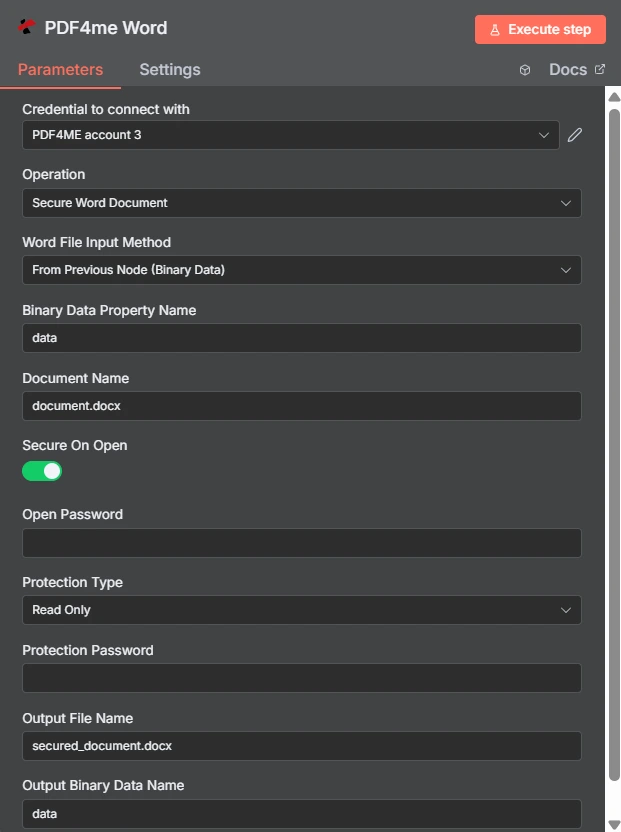
“打开时启用”是一个切换开关,“保护类型”是一个单独的下拉菜单,此处设置为“只读”。它们下方的两个密码输入框彼此独立。
开放密码与编辑限制
| 问题 | 打开密码 | 编辑限制 |
|---|---|---|
| Which fields set it | Secure On Open and Open Password | Protection Type and Protection Password |
| What it blocks | Opening the document at all | Changing the document once open |
| Can the recipient read it | Only with the password | Yes, reading is always allowed |
| Typical recipient | A named person receiving something confidential | A reviewer or a form filler |
| Use it when | The content must not be seen by others | The content may be seen but not altered |
安全有哪些参数? Word 需要文件吗?
| 范围 | 必需的 | 它的作用 | 例子 |
|---|---|---|---|
| Credential to connect with | Required | The PDF4me account credential the node authenticates with. | PDF4ME account |
| Operation | Required | The action this node performs. Select Secure Word Document. | Secure Word Document |
| Word File Input Method | Required | How the .docx reaches the node: from the previous node as binary data, as a Base64 string, or from a URL. | From Previous Node (Binary Data) |
| Binary Data Property Name | Conditional | Name of the binary property holding the document. Appears when the file comes from the previous node. | data |
| Document Name | Required | Filename of the input document including the extension. Drives format detection. | document.docx |
| Secure On Open | Optional | Toggle that requires a password before the document will open. Leave off if you only want an editing restriction. | enabled |
| Open Password | Conditional | The password needed to open the file. Required once Secure On Open is enabled. Supply it through an expression, not as literal text. | {{ $env.DOC_OPEN_PW }} |
| Protection Type | Optional | Editing restriction applied to the document: Read Only, Allow Comments, Allow Form Fields, or Allow Revisions. | Read Only |
| Protection Password | Conditional | The password that lifts the editing restriction. Required once a Protection Type is chosen, and should differ from Open Password. | {{ $env.DOC_EDIT_PW }} |
| Output File Name | Optional | Filename of the returned secured document. Keep the .docx extension. | secured_document.docx |
| Output Binary Data Name | Optional | Binary property the secured document is written to. Leave as data unless a later node expects another name. | data |
保护类型选项
| 选项 | 接收者可以做什么 |
|---|---|
Read Only | View the document only. No edits of any kind are accepted. |
Allow Comments | Add and edit comments, but not change the document text itself. |
Allow Form Fields | Fill in form fields while the surrounding content stays locked. |
Allow Revisions | Edit, but only with tracked changes recorded so every alteration is visible. |
输出
| 场地 | 类型 | 它包含什么 |
|---|---|---|
| fileName | String | Name of the returned secured document. |
| fileSize | Number | Size of the secured document in bytes. |
| success | Boolean | Whether protection was applied. Branch on this so failures surface as alerts. |
| originalFileName | String | Name of the input document as supplied in Document Name. |
| secureOnOpen | Boolean | Whether an open password was applied, echoed back for verification. |
| protectionType | String | The editing restriction applied, such as ReadOnly, or empty when none was set. |
| message | String | Human-readable status text describing the result of the operation. |
检查 protectionType 回复是确认您所期望的限制是否实际生效的最经济的方式。
如何设置安全 Word 文档 n8n?
- 添加 PDF4me Word 将节点添加到您的工作流程并设置 手术 到 安全的 Word 文档。
- 选择您的 PDF4me 或者创建一个凭证并粘贴您的凭证 API 钥匙。
- 选择一个 Word 文件输入法 并提供
.docx穿过它下面的田野。 - 放 文档名称 使用正确的扩展名。
- 要打开大门,请打开 安全开启 并设置 打开密码 从凭据或环境变量中获取。
- 要限制编辑,请设置 保护类型 并提供不同的 保护密码。
- 放 输出文件名 以……结尾
.docx。 - 执行节点,确认
secureOnOpen和protectionType在响应中,将加密文件路由下去。
典型配置
工作流程示例Common n8n workflow patterns using Secure Word Document.
发送一份保密报告
- 报告步骤会生成包含敏感数据的文档。
- Secure On Open 会应用保存在环境变量中的密码。
- 文件通过电子邮件发送,密码通过另一个渠道共享。
分发征求意见稿
- 保护类型设置为允许评论。
- 审阅者在不更改任何条款文本的情况下进行注释。
- 反馈信息到达时没有差异需要事后协调。
分发可填写表格
- 允许表单字段会保持周围的文字不变。
- 收件人只需填写分配给他们的字段。
- 返回的表单足够一致,可以自动解析。
锁定已批准的模板
- 模板已获批准并发布到共享驱动器。
- 只读保护可防止静默本地编辑。
- 所有人都依据同一份权威措辞进行工作。
实用技巧
Keep passwords out of the workflow
An expression reading a credential or environment variable keeps the secret out of exported workflow JSON and out of version control.
Use different values for the two passwords
Reusing one value means anyone who can open the file can also unlock editing, which removes the distinction you set up.
Pick the least restrictive type that works
Allow Comments or Allow Revisions often serves a review better than Read Only, because reviewers can still express changes.
Verify protectionType in the response
The echoed value confirms the restriction landed as intended, which is faster than opening a sample in Word every run.
Secure last in the chain
Watermarking, merging, and header updates all need an editable file. Apply protection after those steps, not before.
Record the passwords before scaling up
This action applies protection and offers no recovery. Store both values in your secret manager before running it across a batch.
速查表
| 场地 | 价值 |
|---|---|
| Operation | Secure Word Document |
| Word File Input Method | From Previous Node (Binary Data) |
| Binary Data Property Name | data |
| Document Name | document.docx |
| Secure On Open | enabled |
| Open Password | {{ $env.DOC_OPEN_PW }} |
| Protection Type | Read Only |
| Protection Password | {{ $env.DOC_EDIT_PW }} |
| Output File Name | secured_document.docx |
| Output Binary Data Name | data |
常见问题
相关操作
安全的 Excel
同样的保护理念也适用于工作流程中传入的电子表格。
保护文档
对某事物应用密码保护 PDF 而不是 Word 文件。
添加图片水印 Word 文档
在锁定文档之前,先给文档加上标识或标记。
禁用跟踪更改 Word
关闭修订记录,这与“允许修订”限制是不同的控制项。
在其他平台上执行相同任务
安全文档 Make
与 a 相同的保护引擎 Make 模块内部 Make 场景。
安全文档 Zapier
扳机 Word 保护免受数千个 SaaS 应用和 Webhook 的攻击。
安全文档 Power Automate
Microsoft 365 与……流动 SharePoint, Outlook以及 Teams 集成。
安全文档 REST API
原始 PDF4me 用于自定义后端代码或 Postman 测试的端点。