添加图片水印 Word 文档 n8n
添加图片水印 Word 是一个 PDF4me 节点操作 n8n 将图像印在 Word 文档。使用此功能,无需打开任何文件,即可在对外发布的报告上添加公司徽标、在审阅前标记草稿,或为工作流程生成的每份合同添加保密标识。 Word。
此节点的功能
PDF4me Word添加图片水印 Word 需要两个输入,而不是一个: .docx 文件盖章和 图像 盖章到上面。每个都有自己的输入法下拉菜单,因此文档和水印可以通过不同的路径到达,例如来自先前节点的文档和从……获取的徽标。 URL尺寸由…… 规模 除非你明确设置。 宽度 或者 高度 以积分表示。
相关博客文章
目前尚无关于此功能的博客文章——敬请期待。
在此期间,您可以浏览 PDF4me 博客,查看适用于各平台的教程和工作流程。
访问博客 →
验证您的身份 API 要求
每一个 PDF4me 节点 n8n 需要有效的凭证。创建或选择一个包含您身份信息的凭证。 PDF4me API 关键在于确保工作流程能够安全地验证水印请求。
您不容错过的重要事实
两个输入框,两个下拉菜单
这 Word 文件和水印图像是分别配置的,各自使用不同的输入法选择器。如果只配置了一个而忘记配置另一个,这是节点拒绝运行的最常见原因。
宽度和高度均为 0 表示使用缩放
两个尺寸字段的默认值均为 0,这并非零尺寸水印,而是指示图像按缩放因子缩放。仅当需要精确尺寸时才在任一字段中输入数值。
使用透明 PNG
A JPEG 由于没有透明度通道,它的白色背景会覆盖下面的文字。 PNG 真正的透明度才能让水印看起来像水印,而不是粘贴的方框。
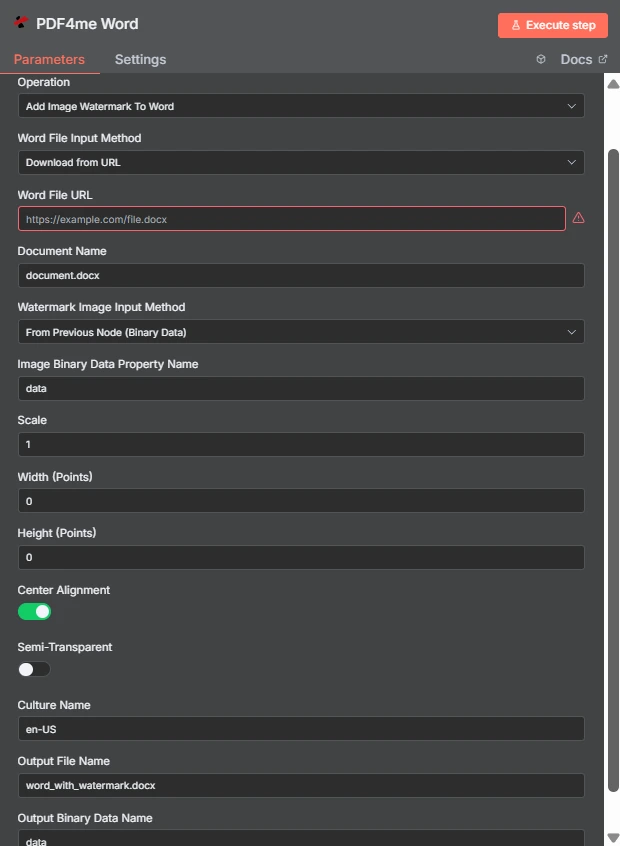
注意两种独立的输入方法: Word 文件到达 URL 水印图像来自前一个节点。宽度和高度均为 0,因此缩放比例 1 控制图像大小。
图片水印与文字水印 Word
| 问题 | 添加图片水印 Word | 添加文字水印 Word |
|---|---|---|
| What gets stamped | An image file such as a logo, seal, or badge | A word or phrase you type, such as DRAFT |
| Second input needed | Yes, the image file itself | No, only the text string |
| Changing it per run | Swap the image binary or URL | Change the text with an expression |
| Best for | Company branding and scanned marks | Status labels and per-document text |
| Transparency control | Semi-Transparent toggle plus PNG alpha | Handled through the text styling options |
添加图像水印需要哪些参数? Word 需要?
这 Word 文件和水印图像各自都有一个输入方式下拉菜单。无论您选择哪种方式,匹配的源字段都会直接显示在下方,因此下面的条件行会根据您的选择而变化。
| 范围 | 必需的 | 它的作用 | 例子 |
|---|---|---|---|
| Credential to connect with | Required | The PDF4me API credential the node authenticates with. | PDF4me account |
| Operation | Required | The action this node performs. Select Add Image Watermark To Word. | Add Image Watermark To Word |
| Word File Input Method | Required | How the .docx reaches the node: from the previous node as binary data, as a Base64 string, or downloaded from a URL. | Download from URL |
| Word File URL | Conditional | Public URL of the .docx to stamp. Appears only when the Word file input method is set to download from a URL. | https://example.com/file.docx |
| Document Name | Required | Filename of the input document including the extension. Used for format detection, so keep the .docx suffix accurate. | document.docx |
| Watermark Image Input Method | Required | How the image reaches the node. Independent of the Word file input method, so the two can differ. | From Previous Node (Binary Data) |
| Image Binary Data Property Name | Conditional | Name of the binary property holding the watermark image. Appears when the image comes from the previous node. | data |
| Scale | Optional | Size multiplier applied to the image at its natural size. Ignored when a non-zero Width or Height is supplied. | 1 |
| Width (Points) | Optional | Exact watermark width in points. Leave at 0 to size by Scale. Setting only Width keeps the aspect ratio. | 0 |
| Height (Points) | Optional | Exact watermark height in points. Leave at 0 to size by Scale. Setting only Height keeps the aspect ratio. | 0 |
| Center Alignment | Optional | Toggle that centres the watermark on the page. Ships enabled; turn it off to align to the top left within the margins. | enabled |
| Semi-Transparent | Optional | Toggle that reduces watermark opacity so page text stays readable underneath. Ships disabled. | disabled |
| Culture Name | Optional | Culture code recorded for document processing, such as en-US or de-DE. | en-US |
| Output File Name | Optional | Filename of the returned document. Keep the .docx extension so downstream steps handle it correctly. | word_with_watermark.docx |
| Output Binary Data Name | Optional | Binary property the stamped document is written to. Leave as data unless a later node expects another name. | data |
输出
| 场地 | 类型 | 它包含什么 |
|---|---|---|
| fileName | String | Name of the returned watermarked document, taken from Output File Name. |
| fileSize | Number | Size of the returned document in bytes. A useful sanity check that the image was embedded. |
| success | Boolean | Whether the watermark was applied. Branch on this so failures surface as alerts. |
| originalFileName | String | Name of the input document as supplied in Document Name. |
| scale | Number | The scale factor actually applied, echoed back for verification. |
| alignImage | Boolean | Whether centre alignment was used, reflecting the Center Alignment toggle. |
| semiTransparent | Boolean | Whether reduced opacity was applied, reflecting the Semi-Transparent toggle. |
| cultureName | String | The culture code recorded for the operation. |
| message | String | Human-readable status text describing the result of the operation. |
盖章后的文档本身以二进制形式返回到名为“in”的属性中。 输出二进制数据名称可以写入存储设备、附加到电子邮件或输入到…… PDF 转换步骤。
如何设置添加图片水印 Word 在 n8n?
- 添加 PDF4me Word 将节点添加到您的工作流程并设置 手术 到 添加图片水印 Word。
- 选择您的 PDF4me 或者创建一个凭证并粘贴您的凭证 API 钥匙。
- 选择一个 Word 文件输入法 并提供
.docx透过它下方出现的田野。 - 放 文档名称 所以
.docx扩展程序已存在且正确。 - 选择一个 水印图像输入方法然后点 图像二进制数据属性名称 通常情况下,在持有该图像的财产中
data。 - 离开 宽度(磅) 和 身高(分) 在
0并进行调整 规模或者,当尺寸必须精确时,可以设置明确的点值。 - 打开 半透明 如果水印位于正文上方,请留下 中心对齐 除非你想要左上角的标记,否则请保持开启状态。
- 放 输出文件名 以……结尾
.docx执行该节点,并将结果路由下去。
典型配置
工作流程示例Common n8n workflow patterns using Add Image Watermark To Word.
给每份外发报告贴上品牌标签
- 报告步骤生成 Word 按计划提交文件。
- 添加图片水印 Word 在上面印上公司标志。
- 品牌文件将通过电子邮件发送到邮件列表。
在批准之前,请将文件标记为草稿。
- 一份合同被放入了审核文件夹。
- 草稿徽章图像已启用半透明效果。
- 审阅者绝不会将工作稿误认为是最终稿。
然后添加水印 PDF
- 在文件仍可编辑时应用徽标。 Word。
- 转换步骤将盖章文件转换为 PDF。
- 这 PDF 出版时,商标是直接印在产品上的,而不是后来添加的。
批量盖章存档
- 文件夹列表会为每个旧版 .docx 文件生成一个项目。
- 每个项目使用相同的水印图像,节点运行一次。
- 盖章后的副本将以新的文件名重新写入。
实用技巧
Start with a transparent PNG
Alpha transparency is what separates a watermark from a pasted rectangle. Export the logo with a transparent background before wiring it in.
Tune Scale before touching Width
Scale keeps the aspect ratio automatically. Reach for explicit point values only when a brand guideline demands an exact size.
Enable Semi-Transparent over body text
A full-opacity mark in the centre of a text page hides content. The toggle exists precisely for documents that are meant to stay readable.
Check the two input methods separately
The document and the image are configured independently, so a run can fail because the image source is unset while the Word source looks fine.
Verify one file before a batch
Open a single stamped document in Word and confirm placement and opacity, then run the workflow across the rest.
Keep the .docx extension
Both Document Name and Output File Name drive format handling. A missing or wrong extension causes confusing downstream failures.
速查表
| 场地 | 价值 |
|---|---|
| Operation | Add Image Watermark To Word |
| Word File Input Method | Download from URL |
| Word File URL | https://example.com/file.docx |
| Document Name | document.docx |
| Watermark Image Input Method | From Previous Node (Binary Data) |
| Image Binary Data Property Name | data |
| Scale | 1 |
| Width (Points) / Height (Points) | 0 / 0 |
| Center Alignment | enabled |
| Semi-Transparent | disabled |
| Culture Name | en-US |
| Output File Name | word_with_watermark.docx |
| Output Binary Data Name | data |
常见问题
相关操作
添加文字水印 Word 文档
对于不需要图像文件的“草稿”和“机密”标签,可以使用文本表示。
安全的 Word 文档
在添加品牌标识之后、文件分发之前,添加密码保护。
给图片添加水印
同样的道理也适用于照片和图形,而不是…… Word 文件。
更新页眉页脚 Word 文档
另一种为文档添加品牌标识的方法,这次是在页眉和页脚区域。
在其他平台上执行相同任务
添加水印 Make
与以下相同的图像水印引擎 Make 模块内部 Make 场景。
添加水印 Zapier
扳机 Word 来自数千个 SaaS 应用和 Webhook 的水印。
添加水印 Power Automate
Microsoft 365 与……流动 SharePoint, Outlook以及 Teams 集成。
添加水印 REST API
原始 PDF4me 用于自定义后端代码或 Postman 测试的端点。