删除行 Excel 工作表 n8n
删除行 是一个 n8n 模块 PDF4me 从数组中删除不需要的行 Excel 在一个工作流程步骤中完成工作表操作。发送一个工作簿和一个涵盖单行、区域或混合列表的行范围字符串, PDF4me 从下往上删除它们,并返回清理后的文件。
此节点的功能
PDF4me删除行 从文档中删除标题行、空白行或过时的部分 Excel 直接在工作表中 n8n提供工作簿。 二进制数据 Base64或者 URL指定一个工作表,或者将第一张工作表留空,并提供一个 基于 1 的行范围字符串 (单行、范围或混合)。返回已清理的工作簿,其中已删除请求的行。非常适合在共享之前清理导出数据、修剪模板或删除超过保留期限的记录。
相关博客文章
目前尚无关于此功能的博客文章——敬请期待。
在此期间,您可以浏览 PDF4me 博客,查看适用于各平台的教程和工作流程。
访问博客 →
验证您的身份 API 要求
每一个 PDF4me 节点 n8n 需要有效 用于连接的凭证创建或选择一个可以容纳您的 PDF4me API 关键在于确保工作流能够安全地验证行删除请求。
您不容错过的重要事实
删除操作自下而上进行。
PDF4me 从指定范围的底部开始向上删除指定的行。这样可以避免简单的自顶向下删除操作中出现的行索引偏移问题。
行号从 1 开始
第 1 行是工作表中的第一行,与您在工作表中看到的内容一致。 Excel's 行标题。没有第 0 行。
行范围接受混合列表
例如,将单行和范围合并到一个字符串中。
1-3,10,25-30,在单个节点执行中删除多个不连续的部分。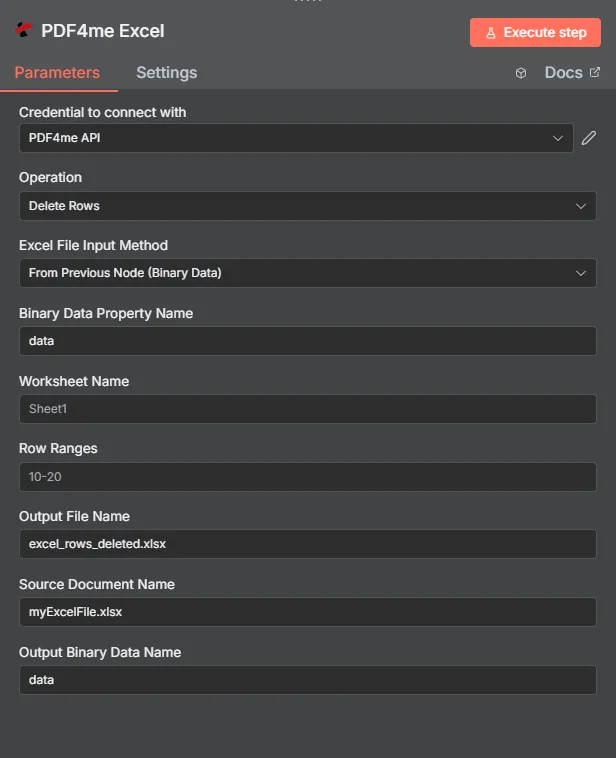
完整节点面板:工作簿(通过二进制数据),Sheet1 上的第 10-20 行范围
参数
必需 n8n 用户界面: Excel 文件输入方式、源文档名称和行范围。工作表名称(默认为第一个工作表)、输出文件名(默认为 excel_rows_deleted.xlsx),以及输出二进制数据名称(默认值) 数据)是可选的。条件工作簿源字段(二进制数据属性名称, Base64 文档内容,文档 URL) 仅当匹配时出现 Excel 已选择文件输入方式。
| 范围 | 必需的 | 它的作用 | 例子 |
|---|---|---|---|
| Excel File Input Method | Required | How the workbook enters the node. From Previous Node (Binary Data) reads from a prior node (default). Base64 String accepts an encoded workbook. URL downloads it from a public link. | From Previous Node (Binary Data) |
| Binary Data Property Name | Conditional | Name of the binary property on the incoming n8n item that holds the workbook. Required when Excel File Input Method is Binary Data. Defaults to data. | data |
| Base64 Document Content | Conditional | Base64-encoded workbook content. Required when Excel File Input Method is Base64 String. | UEsDBBQAAAA... |
| Document URL | Conditional | Publicly reachable HTTPS link to the workbook. Required when Excel File Input Method is URL. | https://files.example.com/report.xlsx |
| Worksheet Name | Optional | Worksheet to clean. Leave blank to target the first sheet in the workbook. | Summary |
| Row Ranges | Required | Row range string with 1-based row numbers. Accepts single rows, ranges, or a mixed comma-separated list. Rows are deleted bottom-to-top. | 1-3,10,25-30 |
| Output File Name | Optional | Filename of the cleaned workbook returned by the node. Default is excel_rows_deleted.xlsx. | excel_rows_deleted.xlsx |
| Source Document Name | Required | Logical filename of the source workbook, used for reference and tracking in the response. | myExcelFile.xlsx |
| Output Binary Data Name | Optional | Name of the binary property the output item exposes. Default is data. Use a different name when a downstream node expects it. | data |
输出结果包含哪些字段?
| 场地 | 类型 | 它包含什么 |
|---|---|---|
fileName | String | Name of the output workbook after row deletion, set from Output File Name (default excel_rows_deleted.xlsx). |
fileSize | Number | Size of the output workbook in bytes. |
success | Boolean | True when the row deletion completed successfully. Use to route error-handling branches. |
originalFileName | String | The Source Document Name that was processed, kept for audit trails. |
worksheetName | String | Name of the worksheet where rows were deleted. |
rowRanges | String | The Row Ranges string that was used for this deletion. |
message | String | Descriptive status message including the row ranges and worksheet name. |
Binary (data) | Binary | The cleaned workbook under Output Binary Data Name (default data). Pass into Write Binary File, Email, or any storage upload. |
如何在……中设置删除行 n8n?
- 添加 PDF4me Excel 节点到你的 n8n 工作流程和设置 手术 到 删除行。
- 在 用于连接的凭证请选择您的 PDF4me 凭证或点击 创建新凭证 并粘贴你的 API 钥匙。
- 放 Excel 文件输入法 到 来自上一个节点(二进制数据) (默认), Base64 String, 或者 URL 并填写匹配字段。
- 进入 源文档名称工作簿的逻辑文件名,用于参考和跟踪。
- 输入 行范围 包含从 1 开始的行号、范围或混合列表的字符串,例如:
1-3,10,25-30。 - (可选) 工作表名称 指定目标页。留空则指定第一页。
- (可选)更改 输出文件名 从默认值
excel_rows_deleted.xlsx和 输出二进制数据名称 从默认值data。 - 执行该节点并将清理后的工作簿路由到写入二进制文件、电子邮件或云存储。
典型配置
工作流程示例Common n8n workflow patterns using Delete Rows.
客户交付前进行报告清理
- Google 云端硬盘下载节点会拉取内部报表工作簿(二进制数据,属性)。
数据)。 - PDF4me 删除行操作使用行范围,目标是内部备注行和空白分隔符行。
- “写入二进制文件”节点使用以下方式保存可供客户端使用的工作簿
$json。fileName。
新用户模板准备
- 读取二进制文件节点加载主文件 Excel 模板。
- PDF4me 删除行操作会在模板分发之前删除示例数据行,并将工作表名称设置为包含示例行的工作表。
- 清理后的模板已上传至共享的新员工入职文件夹。
定期保留清理
- 一个定时任务节点每周都会对存储在固定位置的记录工作簿进行触发。 URL。
- 先前的步骤计算超出保留期限记录的行范围字符串,并将其传递给 PDF4me 删除带有 Excel 文件输入法设置为 URL。
- 清理后的工作簿会覆盖云存储中的源文件。
实用技巧
Row numbers are 1-based, not 0-based
Row 1 is the first row in the worksheet, the same numbering you see in Excel itself. A common mistake is assuming index 0 is the first row.
Bottom-to-top deletion avoids shift bugs
You do not need to recalculate row numbers after each deletion. PDF4me processes the Row Ranges list from the bottom up internally.
Combine ranges in one call
Instead of running the node multiple times, pass a single mixed string like 1-3,10,25-30 to delete several sections in one execution.
Set Worksheet Name for multi-sheet workbooks
Leaving Worksheet Name blank always targets the first sheet. Set it explicitly whenever the workbook has more than one sheet.
Output File Name is separate from Source Document Name
Source Document Name tracks the input file. Output File Name controls what the cleaned workbook is called when it comes back, default excel_rows_deleted.xlsx.
Double-check the range before automating
An incorrect Row Ranges string deletes the wrong rows with no built-in undo. Test with a copy of the workbook before wiring this into a production schedule.
速查表
| 场地 | 价值 |
|---|---|
| Operation | Delete Rows |
| Excel File Input Method | From Previous Node (Binary Data) |
| Binary Data Property Name | data |
| Worksheet Name | Sheet1 |
| Row Ranges | 10-20 |
| Output File Name | excel_rows_deleted.xlsx |
| Source Document Name | myExcelFile.xlsx |
| Output Binary Data Name | data |
| Credentials | PDF4me API credential |
常见问题解答
相关操作
添加行
相反的操作:在工作表中插入新行,而不是删除现有行。
更新行
直接编辑现有行值而不是删除它们,这在需要更正数据而不是删除数据时非常有用。
删除工作表
当整个工作表标签页过时时,应从工作簿中删除整个工作表,而不仅仅是删除一个工作表内的特定行。
在其他平台上执行相同任务
删除行 Excel 在 Make
与以下情况相同的行删除逻辑 Make 模块,带有云存储触发器的可视化场景。
删除行 Excel 在 Zapier
通过 6000 多个 SaaS 应用和 Webhook 触发行清理。 Zapier。
删除行 Excel 在 Power Automate
Microsoft 365 与……流动 SharePoint, OutlookTeams 和 Dataverse 集成。
删除行 REST API
原始
POST office/ApiV2Excel/ExcelDeleteRows 用于自定义后端代码或 Postman 测试的端点。用例
- 报告清理:在发送给客户之前,请删除内部备注、总计或空白分隔符。
- 模板准备:从示例行中移除 Excel 新用户入职前需准备模板。
- 合规工作流程自动删除过期记录或超过保留期限的行。