添加文字水印 Excel 在 n8n
添加文字水印 是一个 PDF4me Excel 操作 n8n 该工具可在 .xlsx 工作簿中的工作表上添加自定义文本标签,例如“机密”或“草稿”。您可以使用它来标记敏感电子表格、在审阅前标记草稿或自动应用公司品牌标识,无需手动编辑。 Excel。
此节点的功能
PDF4me Excel添加文字水印 在屏幕上渲染 WordArt 风格的文本水印 Excel 工作表可控制字体、字号(磅)、文本颜色、粗体和斜体样式、透明度、旋转角度以及九位放置网格。工作表选择功能可决定水印是出现在所有工作表上,还是仅出现在您指定的工作表上。非常适合用于添加保密标签、草稿标记、版权声明和自动化电子表格品牌标识。
相关博客文章
目前尚无关于此功能的博客文章——敬请期待。
在此期间,您可以浏览 PDF4me 博客,查看适用于各平台的教程和工作流程。
访问博客 →
验证您的身份 API 要求
每一个 PDF4me 节点 n8n 需要有效 用于连接的凭证创建或选择一个可以容纳您的 PDF4me API 关键在于确保工作流程能够安全地验证水印请求。
您不容错过的重要事实
文本大小是一个磅值,而不是预设代码。
直接输入所需大小。例如,输入 20 会显示 20 磅的水印,响应会显示 textSize 20。将数值提高到 72 或更高,即可获得全宽斜角显示效果。
工作表选择关卡贯穿整个工作簿
“所有工作表”选项会选中所有工作表,并在响应中报告 worksheetSelection 0。切换到特定选择会按名称或从零开始的索引定位工作表,并报告 worksheetSelection 1。
透明度 0 表示实心,而非不可见。
水印透明度数值范围为 0 到 100,0 表示完全不透明,100 表示完全透明。默认值 0 会生成实心水印,因此当需要保持水印下方数据清晰可读时,请将其提高到大约 50。
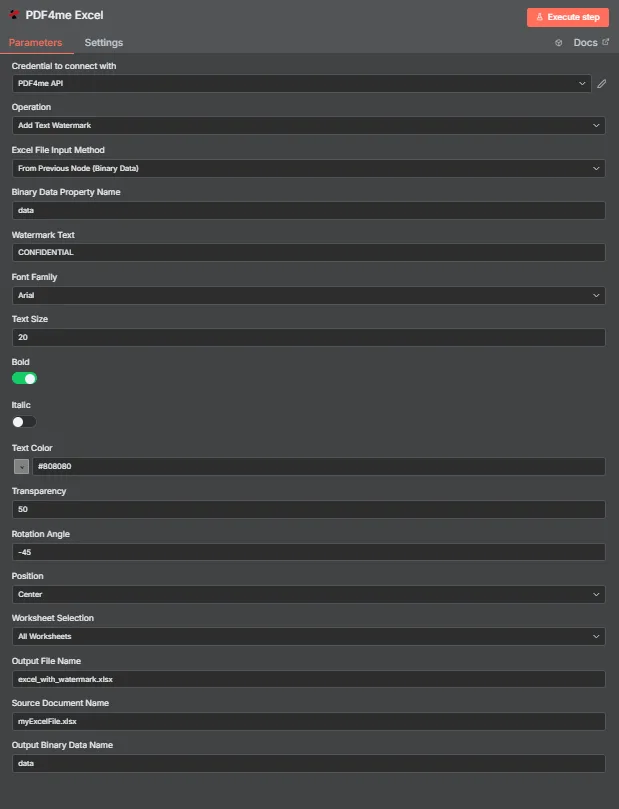
PDF4me Excel 在“添加文本水印参数面板”中 n8n
添加文字水印需要哪些参数?
必需的: 手术, Excel 文件输入方式、与该方法匹配的输入字段、水印文本和输出文件名。样式字段(字体、字号、文本颜色、粗体、斜体、透明度、旋转角度、位置)均提供默认值,源文档名称和输出二进制数据名称为可选标签。
| 范围 | 必需的 | 它的作用 | 例子 |
|---|---|---|---|
| Operation | Required | Selects the PDF4me Excel action to run. Choose Add Text Watermark. | Add Text Watermark |
| Excel File Input Method | Required | How the workbook reaches the node. From Previous Node (Binary Data) reads it from an upstream item; the dropdown also offers base64 and file URL alternatives. | From Previous Node (Binary Data) |
| Binary Data Property Name | Conditional | Name of the binary property on the incoming n8n item that holds the .xlsx workbook. Applies when the input method is binary data. Defaults to data. | data |
| Watermark Text | Required | The text stamped across the worksheet. Accepts any string, including expressions mapped from earlier nodes. | CONFIDENTIAL |
| Font Family | Optional | Font used to render the watermark, chosen from the dropdown of available families. | Arial |
| Text Size | Optional | Watermark size in points, entered directly. The response echoes the same number back as textSize. | 20 |
| Bold | Optional | Toggle that applies bold weight to the watermark text. Off by default. | true |
| Italic | Optional | Toggle that applies italic styling to the watermark text. Off by default. | false |
| Text Color | Optional | Watermark colour, set through the colour picker or as a hex code. | #808080 |
| Transparency | Optional | Transparency from 0 (fully opaque) to 100 (fully invisible). Default 0. | 50 |
| Rotation Angle | Optional | Rotation in degrees. 0 is horizontal, negative values tilt anticlockwise for the classic diagonal watermark. | -45 |
| Position | Optional | Placement on the sheet, picked from a nine-cell grid running Top Left through Bottom Right. Returned as a numeric code in the response. | Center |
| Worksheet Selection | Optional | All Worksheets watermarks every sheet. Switching to a specific selection lets you target sheets by name or zero-based index. | All Worksheets |
| Output File Name | Required | Filename for the watermarked workbook the node returns. Include the .xlsx extension. | excel_with_watermark.xlsx |
| Source Document Name | Optional | Reference label for the incoming workbook. Echoed back as originalFileName for tracking; it does not change the output. | myExcelFile.xlsx |
| Output Binary Data Name | Optional | Name of the binary property the output item exposes. Defaults to data. | data |
输出字段
一次成功的运行返回一个 n8n 携带物品 JSON 元数据加上带有水印的工作簿(以二进制数据形式)。
| 场地 | 类型 | 它包含什么 |
|---|---|---|
success | Boolean | True when the watermark was applied successfully. Use it to route error-handling branches. |
fileName | String | Filename of the watermarked workbook, matching Output File Name. |
fileSize | Number | Size of the returned workbook in bytes. |
originalFileName | String | The value supplied in Source Document Name, echoed back for tracking. |
watermarkText | String | The text that was stamped onto the worksheets. |
fontFamily | String | Font family used to render the watermark. |
textSize | Number | Watermark size in points, matching the Text Size input. |
isBold | Boolean | Whether bold weight was applied. |
isItalic | Boolean | Whether italic styling was applied. |
textColor | String | Watermark colour as a hex value. |
transparency | Number | Transparency level applied, from 0 to 100. |
rotationAngle | Number | Rotation in degrees applied to the watermark. |
position | Number | Numeric code for the placement cell used on the nine-position grid. |
worksheetSelection | Number | 0 when every worksheet was watermarked, 1 when a specific selection was targeted. |
selectedWorksheetNames | Array | Worksheet names targeted, empty when all worksheets were processed. |
selectedWorksheetIndexes | Array | Zero-based worksheet indexes targeted, empty when all worksheets were processed. |
message | String | Human-readable result message for the operation. |
Binary (data) | Binary | The watermarked .xlsx under Output Binary Data Name (default data). Pass into Write Binary File, Email, or a cloud-storage upload. |
N8N 行动反应
这 PDF4me 添加文字水印 操作返回一个响应,您可以在其中以多种格式查看该响应。 n8n:
- JSON
- Schema
- Binary
JSON 回复格式
[
  {
    "fileName": "excel_with_watermark.xlsx",
    "fileSize": 219605,
    "success": true,
    "originalFileName": "myExcelFile.xlsx",
    "watermarkText": "CONFIDENTIAL",
    "fontFamily": "Arial",
    "textSize": 20,
    "isBold": true,
    "isItalic": false,
    "textColor": "#808080",
    "transparency": 50,
    "rotationAngle": -45,
    "position": 1,
    "worksheetSelection": 1,
    "selectedWorksheetNames": [],
    "selectedWorksheetIndexes": [],
    "message": "Text watermark added to Excel file successfully"
  }
]
架构视图
1 item
fileName: T excel_with_watermark.xlsx
fileSize: # 219605
success: true
originalFileName: T myExcelFile.xlsx
watermarkText: T CONFIDENTIAL
fontFamily: T Arial
textSize: # 20
isBold: true
isItalic: false
textColor: T #808080
transparency: # 50
rotationAngle: # -45
position: # 1
worksheetSelection: # 1
selectedWorksheetNames: [] Array
selectedWorksheetIndexes: [] Array
message: T Text watermark added to Excel file successfully
类型指示器: T = String, # = Number, [] = Array。
二进制数据视图
data
File Name: excel_with_watermark.xlsx
File Extension: xlsx
Mime Type: application/vnd.openxmlformats-officedocument.spreadsheetml.sheet
File Size: 219.6 kB
二进制数据访问: 找到工作簿 $binary.data.data可供下载、通过电子邮件发送或存储。
如何在设置中添加文字水印 n8n?
- 添加 PDF4me Excel 节点到你的 n8n 工作流程和设置 手术 到 添加文字水印。
- 在 用于连接的凭证请选择您的 PDF4me API 或者创建一个凭证并粘贴您的凭证 API 钥匙。
- 放 Excel 文件输入法 到 来自上一个节点(二进制数据) 并设置 二进制数据属性名称 通常情况下,归还给存放工作簿的财产。
data。 - 进入 水印文字, 例如
CONFIDENTIAL。 - 为水印添加样式 字体系列, 文本大小 (以要点计) 文本颜色, 大胆的, 和 斜体。
- 调整可见性和位置 透明度, 旋转角度, 和 位置。
- 放 工作表选择 到 所有工作表 或针对特定表格。
- 放 输出文件名 以……结尾
.xlsx然后执行该节点并将带有水印的工作簿路由下去。
典型配置
工作流程示例Common n8n workflow patterns using Add Text Watermark for Excel.
对外分享前请贴上“机密”标签
- 当工作簿进入传出文件夹时,Google 云端硬盘触发器就会触发。
- PDF4me Excel 运行“添加文本水印”,水印文本为“机密”,文本颜色为红色,透明度为50。
- 带有水印的工作簿将通过电子邮件发送给收件人,并存档回云端硬盘。
预定报告上的斜体草稿标记
- 计划触发器根据数据库导出数据生成每周数据工作簿。
- 添加文本水印,水印文本为草稿,旋转角度为 -45,透明度为 50,位置居中。
- 草稿在最终定稿前会发布到 Slack 审核频道。
客户名称按记录盖章
- “循环遍历项目”节点遍历来自客户端的行。 CRM 出口。
- 水印文本是通过表达式映射的,因此每个工作簿都会带有该客户名称。
- 每个输出文件都会以客户端 ID 作为文件名写入云存储。
仅提供汇总表,保留原始数据。
- webhook 会从内部工具接收已完成的报告工作簿。
- 工作表选择的目标是汇总表,因此原始数据选项卡保持未选中状态。
- 结果已上传至 SharePoint 供分发。
实用技巧
Text Size is points, not a preset
Type the point size you actually want. There is no 1 to 4 preset scale, so 20 means 20 points and 100 means a full-width banner.
Raise Transparency before raising size
A large opaque watermark hides cell values. Set Transparency near 50 first, then increase Text Size for coverage.
Rotation -45 gives the classic look
Negative angles tilt anticlockwise. Pair Rotation Angle -45 with Position Center for the traditional diagonal watermark.
Worksheet indexes are zero-based
When targeting sheets by index, the first worksheet is 0, not 1. Mixing this up silently watermarks the wrong tab.
Output File Name needs the .xlsx extension
Omitting the extension can leave downstream nodes unable to detect the format when writing or emailing the file.
Source Document Name is reference-only
It is echoed back as originalFileName for tracking and does not affect the watermark or the output filename.
速查表
| 场地 | 价值 |
|---|---|
| Operation | Add Text Watermark |
| Excel File Input Method | From Previous Node (Binary Data) |
| Binary Data Property Name | data |
| Watermark Text | CONFIDENTIAL |
| Font Family | Arial |
| Text Size | 20 (points) |
| Text Color | #808080 |
| Transparency | 50 |
| Rotation Angle | -45 |
| Position | Center |
| Worksheet Selection | All Worksheets |
| Output File Name | excel_with_watermark.xlsx |
| Output Binary Data Name | data |
| Credentials | PDF4me API credential |
常见问题
相关操作
去除水印 Excel
去除现有的水印,这在工作簿定稿前必须清除草稿标签时非常有用。
添加文本页眉页脚 Excel
将重复文本放置在页面边距而不是纸张正文中,通常还会添加水印以实现完整的品牌推广。
安全的 Excel
添加密码保护,这是将工作簿标记为机密后的自然下一步。
在其他平台上执行相同任务
添加文字水印 Excel 在 Make
与以下设备相同的水印引擎 Make 模块,连接到 Make 场景。
添加文字水印 Excel 在 Zapier
扳机 Excel 来自数千个 SaaS 应用和 Webhook 的水印。
添加文字水印 Excel 在 Power Automate
Microsoft 365 与……流动 SharePoint, Outlook以及团队连接。
添加文字水印 Word 在 n8n
这 Word 等效于在同一工作流程中为 .docx 文件添加时间戳。