向一个数组中添加行 Excel 工作表 n8n
添加行 是一个 PDF4me 节点操作 n8n 写这篇文章的人 JSON 记录到 Excel 工作表。用它来推动 API 将结果生成报告、将 Webhook 有效负载记录到共享工作簿或追加 CRM 导出到跟踪表,其中包含实际到达的数字和日期。 Excel 重视价值观而非文本。
此节点的功能
PDF4me Excel添加行 接受一个现有的 .xlsx 练习册加一本 JSON 数组 JSON 行数据并且每个对象写入一行。它有 两种放置方式:命名一个表 目标 Excel 桌子 键与标头匹配,或者留空。 从行插入 加 从列插入 设置确切的起始单元格。它会编辑您提供的工作簿,而不是从头开始创建一个新工作簿。
相关博客文章
目前尚无关于此功能的博客文章——敬请期待。
在此期间,您可以浏览 PDF4me 博客,查看适用于各平台的教程和工作流程。
访问博客 →
验证您的身份 API 要求
每一个 PDF4me 节点 n8n 需要有效 用于连接的凭证创建或选择一个可以容纳您的 PDF4me API 关键在于确保工作流程能够安全地验证电子表格请求。
您不容错过的重要事实
目标 Excel 表格决定模式
填写此字段会将节点切换到标题匹配模式。留空则会切换到坐标放置模式。行如何放置的所有其他信息都取决于此字段。
这 JSON 必须平整
每个对象都变成一行,每个键变成一列。嵌套对象或数组没有单独的单元格可占,因此在有效负载到达此节点之前将其展平。
坐标模式可以覆盖
“从行插入”和“从列插入”的默认值均为 1,即左上角单元格。除非您打算替换现有内容,否则请将它们指向空白区域。
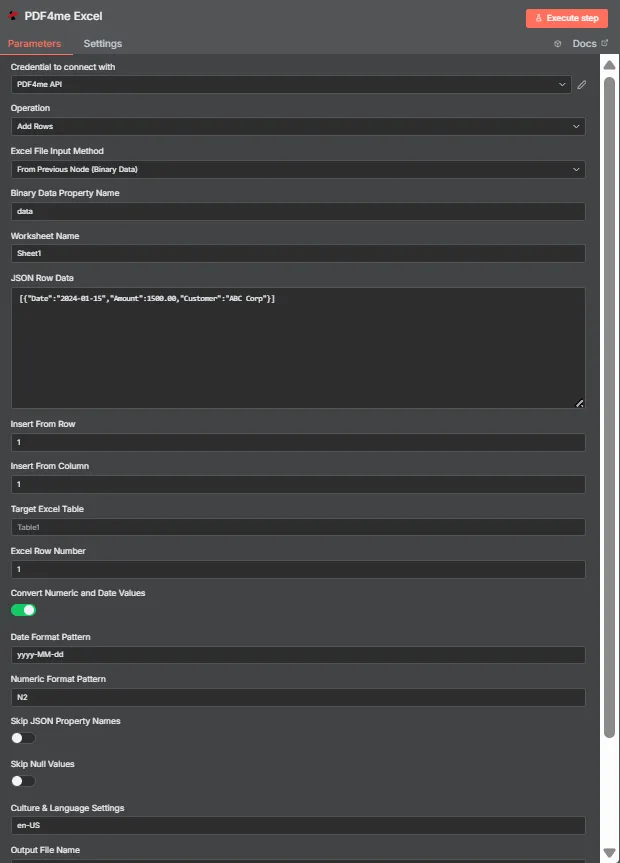
JSON 行数据包含 JSON 一组扁平物体。目标 Excel 此处表格为空,因此“从行插入”和“从列插入”会将数据放置在单元格 A1 中。
表格模式与坐标模式
| 问题 | 表格模式 | 坐标模式 |
|---|---|---|
| How you switch to it | Name a table in Target Excel Table | Leave Target Excel Table blank |
| How columns are matched | JSON keys matched against table headers | Values written in key order from the start cell |
| Does column order matter | No, headers drive placement | Yes, position drives placement |
| Which fields control it | Target Excel Table and Excel Row Number | Insert From Row and Insert From Column |
| Best for | Structured sheets that already have a table | Blank sheets or a fixed reporting layout |
| Overwrite risk | Lower, rows follow the table structure | Higher, the start cell is written to directly |
添加行需要哪些参数?
| 范围 | 必需的 | 它的作用 | 例子 |
|---|---|---|---|
| Credential to connect with | Required | The PDF4me API credential the node authenticates with. | PDF4me API |
| Operation | Required | The action this node performs. Select Add Rows. | Add Rows |
| Excel File Input Method | Required | How the workbook reaches the node: from the previous node as binary data, as a Base64 string, or from a URL. | From Previous Node (Binary Data) |
| Binary Data Property Name | Conditional | Name of the binary property holding the .xlsx. Appears when the workbook comes from the previous node. | data |
| Worksheet Name | Required | Sheet the rows are written to. Match the sheet tab name exactly. | Sheet1 |
| JSON Row Data | Required | JSON array of flat objects. Each object becomes one row and each key maps to a column. | [{"Date":"2024-01-15","Amount":1500.00}] |
| Insert From Row | Conditional | Row number the data starts at, counting from 1. Used in coordinate mode when no table is named. | 1 |
| Insert From Column | Conditional | Column number the data starts at, counting from 1 for column A. Used in coordinate mode. | 1 |
| Target Excel Table | Optional | Name of an existing table to write into. Filling this in switches the node to header matching instead of coordinates. | Table1 |
| Excel Row Number | Conditional | Row index inside the named table where insertion begins. Used in table mode. | 1 |
| Convert Numeric and Date Values | Optional | Toggle that turns numeric and date strings into real Excel values rather than text. Ships enabled. | enabled |
| Date Format Pattern | Optional | Pattern applied to converted dates. Match it to the shape of the dates in your JSON. | yyyy-MM-dd |
| Numeric Format Pattern | Optional | Format applied to converted numbers, such as two decimal places. | N2 |
| Skip JSON Property Names | Optional | Toggle that omits the JSON keys, writing only values. Ships disabled so headers are included. | disabled |
| Skip Null Values | Optional | Toggle that leaves cells untouched where a JSON value is null instead of clearing them. Ships disabled. | disabled |
| Culture and Language Settings | Optional | Culture code used when parsing numbers and dates, which decides separator handling. | en-US |
| Output File Name | Optional | Filename of the returned workbook. Keep a valid Excel extension. | excel_with_rows.xlsx |
输出
| 场地 | 类型 | 它包含什么 |
|---|---|---|
| fileName | String | Name of the returned workbook after the rows were written. |
| fileSize | Number | Size of the returned workbook in bytes. |
| success | Boolean | Whether the insertion completed. Branch on this so failures surface as alerts. |
| originalFileName | String | Name of the input workbook as supplied to the node. |
| worksheetName | String | The worksheet the rows were written to. |
| rowsAdded | Number | How many rows were inserted. The most useful verification signal the node returns. |
| insertFromRow | Number | Starting row used, echoed back when running in coordinate mode. |
| insertFromColumn | Number | Starting column used, echoed back when running in coordinate mode. |
| tableName | String | The table written into, or null when coordinate mode was used. |
| excelRowNumber | Number | Row index inside the table where insertion began, in table mode. |
| convertNumericAndDate | Boolean | Whether numeric and date conversion was applied. |
| dateFormat | String | The date pattern applied during conversion. |
| numericFormat | String | The numeric format applied during conversion. |
| cultureName | String | The culture code used to parse numbers and dates. |
| message | String | Human-readable summary, including the row count and worksheet name. |
更新后的工作簿本身以二进制数据的形式返回,可以写入存储设备、作为附件添加到电子邮件中,或传递给其他程序。 Excel 步。
如何在设置中添加行 n8n?
- 添加 PDF4me Excel 将节点添加到您的工作流程并设置 手术 到 添加行。
- 选择您的 PDF4me 或者创建一个凭证并粘贴您的凭证 API 钥匙。
- 选择一个 Excel 文件输入法 并通过其下方显示的字段提供工作簿。
- 放 工作表名称 精确到您正在写入的工作表标签页。
- 放一个 JSON 将一系列扁平物体变成 JSON 行数据每行一个对象。
- 要使用表格模式,请在下方输入表格名称。 目标 Excel 桌子 并设置 Excel 排 Number要使用坐标,请将表格留空并设置 从行插入 和 从列插入。
- 离开 转换数值和日期值 启用,然后设置 日期格式模式, 数字格式模式, 和 文化和语言环境 与您的数据匹配。
- 放 输出文件名执行该节点并检查
rowsAdded在将工作簿路由到下一个工作簿之前,先进行响应。
典型配置
工作流程示例Common n8n workflow patterns using Add Rows.
将 webhook 有效负载记录到工作簿
- webhook 接收到表单提交信息。 JSON。
- “添加行”操作会将行追加到共享工作簿中的指定表。
- 团队成员直接阅读表格,无需任何人重新输入数据。
推 API 结果汇总成一份报告
- 预定 HTTP 请求从内部数据库中提取记录 API。
- Code 节点将响应扁平化为一个普通数组。
- “添加行”操作会将数据写入报表模板中的固定坐标。
添加每日 CRM 出口
- 一份夜班工作能带来新的机会, JSON。
- 表格模式将键与现有标题进行匹配。
- 源文件中列顺序的更改不会破坏工作表。
分发前请验证写入是否正确
- 添加行将 rowsAdded 返回到工作簿旁边。
- IF 节点将其与输入数组的长度进行比较。
- 如果出现不匹配情况,系统会发出警报,而不是发送简短报告。
实用技巧
Flatten the JSON first
A Set or Code node that removes nesting is cheaper than debugging why a column arrived empty or full of object text.
Prefer table mode when a table exists
Header matching survives column reordering in the source system, which fixed coordinates cannot.
Check rowsAdded, not just success
A run can succeed while inserting fewer rows than you sent. Comparing the count to your array length catches silent shortfalls.
Match culture to the data, not the reader
Culture drives how decimal and thousands separators are parsed. Set it to the format the JSON arrives in.
Point coordinates at empty cells
Insert From Row and Insert From Column both default to 1, so an unchanged run writes over the top-left of the sheet.
Keep a template workbook
This action edits an existing file. Storing a clean template that the workflow copies each run avoids gradual drift.
速查表
| 场地 | 价值 |
|---|---|
| Operation | Add Rows |
| Excel File Input Method | From Previous Node (Binary Data) |
| Binary Data Property Name | data |
| Worksheet Name | Sheet1 |
| JSON Row Data | [{"Date":"2024-01-15","Amount":1500.00}] |
| Insert From Row / Column | 1 / 1 |
| Target Excel Table | Table1 |
| Excel Row Number | 1 |
| Convert Numeric and Date Values | enabled |
| Date Format Pattern | yyyy-MM-dd |
| Numeric Format Pattern | N2 |
| Culture and Language Settings | en-US |
| Output File Name | excel_with_rows.xlsx |
常见问题
相关操作
更新行
修改已存在行中的值,而不是写入新值。
提取行
将工作表中的行读取出来,作为其余工作流程的数据。
删除行
在导入新记录之前清除旧记录,以免表格内容累积。
解析 CSV
转动 CSV 然后您可以将结构化数据导入“添加行”功能。
在其他平台上执行相同任务
在“添加行”中 Make
与以下情况相同的行插入引擎 Make 模块内部 Make 场景。
在“添加行”中 Zapier
从数千个 SaaS 应用和 Webhook 中写入电子表格行。
在“添加行”中 Power Automate
Microsoft 365 与……流动 SharePoint, Outlook以及 Teams 集成。
添加行 REST API
原始 PDF4me 用于自定义后端代码或 Postman 测试的端点。