AI-处理工资单 n8n
AI处理工资单 是一个 PDF4me AI 行动 n8n 读取工资单或工资条并按结构化方式返回其内容 JSON. 使用它可以从文档中提取总工资、净工资、税款预扣、工作时间、扣除项和年初至今的总计,而无需任何人重新输入。
此节点的功能
在 n8n 这看起来像是 资源: AI 加 AI 运营: AI处理工资单将其作为二进制数据、base64 编码或其他形式提供。 URL 它返回一个 工资单数据 该对象涵盖收入、税款、雇员和雇主详细信息、工时、福利以及年初至今的总计,以及 警告 和 备用方案 这样你就能判断结果的可信度了。
验证您的身份 API 要求
每一个 PDF4me 节点 n8n 需要有效 用于连接的凭证创建或选择一个可以容纳您的 PDF4me API 关键在于工作流程能够进行身份验证 AI 提取请求。
您不容错过的重要事实
0 或者空字符串。因此,零是不确定的,所以在未检查之前,切勿将其与零进行比较。 警告。AI-处理工资单与 AI文档解析器:我应该使用哪个?
两者都读取文档并返回结构化数据。区别在于数据模式是否预先确定。
| AI处理工资单 | 对比 AI-文档解析器 | |
|---|---|---|
| 输出形状 | 固定的工资核算方案,每次运行都使用相同的键 | 无论你如何定义每个文档类型 |
| 准备工作 | 选择操作并开始 | 请描述您想要的字段 |
| 最适合 | 大量存根和工资单 | 未采取任何行动的文件 |
| 薪资字段 | 已命名并已输入 | 你给自己起名字。 |
| 哪个 vs 哪个 | 选择文件是否为工资单。 | 在其他情况下选择 |
如果您的文件是工资单,那么此操作最为便捷:工资相关的词汇表已内置。请直接使用 AI-文档解析器 当格式本身没有专门的操作时。
我该如何设置节点?
添加 PDF4me 节点到你的 n8n 工作流程,设置 资源 到 AI然后选择 AI处理工资单 从 AI 运营首次设置请参见 n8n 集成指南。
先决条件: 一个 PDF4me API 凭证,一种 n8n 工作流程,以及工资单作为 PDF, PNG, JPG, 或者 JPEG。
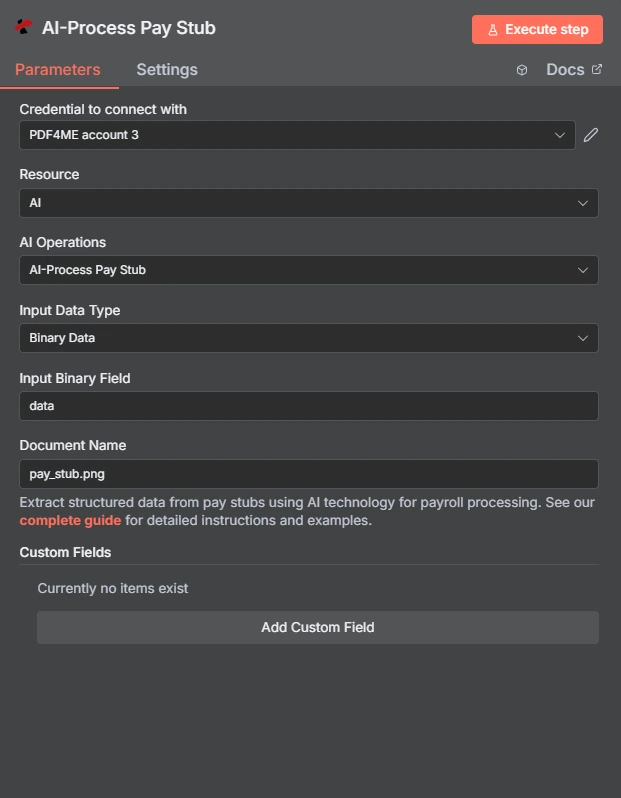
参数有哪些?
这个面板很简洁。大部分工作是选择输入模式和正确命名文件。
| 范围 | 类型 | 必需的 | 描述 | 例子 |
|---|---|---|---|---|
| Resource | Options | Required | Selects the family of operations. Set it to AI to reveal the AI Operations dropdown. | AI |
| AI Operations | Options | Required | The specific AI action to run. Listed in the node as AI-Process Pay Stub. | AI-Process Pay Stub |
| Input Data Type | Options | Required | How the document reaches the node: Binary Data, Base64 String, or URL. The matching source field appears beneath it. | Binary Data |
| Input Binary Field | String | Conditional | Name of the binary property holding the file. Shown when Input Data Type is Binary Data. | data |
| Base64 Pay Stub Content | String | Conditional | The document as a base64 string. Shown when Input Data Type is Base64 String. | JVBERi0xLjQKJ... |
| Pay Stub URL | String | Conditional | A publicly reachable link to the document. Shown when Input Data Type is URL. | https://example.com/paystub.pdf |
| Document Name | String | Optional | Filename with its real extension, which is what drives format detection. Ships with a default. | pay_stub.png |
| Custom Fields | Collection | Optional | An add-item collection, empty by default. Use Add Custom Field to request values outside the standard schema. | shiftDifferential |
注意:这三种输入模式互斥。
二进制数据 Base64 String, 和 URL 每个节点都会显示各自的源字段,只有与您选择的模式匹配的字段才需要赋值。如果之前的节点已经获取过文件,则通常会选择二进制数据。
:::
该节点返回什么?
该回复包含了所有与薪资相关的内容。 payStubData 并同时保存工作元数据。
| 场地 | 类型 | 描述 | 例子 |
|---|---|---|---|
| payStubData | Object | All extracted pay stub fields. Broken down in the table below. | { "grossPay": 1627.74, ... } |
| jobId | String | Identifier for the AI processing job, useful when investigating a specific run. | 00000000-0000-0000-0000-000000000000 |
| jobIdExt | String | External job identifier for third-party system integration, when applicable. | null |
| success | Boolean | Whether the extraction call completed. Note this reports the call, not the quality of the reading. | true |
| message | String | Status text, carrying error detail when something fails. | Pay stub data extracted successfully |
工资单数据内部
| 场地 | 类型 | 团体 | 描述 | 例子 |
|---|---|---|---|---|
| warnings | Array | Quality signal | Data quality issues met during extraction. Read this before trusting any figure. | ["Vision AI processing completed successfully"] |
| fallbackUsed | Boolean | Quality signal | Whether a secondary extraction method was needed. True is a review trigger. | false |
| rawOcrText | String | Quality signal | Raw OCR text from the document, when available. | "" |
| grossPay | Number | Earnings | Gross pay before deductions. | 1627.74 |
| netPay | Number | Earnings | Net pay after all deductions. | 1040.23 |
| payPeriod | String | Earnings | Date range the stub covers. | 07/10/2017 - 07/23/2017 |
| payDateStr | String | Earnings | Pay date as printed on the stub. | 08/04/2017 |
| PayDate | String | Earnings | Pay date. Note the capitalised key, which differs from payDateStr. | 08/04/2017 |
| commissionBonus | Number | Earnings | Commission or bonus amount. | 0 |
| federalIncomeTax | Number | Tax | Federal income tax withheld this period. | 182.98 |
| stateIncomeTax | Number | Tax | State income tax withheld. | 61 |
| socialSecurityTax | Number | Tax | Social Security tax withheld. | 0 |
| medicareTax | Number | Tax | Medicare tax withheld. | 22.12 |
| localCityTax | Number | Tax | Local or city tax withheld. | 0 |
| employeeName | String | Employee | Name of the employee. | Franklin St |
| employeeIdSsn | String | Employee | Employee ID or Social Security Number. Treat as sensitive. | 000000000 |
| employeeAddress | String | Employee | Employee address as printed. | 123 Franklin St, Chapel Hill, NC 27517 |
| jobTitle | String | Employee | Job title or position. | Admin Support Specialist |
| companyName | String | Employer | Employer name. | University of North Carolina |
| employerAddress | String | Employer | Employer address. | 103 South Building, Chapel Hill, NC |
| employerEin | String | Employer | Employer Identification Number, empty when not printed. | "" |
| regularHours | Number | Hours | Regular hours worked in the period. | 74.5 |
| overtimeHours | Number | Hours | Overtime hours worked. | 0 |
| regularRate | Number | Hours | Regular hourly rate. | 20.346846 |
| overtimeRate | Number | Hours | Overtime hourly rate. | 0 |
| totalHours | Number | Hours | Total hours worked in the period. | 80 |
| healthInsurance | Number | Deductions | Health insurance deduction. | 0 |
| retirement401k | Number | Deductions | Retirement contribution deduction. | 97.66 |
| otherBenefits | Number | Deductions | Other benefit deductions. | 0 |
| garnishments | Number | Deductions | Amount withheld for garnishments. | 0 |
| ytdGrossPay | Number | Year to date | Year-to-date gross pay. | 28707.21 |
| ytdNetPay | Number | Year to date | Year-to-date net pay. | 18396.25 |
| ytdFederalTax | Number | Year to date | Year-to-date federal tax. | 3319.78 |
| ytdStateTax | Number | Year to date | Year-to-date state tax. | 1126 |
| checkNumber | String | Payment | Check number or payment reference. | Advice #0000000002214873 |
| directDepositInfo | String | Payment | Direct deposit details as printed, usually with a masked account. | Checking XXXXXXX0000 |
| vacationSickTime | String | Payment | Vacation and sick balance text. | Vacation End Balance: 213.66 |
N8N 行动反应
- JSON
- Confidence routing
{
  "payStubData": {
    "warnings": ["Vision AI processing completed successfully"],
    "fallbackUsed": false,
    "rawOcrText": "",
    "grossPay": 1627.74,
    "netPay": 1040.23,
    "payPeriod": "07/10/2017 - 07/23/2017",
    "payDateStr": "08/04/2017",
    "federalIncomeTax": 182.98,
    "stateIncomeTax": 61,
    "socialSecurityTax": 0,
    "medicareTax": 22.12,
    "localCityTax": 0,
    "employeeName": "Franklin St",
    "employeeIdSsn": "000000000",
    "jobTitle": "Admin Support Specialist",
    "companyName": "The University of North Carolina at Chapel Hill",
    "employerEin": "",
    "regularHours": 74.5,
    "overtimeHours": 0,
    "regularRate": 20.346846,
    "totalHours": 80,
    "retirement401k": 97.66,
    "garnishments": 0,
    "ytdGrossPay": 28707.21,
    "ytdNetPay": 18396.25,
    "ytdFederalTax": 3319.78,
    "ytdStateTax": 1126,
    "checkNumber": "Advice #0000000002214873",
    "commissionBonus": 0,
    "PayDate": "08/04/2017"
  },
  "jobId": "00000000-0000-0000-0000-000000000000",
  "jobIdExt": null,
  "success": true,
  "message": "Pay stub data extracted successfully"
}
根据质量信号而不是根据 success仅报告通话已完成:
// n8n IF node condition
const d = $json.payStubData;
const routine = d.warnings.length === 1
  && d.warnings[0].includes('completed successfully');

// true  -> straight through to payroll
// false -> human review queue
return !d.fallbackUsed && routine && d.grossPay > 0;
这 grossPay > 0 条款很重要,因为未读数字会返回为 0如果没有它,它就与真正的零没有区别。
典型配置
实用技巧
- 从拔出的牙根残端落地的那一刻起,就应将其视为敏感部位进行处理。
employeeIdSsn工资数据和家庭住址会同时出现在一个对象中。在存储任何内容之前,请确定下游系统真正需要哪些信息,并删除其余信息。 - 永远不要分叉
success独自的。 它报告的是通话已完成,而不是读数是否良好。fallbackUsed和warnings这些字段可以告诉你质量如何。 - 谨防出现歧义的零值。 因为未读号码会返回为
0类似“标记净工资超过总工资的存根”这样的规则会悄悄地忽略那些从未读取过总工资的存根。请先检查该数字是否大于零。 - 注意两个付款日期关键信息。
payDateStr和PayDate两者都出现在响应中,第二个字母首字母大写。请选择其中一个并始终使用,因为在映射过程中,字母不一致很容易被忽略。 - 使用自定义字段添加特定于雇主的条目。 津贴、轮班津贴和工会会费因组织而异,而这正是该项收费的用途所在。
- 给它提供最干净的副本。 原创 PDF 或者说,平面扫描比从侧面拍摄的手机照片能提供更多可供提取的信息。
速查表
| 目标 | 设置或领域 |
|---|---|
| 找到动作 n8n | Resource = AI, AI Operations = AI处理工资单 |
| 使用来自先前节点的文件 | Input Data Type = 二进制数据, Input Binary Field = data |
| 处理托管文档 | Input Data Type = URL, 然后 Pay Stub URL |
| 正确检测格式 | Document Name 带有真正的扩展 |
| 捕获非标准线 | 在“添加自定义字段”下 Custom Fields |
| 决定是否相信一次跑步 | fallbackUsed 加 warnings |
| 核心工资总额 | grossPay, netPay, ytdGrossPay |
常见问题
该操作实际名称是什么? n8n?
在节点中 AI处理工资单。 放 资源 到 AI然后选择 AI处理工资单 从 AI 运营 下拉菜单。 word 文档中出现了“工资单”字样。 URL 在日常用法中,但不在…… n8n 界面本身,因此请在下拉菜单中搜索“工资单”。
如何判断提取结果是否可靠?
有两个场承载着该信号。 warnings 提取过程中遇到了数组列表数据质量问题,以及 fallbackUsed 指示是否需要二次萃取方法。处理任何结果。 fallbackUsed 是 true或者在哪里 warnings 包含的内容不仅仅是例行的完成说明,还需要人工审核,才能将数据用于工资发放或贷款决策。
这样做是否使我的工资发放流程符合规定?
不。此操作是从文档中提取数据。工资单包含工资数字,通常还包含员工标识符或部分社会保障号码。 Number因此,提取这些数据会将数据置于您现有的隐私和雇佣记录义务框架内。这些义务属于您的系统和司法管辖区,而非本节点,使用这些数据不会改变您的任何立场。如果您不确定哪些规定适用,请参阅…… 美国劳工部关于记录保存的指导意见 是工资记录的一个合理起点。
工资单上缺少的字段会怎么样?
它们会以空字符串或零的形式返回,而不是被排除在响应之外。 0 在 socialSecurityTax 或者 overtimeHours 因此,这意味着文档上的实际值为零,或者该值无法读取。请检查相应的 warnings 输入数值而不是假设数值是真实的,特别是对于任何你打算进行计算的字段。
我可以提取与我的雇主相关的特定字段吗?
是的。 自定义字段 节点中的集合允许您在标准模式之外添加命名键,这样您就可以捕获诸如轮班津贴、地区补助或工会会费等仅出现在您组织存根中的信息。每个您想要返回的值添加一个条目。
它可以读取哪些文件格式?
PDF, PNG, JPG, 和 JPEG。 放 文档名称 文件名必须包含文件的真实扩展名,因为扩展名才能告诉程序正在处理的文件格式。拍摄的存根照片可以,平面扫描件或原件也可以。 PDF 与从侧面拍摄的手机照片相比,这使得提取数据有更多可供处理的信息。
有关的 AI 行动 n8n
在其他平台上执行相同任务
用例
工资数据录入
读取工资发放机构或员工上传的工资单,并将数字直接写入财务系统,对于置信度信号标记的异常情况,则保留手动输入。
收入和就业情况核实
提取贷款、租赁或福利检查的总收入、净收入、雇主名称和年初至今的总额,以便审核人员可以根据结构化数值进行工作,而不是阅读每份文件。
工资核对和审计
将存根内容与人力资源或会计系统记录的内容进行比较,并仅显示两者不一致的行。
延伸阅读
- 美国劳工部:根据《公平劳动标准法》进行的记录保存 规定了雇主需要保存哪些工资记录。
- n8n处理文件和图像 解释了二进制文件如何在节点之间移动,这正是输入字段所指的内容。