AI-办理结婚证 n8n
AI办理结婚证 是一个 n8n 模块 PDF4me 使用 AI 从结婚证书中提取结构化数据 PDF 或以图像形式发送证书。以二进制数据形式发送证书。 Base64或者 URL并接收配偶姓名、日期、证婚人详情、见证人信息以及可选的真实性核查信息。 JSON。
此节点的功能
PDF4me: AI办理结婚证 阅读结婚证书 PDF 或提取证书详情、夫妻双方姓名及重要信息、证婚人和见证人信息以及官方印章状态的图像和摘要。可选择启用 验证真实性 获取欺诈指标和真伪鉴别建议。接受二进制数据输入。 Base64 String, 或者 URL非常适合重要记录数字化、身份验证和法律文件工作流程。
相关博客文章
目前尚无关于此功能的博客文章——敬请期待。
在此期间,您可以浏览 PDF4me 博客,查看适用于各平台的教程和工作流程。
访问博客 →
验证您的身份 API 要求
每一个 PDF4me 节点 n8n 需要有效 用于连接的凭证创建或选择一个可以容纳您的 PDF4me API 关键在于工作流程能够进行身份验证 AI 安全地处理提取请求。
您不容错过的重要事实
不能替代官方验证
“验证真实性”功能会标记您提供的文档中可能存在的篡改迹象。但它并不会与签发该文档的重要记录机构核实记录的真实性。请将验证结果视为初步筛查工具,而非法律验证。
默认情况下,“验证真实性”功能处于关闭状态。
明确启用此选项可填充 authenticityIssues、fraudIndicators 和 authenticityRecommendation 字段。禁用此选项则无需额外的分析步骤即可更快地返回提取的数据。
把手 PDF, PNG, JPG, 和 JPEG
扫描或拍摄的证书只要文字和官方印章清晰可辨即可。 OCR 能够可靠地阅读。
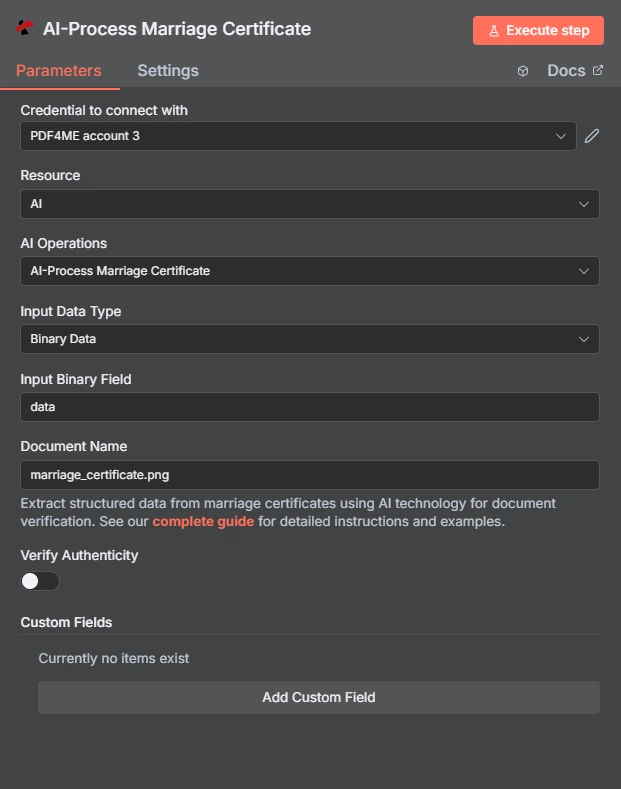
完整节点面板:证书通过二进制数据验证,默认关闭真实性验证。
参数
必需 n8n 用户界面: 输入数据类型和文档名称,以及与您选择的输入类型匹配的字段(输入二进制字段, Base64 文档内容,或文档 URL验证真实性和自定义字段是可选的,请仅启用工作流程所需的功能。
| 范围 | 必需的 | 它的作用 | 例子 |
|---|---|---|---|
| Input Data Type | Required | Format of the certificate input. Choose Binary Data (from a previous node), Base64 String, or URL. | Binary Data |
| Input Binary Field | Conditional | Name of the binary property on the incoming n8n item that holds the certificate. Required when Input Data Type is Binary Data. | data |
| Base64 Document Content | Conditional | Base64-encoded certificate content. Required when Input Data Type is Base64 String. | JVBERi0xLjQK... |
| Document URL | Conditional | Publicly reachable HTTPS URL to the certificate file. Required when Input Data Type is URL. | https://example.com/marriage_certificate.pdf |
| Document Name | Required | Filename of the input certificate with its extension, used for format detection. | marriage_certificate.png |
| Verify Authenticity | Optional | Toggle to run fraud-detection analysis on the certificate. Off by default. On populates authenticityIssues, fraudIndicators, and authenticityRecommendation. | Off |
| Custom Fields | Optional | Collection of extra field definitions to extract beyond the standard certificate data. Click Add Custom Field to add entries. | None by default |
输出结果包含哪些字段?
运行成功后,将返回结构化的证书数据以及可选的真实性分析。
| 场地 | 类型 | 它包含什么 |
|---|---|---|
certificateNumber | String | Unique certificate or registration identifier extracted from the document. |
dateOfMarriage / dateIssued | String | Marriage ceremony date and certificate issue date, in ISO 8601 (YYYY-MM-DD) format. |
placeOfMarriage / issuingAuthority | String | Location of the ceremony and the name of the authority that issued the certificate. |
spouse1FullName / spouse2FullName | String | Full names of both spouses as extracted from the certificate. |
spouse1Age, spouse1BirthDate, spouse1Birthplace, spouse1ResidenceBeforeMarriage | String / Number | Vital data for spouse 1. The equivalent spouse2 fields carry the same data for spouse 2. |
officiantName / officiantTitle / officiantLicenseNumber | String | Name, title, and license number of the officiant who performed the ceremony. |
witnesses | String | Names and information of witnesses present at the ceremony. |
officialSeal / signaturesPresent | String | Description of the seal or stamp, and which signatures are present on the certificate. |
authenticityIssues / fraudIndicators / authenticityRecommendation | Array / Array / String | Populated only when Verify Authenticity is on. Lists detected issues and a summary recommendation. |
extractedFields | Object | Values for any Custom Fields requested beyond the standard certificate data. |
warnings / fallbackUsed / rawOcrText | Array / Boolean / String | Data-quality warnings, whether fallback extraction was used, and the raw OCR text. |
jobId / jobIdExt | String | Internal PDF4me job identifier and an external identifier for third-party system integration. |
success / message | Boolean / String | Whether the extraction succeeded, and a descriptive status message. Use success to route error-handling branches. |
我该如何设置? AI-办理结婚证 n8n?
- 添加 PDF4me 致你 n8n 工作流程。设置 资源 到 AI 和 AI 运营 到 AI办理结婚证。
- 在 用于连接的凭证请选择您的 PDF4me 凭证或点击 创建新凭证 并粘贴你的 API 钥匙。
- 放 输入数据类型 到 二进制数据 (默认), Base64 String, 或者 URL 并提供匹配的源字段。
- 放 文档名称 将证书文件名转换为具有正确扩展名的文件。
- 切换 验证真实性 如果需要输出结果中包含欺诈指标和真实性建议,请启用此功能。
- (可选)点击 添加自定义字段 在“自定义字段”下,可以添加标准证书字段之外的任何数据点。
- 执行节点并路由结构化数据 JSON 写入数据库、电子表格行或下游验证步骤。
典型配置
工作流程示例Common n8n workflow patterns using AI-Process Marriage Certificate.
重要记录数字化
- 集成扫描仪的节点上传一批扫描的结婚证书(二进制数据,属性)。
数据)。 - PDF4me AI-处理结婚证从每个文件中提取配偶姓名、日期和证书编号。
- 数据库节点将结构化记录写入重要记录索引。
入职过程中的身份验证
- webhook 会接收上传的结婚证,作为更改姓名或福利申请的一部分。
- PDF4me AI-处理结婚证书时启用“验证真实性”功能,以提取数据并标记潜在的篡改。
- If 节点会将存在 fraudIndicators 的应用程序路由到人工审核队列。
准备法律案件档案
- 当与案件档案关联的新结婚证上传时,文档管理系统会触发。
- PDF4me AI-处理结婚证书时,会提取证婚人、见证人以及配偶的信息。
- 结构化输出结果将附加到案件档案记录中,以供法律审查。
实用技巧
Verify Authenticity is a screening aid, not proof
It flags potential tampering signs in the document you supply. For legal certainty, confirm the record directly with the issuing vital records office.
Scan quality affects extraction accuracy
A blurry or low-resolution scan can degrade OCR accuracy, especially for the official seal and signature fields. Use the clearest available copy.
Custom Fields adds, it does not filter
Entries added via Add Custom Field extend the standard output into extractedFields. They do not remove or replace the default certificate fields.
Check warnings and fallbackUsed on every run
A non-empty warnings array or fallbackUsed set to true signals the extraction had to work around a data-quality issue, worth a manual glance.
Sensitive personal data, handle accordingly
The output includes full names, birth dates, and addresses for both spouses. Apply the same data-handling controls you would use for any PII in your workflow.
jobId is for support and debugging
Log jobId alongside your processing records so PDF4me support can trace a specific extraction if you ever need to report an issue.
速查表
| 场地 | 价值 |
|---|---|
| Resource | AI |
| AI Operations | AI-Process Marriage Certificate |
| Input Data Type | Binary Data |
| Input Binary Field | data |
| Document Name | marriage_certificate.png |
| Verify Authenticity | Off |
| Custom Fields | None by default |
| Credentials | PDF4me API credential |
常见问题解答
相关操作
AI处理银行支票
从银行支票中提取结构化数据,可用于相同的身份和财务文件验证工作流程。
AI-处理健康卡
从另一种与身份相关的文档类型中提取结构化数据,可用于组合身份验证流程。
AI-流程合同
从法律合同中提取结构化条款和细则,法律合同是同一法律案件文件中常见的伴随文档类型。
在其他平台上执行相同任务
AI-办理结婚证 Make
相同的 AI 提取作为一种 Make 模块,带有云存储触发器的可视化场景。
AI 结婚证书解析器 Zapier
通过以下方式从 6,000 多个 SaaS 应用和 Webhook 中触发证书提取: Zapier。
AI-结婚证书解析器 Power Automate
Microsoft 365 与……流动 SharePoint, OutlookTeams 和 Dataverse 集成。
用例
企业法律自动化
- 重要记录管理:实现重要记录系统中结婚证处理的自动化
- 身份验证使用提取的结婚证数据验证身份
- 文件认证核实结婚证的真伪
- 欺诈检测:检测伪造的结婚证书,以用于法律诉讼
AI- 电动文档处理
- 多格式支持: 过程 PDF, PNG, JPG, 和 JPEG 结婚证格式
- 多语言处理:从各种语言的结婚证书中提取数据
- 智能场识别自动识别并提取相关证书字段
商业智能与分析
- 合规性跟踪:利用提取的证书数据跟踪法律合规性
- 审计跟踪维护证书处理的完整审计跟踪
- 绩效指标跟踪处理准确性和效率