AI-处理健康卡 n8n
AI-处理健康卡 是一个 PDF4me 节点操作 n8n 读取健康保险卡并以结构化形式返回其详细信息 JSON. 使用它可以从扫描或照片中获取会员 ID、团体编号、计划类型和处方路由代码,而不是手动从卡片上输入。
此节点的功能
PDF4me: AI-处理健康卡 拍摄卡片图像或 PDF 并返回一个 健康数据 它读取的是对象而不是文件。它读取成员身份、计划详情以及 rxBin, rxPcn, 和 rxGroup 处方路由代码,并报告 每个字段的置信度得分 因此,不确定的读取结果可以转交给人工处理。它负责提取数据;至于如何存储和处理这些数据,则由您决定。
相关博客文章
目前尚无关于此功能的博客文章——敬请期待。
在此期间,您可以浏览 PDF4me 博客,查看适用于各平台的教程和工作流程。
访问博客 →
验证您的身份 API 要求
每一个 PDF4me 节点 n8n 需要有效 用于连接的凭证创建或选择一个可以容纳您的 PDF4me API 关键在于确保工作流程能够安全地验证提取请求。
您不容错过的重要事实
提取信息并不等同于遵守规定。
此操作返回的值用于识别个人及其保险范围。将其导入您的系统后,这些个人将适用您现有的健康数据规则。此节点不会改变这一规则。
置信度得分是准确性信号。
响应中包含一个针对每个字段的置信度对象。这是该操作公开的唯一质量指标,因此应以此为依据进行分支判断,而不是对每个提取结果都一视同仁。
处方代码通常印在背面。
大多数保险公司会在卡的背面打印 BIN、PCN 和团体路由代码。如果这些字段为空,则很可能只提交了正面信息。
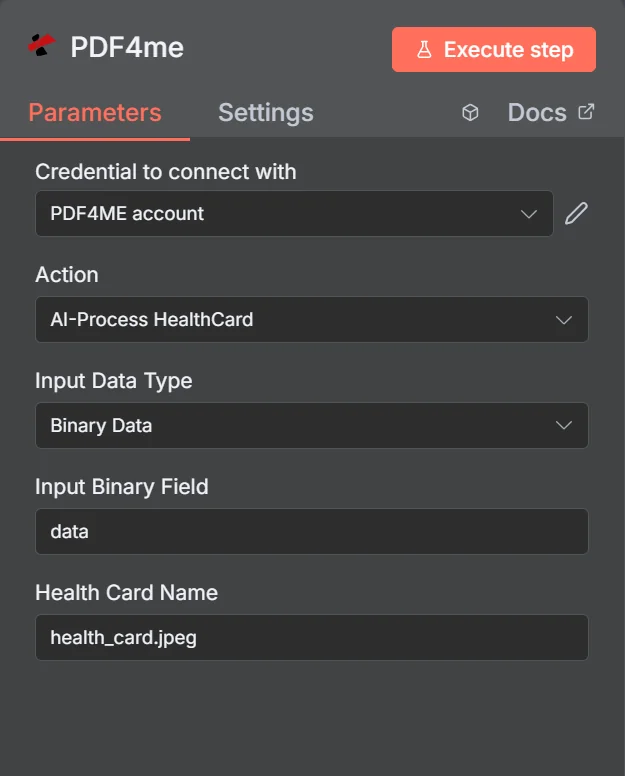
该行动被列为 AI-处理健康卡。选择二进制数据后,面板只需要输入二进制字段和健康卡名称,因此文件名中的扩展名决定了格式检测。
健康卡解析与通用解析 OCR
| 问题 | AI-处理健康卡 | 通用文本提取 |
|---|---|---|
| What you get back | Named fields such as memberId and rxBin | A block of unstructured text |
| Layout differences | Handled, fields are identified by meaning | Not handled, position shifts break parsing |
| Quality signal | Per-field confidence scores | None beyond whether text was found |
| Work needed after | Map fields and check confidence | Write and maintain regex per insurer |
| Best for | Cards from many different insurers | One fixed, unchanging document layout |
哪些参数 AI- 需要办理健康卡吗?
这三个来源字段互斥。只有与您的匹配项匹配的字段才有效。 输入数据类型 出现在面板中,这就是为什么它们被标记为条件性选项而不是必填选项的原因。
| 范围 | 必需的 | 它的作用 | 例子 |
|---|---|---|---|
| Credential to connect with | Required | The PDF4me account credential the node authenticates with. | PDF4ME account |
| Action | Required | The action this node performs. Select AI-Process HealthCard. | AI-Process HealthCard |
| Input Data Type | Required | How the card image reaches the node: binary data from a previous node, a Base64 string, or a URL. | Binary Data |
| Input Binary Field | Conditional | Name of the binary property holding the card image. Appears when Input Data Type is Binary Data. | data |
| Base64 Health Card Content | Conditional | The card image encoded as a Base64 string. Appears when Input Data Type is Base64 String. | JVBERi0xLjQKJ... |
| Health Card URL | Conditional | Publicly reachable URL of the card image. Appears when Input Data Type is URL. | https://example.com/card.jpeg |
| Health Card Name | Required | Filename of the submitted card including the extension. Drives format detection, so keep it accurate. | health_card.jpeg |
输出
该操作返回数据,而非文件。顶级响应字段:
| 场地 | 类型 | 它包含什么 |
|---|---|---|
| success | Boolean | Whether the extraction completed. Branch on this before reading any field. |
| message | String | Human-readable status text describing the result. |
| processedData | Object | Wrapper holding healthData, status, errors, and the job identifiers. |
| processedData.status | String | Overall processing status for the run. |
| processedData.errors | Array | Errors encountered during extraction. Empty when the read was clean. |
| processedData.jobId | String | Unique identifier for the processing job, useful when reporting an issue. |
| processingTimestamp | String | ISO 8601 timestamp for when processing completed. |
里面 processedData.healthData:
| 场地 | 类型 | 它包含什么 |
|---|---|---|
| memberId | String | The member identification number printed on the card. |
| memberName | String | Full name of the insured member. |
| dateOfBirthStr | String | Member date of birth as read from the card. |
| insuranceProvider | String | Name of the insurer that issued the card. |
| groupNumber | String | Group or policy number for the plan. |
| planType | String | Plan category such as PPO, HMO, or EPO. |
| effectiveDateStr | String | Date the coverage takes effect. |
| rxBin | String | Prescription BIN routing code, usually printed on the reverse. |
| rxPcn | String | Prescription processor control number, usually on the reverse. |
| rxGroup | String | Prescription group identifier, usually on the reverse. |
| copayInfo | Array | Copay amounts per service type where the card lists them. |
| confidence | Object | Per-field confidence scores. Use these to gate automatic acceptance. |
我该如何设置? AI-处理健康卡 n8n?
- 添加 PDF4me 将节点添加到您的工作流程并进行设置 行动 到 AI-处理健康卡。
- 选择您的 PDF4me 或者创建一个凭证并粘贴您的凭证 API 钥匙。
- 放 输入数据类型 并将卡片插入匹配字段。
- 放 健康卡名称 例如,使用正确的扩展名。
health_card.jpeg。 - 执行节点并检查
processedData.healthData在输出中。 - 添加一个 IF 节点来检查
success以及相关confidence得分。 - 将有把握提取的内容直接发送,其余内容发送到人工审核队列。
- 仔细决定下游存储哪些数据,只保留流程实际需要的字段。
典型配置
工作流程示例Common n8n workflow patterns using AI-Process HealthCard.
从照片中获取患者信息
- 新患者通过表格上传病历照片。
- AI-处理健康卡,读取会员和计划详细信息。
- 这些字段会预先填写入院记录,供工作人员确认。
正确处理药房索赔
- 将卡片的背面提交给节点。
- rxBin、rxPcn 和 rxGroup 作为单独的字段返回。
- 该索赔申请未经任何人转录代码就直接提交。
置信度控制审查队列
- 每次提取都会返回每个字段的置信度分数。
- IF 节点会将它们与您设定的阈值进行比较。
- 只有不确定的卡片才会送到人手中,因此审核工作量很小。
续保时更新保险范围
- 续订计划完成后,补发的卡片会陆续寄到。
- 该节点读取 effectiveDateStr 和 plan 字段。
- 在旧信息导致申请被拒之前,记录会被更新。
实用技巧
Decide what you store, deliberately
Reading a field does not oblige you to keep it. Persist only what the process needs, and confirm your obligations with whoever owns compliance.
Capture both sides of the card
Member details are on the front and Rx routing codes are usually on the back. Two runs give a complete picture.
Gate on confidence, not just success
A run can succeed while reading a digit wrong. Thresholding the per-field scores is what keeps bad member IDs out of your records.
Test against real insurer variety
Card layouts differ substantially between insurers. Validate on a sample of the cards you genuinely receive, not one example.
Give the model a clean image
Glare, low resolution, and cropped edges cause empty fields far more often than the card layout does.
Keep the filename extension right
Health Card Name drives format detection. A .jpeg image named .pdf will not be handled as you expect.
速查表
| 场地 | 价值 |
|---|---|
| Action | AI-Process HealthCard |
| Input Data Type | Binary Data |
| Input Binary Field | data |
| Health Card Name | health_card.jpeg |
| Credentials | PDF4ME account |
| Key output path | processedData.healthData |
| Quality gate | processedData.healthData.confidence |
常见问题
相关操作
AI处理信用卡
支付卡的读卡方式与支付卡相同,但有其自身的处理义务。
AI 文档解析器
通用解析器,用于解析没有专门操作的文档。
AI-处理银行对账单
另一个敏感文档解析器,可返回结构化字段和置信度。
AI-处理税务文件
对同一接收流程中到达的税务表格进行结构化提取。
在其他平台上执行相同任务
AI-处理健康卡 Make
与……相同的萃取发动机 Make 模块内部 Make 场景。
AI 健康卡解析器 Zapier
从收款表单和数千个 SaaS 应用中触发卡片提取。
AI 健康卡解析器 Power Automate
Microsoft 365 与……流动 SharePoint, Outlook以及 Teams 集成。