AI-处理信用卡 n8n
AI处理信用卡 是一个 PDF4me 节点操作 n8n 读取信用卡图像或 PDF 并以结构化方式返回卡片详细信息。 JSON 字段。使用此功能可从扫描件或照片中获取持卡人姓名、卡号、有效期和发卡行信息,而无需手动重新输入到表单中。
此节点的功能
PDF4me: AI处理信用卡 从二进制数据中获取卡片文件 Base64 String或者 URL 并运用视觉 AI 返回 信用卡数据 包含各个卡片字段的对象。它接受 PDF, PNG, JPG, 和 JPEG因为它返回的是离散值而不是一大段文本,所以下一步工作流可以对单个字段进行操作,您可以有目的地选择哪些值值得保留。
相关博客文章
目前尚无关于此功能的博客文章——敬请期待。
在此期间,您可以浏览 PDF4me 博客,查看适用于各平台的教程和工作流程。
访问博客 →
验证您的身份 API 要求
每一个 PDF4me 节点 n8n 需要有效 用于连接的凭证创建或选择一个可以容纳您的 PDF4me API 关键在于确保工作流程能够安全地验证提取请求。
您不容错过的重要事实
提取与存储并不相同。
卡号和安全码属于受监管数据。应逐字段确定工作流程中需要保留的数据,并在任何数据到达存储或日志之前删除其余数据。
空字符串,而非缺失的键
模型无法读取的字段返回为
"" 与其检查键是否存在,不如检查值是否为空。图像质量决定精度
眩光、角度和凸起的数字都会降低清晰度。 OCR 可靠性。使用
警告 数组和 备用方案 将可疑结果送交复核。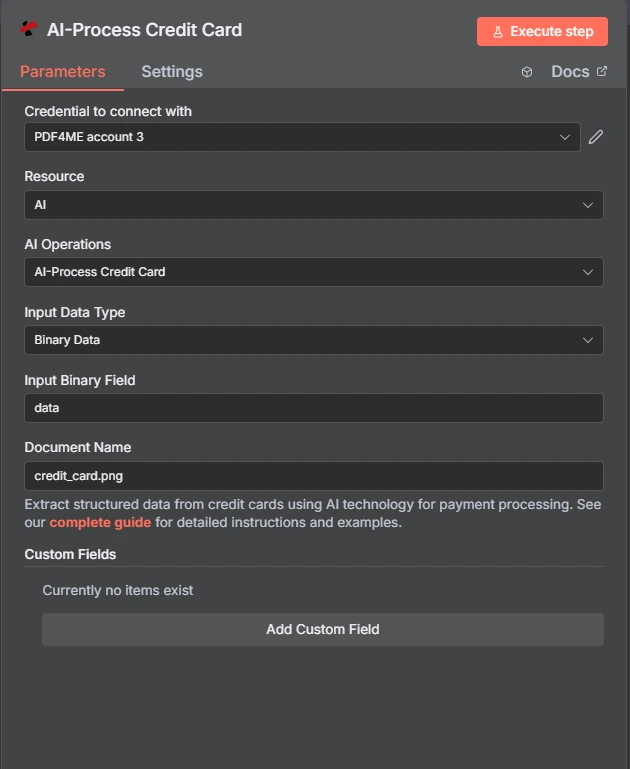
PDF4me AI-处理信用卡交易 n8n
卡片 OCR 与通用文档解析器相比
PDF4me 它同时包含卡牌专用操作和通用解析器。卡牌操作知道卡牌的外观;通用解析器则被告知要查找的内容。
| 方面 | AI处理信用卡 | AI 文档解析器 |
|---|---|---|
| Field set | A fixed card schema returned as creditCardData | Whatever fields you define for the document |
| Setup effort | None, the card fields are already known | You describe the fields you want extracted |
| Best fit | Payment cards specifically | Any document shape the card action does not cover |
| Extending it | Custom Field Keys for extras beyond the card schema | Fully defined by you from the start |
哪些参数 AI-需要处理信用卡吗?
必需的: 操作、输入数据类型、与该输入类型匹配的字段以及信用卡名称。自定义字段键为可选。
| 范围 | 必需的 | 它的作用 | 例子 |
|---|---|---|---|
| Action | Required | Selects the PDF4me node action to run. Choose AI-Process Credit Card. | AI-Process Credit Card |
| Input Data Type | Required | Format of the source card input. Choose Binary Data (from a previous node), Base64 String, or URL. | Binary Data |
| Input Binary Field | Conditional | Name of the binary property on the incoming n8n item that holds the card file. Required when Input Data Type is Binary Data. Defaults to data. | data |
| Base64 Credit Card Content | Conditional | Base64-encoded content of the card file. Required when Input Data Type is Base64 String. | JVBERi0xLjQKJ... |
| Credit Card URL | Conditional | Publicly reachable HTTPS URL to the card file. Required when Input Data Type is URL. | https://example.com/card.jpg |
| Credit Card Name | Required | Filename of the input file, used for format detection. Accepts .pdf, .png, .jpg, and .jpeg extensions, so give it the extension the file actually is. | card.jpg |
| Custom Field Keys | Optional | List of extra field keys to pull beyond the standard card schema. Leave empty unless the source carries values the built-in fields do not cover. | ["loyaltyId", "branchCode"] |
输出字段
节点返回 JSON 而不是一个文件。卡片值存储在卡片内部。 creditCardData 目的。
| 场地 | 类型 | 它包含什么 |
|---|---|---|
creditCardData | Object | The extracted card fields. See the field breakdown below. |
jobId | String | Identifier for the AI processing job, useful when reporting an extraction problem. |
jobIdExt | String | External job identifier for third-party integration, null when unused. |
success | Boolean | True when extraction completed. Use it to branch error handling. |
message | String | Human-readable status message, carrying success confirmation or error detail. |
信用卡数据内部字段
模型无法读取给定图像中的任何字段都将返回空字符串。
| 场地 | 类型 | 它包含什么 |
|---|---|---|
cardholderName | String | Name as it appears on the card. |
cardNumber | String | The primary account number. Regulated data, so handle deliberately. |
expiryDate | String | Expiry date, typically MM/YY. |
validFrom | String | Valid-from date where the card shows one. |
validThru | String | Valid-through date, often the same as expiryDate. |
cvv | String | Card security code. The PCI DSS standard prohibits retaining this after authorisation. |
cardType | String | Card type where detected, such as credit or debit. |
cardBrand | String | Card brand where detected, such as Visa or MasterCard. |
bankName | String | Bank name printed on the card. |
issuingBank | String | Issuing bank where it can be determined separately from bankName. |
accountNumber | String | Associated account number when the source is a statement rather than a card face. |
warnings | Array | Messages about data quality or extraction difficulty on this file. |
fallbackUsed | Boolean | Whether an alternative extraction path was used. A useful low-confidence signal. |
我该如何设置? AI-处理信用卡 n8n?
- 添加 PDF4me 致你 n8n 工作流程并选择 AI处理信用卡 行动。
- 在 用于连接的凭证请选择您的 PDF4me 凭证或点击 创建新凭证 并粘贴你的 API 钥匙。
- 放 输入数据类型 到 二进制数据 (默认), Base64 String, 或者 URL 并提供匹配的卡片文件字段。
- 放 信用卡名称 例如,使用正确的扩展名。
card.jpg或者statement.pdf。 - (可选) 自定义字段键 用于超出标准卡片架构的值。
- 执行节点并读取
creditCardData从响应中获取对象。 - 在存储任何内容之前,请先选择您实际需要的字段,删除其余字段。
典型配置
工作流程示例Common n8n workflow patterns using AI-Process Credit Card.
无需重新输入即可完成入职
- 顾客在注册时上传银行卡照片。
- AI-处理信用卡时,读取持卡人姓名和到期日。
- 仅使用非敏感字段预填表单以供确认。
低置信度路线读作人类
- 该节点处理上传的卡片图像。
- IF 节点检查 warnings 数组和 fallbackUsed 标志。
- 任何存疑的项目都会进入审核队列,而不是直接通过。
已存档的到期监控
- 卡片图像在采集时仅处理一次。
- 仅保留到期日期和持卡人姓名。
- 预先设定的工作流程会标记即将到期的信用卡,以便进行续费提醒。
将报表与账户匹配
- 信用卡账单 PDF 发送到共享邮箱。
- 该节点提取银行名称和账号。
- 该声明将与相应的账户记录一起存档。
实用技巧
Drop what you do not need immediately
Select the handful of fields the workflow actually uses in the very next node, so the full card payload never reaches storage, logs, or an error notification.
Give the filename its real extension
Credit Card Name drives format detection. Calling a JPEG card.pdf invites a failed or degraded read.
Check warnings before trusting a value
The warnings array and fallbackUsed are the cheapest confidence signal available. Branch on them rather than assuming a clean read.
Test for empty strings, not missing keys
Unread fields return as empty strings, so a key-existence check will pass on a field that holds nothing.
Improve the input before blaming the model
A flat, evenly lit, high resolution capture beats any amount of downstream correction, especially on embossed digits.
Use Custom Field Keys sparingly
The standard schema covers the card face. Reach for custom keys only when the source genuinely carries something extra.
速查表
| 场地 | 价值 |
|---|---|
| Action | AI-Process Credit Card |
| Input Data Type | Binary Data |
| Input Binary Field | data |
| Credit Card Name | card.jpg |
| Custom Field Keys | (empty) |
| Accepted formats | PDF, PNG, JPG, JPEG |
| Returns | JSON with a creditCardData object |
| Credentials | PDF4me API credential |
常见问题
相关操作
AI-处理银行对账单
当数据源是账单而不是银行卡时,读取交易记录和余额。
AI-处理收据
费用工作流程中的得力助手,可以记录实际购买的物品。
AI 文档解析器
当固定的卡片结构不符合要求时,请定义您自己的字段集。
AI 发票解析器
从同一账户流程中的发票中提取明细项目和总计。
在其他平台上执行相同任务
AI-处理信用卡 Make
与……相同的萃取发动机 Make 模块,连接到 Make 场景。
AI 信用卡解析器 Zapier
从数千个 SaaS 应用和 Webhook 中触发卡片提取。
AI 信用卡解析器 Power Automate
Microsoft 365 与……流动 SharePoint, OutlookTeams 和 Dataverse 集成。