AI - 文档解析器 n8n
此节点的功能
PDF4me AI文档解析器 通过运行已保存的脚本,从任何文档中提取结构化数据。 AI 分析器 你的 PDF4me 根据文件创建账户。与固定解析器(AI发票解析器、AI流程合同)不同,您可以选择…… AI 分析器 ID 从配置的分析器下拉菜单中 PDF4me 仪表盘,因此同一个节点可以处理发票、采购订单、收据、自定义表单、实验室报告、内部模板以及您在模式中描述的所有内容。使用 解析 单个模式或 分类 一次调用即可分析多个文档变体。返回动态结果。 JSON 由您的模式加上一个键 元数据 块,无二进制文件。
测试发票样本
在将工作流指向真实数据之前,请使用此示例供应商发票确认节点端到端运行正常。将其映射为二进制输入并选择 default_invoice_extraction 作为 AI 分析器 ID。
验证您的身份 API 要求
每一个 PDF4me 节点 n8n 需要有效 用于连接的凭证创建或选择一个可以容纳您的 PDF4me API 关键在于工作流程能够进行身份验证 AI 安全地执行提取请求。同一凭证也用于…… AI 分析器 ID 通过 GetAnalyzerId 下拉菜单 API。
首先设置分析器
- 分析器列表(步骤 1–2):
https://dev.pdf4me.com/dashboard/#/ai-document-parser/ - 分析器详细信息(步骤 3–5):
https://dev.pdf4me.com/ai-document-parser/?id=<analyzer-guid>
您不容错过的重要事实
元数据 对象始终会附加 success、message、timestamp、source filename、analyzer Id 和 operation 等信息。没有 输出二进制字段名称。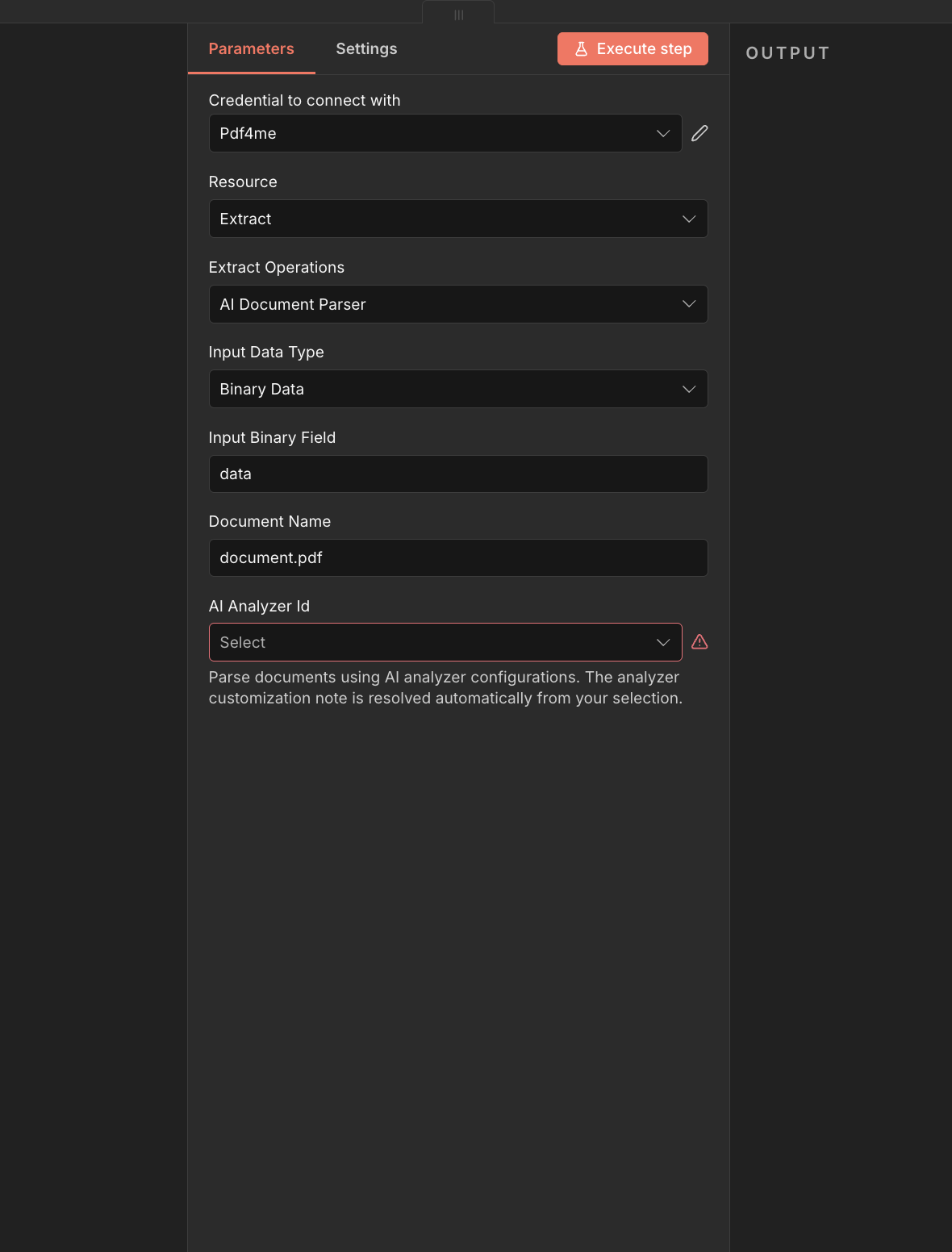
完整节点面板:提取 → AI 支持二进制数据输入的文档解析器。选择一个 AI 分析器 ID 跑步之前。
参数
- 分析器列表(步骤 1–2):
https://dev.pdf4me.com/dashboard/#/ai-document-parser/ - 分析器详细信息(步骤 3–5):
https://dev.pdf4me.com/ai-document-parser/?id=<analyzer-guid>
必需 n8n 用户界面: 连接凭证、输入数据类型、文档名称 AI 分析器 ID。条件必填字段(输入二进制字段、Base64 文档内容或文档 URL)仅在选择匹配的输入数据类型时才会显示。 输出二进制字段名称 并且没有 高级选项/自定义配置文件 本次行动。
| 范围 | 必需的 | 它的作用 | 例子 |
|---|---|---|---|
| Input Data Type | Yes | How the document is supplied. Binary Data reads from a previous node (default, most common). Base64 String accepts an encoded document. URL downloads the document from a public link. | Binary Data |
| Input Binary Field | Conditional | Name of the binary property on the incoming n8n item that holds the document. Required when Input Data Type is Binary Data. Defaults to data. Error reports which property was missing when the name is wrong. | data |
| Base64 Document Content | Conditional | Base64-encoded document. Required when Input Data Type is Base64 String. Data-URL style prefixes (text before the comma) are stripped automatically. | JVBERi0xLjQK... |
| Document URL | Conditional | Publicly reachable HTTPS URL to the document. Required when Input Data Type is URL. Must be a valid full URL. | https://example.com/document.pdf |
| Document Name | Yes | Filename used by PDF4me for processing. Default document.pdf. With Binary Data, the uploaded file name is used for upload but your explicit Document Name value takes precedence in the API call when set. Use a real extension (.pdf, .png, .jpg, etc.) so PDF4me handles the file correctly. | document.pdf |
| AI Analyzer Id | Yes | The saved Analyzer that controls extraction. Create Analyzers at https://dev.pdf4me.com/dashboard/#/ai-document-parser/ (+ Add), then edit schemas on https://dev.pdf4me.com/ai-document-parser/?id=<analyzer-guid>. Dropdown populated via GetAnalyzerId API. Sent as customisationNote. Pick Parse for one schema or Classify for many variants. | aaaa133 |
输入数据类型选项
选择文档进入节点的方式。后续字段会根据此选择而改变。
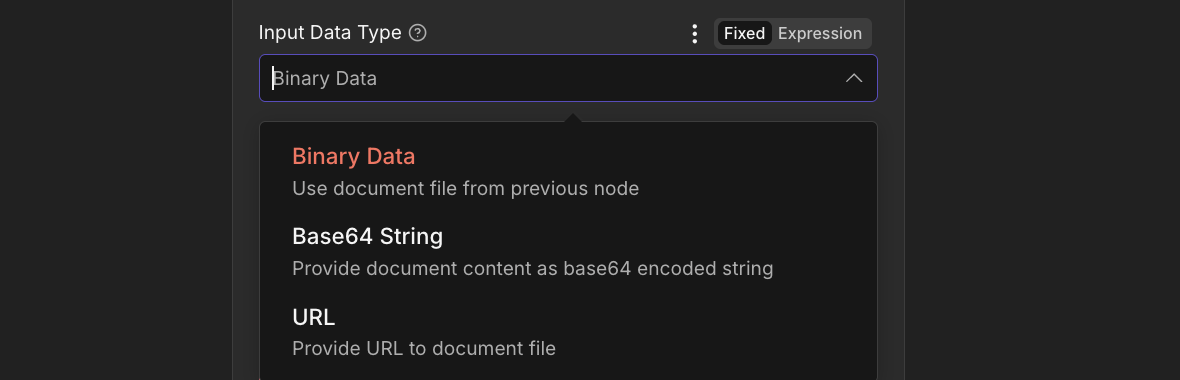
输入数据类型。二进制数据(默认)、Base64 字符串或 URL。
二进制数据默认值:来自上一个节点的文件输入二进制字段 二进制字段名称(默认值) 数据除非您指定文档名称,否则将使用上传的文件名。Base64字符串内联编码文档Base64 文档内容数据 URL 样式前缀(逗号前的文本)会自动去除。 文档名称 正确的文件扩展名可以检测文件格式。URL从公共链接下载文档 URL。 PDF4me 直接获取文档。待处理的文件名取自…… URL 如果可能,请提供路径;否则,请从文档名称获取路径。AI 分析器 ID 下拉菜单
下拉菜单的内容来自您的 PDF4me 通过账户 获取分析器 ID API 打开字段时,每个选项都是您保存的分析器。 PDF4me 仪表板。选择架构与您正在处理的文档类型相匹配的仪表板。
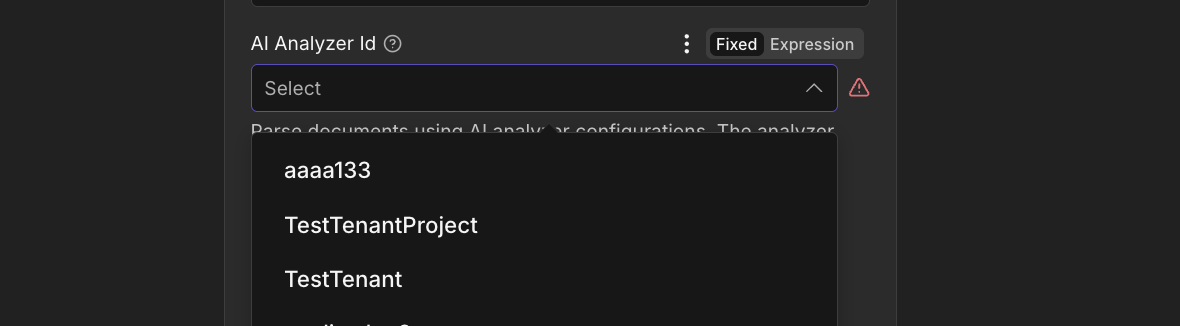
AI 分析器 ID 下拉菜单已从您的设备加载 PDF4me 帐户。
字段类型:"表格" 对于嵌套行和 字段方法 (提取默认值,生成以导出/规范化)。下拉菜单为空? 节点显示 "GetAnalyzerId 没有返回任何分析器选项" 当您的帐户没有分析器或凭据无法访问时 API打开 分析器列表 并且至少添加一个分析器 分析器详情 页面,然后验证 API 输入您的 n8n 凭证。
输出字段
一次成功的运行返回一个 n8n 物品 JSON 仅此而已,没有二进制文件。顶级键与您的分析器架构匹配; _metadata 对象始终附加到末尾。
| 场地 | 类型 | 它包含什么 |
|---|---|---|
Top-level extracted fields | Dynamic | One key per field defined in your Analyzer schema (string, number, date, or nested table rows). Names match fieldName exactly. |
_metadata.success | Boolean | true on a successful parse. |
_metadata.message | String | "Document parsed successfully using AI Document Parser". |
_metadata.processingTimestamp | String | ISO timestamp of the parse. |
_metadata.sourceFileName | String | Document name used for processing. |
_metadata.aiAnalyzerId | String | The Analyzer Id you selected (sent as customisationNote to the API). |
_metadata.operation | String | "aiDocumentParser". |
rawContent (fallback only) | String | If the API returns plain text instead of JSON and parsing fails, the node wraps the response as { "rawContent": "<api response string>" } at the top level. |
快速设置
- 首先构建分析器。打开 分析器列表, 点击 + 添加输入一个清晰的分析器 ID,选择 解析 或者 分类保存该行,然后在该行上添加文档架构。 分析器详情 请参阅页面。 解析设置指南 或者 分类设置指南 完整的模式规则,包括
fieldType: "table"对于嵌套行和fieldMethod(提取或生成)。 - 在你的 n8n 工作流程,点击 + 并搜索 PDF4me。 放 资源 到 提炼 和 提取操作 到 AI文档解析器。
- 在 用于连接的凭证请选择您的 PDF4me 凭证或粘贴 API 钥匙。
- 放 输入数据类型二进制数据(默认)从前一个节点读取,是最常见的。
- 填写匹配的输入字段(输入二进制字段, Base64 文档内容, 或者 文档 URL)。
- 文档名称覆盖默认值
document.pdf使用带有正确扩展名的真实文件名。 - 选择一个 AI 分析器 ID 从下拉菜单中选择(从您的帐户加载)。
- 执行该节点。输出项包含顶层已解析字段以及……
_metadata路由到 Set、代码、Google Sheets、Airtable、数据库、电子邮件或任何下游节点。
典型配置
工作流程示例Common n8n workflow patterns using AI Document Parser.
- 电子邮件触发器 (IMAP) 在收到新邮件时触发 PDF 依恋。
- AI 文档解析器以二进制数据作为输入数据类型运行,文档名称设置为附件文件名。 AI 分析器 ID 设置为您的
发票解析器分析器。 - Google 表格 附加 将发票号、供应商名称、总金额、到期日写入应付账款跟踪表。
- 受监视文件夹收到混合 PDFs 来自客户 ABC、客户 XYZ 以及长尾客户。
- AI 文档解析器设置为分类分析器 ID(每个供应商一个架构)。
- Switch 节点根据响应中返回的匹配分类名称进行分支,并将每个结果发送到匹配的下游表。
- Webhook 会收到来自您门户网站的文档链接。
- AI 文档解析器使用输入数据类型运行 URL 以及您的自定义表单分析器 ID。
- 输出 JSON 映射到 Dataverse / Airtable / Postgres 写入以创建新记录。
- 扫描仪输出的文件会落入一个边框较宽的文件夹中。
- AI自动裁剪文档 (资源) AI) 修剪边缘。
- AI 文档解析器在具有匹配的分析器 ID 的裁剪二进制文件上运行。
- 已解析 JSON 水流照常向下游流动。
- AI 文档解析器返回结构化字段。
- 代码节点验证必填字段并应用业务规则。
- 如果有效,则 HTTP 请求会从您的 CRM 中提取供应商数据;如果没有,则会向 Slack 发送警报以供人工审核。
实用技巧
故障排除
运行前请从下拉菜单中选择分析器。该字段不能为空。
对齐 输入二进制字段 与前一个节点(通常) 数据错误信息会报告缺少哪个属性。
base64 编码为空或文件缺失。请在对应的“输入数据类型”字段中提供内容。
查看 文档 URL 是一个完整有效的 URL (方案 + 主机 + 路径)。
帐户上没有分析器,或者存在凭据问题。请在帐户中创建分析器。 PDF4me 仪表盘或验证 API 关键在于 n8n 凭证。
速查表
| 场地 | 价值 |
|---|---|
| Resource | Extract |
| Operation | AI Document Parser |
| Input Data Type | Binary Data |
| Input Binary Field | data |
| Document Name | form.pdf (with the real extension) |
| AI Analyzer Id | (pick from the dropdown loaded from your account) |
| Credentials | PDF4me API credential |
常见问题解答
相关操作
在其他平台上执行相同任务
/v2/FlowV2/AiDocumentParser 用于自定义后端代码或 Postman 测试。