从 PDF 在 n8n
从 PDF 是一个 PDF4me 节点操作 n8n 构建一个新的 PDF 仅包含 pages 您可以列出所需内容。例如,您可以从合同中提取签名页,从手册中提取单个章节,或者仅向后续步骤提供摘要。 pages 而不是整个文档。
此节点的功能
PDF4me从以下位置提取页面 PDF 需要 PDF 来自二进制数据, Base64 String或者 URL 并返回一个仅包含以下内容的新文件: pages 命名 页码该字段代表整个操作:它接受单个 pages包括带连字符的范围、混合列表以及延伸到文档末尾的开放范围。由于它是作为工作流步骤运行的,因此相同的提取规则适用于所有未经任何人打开编辑器而到达的文件。
相关博客文章
目前尚无关于此功能的博客文章——敬请期待。
在此期间,您可以浏览 PDF4me 博客,查看适用于各平台的教程和工作流程。
访问博客 →
验证您的身份 API 要求
每一个 PDF4me 节点 n8n 需要有效 用于连接的凭证创建或选择一个可以容纳您的 PDF4me API 关键在于确保工作流程能够安全地验证提取请求。
您不容错过的重要事实
页码是唯一重要的字段。
此项为必填项,已验证。留空即可。 n8n 在节点运行之前标记该字段。
开放式范围可处理可变的页数。
写作
10- 意思是第 10 页到最后一页,因此一个设置可以适用于不同长度的文档。页码从1开始编号。
第一页的值为 1,而不是 0。请注意,当前面的代码节点以编程方式生成页面列表时,这一点尤为重要。
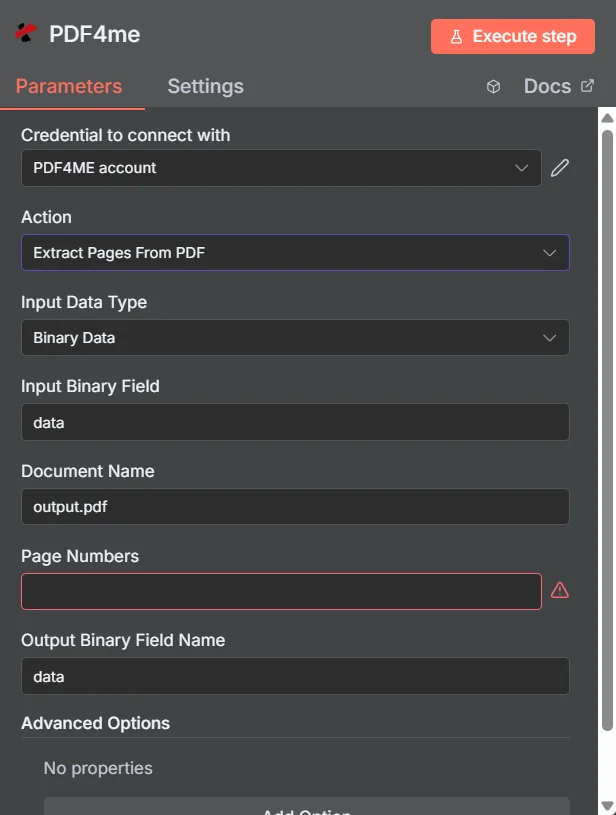
PDF4me 从 PDF 参数面板 n8n
提取页面与拆分页面 PDF
两者都会生成较小的文档,但它们回答的问题不同。提取操作问的是: pages 你想保留什么;拆分是指如何分割整个文档。
| 问题 | 从 PDF | 分裂 PDF |
|---|---|---|
| How many files come back | One PDF holding the pages you listed | Several PDFs covering the whole document |
| What happens to unlisted pages | They are absent from the output | They still appear, in another output file |
| Typical use | Pull the signature page, one chapter, or a summary section | Break a bundle into per-invoice or per-section files |
| Driven by | An explicit page list you supply | A split rule such as page count, text, or barcode |
提取页面需要哪些参数? PDF 需要?
必需的: 操作、输入数据类型、与该输入类型匹配的字段、文档名称和页码。输出二进制字段名称具有一个工作默认值。 数据高级选项初始为空。
| 范围 | 必需的 | 它的作用 | 例子 |
|---|---|---|---|
| Action | Required | Selects the PDF4me node action to run. Choose Extract Pages From PDF. | Extract Pages From PDF |
| Input Data Type | Required | Format of the source PDF input. Choose Binary Data (from a previous node), Base64 String, or URL. | Binary Data |
| Input Binary Field | Conditional | Name of the binary property on the incoming n8n item that holds the PDF. Required when Input Data Type is Binary Data. Defaults to data. | data |
| Base64 Document Content | Conditional | Base64-encoded content of the source PDF. Required when Input Data Type is Base64 String. | JVBERi0xLjQK... |
| File URL | Conditional | Publicly reachable HTTPS URL to the source PDF. Required when Input Data Type is URL. | https://example.com/report.pdf |
| Document Name | Required | Filename used for the document on the request, for reference and tracking. Include the .pdf extension. | output.pdf |
| Page Numbers | Required | The pages to keep. Accepts a comma-separated list, a hyphenated range, a mixed list, or an open range that runs to the end of the document. Pages are numbered from 1. | 1,3,5-8 |
| Output Binary Field Name | Optional | Name of the binary property the output item exposes. Defaults to data. | data |
| Advanced Options | Optional | A collection that starts empty, shown as No properties with an Add Option button. Leave it alone unless you have a specific option to add. | No properties |
如何填写页码字段
| 图案 | 例子 | 返回的结果 |
|---|---|---|
| Single page | 5 | Just page 5, as a one page PDF. |
| Comma-separated list | 1,3,5 | Pages 1, 3, and 5 in one PDF, with pages 2 and 4 absent. |
| Hyphenated range | 2-5 | Pages 2, 3, 4, and 5, with both ends included. |
| Mixed list | 1,3,5-8 | Page 1, page 3, then the block from 5 to 8. |
| Open range | 10- | Page 10 through the last page, whatever the document length turns out to be. |
输出字段
一次成功的运行返回一个 n8n 携带提取物的物品 PDF。
| 场地 | 类型 | 它包含什么 |
|---|---|---|
Binary (data) | Binary | The extracted PDF, under Output Binary Field Name (default data). |
fileName | String | Generated filename of the extracted PDF. |
mimeType | String | MIME type of the output, always application/pdf. |
fileSize | Number | Size of the returned PDF in bytes. |
pagesExtracted | Number | How many pages ended up in the output. Compare it against the length of your requested list as a cheap sanity check. |
originalPageCount | Number | Page count of the source document before extraction. |
extractedPageNumbers | Array | The page numbers that were actually extracted, useful for verifying the result against what you asked for. |
success | Boolean | True when the extraction completed, false on failure. Use it to branch error handling. |
message | String | Human-readable status message, carrying success confirmation or error detail. |
如何设置从中提取页面 PDF 在 n8n?
- 添加 PDF4me 致你 n8n 工作流程并选择 从 PDF 行动。
- 在 用于连接的凭证请选择您的 PDF4me 凭证或点击 创建新凭证 并粘贴你的 API 钥匙。
- 放 输入数据类型 到 二进制数据 (默认), Base64 String, 或者 URL 并提供匹配的来源 PDF 场地。
- 放 文档名称 对于源文件,包括
.pdf扩大。 - 进入 页码 使用列表、范围、混合列表或开放范围。
- 离开 输出二进制字段名称 作为
data除非后面的节点期望不同的属性。 - 执行节点并路由返回结果 PDF 进入下一步,例如存储、电子邮件或审核队列。
典型配置
工作流程示例Common n8n workflow patterns using Extract Pages From PDF.
从合同中取出签名页
- 签署后的合同将以电子邮件附件的形式发送给您。
- 从 PDF 使用开放范围获取最后一页。
- 该单页文件已归档至客户记录中,以便快速查阅。
只需将摘要发送给审稿人
- 系统会按计划生成一份长篇报告。
- 从 PDF 保留前几个 pages 范围例如
1-3。 - 审稿人会收到摘要,而完整报告则会存档。
从手册中截取一个章节
- 支持请求中引用了产品手册的某一章节。
- 从 PDF 用连字符连接该章节。
- 客户获得相关信息 pages 而不是大型附件。
提取后合并成消化物
- 多份原始文件中,每份都只有一页值得保留。
- 从 PDF 每个文档运行一次以获取该页面。
- 合并多个 PDFs 将结果合并成一个摘要。
实用技巧
Use an open range for variable documents
When the page count differs between files, 10- keeps everything from page 10 onward without knowing the total.
Check pagesExtracted against your request
Comparing the returned count with the number of pages you asked for catches a malformed page list before it reaches the customer.
Remember pages start at 1
A code node that builds the list from a zero-based array will be off by one on every document. Add one when generating the string.
Extract before you merge
Pulling the wanted pages from each source first keeps the merge step small and the final document free of filler.
Branch on the success field
Test the returned success boolean before sending the file onward so a failed extraction raises an alert instead of forwarding an empty result.
Reuse one source for several subsets
The original is untouched, so the same PDF can feed two extraction nodes to produce an internal copy and a customer copy in one run.
速查表
| 场地 | 价值 |
|---|---|
| Action | Extract Pages From PDF |
| Input Data Type | Binary Data |
| Input Binary Field | data |
| Document Name | output.pdf |
| Page Numbers | 1,3,5-8 |
| Output Binary Field Name | data |
| Advanced Options | No properties |
| Credentials | PDF4me API credential |
常见问题
相关操作
分裂 PDF
将整个文档拆分成多个文件,而不是只保留一个子集。
从以下位置删除不需要的页面 PDF
反向方法:命名 pages 移除而不是 pages 保留。
合并多个 PDFs
合并 pages 你从多个来源提取信息,并将其汇总成一个摘要。
旋转文档
发送前请检查提取的输出文件页面方向是否正确。
在其他平台上执行相同任务
提取页面 Make
与……相同的萃取发动机 Make 模块,连接到 Make 场景。
从 PDF 在 Zapier
从数千个 SaaS 应用和 Webhook 中触发页面提取。
提取页面 Power Automate
Microsoft 365 与……流动 SharePoint, OutlookTeams 和 Dataverse 集成。
摘录页面 REST API
原始 PDF4me 用于自定义后端代码或 Postman 测试的端点。