叠加 PDFs 在 n8n
叠加 PDFs 是一个 PDF4me 节点操作 n8n 放置一个 PDF 叠加在另一个之上,将两者合并到同一个位置。 pages 而不是附加它们。使用此功能,无需添加任何页面,即可在生成的内容上盖上设计好的信头,应用证书边框,或将已批准的模板覆盖在收到的文档上。
此节点的功能
PDF4me:叠加层 PDFs 需要两个 PDFs,一个 根据 它充当背景和 层 它位于顶部,并返回一个文档,其中两者都显示在同一位置。 pages每个文件都有自己的输入类型,因此基础数据可以来自之前的节点(二进制数据),而图层数据则可以从其他节点获取。 URL与合并不同,页面数量不会增加,因此它是信头、边框和模板印章的理想工具。
相关博客文章(1)
验证您的身份 API 要求
每一个 PDF4me 节点 n8n 需要有效 用于连接的凭证创建或选择一个可以容纳您的 PDF4me API 关键在于确保工作流程能够安全地验证叠加请求。
您不容错过的重要事实
叠加层未合并
合并追加项 pages 所以计数加起来了。叠加操作会将两个文档堆叠在同一层上。 pages页数保持不变。
两个文件,两种独立的输入类型
根据 PDF 输入类型和层 PDF 输入类型可以单独设置,因此一个文件可以是二进制数据,而另一个文件可以来自…… URL。
秩序改变了哪些内容会保持可见。
该图层位于基层之上。纯色背景的图层可能会遮挡下方的内容,因此请先在一组示例图层上测试两种顺序。
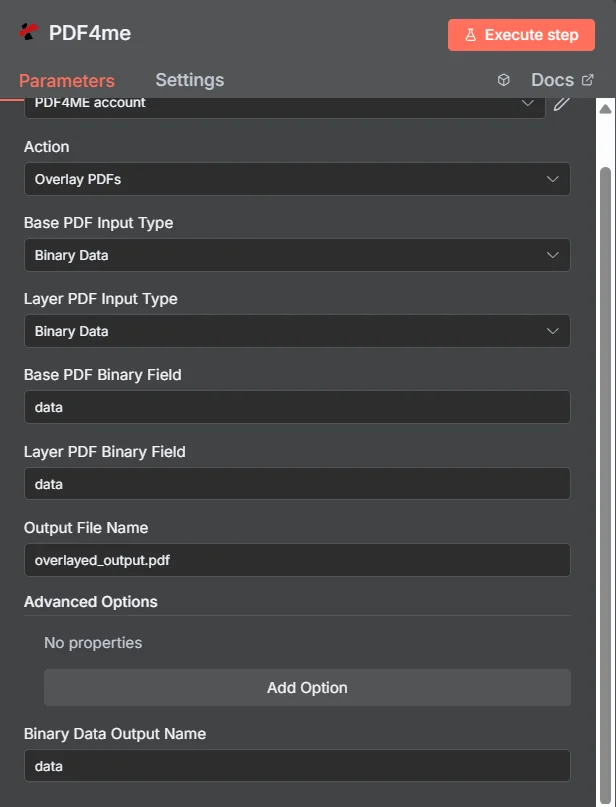
PDF4me 叠加 PDFs 参数面板 n8n两种输入类型均设置为二进制数据
叠加 vs 合并 vs 水印
三种将额外内容引入到……的方法 PDF各自生成不同的文档。
| 方法 | 对……的影响 pages | 最佳匹配 |
|---|---|---|
| Overlay PDFs | Both documents appear on the same pages, page count unchanged | Branding that already exists as a designed PDF, such as a letterhead or certificate frame |
| Merge PDFs | Documents follow one another, page counts add up | Content that genuinely belongs in sequence as one longer document |
| Add watermark | Simple text or a single image drawn onto the existing pages | A short notice such as DRAFT or CONFIDENTIAL, where no designed PDF layer exists |
Overlay 的参数有哪些? PDFs 需要?
必需的: 操作、两种输入类型、与每种输入类型匹配的源字段以及输出文件名。二进制数据输出名称和“高级选项”下的任何内容均具有可用的默认值。
| 范围 | 必需的 | 它的作用 | 例子 |
|---|---|---|---|
| Action | Required | Selects the PDF4me node action to run. Choose Overlay PDFs. | Overlay PDFs |
| Base PDF Input Type | Required | Format of the background PDF. Choose Binary Data, Base64 String, or URL. Independent of the layer setting. | Binary Data |
| Layer PDF Input Type | Required | Format of the PDF placed on top. Choose Binary Data, Base64 String, or URL. Independent of the base setting. | Binary Data |
| Base PDF Binary Field | Conditional | Name of the binary property holding the base PDF. Required when Base PDF Input Type is Binary Data. | data |
| Layer PDF Binary Field | Conditional | Name of the binary property holding the layer PDF. Required when Layer PDF Input Type is Binary Data. | data |
| Base PDF Base64 Content | Conditional | Base64-encoded content of the base PDF. Required when Base PDF Input Type is Base64 String. | JVBERi0xLjQK... |
| Layer PDF Base64 Content | Conditional | Base64-encoded content of the layer PDF. Required when Layer PDF Input Type is Base64 String. | JVBERi0xLjQK... |
| Base PDF File URL | Conditional | Publicly reachable HTTPS URL to the base PDF. Required when Base PDF Input Type is URL. | https://example.com/base.pdf |
| Layer PDF File URL | Conditional | Publicly reachable HTTPS URL to the layer PDF. Required when Layer PDF Input Type is URL. | https://example.com/letterhead.pdf |
| Output File Name | Required | Filename for the combined PDF. Include the .pdf extension. | overlayed_output.pdf |
| Binary Data Output Name | Optional | Name of the binary property the output item exposes. Defaults to data. | data |
| Advanced Options | Optional | Collection for extra processing settings, added with Add Option. Leave empty unless you have a specific requirement. | No properties |
输出字段
一次成功的运行返回一个 n8n 携带组合的物品 PDF。
| 场地 | 类型 | 它包含什么 |
|---|---|---|
Binary (data) | Binary | The combined PDF with the layer placed over the base, under Binary Data Output Name (default data). |
fileName | String | Generated filename, matching Output File Name. |
mimeType | String | MIME type of the output, always application/pdf. |
fileSize | Number | Size of the combined PDF in bytes. |
docName | String | Document name reference for the processed file, matching fileName. |
overlayCompleted | Boolean | Confirms the overlay operation finished, useful as an explicit check that the layer was applied. |
layersProcessed | Number | Count of PDF layers combined into the final document. |
success | Boolean | True when the operation completed, false on failure. Use it to branch error handling. |
message | String | Human-readable status message, carrying success confirmation or error detail. |
如何设置叠加层 PDFs 在 n8n?
- 添加 PDF4me 致你 n8n 工作流程并选择 叠加 PDFs 行动。
- 在 用于连接的凭证请选择您的 PDF4me 凭证或点击 创建新凭证 并粘贴你的 API 钥匙。
- 放 根据 PDF 输入类型 和 层 PDF 输入类型它们是独立的,因此每个文件的到达方式可能不同。
- 填写匹配的来源字段,例如 根据 PDF 二元场 和 层 PDF 二元场两者均默认为
data。 - 放 输出文件名 (必须以……结尾)
.pdf)。 - 执行节点并路由组合后的流量 PDF暴露于 二进制数据输出名称进入下一步。
典型配置
工作流程示例Common n8n workflow patterns using Overlay PDFs.
生成文件的信头
- 该文档由不带任何品牌标识的模板生成。
- 叠加 PDFs 使用经批准的信笺抬头 PDF 取自 URL 作为该层。
- 品牌成品未经设计师修改就直接寄出。
动态内容的证书框架
- 课程完成数据生成一个简单的 PDF 收件人姓名。
- 叠加 PDFs 将设计好的证书边框覆盖在上面。
- 每份证书都会通过电子邮件发送给收件人。
审核文件上的批准印章
- 文件完成工作流程中的审批步骤。
- 叠加 PDFs 应用预先设计并批准的印章层。
- 盖章后的副本归档到记录系统中。
批量模板应用程序
- “循环遍历项目”节点遍历包含供应商传入文档的文件夹。
- 叠加 PDFs 应用同一层 PDF 一个 URL 给每个人。
- 每份文件都以一致的格式进入档案馆。
实用技巧
Test both orderings before a batch run
Swapping which file is base and which is layer changes what stays visible. Prove it on one sample pair rather than discovering it across a hundred documents.
Design the layer with transparency in mind
A layer PDF with a solid white background will hide the base underneath. Frames, borders, and letterheads work best when the middle is genuinely empty.
Match page sizes where you can
A layer built at the same page size as the base lines up predictably. Mismatched geometry is the usual reason a stamp lands in the wrong place.
Mix input types to avoid extra nodes
Keeping a static letterhead at a URL while the base arrives as binary from the previous node saves fetching the template into the workflow separately.
Reach for merge when page count should grow
If the second document is meant to be read after the first rather than on top of it, Merge Multiple PDFs is the correct action.
Check overlayCompleted alongside success
The output carries an explicit overlay confirmation flag, which is a more specific signal than the generic success boolean alone.
速查表
| 场地 | 价值 |
|---|---|
| Action | Overlay PDFs |
| Base PDF Input Type | Binary Data |
| Layer PDF Input Type | Binary Data |
| Base PDF Binary Field | data |
| Layer PDF Binary Field | data |
| Output File Name | overlayed_output.pdf |
| Binary Data Output Name | data |
| Advanced Options | No properties |
| Credentials | PDF4me API credential |
常见问题
相关操作
合并多个 PDFs
当文档需要依次递增且页数需要增加时,请使用此方法。
添加图像印章 PDF
当图层是单个图像而不是设计好的图像时,这是一个更轻量级的选择。 PDF。
添加文字图章 PDF
对于草稿或机密等简短通知,不包含任何层级 PDF 需要。
分裂 PDF
如果只有部分内容需要叠加,请先将文档拆分成多个部分。
在其他平台上执行相同任务
合并叠加层 Make
与以下情况相同的叠加引擎 Make 模块,连接到 Make 场景。
合并 PDF 叠加 Zapier
扳机 PDF 可从数千个 SaaS 应用和 Webhook 中进行分层。
合并叠加层 Power Automate
Microsoft 365 与……流动 SharePoint, OutlookTeams 和 Dataverse 集成。
合并叠加层 REST API
原始 PDF4me 用于自定义后端代码或 Postman 测试的端点。