旋转图像 n8n
旋转图像 是一个 n8n 模块 PDF4me 只需一步操作即可将图像旋转精确角度。以二进制数据形式发送图像。 Base64或者 URL设置 0 到 360 度之间的旋转角度,选择背景填充颜色,即可获得旋转后的文件。
此节点的功能
PDF4me旋转图像 旋转 JPG, PNG以任意角度拍摄的 GIF 或 BMP 图像 n8n 步骤。设置 旋转角度 以度为单位 背景颜色 填充旋转后暴露出的任何区域,并且 按比例调整大小 保持宽高比。接受二进制数据输入。 Base64 String, 或者 URL非常适合用于方向校正、照片标准化和内容准备工作流程。
相关博客文章
目前尚无关于此功能的博客文章——敬请期待。
在此期间,您可以浏览 PDF4me 博客,查看适用于各平台的教程和工作流程。
访问博客 →
验证您的身份 API 要求
每一个 PDF4me 节点 n8n 需要有效 用于连接的凭证创建或选择一个可以容纳您的 PDF4me API 关键在于确保工作流程能够安全地验证图像旋转请求。
您不容错过的重要事实
任意角度,不仅限于90度预设角度
旋转角度可接受 0 到 360 度之间的任何值,因此您不必局限于四分之一圈的旋转。正值表示顺时针旋转。
背景色填充裸露的边角。
旋转角度若非90度的倍数,则会露出原图之外的空白角落区域。默认背景色为白色,该区域将填充您选择的十六进制颜色。
比例调整大小控制输出尺寸
默认开启时,会调整尺寸以保持宽高比并防止失真。关闭时则保持画布原始尺寸,这可能会导致在非 90 度旋转时内容被裁剪。
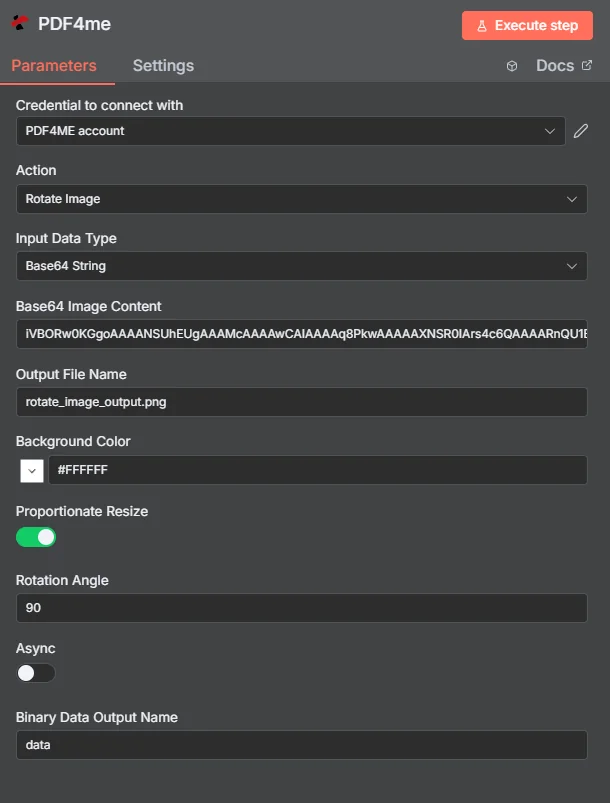
完整节点面板:图片来自 Base64 String旋转 90 度,白色背景填充
参数
必需 n8n 用户界面: 输入数据类型和旋转角度。输出文件名(默认值) rotate_image_output.png),背景颜色(默认值) #FFFFFF按比例调整大小, Async以及二进制数据输出名称(默认值) 数据)是可选的。条件源字段(输入二进制字段, Base64 图片内容,图片 URL)仅当选择与其匹配的输入数据类型时才会出现。
| 范围 | 必需的 | 它的作用 | 例子 |
|---|---|---|---|
| Input Data Type | Required | How the source image enters the node. Binary Data reads from a previous node (default, most common). Base64 String accepts an encoded image. URL downloads it from a public link. | Binary Data |
| Input Binary Field | Conditional | Name of the binary property on the incoming n8n item that holds the image. Required when Input Data Type is Binary Data. | data |
| Base64 Image Content | Conditional | Base64-encoded image content (.jpg, .png, .gif, .bmp). Required when Input Data Type is Base64 String. | /9j/4AAQSkZJRgAB... |
| Image URL | Conditional | Publicly reachable URL to the image file. Required when Input Data Type is URL. | https://abc.com/photo.jpg |
| Output File Name | Optional | Filename of the rotated image returned by the node. Default is rotate_image_output.png. | rotate_image_output.png |
| Background Color | Optional | Hex color code used to fill areas exposed during rotation. Default is #FFFFFF (white). | #FFFFFF |
| Proportionate Resize | Optional | Toggle to maintain proportional dimensions during rotation, preventing distortion. On by default. | On |
| Rotation Angle | Required | Rotation angle in degrees, 0 to 360. Positive values rotate clockwise. | 90 |
| Async | Optional | Toggle background processing for large images or non-time-critical jobs. Off by default. | Off |
| Binary Data Output Name | Optional | Name of the binary property the output item exposes. Default is data. | data |
输出结果包含哪些字段?
| 场地 | 类型 | 它包含什么 |
|---|---|---|
success | Boolean | True when the rotation completed successfully. Use to route error-handling branches. |
message | String | Descriptive status message confirming success or describing an error. |
fileName | String | Filename of the rotated image, set from Output File Name. |
mimeType | String | MIME type of the output image, for example image/png. |
fileSize | Number | Size of the rotated image file in bytes. |
rotationAngle | Number | The actual rotation angle that was applied, useful for tracking and verification. |
Binary (data) | Binary | The rotated image file under Binary Data Output Name (default data). Pass into Write Binary File, Email, or any storage upload. |
如何在软件中设置旋转图像 n8n?
- 添加 PDF4me 致你 n8n 工作流程和设置 行动 到 旋转图像。
- 在 用于连接的凭证请选择您的 PDF4me 凭证或点击 创建新凭证 并粘贴你的 API 钥匙。
- 放 输入数据类型 到 二进制数据 (默认), Base64 String, 或者 URL 并填写匹配字段。
- 进入 旋转角度 以度为单位,0 到 360 度。
- (可选) 背景颜色 控制旋转后暴露区域的填充,并切换 按比例调整大小 为了保持宽高比。
- (可选)更改 输出文件名 从默认值
rotate_image_output.png和 二进制数据输出名称 从默认值data。 - 执行该节点并将旋转后的图像路由到写入二进制文件、电子邮件或云存储。
典型配置
工作流程示例Common n8n workflow patterns using Rotate Image.
移动上传方向修复
- webhook 接收从移动设备上传的照片(二进制数据,属性)。
数据)。 - PDF4me 旋转图像时,旋转角度会根据检测到的方向问题进行设置。
- 修正后的图像已保存到共享照片库文件夹中。
扫描文档矫正 OCR
- 读取二进制文件节点从网络文件夹加载一批扫描的文档图像。
- PDF4me 旋转图像功能配置了一个较小的校正角度,并将背景颜色设置为白色,以便为每次扫描做好准备,确保扫描精度。 OCR。
- 校正后的图像被传递到下游。 OCR 或文本提取步骤。
产品目录的统一方向
- 一个 HTTP 请求节点从供应商处下载产品图片。 URL。
- PDF4me 旋转图像运行,输入数据类型 URL 然后按比例调整大小,以标准化方向,而不会扭曲产品照片。
- 标准化图像被上传到目录的图像存储桶中。
实用技巧
Set Background Color to match your destination
For product photos or documents going onto a white page, keep the default #FFFFFF. For dark-themed use cases, set a matching hex color so exposed corners blend in.
Non-90-degree angles expose corners
Only rotations at exactly 0, 90, 180, or 270 degrees avoid exposing background-filled corners. Any other angle will show the Background Color in the newly exposed areas.
Keep Proportionate Resize on to avoid distortion
Turning it off keeps the original canvas dimensions, which can crop parts of the image on non-90-degree rotations. Leave it on unless you specifically need a fixed output size.
If you already know the EXIF orientation, use the EXIF variant
When photos already carry EXIF orientation metadata, Rotate Image By EXIF Data can auto-correct them without you specifying a manual angle.
Enable Async for large batches
Turning Async on lets larger images or higher-volume rotation jobs process in the background instead of blocking the workflow synchronously.
rotationAngle in the output confirms what was applied
Log this field alongside your processing records, especially in batch jobs, to confirm each image received the intended rotation.
速查表
| 场地 | 价值 |
|---|---|
| Action | Rotate Image |
| Input Data Type | Base64 String |
| Base64 Image Content | /9j/4AAQSkZJRgAB... |
| Output File Name | rotate_image_output.png |
| Background Color | #FFFFFF |
| Proportionate Resize | On |
| Rotation Angle | 90 |
| Async | Off |
| Binary Data Output Name | data |
| Credentials | PDF4me API credential |
常见问题解答
相关操作
根据 EXIF 数据旋转图像
使用照片自身的 EXIF 元数据自动校正方向,而不是手动指定角度。
裁剪图像
将图像裁剪到特定区域,这是旋转图像后常见的下一步,因为您还需要去除被背景填充的角。
翻转图像
将图像水平或垂直镜像,这是仅靠旋转无法实现的定向校正。
在其他平台上执行相同任务
旋转图像 Make
与 A 相同的旋转逻辑 Make 模块,带有云存储触发器的可视化场景。
旋转图像 Zapier
通过 6000 多个 SaaS 应用和 Webhook 触发图像旋转 Zapier。
旋转图像 REST API
原始 REST 用于自定义后端代码或 Postman 测试的端点。
用例
摄影和图像方向校正
- 自动校正移动设备和数码相机拍摄的图像方向错误问题
- 批量处理用户生成内容的上传,以确保照片库和作品集的风格一致。
- 规范专业摄影工作流程和客户交付成果的图像方向
文档处理和数字资产管理
- 将扫描的文档和图像旋转到正确的阅读方向。 OCR 处理和归档系统
- 在批量文档处理工作流程中自动校正方向错误的图像,以提高可读性。
- 为了实现一致的呈现效果,请在内容管理系统和数字资产库中规范图像方向。
网站内容和社交媒体优化
- 自动调整图像方向,以便在不同平台和设备方向上获得最佳显示效果
- 处理用户上传到社交媒体平台的图片,这些平台有特定的方向要求。
- 为响应式网页设计和移动应用程序界面创建标准化的图像方向