将文本替换为图像 n8n
将文本替换为图像 是一个 n8n 节点 PDF4me 找到一个精确的文本占位符 PDF 并将其替换为尺寸匹配的徽标、签名或产品图片。可用于模板品牌化、签名插入或自动视觉个性化,无需手动编辑。 PDF。
此节点的功能
PDF4me用图片替换文本 扫描 PDF 对于精确的文本字符串,它会将目标页面上所有匹配项替换为按您选择的高度和宽度缩放的图像。它接受源文件和源文件。 PDF 并通过二进制数据替换图像, Base64 字符串,或 URL独立操作。非常适合将徽标、签名、印章或产品照片插入模板中。 PDFs。
相关博客文章
目前尚无关于此功能的博客文章——敬请期待。
在此期间,您可以浏览 PDF4me 博客,查看适用于各平台的教程和工作流程。
访问博客 →
验证您的身份 API 要求
每一个 PDF4me 节点 n8n 需要有效 用于连接的凭证创建或选择一个可以容纳您的 PDF4me API 关键在于确保工作流程能够安全地验证替换请求。
您不容错过的重要事实
要替换的文本必须完全匹配
PDF4me 执行精确的文本匹配,包括空格、标点符号和大小写。占位符类似
[此处显示LOGO] 只匹配该确切的字符串,不匹配部分或大小写不同的版本。PDF 图像输入是独立的
PDF 输入数据类型和图像输入数据类型是分别设置的,一个可以来自二进制数据,另一个可以来自…… URL当模板 PDF 该标志存在于不同的系统中。
这是 PDF 行动,而不是 Word 变体
“将 Word 文档中的文本替换为图像”节点用于处理带有 Word 特定占位符的 .docx 文件。仅当源文档已经是 .docx 文件时才使用此节点。 PDF。
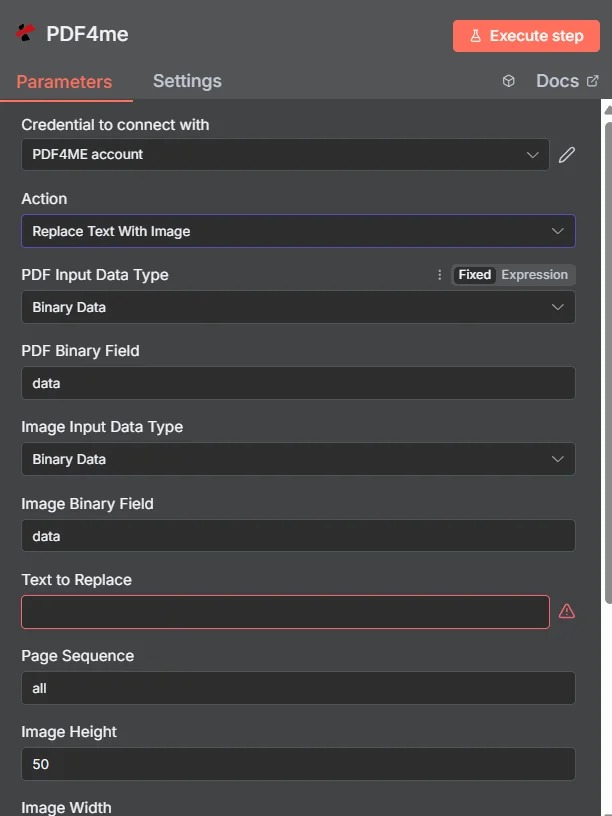
PDF4me 在“将文本替换为图像”节点参数面板中 n8n
“将文本替换为图像”功能需要哪些参数?
必需的: PDF 输入数据类型、图像输入数据类型、替换文本、图像高度、图像宽度和输出文件名。条件字段仅在选择其父级输入数据类型时才会显示。页面顺序, Async“二进制数据输出名称”是可选的,并具有可用的默认值。
| 范围 | 必需的 | 它的作用 | 例子 |
|---|---|---|---|
| PDF Input Data Type | Required | Format of the source PDF input. Choose Binary Data (from a previous node), Base64 String, or URL. | Binary Data |
| PDF Binary Field | Conditional | Name of the binary property on the incoming n8n item that holds the source PDF. Required when PDF Input Data Type is Binary Data. | data |
| Base64 PDF Content | Conditional | Base64-encoded source PDF content. Required when PDF Input Data Type is Base64 String. | JVBERi0xLjQK... |
| PDF URL | Conditional | Publicly reachable HTTPS URL to the source PDF. Required when PDF Input Data Type is URL. | https://example.com/sample.pdf |
| Image Input Data Type | Required | Format of the replacement image input. Choose Binary Data, Base64 String, or URL, independent of the PDF input type. | Binary Data |
| Image Binary Field | Conditional | Name of the binary property on the incoming n8n item that holds the replacement image. Required when Image Input Data Type is Binary Data. | data |
| Base64 Image Content | Conditional | Base64-encoded replacement image content. Required when Image Input Data Type is Base64 String. | /9j/4AAQSkZJRgAB... |
| Image URL | Conditional | Publicly reachable HTTPS URL to the replacement image. Required when Image Input Data Type is URL. | https://example.com/logo.png |
| Text to Replace | Required | The exact text string to find and replace with the image, matched precisely including case and punctuation. | [LOGO_HERE] |
| Page Sequence | Optional | Pages to search for the placeholder. Use all, specific pages (1,3,5), or a range (1-5). Default all. | all |
| Image Height | Required | Height in pixels to scale the replacement image to, maintaining aspect ratio. | 50 |
| Image Width | Required | Width in pixels to scale the replacement image to, maintaining aspect ratio. | 100 |
| Output File Name | Required | Filename for the resulting PDF, must include the .pdf extension. | replace_text_with_image.pdf |
| Async | Optional | Enables background processing for large PDFs. Default false. | false |
| Binary Data Output Name | Optional | Name of the binary property the output item exposes. Default is data. | data |
输出字段
一次成功的运行返回一个 n8n 携带物品 JSON 元数据和更新后的二进制文件 PDF。
| 场地 | 类型 | 它包含什么 |
|---|---|---|
success | Boolean | True when the replacement succeeded. Use to route error-handling branches. |
message | String | Human-readable status message for the replacement result. |
fileName | String | Generated filename, matching Output File Name. |
mimeType | String | MIME type of the output, always application/pdf. |
fileSize | Number | Size of the resulting PDF in bytes. |
pagesProcessed | Number | Number of pages searched for the placeholder text. |
Binary (data) | Binary | The updated PDF under Binary Data Output Name (default data). Pass into Write Binary File, Email, or any cloud-storage upload. |
如何在文本中设置“将文本替换为图像”? n8n?
- 添加 PDF4me 致你 n8n 工作流程并选择 将文本替换为图像 行动。
- 在 用于连接的凭证请选择您的 PDF4me 凭证或点击 创建新凭证 并粘贴你的 API 钥匙。
- 放 PDF 输入数据类型 并提供来源 PDF 通过 PDF 二元场, Base64 PDF 内容, 或者 PDF URL。
- 放 图像输入数据类型 并通过以下方式提供替换图像 图像二值场, Base64 图片内容, 或者 图像 URL。
- 进入 要替换的文本 完全按照原文所示 PDF并设置 页面顺序 如果您需要定位特定页面。
- 放 图片高度 和 图片宽度 缩放替换图像,并设置 输出文件名。
- 使能够 Async 大型 PDFs 如有需要,执行节点并路由更新后的日志。 PDF 进入下一步。
典型配置
工作流程示例Common n8n workflow patterns using Replace Text With Image.
在提案模板中插入客户徽标
- 当为客户生成新提案时,CRM webhook 会触发。
- PDF4me 将文本替换为图像运行,并将要替换的文本设置为
[客户标志]和图像输入数据类型 URL 指向客户的标志。 - 品牌方案将通过电子邮件发送给销售代表进行最终审核。
已生成合同上的签名章
- 合约是通过以下方式生成的: PDF4me 使用以下方式生成文档
[签名]占位符。 - PDF4me “将文本替换为图像”功能会使用签名者的签名图像,并且“页面顺序”功能只会针对最后一页运行。
- 这份看似已签署的合同已被存档。 SharePoint。
产品目录中的图片替换 PDF
- “循环遍历项目”节点遍历库存数据库中的产品记录。
- PDF4me “将文本替换为图像”功能按项目运行,替换为
[产品图片]这里是每个产品图片的占位符,图片来自云存储。 - 每个个性化目录页面都会在下游合并成一个可分发的单一页面。 PDF。
签字后的批准印章图形
- 当经理在内部工具中将文档标记为已批准时,审批 webhook 就会触发。
- PDF4me “将文本替换为图像”功能正在运行。
[批准印章]占位符已替换为确认图片。 - 最终版 PDF 文件已存档,文件名中包含批准日期。
实用技巧
Use a distinctive placeholder string
A unique token like [CLIENT_LOGO] avoids accidentally matching unrelated text elsewhere in the document.
Match Image Height/Width to the source aspect ratio
Mismatched dimensions can stretch or squash the inserted image; check the source image proportions first.
Narrow Page Sequence when possible
Targeting only the pages that contain the placeholder is faster and avoids unintended matches on other pages.
PDF and image sources can differ
Pull the template PDF from Binary Data while sourcing the logo from a URL, or any other combination that fits your workflow.
Enable Async for large PDFs
Large documents benefit from asynchronous processing so the workflow execution does not time out.
Use the Word variant for .docx files
This node processes PDFs; for Word documents use the separate Replace Text With Image in Word Document node.
速查表
| 场地 | 价值 |
|---|---|
| Action | Replace Text With Image |
| PDF Input Data Type | Binary Data |
| PDF Binary Field | data |
| Image Input Data Type | Binary Data |
| Image Binary Field | data |
| Text to Replace | [LOGO_HERE] |
| Page Sequence | all |
| Image Height | 50 |
| Image Width | 100 |
| Output File Name | replace_text_with_image.pdf |
| Credentials | PDF4me API credential |
常见问题
相关操作
在 Word 文档中将文本替换为图像
同样的文本转图像概念,应用于带有 Word 特有占位符的 .docx 文件,而不是 PDFs。
给图片添加水印
将徽标或水印覆盖在整个图像上,而不是替换特定的文本占位符。
从图像创建图像 PDF
转换 PDF 将页面转换为图像文件,可用于预览文本到图像替换的结果。
在其他平台上执行相同任务
在 Make 中将文本替换为图像
相同的 PDF 文本转图像引擎作为 Make 模块,可视化场景采用相同的字段集。
在 Zapier 中将文本替换为图像
从 6000 多个触发器占位符中替换任意一个。 SaaS 应用程序和网络钩子。
将文本替换为图像 Power Automate
Microsoft 365 与……流动 SharePoint, OutlookTeams 和 Dataverse 集成。