获取图像元数据 n8n
此节点的功能
PDF4me 获取图像元数据 读取您图像中任何图像的技术属性 n8n 工作流程并以结构化数据的形式返回它们——格式、宽度、高度、DPI、每像素位数、方向等。 EXIF 如有摄像头数据,则使用该输出进行图像质量检查、将资产属性记录到数据库、将过大的图像路由到调整大小步骤,或在存储之前验证上传的照片是否符合发布规范。接受二进制数据。 Base64 字符串,或公共字符串 URL秒。
相关博客文章
目前尚无关于此功能的博客文章——敬请期待。
在此期间,您可以浏览 PDF4me 博客,查看适用于各平台的教程和工作流程。
访问博客 →
验证您的身份 API 要求
每一个 PDF4me 节点 n8n 需要有效 证书创建或选择包含您的凭据 PDF4me API 密钥,以便节点能够安全地验证图像分析请求。
您不容错过的重要事实
图像类型必须与实际格式匹配
将图像类型设置为 JPEG, PNG图像类型设置为 GIF 或 BMP,以匹配您提供的图像的实际格式。图像类型值与实际格式不匹配可能会导致节点返回错误或不正确的元数据。如果您不确定格式,请检查文件扩展名或 MIME 设置此参数之前,请从前一个节点获取类型。
hasExifData 会告诉你 exifData 是否安全。
当图像没有嵌入信息时,exifData 字段为空。 EXIF 元数据——通常用于程序生成的图像、屏幕截图和导出的图形。在将 exifData 字段映射到下游节点之前,务必先检查 hasExifData 布尔值。尝试访问空对象的子字段会导致错误。 n8n 执行失败。
分辨率单位是DPI,而不是像素。
horizontalResolution 和 verticalResolution 的单位是每英寸点数 (DPI),而不是像素。典型的网页图像的 DPI 为 72 或 96。印刷质量的图像 DPI 应为 300 或更高。在质量检查工作流程中,可以使用这些字段来控制图像——例如,拒绝 DPI 低于 200 的图像用于印刷出版,并将其路由到重新上传请求步骤。
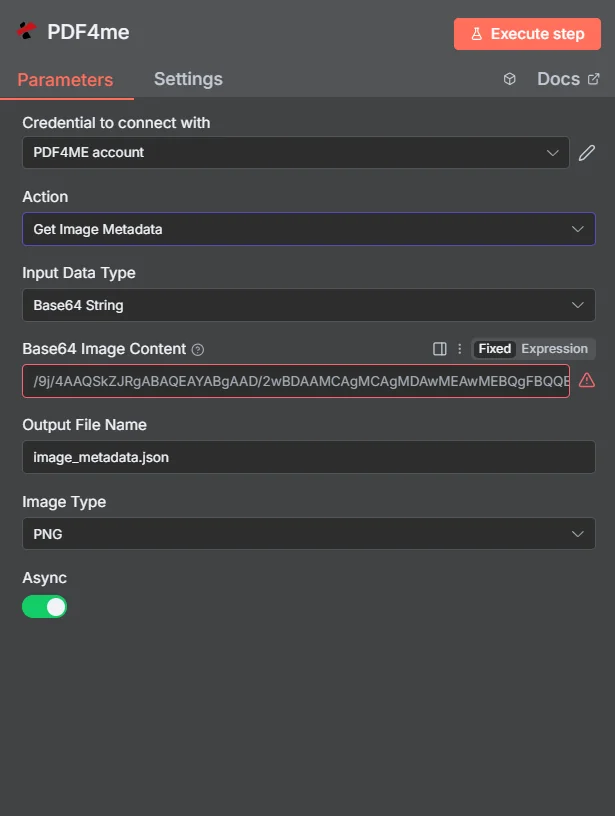
将输入数据类型和图像类型设置为与图像源匹配,输入扩展名为 .json 的输出文件名,然后执行。所有元数据字段都将在节点输出中显示。
参数
必需的: 输入数据类型,与该类型匹配的图像源字段(输入二进制字段, Base64 图像内容,或图像 URL)、输出文件名和图像类型。 Async 是可选的。
| 范围 | 必需的 | 它的作用 | 例子 |
|---|---|---|---|
| Input Data Type | Yes | Format of the source image. Choose Binary Data to map from a prior node, Base64 String for encoded image data, or URL for a publicly accessible image file. | Binary Data |
| Input Binary Field | Yes (Binary Data) | The binary property name from the prior node holding the image. Must match the binary output key of the upstream node. | data |
| Base64 Image Content | Yes (Base64) | Base64-encoded image string. JPEG, PNG, GIF, and BMP all accepted. | /9j/4AAQS... |
| Image URL | Yes (URL) | Publicly accessible HTTPS URL to the image. PDF4me fetches it and returns the metadata. | https://example.com/photo.png |
| Output File Name | Yes | Filename for the metadata output. Use .json extension. This names the binary output item in n8n. | image_metadata.json |
| Image Type | Yes | Actual format of the source image. Must match the real format - JPEG, PNG, GIF, or BMP. | PNG |
| Async | No | When true, runs asynchronously and returns immediately for large image files. Results must be handled via polling or callback. | false |
输出字段
| 场地 | 类型 | 它包含什么 |
|---|---|---|
imageFormat | String | Detected format of the image - Jpeg, Png, Gif, or Bmp. |
fileSize | Number | Size of the original image in bytes. |
width | Number | Image width in pixels. |
height | Number | Image height in pixels. |
orientation | String | null | Portrait, Landscape, Square, or null if not encoded in the image. |
bitsperPixel | Number | Color depth. 32 is typical for PNG with alpha; 24 for standard JPEG. |
horizontalResolution | Number | Horizontal resolution in DPI. 96 = web, 300 = print quality. |
verticalResolution | Number | Vertical resolution in DPI. |
hasExifData | Boolean | True if the image contains embedded EXIF metadata. Always check this before using exifData. |
exifData | Object | null | Camera settings, GPS coordinates, timestamps, and other EXIF fields. Null when hasExifData is false. |
hasXmpData | Boolean | True if the image contains Adobe XMP metadata. |
_metadata | Object | Processing summary - success status, message, timestamp, and operation name. |
快速设置
- 添加一个 PDF4me 节点和选择 获取图像元数据。
- 选择或创建 证书 你的 PDF4me API 钥匙。
- 放 输入数据类型 并映射图像源(二进制, Base64, 或者 URL)。
- 放 图片类型 与图片的实际格式相匹配。
- 进入 输出文件名 和
.json扩展程序和点击 执行节点。 地图width,height,horizontalResolution, 和hasExifData进入下游节点。
工作流程示例
工作流程示例Common n8n workflow patterns using Get Image Metadata.
按图像分辨率打印作业
- 当设计师上传用于印刷制作的图片时,就会触发表单提交。
- 获取图像元数据从上传的文件中读取 horizontalResolution 和 verticalResolution。
- IF 节点检查这两个值是否都大于等于 300 DPI。
- 通过审核的图片会进入 Airtable 的打印队列。审核失败的图片会触发 Slack 消息,要求设计师重新上传更高分辨率的图片。
将包含完整元数据的数字资产编入数据库
- 当新图像进入“资源导入”文件夹时,Dropbox 监视文件夹功能会触发。
- 获取图像元数据会提取所有属性,包括 EXIF 如有摄像头数据,请提供。
- Postgres 或 Airtable 节点会写入一个新行,其中包含文件名、维度、格式、DPI 等信息。 EXIF 日期已添加到资产目录。
- 该资产被移至“已编目”文件夹,并且 Slack 消息会确认新条目。
发布前,将过大的图片引导至调整大小步骤。
- 一个 HTTP webhook 从电子商务上传表单接收产品图片。
- 获取图像元数据会返回每张图像的宽度和高度。
- IF 节点会将宽度超过 4000px 的图像路由到压缩图像或调整大小步骤,然后再进行存储。
- 尺寸正确的图片可以跳过调整大小的步骤,直接上传到产品 CDN。
常见问题解答
相关节点
翻转图像
水平、垂直或同时镜像图像 - 在读取元数据后使用,以纠正分析中检测到的方向问题。
压缩图像
如果元数据显示图像超出您的存储空间或带宽限制,请在上传到云存储之前减小图像文件大小。
转换图像格式
当检测到的图像格式与下游处理器所需的格式不匹配时,将图像转换为其他格式。 API 或出版系统。