翻转图像 n8n
此节点的功能
PDF4me - 翻转图像 将图像水平、垂直或双向镜像,并将结果以二进制数据的形式返回到您的设备中。 n8n 工作流程。从先前的节点提供源图像的二进制数据, Base64编码字符串,或公共 URL翻转后的输出图像可立即用于云存储、电子邮件、数据库或任何进一步的图像处理步骤——无需手动编辑,无需外部工具。
相关博客文章
目前尚无关于此功能的博客文章——敬请期待。
在此期间,您可以浏览 PDF4me 博客,查看适用于各平台的教程和工作流程。
访问博客 →
验证您的身份 API 要求
每一个 PDF4me 节点 n8n 需要有效 证书创建或选择包含您的凭据 PDF4me API 密钥,以便节点能够安全地验证图像处理请求。
您不容错过的重要事实
三种输入类型——一次只需要一种。
将输入数据类型设置为二进制数据,并填写输入二进制字段,或者 Base64 字符串和填充 Base64 图像内容,或 URL 并填充图像 URL只有与您选择的类型相匹配的字段才需要赋值——其他两组字段留空以避免出错。
水平和垂直翻转将两种翻转方式结合在一个呼叫中
选择“水平”和“垂直”作为方向类型,会同时沿两个方向翻转图像——结果相当于旋转 180 度。当您需要校正镜像且上下颠倒的图像时,请使用此功能,而无需调用两个单独的翻转函数。
输出文件名设置二进制文件名 - 请使用正确的扩展名
您提供的输出文件名将作为返回的二进制文件的名称,包括扩展名。如果您提供一个 JPEG 并命名输出
结果.png下游节点可能会看到 MIME 类型不匹配。请确保文件扩展名与实际图像格式一致,以便顺利传输到存储或电子邮件节点。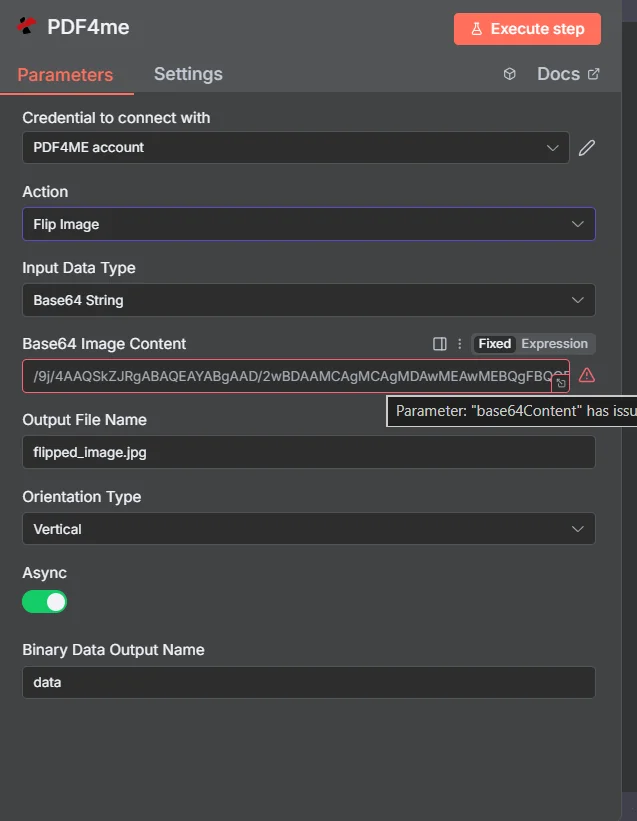
在运行工作流程之前,请设置输入数据类型、映射图像源、设置具有正确扩展名的输出文件名,并选择方向类型。
参数
必需的: 输入数据类型,与该类型匹配的图像字段(输入二进制字段, Base64 图像内容,或图像 URL)、输出文件名、方向类型和二进制数据输出名称。 Async 是可选的。
| 范围 | 必需的 | 它的作用 | 例子 |
|---|---|---|---|
| Input Data Type | Yes | Format of the source image. Choose Binary Data to map from a prior node, Base64 String to supply encoded image data, or URL to point to a publicly accessible image file. | Binary Data |
| Input Binary Field | Yes (Binary Data) | The binary property name from the prior node that holds the image. Use the n8n expression to reference it. | {{$binary.data}} |
| Base64 Image Content | Yes (Base64) | Base64-encoded string of the image to flip. JPEG, PNG, GIF, and BMP all accepted. | /9j/4AAQSkZJRgA... |
| Image URL | Yes (URL) | Publicly accessible URL to the source image. PDF4me downloads and flips the image from this address. | https://example.com/photo.jpg |
| Output File Name | Yes | Filename for the returned flipped image, including extension. Must match the actual image format to avoid MIME mismatches in downstream nodes. | flipped_image.jpg |
| Orientation Type | Yes | Direction to flip the image. Horizontal mirrors left-to-right. Vertical mirrors top-to-bottom. Horizontal and Vertical applies both simultaneously. | Horizontal |
| Async | No | When true, the operation runs asynchronously and returns immediately without waiting for the result. Useful for large images in batch workflows. | false |
| Binary Data Output Name | Yes | Key name under which the flipped image binary is stored in the n8n output. Downstream nodes reference the image by this name. | data |
快速设置
- 添加一个 PDF4me 节点到你的 n8n 工作流程和选择 翻转图像 作为行动。
- 选择或创建 证书 你的 PDF4me API 钥匙。
- 放 输入数据类型 并填写匹配字段——二进制数据 Base64 图像内容,或图像 URL。
- 进入 输出文件名 使用正确的扩展名。
- 选择 方向类型 - 水平、垂直或水平和垂直。
- 放 二进制数据输出名称 (默认:
data)并点击 执行节点翻转后的图像已在输出二进制文件中准备就绪。
工作流程示例
工作流程示例Common n8n workflow patterns using Flip Image.
镜像产品图片以导出目录
- 一个 HTTP 请求节点获取产品图片 URL来自PIM系统 API。
- “分批分割”节点处理每张图像 URL 单独地。
- 翻转图像功能在输入数据类型设置为时运行 URL方向类型设置为水平,创建每张产品照片的左右镜像。
- Google 云端硬盘会将每个翻转后的图像上传到以产品 SKU 命名的“镜像资源”文件夹中。
自动校正倒置的扫描图像
- 当扫描的图像到达接收文件夹时,Dropbox 监视文件夹功能就会触发。
- 翻转图像功能将方向类型设置为垂直,以纠正扫描仪造成的上下颠倒方向。
- 校正后的图像已上传至“已处理扫描件”文件夹。
- Slack 通知确认更正后的图片已准备好交付给文档团队。
为社交内容生成前后对比图对
- 当新的图像记录添加到内容日历库时,Airtable 会触发。
- HTTP 请求从 Airtable 附件下载原始图像 URL。
- Flip Image 功能会为并排比较帖子的“之后”帧创建一个水平镜像版本。
- 两张图片都已上传到 S3,Airtable 记录也已更新为镜像资源。 URL。
常见问题解答
相关节点
获取图像元数据
在翻转图像之前,读取图像的宽度、高度、格式和 DPI,以验证尺寸和方向是否符合您的工作流程要求。
压缩图像
翻转图像后,在上传到云存储或嵌入文档之前,减小图像文件大小,以保持文件大小可控。
转换图像格式
将翻转后的图像转换为其他格式——例如 PNG 到 JPEG 在将其交给某人之前 API 或者需要特定格式的存储系统。