将文本替换为图像 Word 在 n8n
将文本替换为图像 Word 是一个 PDF4me 节点操作 n8n 找到文本标记 .docx 并替换为图像。您可以使用它将签名添加到合同中,将徽标添加到品牌模板中,或生成图像。 QR 将代码直接写入发货单,无需任何手动编辑。
此节点的功能
此行动采取 两个独立输入:a Word 一份文档和一张图片,每张都包含 它自己的输入类型下拉菜单它会在文档中搜索确切的字符串。 搜索文本 并将该字符串出现在的任何位置替换为该图像。 pages 你确定范围。结果是一个新 .docx 图片已嵌入,准备进入下一个节点。
验证您的身份 API 要求
每一个 PDF4me 节点 n8n 需要有效 用于连接的凭证创建或选择一个可以容纳您的 PDF4me API 关键在于工作流能够验证文档请求。
您不容错过的重要事实
替换件已制作 而不是在 success。Word 邮件合并 vs 用图片替换文本:我应该使用哪个?
Word的原生邮件合并功能旨在替代 文本通常情况下,放置图片意味着嵌套一个 INCLUDEPICTURE 内部的字段 MERGEFIELD将其指向一个稳定的文件路径,并在图像显示前刷新字段。这在桌面端可行,但在自动化流程中却很笨拙。此节点将占位符视为普通文档文本,并替换为真实图像,因此离开工作流的文件已嵌入图片。
| Word 邮件合并包含图片 | PDF4me 将文本替换为图像 | |
|---|---|---|
| 图片来源 | 该字段可以访问的文件路径 | 二进制数据、base64 编码或 URL |
| 字段刷新 | 图片渲染前通常需要这样做 | 不适用,图片已嵌入 |
| 无人值守运行 | 在桌面应用程序之外,它很脆弱 | 专为此设计 |
| 按页面定向 | 未内置 | 页码加上首页跳转 |
| 几个标记 | 一次合并 | 每个标记连接一个节点 |
| 哪个 vs 哪个 | 选择桌面版,一次性合并 | 选择用于无人值守工作流程运行 |
我该如何设置节点?
添加 PDF4me 将文本替换为图像 Word 采取你的行动 n8n 工作流程。首次设置请参见 n8n 集成指南。
先决条件: 一个 PDF4me API 凭证,一种 n8n 工作流程,一个 .docx 包含您的标记文本和要插入的图像。
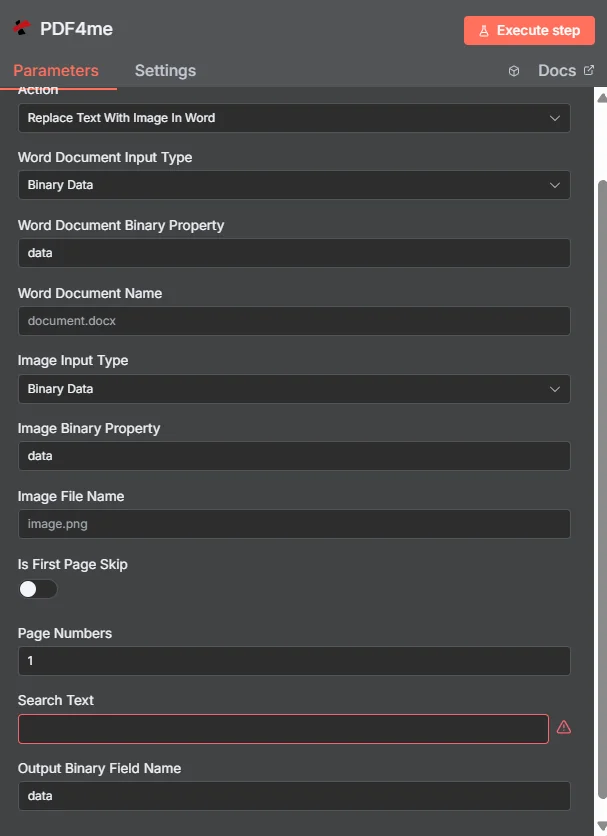
参数有哪些?
面板中的字段按以下顺序显示。 搜索文本 标记为必填项;其余项有默认值,或者取决于你选择的输入模式。
| 范围 | 类型 | 必需的 | 描述 | 例子 |
|---|---|---|---|---|
| Word Document Input Type | Options | Required | How the .docx reaches the node: Binary Data, Base64 String, or URL. The matching source field appears directly beneath it. | Binary Data |
| Word Document Binary Property | String | Conditional | Name of the binary property holding the Word file. Shown when the input type is Binary Data. | data |
| Base64 Word Document Content | String | Conditional | The .docx as a base64 string. Shown when the input type is Base64 String. | UEsDBBQABgAI... |
| Word Document URL | String | Conditional | A publicly reachable link to the .docx. Shown when the input type is URL. | https://example.com/contract.docx |
| Word Document Name | String | Optional | Filename used for the document being processed. Ships with a placeholder default. | document.docx |
| Image Input Type | Options | Required | How the image reaches the node. This is a separate dropdown from the Word document and is set independently. | Binary Data |
| Image Binary Property | String | Conditional | Name of the binary property holding the image. Shown when the image input type is Binary Data. | data |
| Base64 Image Content | String | Conditional | The image as a base64 string. Shown when the image input type is Base64 String. | iVBORw0KGgoAAAANS... |
| Image URL | String | Conditional | A publicly reachable link to the image. Shown when the image input type is URL. | https://example.com/logo.png |
| Image File Name | String | Optional | Filename of the image being inserted. Ships with a placeholder default. | image.png |
| Is First Page Skip | Toggle | Optional | Excludes page one from the search. Ships switched off. Useful when a cover page or letterhead must stay untouched. | off |
| Page Numbers | String | Optional | Pages to search. Accepts a single page, a comma list, or a hyphenated range. Ships with 1. | 1 |
| Search Text | String | Required | The exact marker string to find and replace. The node shows a validation warning while this is empty. | [LOGO_PLACEHOLDER] |
| Output Binary Field Name | String | Optional | Property name the resulting .docx is written to for the next node. Ships with data. | data |
:::注意 页码语法
该字段接受单个页码(3),逗号分隔的列表(1,4,7),一个带连字符的范围(2-6),或者两者的混合(1,3,5-8)。将其范围限定为 pages 这样一来,标记就真正包含在文档中了,因此即使长文档中其他地方出现零星匹配,也不会找到图像。
:::
该节点返回什么?
| 场地 | 类型 | 描述 | 例子 |
|---|---|---|---|
| success | Boolean | Whether the operation completed. Note that a run which found no matches still returns true. | true |
| message | String | Human-readable status text, used for error detail when something fails. | Text replaced with image successfully |
| fileName | String | Filename of the generated Word document. | document_with_images.docx |
| mimeType | String | MIME type of the output, always the .docx type. | application/vnd.openxmlformats-officedocument.wordprocessingml.document |
| fileSize | Number | Size of the generated document in bytes. | 125430 |
| docName | String | Document name reference, matching fileName. | document_with_images.docx |
| textReplacementCompleted | Boolean | Confirms the replacement pass ran to completion. | true |
| replacementsMade | Number | How many instances of the search text were substituted. This is the field to branch on. | 3 |
N8N 行动反应
- JSON
- Binary
[
  {
    "success": true,
    "message": "Text replaced with image successfully",
    "fileName": "document_with_images.docx",
    "mimeType": "application/vnd.openxmlformats-officedocument.wordprocessingml.document",
    "fileSize": 125430,
    "docName": "document_with_images.docx",
    "textReplacementCompleted": true,
    "replacementsMade": 3
  }
]
data
─────────────────────────────
File Name: document_with_images.docx
File Extension: docx
Mime Type: application/vnd.openxmlformats-officedocument.wordprocessingml.document
File Size: 122.5 KB
在后续节点中通过以下方式访问文件 $binary.data使用你在[此处应填写具体名称]中设置的任何名称 输出二进制字段名称。
典型配置
实用技巧
- 分支
replacementsMade, 不是success。 即使运行结果与任何内容都不匹配,仍然会报告。 success一个 IF 节点检查计数是否大于零,以便在文档到达客户之前捕获损坏的模板。 - 输入标记一次,然后复制它。 如果占位符的一部分被重新输入或重新设置样式 Word该程序会在内部将其拆分为单独的格式化运行,即使页面看起来没有变化,搜索也不再看到一个连续的字符串。
- 选择自然界不可能出现的标记。 带括号的大写字母标记,例如
[LOGO_PLACEHOLDER]不会像裸露的文本那样与主体内容发生冲突。 word 喜欢Logo能。 - 用于多幅图像的链式节点。 将每个节点的输出文档作为下一个节点的输入,以累积徽标、签名和 QR 代码都放在一个文件中。
- 请注意占位符自身的格式。 图片会落在文本所在的位置,因此,位于居中且间距较大的段落中的标记通常比位于句子中间的标记效果更好。
- 更喜欢 URL 静态艺术作品模式。 一个永远不会改变的公司标志不需要在每次执行时都以二进制数据的形式在工作流程中传递。
速查表
| 目标 | 环境 |
|---|---|
| 插入签名图片 | Search Text = 您的签名标记,图像通过二进制数据 |
| 封面页不要动。 | Is First Page Skip 在 |
| 仅搜索 pages 2至5 | Page Numbers = 2-5 |
| 使用托管徽标 | Image Input Type = URL, Image URL =链接 |
| 检测到匹配失败 | 查看 replacementsMade 等于 0 |
| 将结果反馈下去 | 读取名为“ Output Binary Field Name |
常见问题
为什么 Word 邮件合并处理图片有困难吗?
Word内置的邮件合并功能会替换文本。传统上,添加图片意味着…… INCLUDEPICTURE 嵌套字段 MERGEFIELD这要求图像位于稳定的文件路径中,并且通常需要手动刷新字段才能显示。此节点采用不同的方法:它将占位符视为普通文本。 .docx 并用实际图像替换它,因此合并后的文档中图片已经嵌入其中。
做 Word 文档和图像必须使用相同的输入方式吗?
不。 Word 文档输入类型 和 图像输入类型 是两个独立配置的下拉菜单。常见的模式是二进制数据。 .docx 来自前 n8n 节点,以及 URL 对于位于固定地址的徽标,可以避免每次运行时都获取相同的图像。
如果找不到搜索文本会发生什么?
操作完成并返回一个文档,但没有任何内容被替换。检查 replacementsMade 响应中:一个值为 0 这意味着标记从未匹配。常见原因是 Word 由于占位符在内部格式设置过程中被分割,当标记的一部分被重新输入或重新设置样式时,就会发生这种情况,因此即使在屏幕上看起来是正确的,它也不再作为一个连续的字符串存在。
一个运行命令可以替换多个不同的占位符吗?
一次执行处理一个 搜索文本 价值与一张图片相结合。一个需要徽标、签名和……的模板。 QR 代码处理方式是将三个这样的节点链接起来,每个节点将其输出文档作为下一个节点的输入,这样替换操作就会累积到一个文件中。
哪些字段是必填项?
搜索文本 这是节点唯一标记为必填的字段。 Word 文档名称, 图像文件名, 页码, 和 输出二进制字段名称 所有功能都带有可用的默认值,两个输入类型的下拉菜单都需要与你选择的模式相匹配的源字段。
如何防止封面页被更改?
打开 是否跳过第一页 此切换开关会关闭搜索功能。它会将第一页从搜索范围中排除,这在信头或标题页恰好包含与文档其他位置要定位的标记相同的文字时非常有用。
相关操作 n8n
在其他平台上执行相同任务
用例
文件品牌和视觉识别
将占位符替换为公司徽标或产品图片,以便工作流程生成的每个文档都具有一致的品牌形象,而无需任何人打开 Word。
签名和认证标志
在工作流程到达合同和审批表单时,将签名图像、印章或印章添加到其中,从而将签名步骤保留在自动化流程中。
每条记录生成的艺术作品
插入 QR codes条形码或图表是在同一工作流程中早期生成的,因此一批运输单据或个性化报告最终会单独绘制出来。
延伸阅读
- 微软:字段代码,包含图片字段 文件
INCLUDEPICTURE此操作取代了之前的做法。 - n8n处理文件和图像 解释了二进制文件如何在节点之间移动,这就是输入和输出属性名称所指的内容。