在 Word 中启用跟踪更改 n8n
此节点的功能
PDF4me - 在 Word 中启用跟踪更改功能 在任何位置激活版本跟踪标志 DOCX 文件位于您的 n8n 工作流程。启用跟踪后,审阅者所做的每一次插入、删除和格式更改都会被记录下来,并附上他们的姓名和时间戳——随时可以进行接受/拒绝审核。从之前的节点以二进制数据的形式提供文档。 Base64 字符串,或公共字符串 URL. 具备跟踪更改功能的 DOCX 立即返回以便路由至电子邮件, SharePoint,Google 云端硬盘,或下游审核工作流程。
相关博客文章
目前尚无关于此功能的博客文章——敬请期待。
在此期间,您可以浏览 PDF4me 博客,查看适用于各平台的教程和工作流程。
访问博客 →
验证您的身份 API 要求
每一个 PDF4me 节点 n8n 需要有效 证书创建或选择包含您的凭据 PDF4me API 密钥,以便节点能够安全地验证文档处理请求。
您不容错过的重要事实
仅有的 DOCX 支持格式,但不支持 DOC 或 RTF。
该节点处理现代的 Open XML Word 格式 (.docx)。如果您的源文档是较旧的 .doc 二进制格式或 RTF 格式,请将其转换为 .docx 格式。 DOCX 首先使用 Word 转换 PDF 在将其传递到这里之前,需要经过表单或其他转换步骤。
可安全地对已启用跟踪功能的文档运行。
如果文档已启用变更跟踪,则该节点会返回未更改的文档,并显示成功状态。这意味着您可以将“启用变更跟踪”作为任何审阅流程中的预防性第一步,而无需担心对已跟踪的文档进行重复处理或出错。
与 Get Tracking Changes 配合使用,以编程方式读取修订版本。
审阅者编辑文档后,“获取 Word 中的跟踪更改”节点会将记录的每次修订提取为结构化数据。 JSON - 审核人姓名、更改类型、原文和修订文本。这样,您无需手动打开文件,即可构建完整的审批流程,记录、比较或路由更改以供签字。
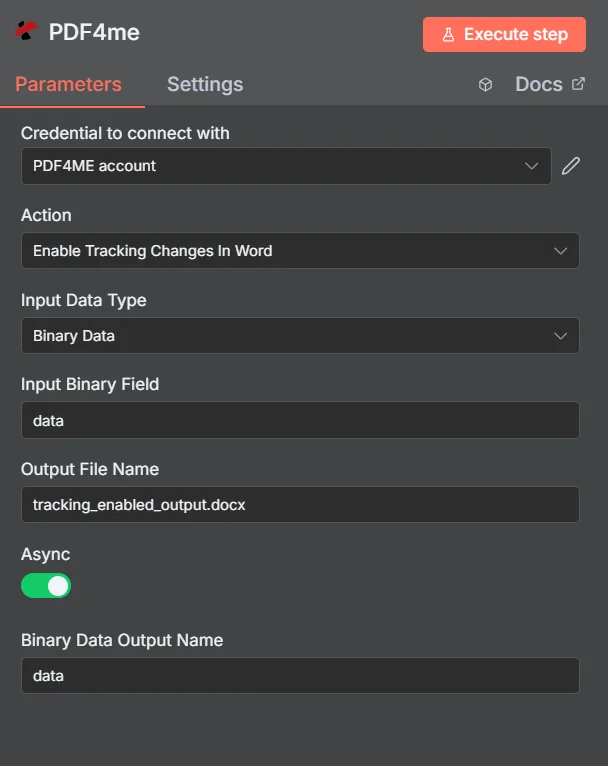
设置输入数据类型,映射 DOCX 从上一个节点,输入扩展名为 .docx 的输出文件名,然后运行工作流。
参数
必需的: 输入数据类型,与该类型匹配的文档字段(输入二进制字段, Base64 文档内容或文件 URL)、输出文件名和二进制数据输出名称。异步和自定义配置文件是可选的。
| 范围 | 必需的 | 它的作用 | 例子 |
|---|---|---|---|
| Input Data Type | Yes | Format of the source DOCX. Choose Binary Data to map from a prior node, Base64 String to supply encoded document data, or URL for a publicly accessible Word file. | Binary Data |
| Input Binary Field | Yes (Binary Data) | Property name of the binary DOCX from the prior node. Must match the binary output key of the upstream node. | data |
| Base64 Document Content | Yes (Base64) | Base64-encoded string of the DOCX to process. PDF4me decodes and activates tracking on the document. | UEsDBBQABgAI... |
| File URL | Yes (URL) | Publicly accessible URL to the source DOCX. PDF4me downloads and activates tracking on the document from this address. | https://example.com/contract.docx |
| Output File Name | Yes | Filename for the returned DOCX with tracking enabled, including .docx extension. | review_ready_contract.docx |
| Binary Data Output Name | Yes | Key name under which the output DOCX binary is stored in the n8n item. Downstream nodes reference this document by this name. | data |
| Async | No | When true, the operation runs asynchronously for large documents and returns immediately. Use for batch processing pipelines with large files. | false |
| Custom Profiles | No | Advanced configuration JSON string for additional processing options such as outputDataFormat or preserveMetadata. | {"preserveMetadata": true} |
快速设置
- 添加一个 PDF4me 节点到你的 n8n 工作流程和选择 在 Word 中启用跟踪更改功能。
- 选择或创建 证书 你的 PDF4me API 钥匙。
- 放 输入数据类型 并绘制地图 DOCX 来自匹配的源字段。
- 进入 输出文件名 和
.docx扩大。 - 点击 执行节点返回 DOCX 已启用跟踪更改 - 将其路由到电子邮件、存储或审核步骤。
工作流程示例
工作流程示例Common n8n workflow patterns using Enable Tracking Changes In Word.
向审阅者发送已预先启用跟踪功能的合同。
- 当合同记录被移至“准备进行法律审核”状态时,Airtable 会触发。
- Google 云端硬盘下载了合同草案。 DOCX。
- 在 Word 中启用“跟踪更改”功能,即可激活文档的修订跟踪功能。
- Gmail 发送已准备好跟踪更改的邮件 DOCX 提交给法务团队。他们所做的每一次修改都会被记录下来,并附上他们的姓名和时间戳。
自动化政策文件审核流程
- SharePoint 当新的政策文件上传到“政策草案”库时,会触发监视。
- 在 Word 中启用跟踪更改功能,即可激活修订跟踪功能,作为预防性的第一步。
- 已准备好的轨道文件将通过电子邮件发送给部门主管进行审核。
- 当审核后的文件返回时,“在 Word 中跟踪更改”功能会将所有修订提取到 Google 表格中,作为合规性日志。
对所有模板文档启用批量跟踪
- 一个定时触发器每周运行一次,并列出所有内容 DOCX Google 云端硬盘“模板”文件夹中的文件。
- “分批拆分”节点会分别处理每个模板。
- 在 Word 中启用跟踪更改功能,可确保每个模板都启用修订跟踪。
- Google 云端硬盘会将每个文件替换为启用跟踪功能的版本。Slack 消息会报告有多少个模板已更新。
常见问题解答
相关节点
在 Word 中启用跟踪更改功能
提取所有已记录的修订版本(结构化格式)。 JSON 在审阅者编辑完文档之后——这是审阅流程中的自然下一步。
在 Word 中禁用跟踪更改
所有更改都经过审核和接受后,关闭修订记录以生成最终的干净文档。
比较 Word 文档
生成两个红线对比图 DOCX 当您需要找出草稿和最终稿之间的差异,而无需手动跟踪编辑时,可以使用版本控制功能。