填写 PDF 以 n8n
此节点的功能
PDF4me填写 PDF 形式 需要一个可填写的 PDF (AcroForm) 并用您的数据填充其字段 n8n 步骤一:提供模板 Binary Data, Base64, 或者 URL 以及字段值作为 JSON 目的 (JSON 字符串、二进制或 Base64)或作为 字段名称/字段值行返回已完成的 PDF可以是扁平化格式(默认)或保留可编辑字段格式。非常适合填写申请表、合同、收据表格或任何其他表格。 AcroForm 模板来自 CRM、webhook 或电子表格数据。
验证您的身份 API 要求
每一个 PDF4me 节点 n8n 需要有效 用于连接的凭证创建或选择一个可以容纳您的 PDF4me API 关键在于确保工作流程能够安全地验证表单填写请求。
您不容错过的重要事实
名 而不是 名运行“从表单提取数据” PDF 首先在模板上查看,或者使用 Adobe Acrobat Prepare Form 查看以获取准确的列表。{"firstname":"John","lastname":"Doe"}包含单个对象的数组会被解包;包含多个对象的数组会被拒绝。要填充多个对象,需要进行以下操作。 PDF如果一次运行中出现 s,请将此节点包装在“循环遍历项目”中。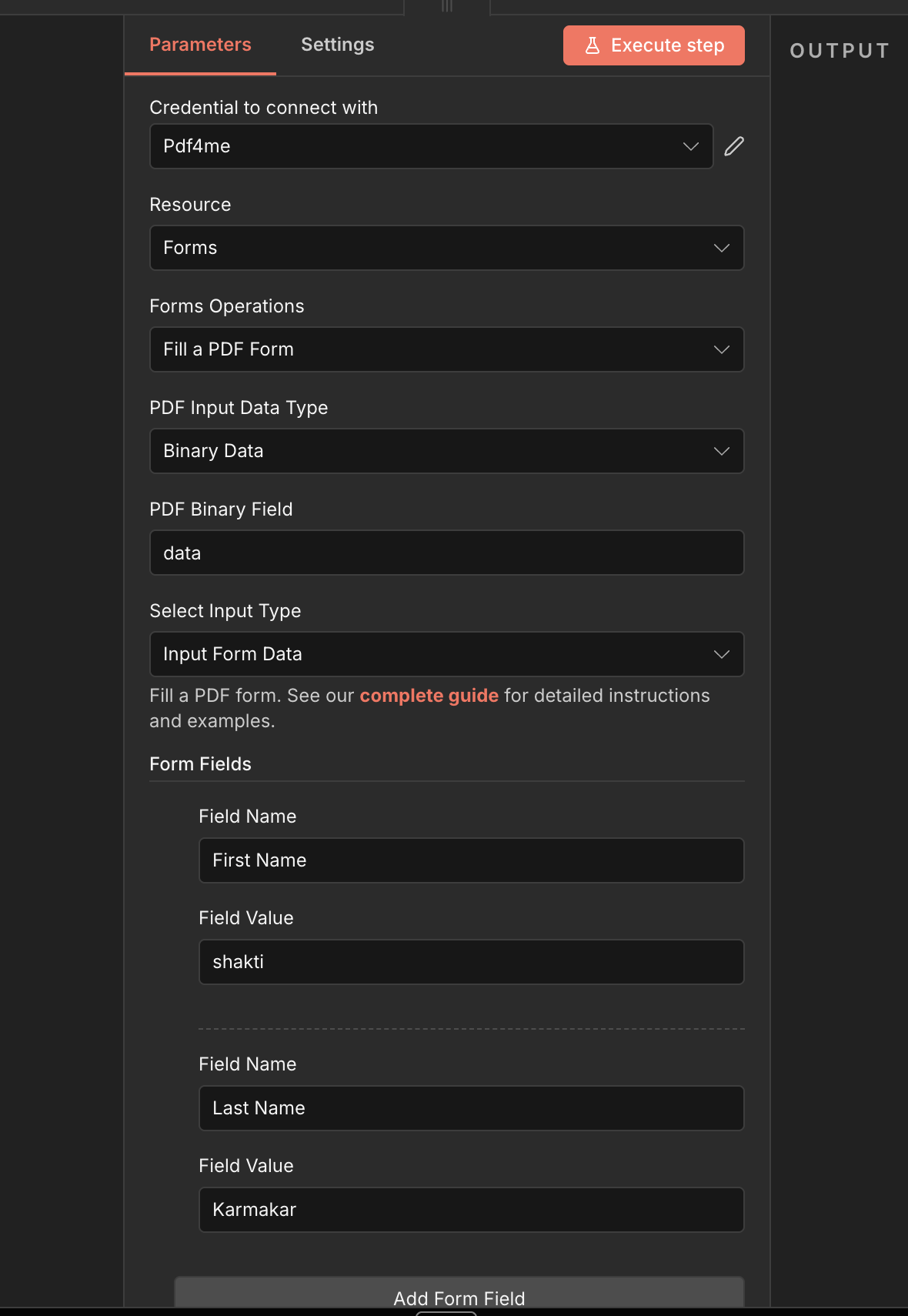
完整节点面板: PDF 通过模板 Binary Data + 输入表单数据字段行
参数
必需 n8n UI: 用于连接的凭证 PDF 输入数据类型、选择输入类型,以及(取决于选择输入类型)表单数据输入类型及其匹配的内容字段,或者至少一行包含字段名称和字段值的表单字段。输出文件名(默认值) 已填写的表单输出.pdf), 保持 PDF 可编辑(关闭)和 Binary Data 输出名称(默认值) 数据)是可选的。条件模板字段(PDF 二元字段, PDF Base64 内容, PDF URL)仅在选择其输入类型时才会出现。
| 范围 | 必需的 | 它的作用 | 例子 |
|---|---|---|---|
| PDF Input Data Type | Yes | How the PDF template enters the node. Binary Data reads from a previous node (default, most common). Base64 String accepts an encoded PDF. URL downloads the PDF from a public link. | Binary Data |
| PDF Binary Field | Conditional | Name of the binary property on the incoming n8n item that holds the PDF. Required when PDF Input Data Type is Binary Data. Defaults to data. | data |
| PDF Base64 Content | Conditional | Base64-encoded PDF content. Required when PDF Input Data Type is Base64 String. Data-URL prefixes (data:application/pdf;base64,) are stripped automatically. | JVBERi0xLjQK... |
| PDF URL | Conditional | Publicly reachable HTTPS URL to the PDF template. Required when PDF Input Data Type is URL. Must be a valid full URL format. | https://example.com/application-form.pdf |
| Select Input Type | Yes | How the field values are supplied. JSON sends a stringified JSON object via dataArray. Input Form Data adds one UI row per field with Field Name and Field Value. | JSON |
| Form Data Input Type | Conditional | How the JSON object is supplied. Required when Select Input Type is JSON. JSON String pastes the object directly (default). Binary Data reads a JSON file from a previous node. Base64 String accepts an encoded JSON object. | JSON String |
| Form Data (JSON) | Conditional | Raw JSON object whose keys are PDF field names and values are what to fill. Required when Form Data Input Type is JSON String. Must be a single object, not a list. | {"firstname":"John","lastname":"Doe","email":"[email protected]"} |
| Form Data Binary Field | Conditional | Name of the binary property on the incoming n8n item that holds the JSON data file. Required when Form Data Input Type is Binary Data. Defaults to data. | data |
| Form Data Base64 Content | Conditional | Base64-encoded UTF-8 JSON object. Required when Form Data Input Type is Base64 String. Decoded then stringified into dataArray. | eyJmaXJzdG5hbWUiOiJKb2huIn0= |
| Form Fields | Conditional | Collection of field rows. Required when Select Input Type is Input Form Data. Add at least one row via Add Form Field. The node errors if the list is empty. | [{Field Name: firstname, Field Value: John}] |
| Field Name (per row) | Conditional | Exact AcroForm field name to fill. Required for every row added to Form Fields. | firstname |
| Field Value (per row) | Conditional | Value to fill into the matching AcroForm field. Required for every row added to Form Fields. | John |
| Output File Name | No | Filename of the filled PDF returned by the node. Default is filled_form_output.pdf. Include the .pdf extension. | filled_form_output.pdf |
| Keep PDF Editable | No | Toggle to keep AcroForm fields editable on the filled PDF. Off (default) flattens the form into static text. On preserves field definitions so the recipient can re-edit. | Off |
| Binary Data Output Name | No | Name of the binary property the output item exposes. Default is data. Use a different name when a downstream node expects it. | data |
PDF 输入数据类型选项
选择如何 PDF 模板进入节点。后续字段会根据此选择而改变。
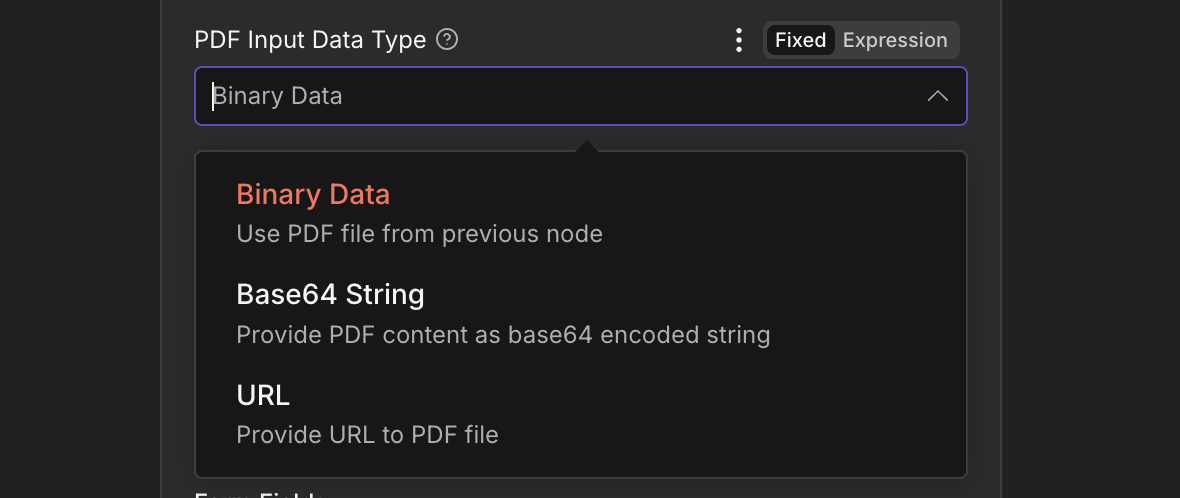
PDF 输入数据类型: Binary Data, Base64 字符串,或 URL
二进制数据默认: PDF 来自前一个节点PDF二进制字段 二进制字段名称(默认值) 数据)。Base64字符串PDF 作为 base64 字符串PDF Base64 内容。 数据-URL 样式前缀(data:application/pdf;base64,)会被自动剥离。URL从公共链接下载PDF URL。 PDF4me 直接获取模板。 URL 必须有效且无需身份验证即可访问。选择输入类型选项
选择字段值的提供方式。后续字段会根据此选择而变化。
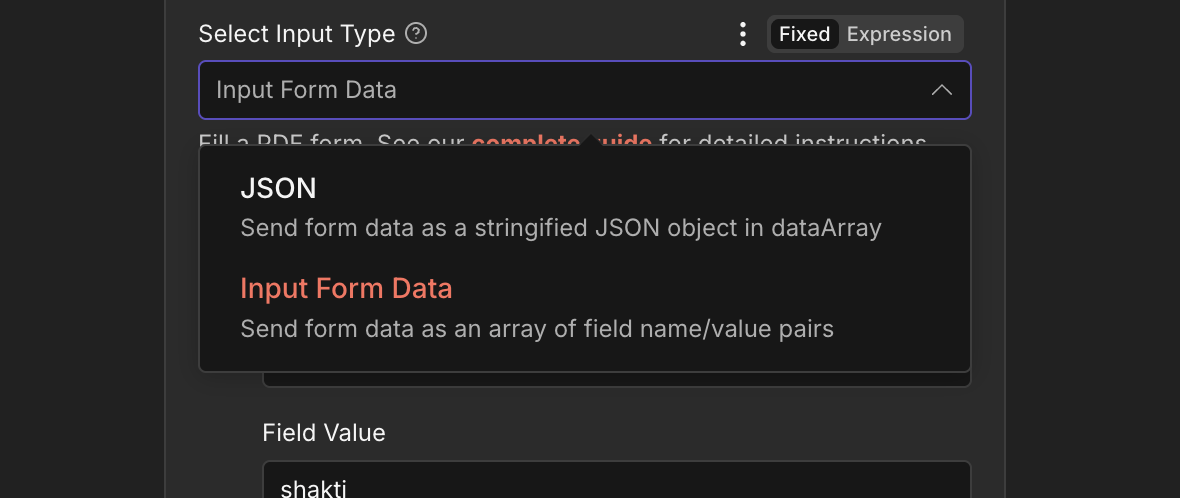
选择输入类型: JSON (对于数据数组)或输入表单数据(UI 行)
JSON最适合多字段和动态数据数据数组 字段。键是 PDF 字段名称和值是需要填写的内容。添加后续表单数据输入类型选项(JSON 细绳, Binary Data, 或者 Base64 字符串)来提供对象。输入表单数据最适合配置中的小型固定集。 UI字段名称 (精确的 AcroForm 姓名)和 字段值如果列表为空,则该节点会报错。表单数据输入类型选项(当选择输入类型时) JSON)

表单数据输入类型: JSON 细绳, Binary Data, 或者 Base64 细绳
JSON 字符串默认值:粘贴或映射 JSON 排队表单数据(JSON) 或者从之前的节点表达式映射它。最常见的选择是 CRM-驱动或webhook驱动的工作流。二进制数据JSON 来自先前节点的文件表单数据二进制字段 二进制字段名称(默认值) 数据)。当……时使用 JSON 以下载文件的形式到达。该文件必须包含单个对象。Base64字符串Base64编码 JSON 目的表单数据 Base64 内容该节点将其解码并字符串化。 数据数组。表单数据(JSON)示例
什么时候 Form Data Input Type 是 JSON 字符串,粘贴一个键值完全匹配的单个对象。 AcroForm 字段名称。
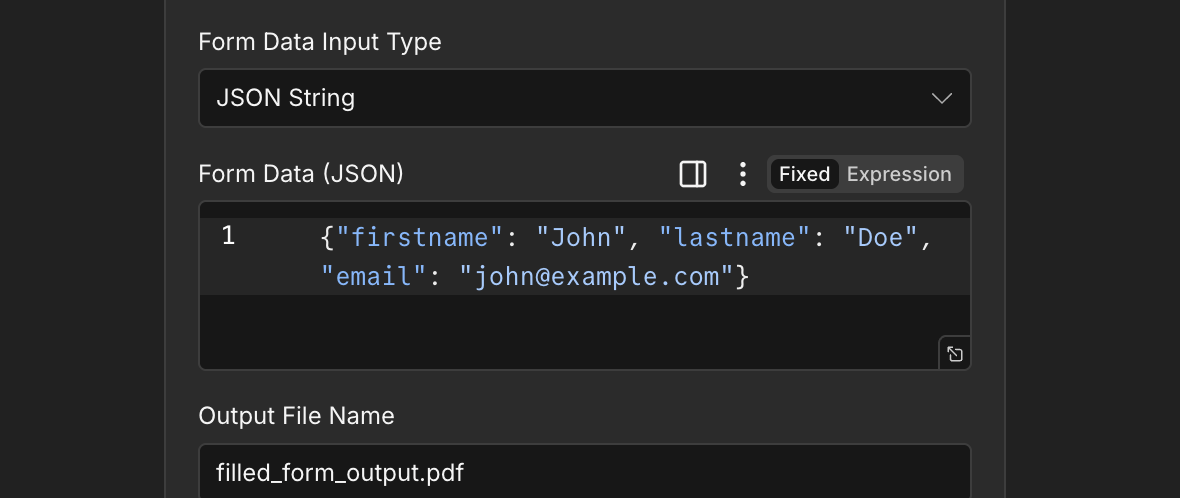
JSON 字符串输入:一个对象,键匹配 AcroForm 字段名称完全一致
{
"firstname": "John",
"lastname": "Doe",
}
输出字段
一次成功的运行返回一个 n8n 携带物品 JSON 元数据和已填写的内容 PDF。
| 场地 | 类型 | 它包含什么 |
|---|---|---|
success | Boolean | True when the PDF was filled successfully. Use to route error-handling branches. |
message | String | Human-readable status confirming success or describing an error. |
fileName | String | Filename of the filled PDF, set from Output File Name (default filled_form_output.pdf). |
mimeType | String | MIME type of the filled file, application/pdf. |
fileSize | Number | Size of the filled PDF in bytes. |
inputMode | String | Which input mode was used: json or inputFormData. |
fieldCount | Number | How many form fields were sent in this request. |
Binary (data) | Binary | The filled PDF under Binary Data Output Name (default data). Pass into Write Binary File, Email, or any cloud-storage upload. |
快速设置
- 添加 PDF4me 致你 n8n 工作流程。设置 资源 到 表格 和 表单操作 到 填写 PDF 形式。
- 在 用于连接的凭证请选择您的 PDF4me 凭证或点击 创建新凭证 并粘贴你的 API 钥匙。
- 放 PDF 输入数据类型 到 Binary Data (默认), Base64 细绳, 或者 URL 并填写匹配字段(
PDF二进制字段,PDF Base64 内容, 或者PDF URL)。 - 放 选择输入类型 到 JSON (然后选择) 表单数据输入类型 = JSON 细绳 / Binary Data / Base64 字符串并提供对象)或 输入表单数据 (点击 添加表单字段 每个字段添加一行 字段名称 和 字段值)。
- 确保每 字段名称 匹配 AcroForm 模板中的字段名称必须完全一致(区分大小写)。使用“从表单提取数据”功能。 PDF 如果您不确定,请先咨询。
- (可选)更改 输出文件名 从默认值
filled_form_output.pdf。 - 切换 保持 PDF 可编辑 仅当收件人需要能够重新编辑已填写的字段时才启用。默认情况下禁用此功能会将表单展平。
- 离开 Binary Data 输出名称 作为
data除非下游节点需要不同的属性名称。执行该节点并路由已填充的数据。 PDF 写入二进制文件、电子邮件或云存储。
典型配置
工作流程示例Common n8n workflow patterns using Fill a PDF Form.
- Google 云端硬盘下载节点会拉取申请表。 PDF 模板 (Binary Data, 财产
数据)。 - PDF4me 填写 PDF 形式运行与 PDF 输入数据类型 Binary Data选择输入类型 JSON表单数据输入类型 JSON 细绳。
表单数据(JSON)是一个单独的内联对象。 - “写入二进制文件”节点保存已填充的文件。 PDF 使用
$json.fileName。
- webhook 从网站接收表单提交的有效负载。
- PDF4me 填写 PDF 表单配置了选择输入类型 JSON表单数据输入类型 JSON 细绳。
表单数据(JSON)是一个 n8n 将 webhook 有效负载直接映射到 AcroForm 场形状({{ { firstname: $json.first, lastname: $json.last } })。 - Gmail 节点会将填好的邮件发送给用户。 PDF 以附件形式返回给提交者。
- 一份入院表格只有三个部分 AcroForm 字段:
名,姓,电子邮件。 - PDF4me 填写 PDF 表单已设置为“选择输入类型”和“输入表单数据”。通过以下方式添加了三行数据: 添加表单字段 使用确切的字段名称和键入或表达式映射的值。
- 保持 PDF 已关闭编辑功能,因此填写后的表单将被扁平化。
- 这 PDF 已上传至 SharePoint 文档库。
- 一个节点下载 PDF 模板;另一个节点下载该模板 JSON 数据文件。合并节点将它们合并成一个项目。
- PDF4me 填写 PDF 表单已配置 PDF 输入数据类型 Binary Data (
PDF二进制字段设置为 PDF 字段名称)和选择输入类型 JSON表单数据输入类型 Binary Data (表单数据二进制字段设置为 JSON 字段名称)。 - 已填满 PDF 订单已保存 ID 作为文件名。
- A CRM 更新操作会在创建新客户时触发工作流。
- PDF4me 填写 PDF 表单预先填写了客户已知的注册表单字段(
姓名,电子邮件,账户 ID使用选择输入类型 JSON。 - 保持 PDF 可编辑 已启用,以便客户可以填写剩余的可选字段。
- 一个 Outlook 节点通过电子邮件发送预先填写的可编辑内容。 PDF 并附有截止日期提醒。
实用技巧
速查表
| 场地 | 价值 |
|---|---|
| Resource | Forms |
| Operation | Fill a PDF Form |
| PDF Input Data Type | Binary Data |
| PDF Binary Field | data |
| Select Input Type | JSON |
| Form Data Input Type | JSON String |
| Form Data (JSON) | {"firstname":"John","lastname":"Doe","email":"[email protected]"} |
| Output File Name | filled_form_output.pdf |
| Keep PDF Editable | Off |
| Binary Data Output Name | data |
| Credentials | PDF4me API credential |
常见问题解答
相关操作
在其他平台上执行相同任务
POST /api/v2/FillPdfForm 用于自定义后端代码或 Postman 测试的端点。