在文本中查找和替换文本 PDF 和 n8n
此节点的功能
PDF4me 查找和替换文本 搜索 PDF 针对文本模式,在您的文本中,将所有匹配项替换为新内容。 n8n 无需手动编辑 Adobe Acrobat,即可完成工作流程。可针对整个文档或特定页面范围进行替换,保留字体、颜色、大小和周围布局,并可串联多个替换项以实现复合替换。非常适合用于…… 收购后批量更改供应商名称、更新产品目录品牌形象、纠正拼写错误、更新报价单价格、术语标准化以及基于模板的文档个性化。
相关博客文章
目前尚无关于此功能的博客文章——敬请期待。
在此期间,您可以浏览 PDF4me 博客,查看适用于各平台的教程和工作流程。
访问博客 →
验证您的身份 API 要求
每一个 PDF4me 节点 n8n 需要有效 用于连接的凭证创建或选择一个可以容纳您的 PDF4me API 关键在于确保工作流程能够安全地验证文本替换请求。
您不容错过的重要事实
保留字体、颜色和布局。
所有旧文本都会在原位置进行替换,并保留原始字体、颜色和大小。与此不同的是,周围的文本、图像、页码和文档结构均保持不变。 PDF-to-Word-to-PDF 往返操作通常会改变布局并破坏格式。
页面范围定位,仅更新需要更改的内容
页面顺序支持
全部单页(1、2、3),范围(1-5,10-15),以及混合(1,2,3-7,10仅更新封面页、签名页或特定章节,而不修改文档的其余部分。大型文档的异步处理
对于大型或高容量场景,启用异步选项,操作将在后台运行,以提高工作流吞吐量。建议在处理数十或数百个数据的企业级场景中使用。 PDF每次运行 s。
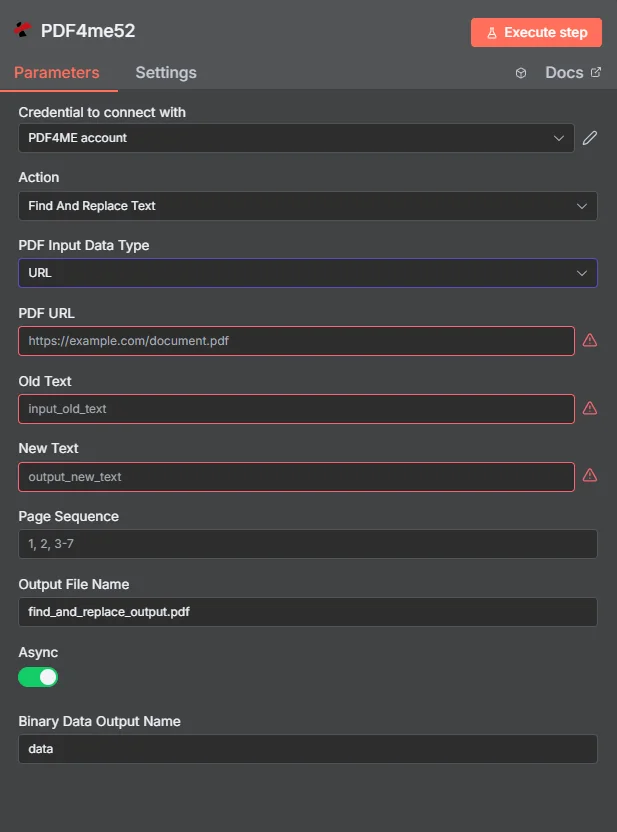
绘制地图 PDF 二进制,输入旧文本和新文本,设置页面顺序,然后执行,修改后的内容 PDF 返回结果位于一个节点中。
参数
必需的: 用于连接的凭证 PDF 必须提供输入数据类型、旧文本、新文本、页面顺序、输出文件名和二进制数据输出名称。匹配的输入字段(输入二进制字段, Base64 PDF 内容,或 PDF URL根据所选内容,需要进行以下操作: PDF 输入数据类型。
| 范围 | 必需的 | 它的作用 | 例子 |
|---|---|---|---|
| PDF Input Data Type | Yes | How the source PDF is supplied. Binary Data reads from a previous n8n node (most common). Base64 String accepts encoded payload. URL downloads from a public link. | Binary Data |
| Input Binary Field | Conditional | Binary field holding the PDF content from the previous node. Required when PDF Input Data Type is Binary Data. | {{ $binary.data }} |
| Base64 PDF Content | Conditional | Base64-encoded PDF content. Required when PDF Input Data Type is Base64 String. | JVBERi0xLjQK... |
| PDF URL | Conditional | Public URL to the source PDF. Required when PDF Input Data Type is URL. Must not require authentication. | https://example.com/contract.pdf |
| Old Text | Yes | Exact text pattern to find in the PDF. Case-sensitive by default. Each occurrence within the Page Sequence will be replaced. | Old Vendor Inc. |
| New Text | Yes | Replacement text. Inserted in place of every Old Text occurrence with preserved font, color, and size. | New Vendor LLC |
| Page Sequence | Yes | Pages to process. Use "all" for entire document, comma-separated pages "1,2,3", ranges "1-5,10-15", or mixed "1,2,3-7,10". Default "all". | 1,2,3 |
| Output File Name | Yes | Filename for the modified PDF. Must include the .pdf extension. | find_and_replace_output.pdf |
| Binary Data Output Name | Yes | Name of the binary field in the n8n output holding the modified PDF. Used in subsequent workflow nodes. | data |
| Async | No | Enable asynchronous processing. true runs the operation in background for higher throughput; recommended for large PDFs and high-volume scenarios. Default behavior varies by deployment. | true |
高级选项
自定义配置文件JSON- 高级替换行为的格式选项,设置区分大小写、仅匹配整个单词或其他自定义规则。
页面顺序模式
全部完整文档默认值。替换所有页面中出现的所有相关内容,用于全球品牌更新或术语标准化。
1、2、3特定页面以逗号分隔。仅更新特定页面,适用于封面页、签名页或已知位置。
1-5,10-15页面范围使用连字符分隔的区域。更新特定章节或段落,同时保持文档其余部分不变。
1,2,3-7,10混合页面 + 范围合并单个页面和范围。为多章节合同或技术手册等复杂文档提供最大的灵活性。
输出字段
| 场地 | 类型 | 它包含什么 |
|---|---|---|
success | Boolean | True when text replacement completed successfully; false on error. |
message | String | Human-readable status message confirming success or describing the error. |
fileName | String | Filename of the modified PDF (e.g. find_and_replace_output.pdf). |
mimeType | String | MIME type of the output: always application/pdf. |
fileSize | Number | Size of the modified PDF in bytes. |
oldText | String | Echo of the Old Text searched for, for audit and verification. |
newText | String | Echo of the New Text replacement applied, for audit and verification. |
pageSequence | String | Echo of the page range processed (e.g. "all pages", "1,2,3"). |
快速设置
- 添加 PDF4me 致你 n8n 工作流程和选择 查找和替换文本 作为行动。
- 在 用于连接的凭证请选择您的 PDF4me 或使用您的凭证创建一个凭证 API 钥匙。
- 放 PDF 输入数据类型 到 二进制数据 和地图 输入二进制字段 到前一个节点(Dropbox、Google Drive、HTTP 请求等)的二进制输出。
- 进入 旧文本:要在文本中查找的确切文本模式 PDF (例如。
Old Vendor Inc.)。 - 进入 新文本:替换文本(例如:
New Vendor LLC)。 - 放 页面顺序: 使用
all用于全局替换,或特定页面/范围,例如1,2,3或者1-5,10-15。 - 放 输出文件名 重命名为您想要的文件名(使用
.pdf扩展)和 二进制数据输出名称 到data。 - (可选) 异步 适用于大型文档或高容量处理。
- 执行。输出包包含修改后的内容。 PDF 所有替换均已应用,可上传、通过电子邮件发送或进行进一步处理。
工作流程示例
工作流程示例Common n8n workflow patterns using Find and Replace Text.
收购后批量更改供应商名称 → 更新所有合同
- 收购完成后,法务团队需要更新所有有效合同。 PDF 为了反映新的实体名称。
- A SharePoint Watch Files 会触发 active-contracts 文件夹中每个合约的事件。
- PDF4me 查找和替换文本功能会将所有页面(页面顺序 = 全部)上的旧公司名称替换为新实体名称。字体和布局将保持不变。
- 另一个查找和替换文本节点将同一文档中的注册地址从旧总部更新为新总部。
- 更新后的合同已保存。 SharePoint 采用版本控制文件名。Slack 通知会向法务部门确认更新。数百份合同只需几分钟即可更新,而手动编辑 Acrobat 文件则需要数周时间。
报价单 PDF 个性化 → 替换客户占位符
- 来自以下平台的 webhook CRM 当销售部门生成新报价时触发 PDF 使用模板。
- PDF4me 查找和替换文本功能按顺序运行 4 次(链式节点),每次替换一个占位符:
{{CUSTOMER_NAME}},{{TOTAL_PRICE}},{{VALID_UNTIL}},{{ACCOUNT_MANAGER}}。 - 个性化报价将通过 Gmail 发送给客户,邮件主题和附件均为动态格式。
- A Salesforce 更新记录步骤会附加最终报价 PDF 抓住这个机会。
- Airtable 日志记录客户、报价单 ID、总价值和发送时间戳,用于销售报告。
年度价格更新 → 仅更新产品目录封面页
- 每年 1 月 1 日,系统会触发计划触发器,以更新产品目录和价格。
- Google 云端硬盘列表步骤会检索所有目录 PDF 在目录文件夹中。
- 循环遍历项目会处理每个项目。 PDF。 PDF4me 查找和替换文本将“价格有效期至 2024 年”更新为“价格有效期至 2025 年”,并将页面顺序设置为
1,2(仅封面和摘要页,正文内容不变)。 - 第二个“查找和替换文本”节点会更新页面序列上的版权年份页脚。
all。 - 更新后的产品目录会重新上传到同一 Google 云端硬盘位置,覆盖旧版本。市场部会收到一份 Slack 汇总邮件,其中列出了所有已更新的产品目录。
常见问题解答
相关操作
转变 PDF 可编辑 PDF 使用 OCR
为扫描件添加可搜索文本图层 PDF在对拍摄或扫描的源文档执行查找和替换操作之前,需要进行一些设置。
添加文字图章 PDF
添加“草稿”、“机密”或版本标记等叠加文本注释,并结合查找和替换功能,实现完整的文档控制工作流程。
添加 HTML 页眉页脚 PDF
添加或替换自定义页眉和页脚 HTML当您需要对文档结构进行更新(而不仅仅是行内文本)时,它是查找和替换功能的补充。