解析文档 n8n
此节点的功能
PDF4me 解析文档 使用您保存的解析模板对 PDF 在 n8n 工作流并将提取的字段作为结构化数据返回。向其提供来自先前节点的二进制数据。 Base64 字符串,或公共字符串 URL引用模板 解析 ID并将结果通过管道传输。 JSON, XML, 或者 CSV 直接进入 Set、IF、HTTP 请求或任何下游 n8n 节点。模板包含提取逻辑,因此同一个节点可以提取发票、合同、收据以及您配置的任何自定义布局。
相关博客文章(1)
运行此节点之前: 在解析模板中创建解析模板 PDF4me 仪表板。定义您的捕获密钥并选择 正则表达式 对于稳定模式或 JavaScript 表达 用于条件逻辑。 n8n 节点引用该模板 解析 ID。 看 准备文档解析信息 完整设置请参见正则表达式示例(INV-\d{6,10}, \d{2}/\d{2}/\d{4}),以及两个工作单位 JavaScript 表达式分类器样本。
验证您的身份 API 要求
这 PDF4me 节点 n8n 需要 PDF4me API 证书只需创建一次凭据即可。 n8n 你的 API 从仪表板获取密钥,然后从每个地方引用它。 PDF4me 工作流程中的节点。
您不容错过的重要事实
解析 ID 为必填项(即您的 TemplateId)。
解析 ID 是仪表板在模板上保存更改时分配的 GUID。从模板详细信息面板复制它,然后将其粘贴到 n8n 节点。如果没有它,节点就没有要提取哪些字段的映射。
用于稳定模式的正则表达式 JavaScript 用于条件逻辑
捕获键存储在模板中。发票编号、日期、金额、税号(约占生产键的 80%)使用正则表达式。 JavaScript 用……表达
文本 用于分类和回退规则的变量。输出是结构化数据,而不是二进制数据。 PDF
与返回原始数据的压缩、保护或转换节点不同。 PDF 字节,解析文档返回 JSON (默认), XML, 或者 CSV 在指定的二进制字段中。将其连接到 Set 或 IF 节点,以便将值路由到下游。
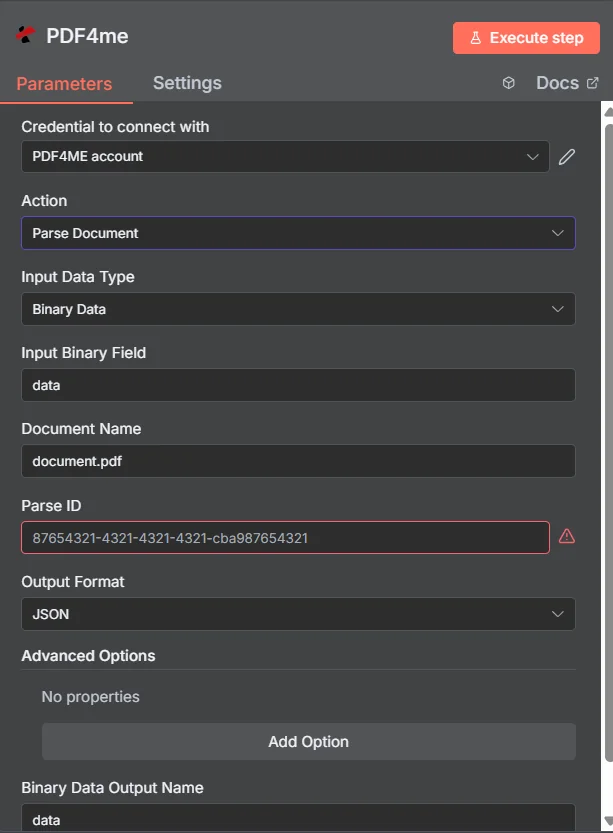
参数
| 范围 | 必需的 | 它的作用 | 例子 |
|---|---|---|---|
| Input Data Type | Yes | How the PDF reaches the node. Binary Data (from a prior node), Base64 String (inline encoded), or URL (public file URL). | Binary Data |
| Input Binary Field | Conditional | Name of the binary field on the input item containing the PDF. Required when Input Data Type is Binary Data. | data |
| Base64 PDF Content | Conditional | Base64 encoded PDF content. Required when Input Data Type is Base64 String. No data: prefix. | JVBERi0xLjQK... |
| PDF URL | Conditional | Publicly reachable URL of the PDF. Required when Input Data Type is URL. The PDF4me service downloads and processes it. | https://example.com/invoice.pdf |
| Document Name | Yes | Source filename including .pdf extension. Used for format detection and error tracing. | invoice.pdf |
| Parse ID | Yes | TemplateId GUID from the PDF4me dashboard. Identifies the parse template (capture keys + extraction rules) to apply. | 12345678-1234-1234-1234-123456789abc |
| Output Format | Yes | Shape of the returned data. JSON (default, structured object), XML (hierarchical), or CSV (flat tabular). JSON is the right choice for almost every n8n workflow. | JSON |
| Output Binary Field Name | Yes | Name of the binary field the node attaches the parsed output to on the output item. Reference it from downstream nodes. | data |
| Custom Profiles | No | Advanced JSON-style overrides for parsing behaviour (output sub-format, include metadata flag, etc). Leave empty for default behaviour. | { "outputDataFormat": "json", "includeMetadata": true } |
解析模板中的表达式类型
捕获规则存在于模板中,而不是在……中。 n8n 节点。两种表达式类型都随每个节点一起提供。 PDF4me 帐户。
正则表达式稳定模式发票号码(
INV-\d{6,10}),日期(\d{2}/\d{2}/\d{4}),金额($?\d{1,3}(?:,\d{3})*(?:.\d{2})?约占生产密钥的 80%。JavaScript 表达式条件逻辑和分类器捕获区域文本以如下方式传递:
文本返回一个字符串。支持多标记分类、回退规则和日期规范化。参见 准备文档解析信息 提供两个工作样品。输出
| 场地 | 类型 | 它包含什么 |
|---|---|---|
fileName | String | Generated output filename with timestamp and extension matching Output Format (.json / .xml / .csv). |
mimeType | String | MIME type of the output (application/json, application/xml, text/csv). |
fileSize | Number | Size of the parsed output in bytes. |
success | Boolean | true on a successful parse, false otherwise. Wire into an IF node for branching. |
message | String | Status message. Document parsed successfully on the happy path, or a descriptive error. |
docName | String | Original input filename, preserved for audit trails. |
解析后的键/值数据本身存储在您指定的二进制字段中。 输出二进制字段名称。
工作流程示例
常见的 n8n 工作流程模式Typical ways to chain Parse Document into an n8n workflow.
通过电子邮件发送到 Postgres。
- Gmail 触发器会在新发票标记为 vendor-invoice 时触发。
- 筛选器仅通过以 .pdf 结尾的附件。
- 解析文档会针对二进制附件运行发票模板。
- 已解析集合节点映射 invoiceNumber, totalAmount, invoiceDate。
- Postgres Insert 语句会将一行写入 accounts_payable 表中。
在一个工作流程中完成分类和提取
- Webhook 收到一个 PDF 来自合作伙伴的上传门户。
- 解析文档会运行一个带有模板的程序 JavaScript 返回文档类型的表达式键。
- 根据返回的类型(发票/订单/收据)切换节点路由到特定类型的下游分支。
- 每个分支都会将解析后的字段发布到正确的目标系统。
将 S3 中的数据批量解析到 Airtable
- 定时触发器每 15 分钟触发一次。
- S3 List + Get Object 加载每个新对象 PDF 在入库桶中。
- 解析文档会针对每个二进制项运行模板。
- Airtable 创建记录会将解析后的字段写入跟踪数据库。
常见问题解答
相关行动
准备文档解析信息
模板设置详解,包含正则表达式示例和两个可运行的示例。 JavaScript 表达式分类器样本。
设置文档分类
仅针对类别输出的配套指南。在“解析文档”之前用作预路由。
解析文档 REST API
通过原始 REST 端点调用同一引擎。用于从外部自定义代码调用时。 n8n。
在其他平台上执行相同的任务
解析文档 Make
将“解析文档”模块拖入 Make 场景:相同的模板 ID,相同的提取字段。
解析文档 Zapier
可从 6000 多个触发器中任选一个触发 Zapier 应用程序和路由解析字段到电子表格或数据库中。
解析文档 Power Automate
Microsoft 365 与……流动 SharePoint, Outlook团队和 Dynamics 集成。