从 Word 中提取文本 n8n
从 Word 中提取文本 是一个 n8n 节点 PDF4me 它能从 .docx 文件中提取干净的文本内容,并提供去除注释、页眉、页脚以及在提取前最终确定修订痕迹等选项。可用于内容迁移、文本挖掘,或将文档文本直接导入下游分析,无需手动复制粘贴。
此节点的功能
PDF4me从 Word 中提取文本 读取 .docx 文件并返回其文本内容,可选择限制在指定页面范围内,并清除注释、页眉/页脚或未解析的跟踪更改。接受二进制数据输入。 Base64 字符串,或 URL非常适合用于内容迁移、编辑清理、搜索索引以及将文档文本输入文本挖掘或分析管道。
相关博客文章
目前尚无关于此功能的博客文章——敬请期待。
在此期间,您可以浏览 PDF4me 博客,查看适用于各平台的教程和工作流程。
访问博客 →
验证您的身份 API 要求
每一个 PDF4me 节点 n8n 需要有效 用于连接的凭证创建或选择一个可以容纳您的 PDF4me API 关键在于确保工作流程能够安全地验证提取请求。
您不容错过的重要事实
只有 2 个字段是真正必填的。
Word 文档输入(通过输入数据类型)和文档名称。页面范围和三个清理开关都具有可用的默认值,与已验证的模式相同。 Make 此操作的版本。
“接受更改”操作在提取之前运行,而不是之后运行。
启用“接受更改”选项会首先最终确定文档中的所有跟踪更改,因此提取的文本反映的是编辑后的版本。如果您需要与编辑前的源文本逻辑对应的文本,请禁用此选项。
输出是一个二进制文件,而不是纯字符串。
提取的文本以二进制文件的形式返回,并指定了输出二进制字段名称,通常 JSON将其传递给下游节点,以读取、解析或存储实际的文本内容。
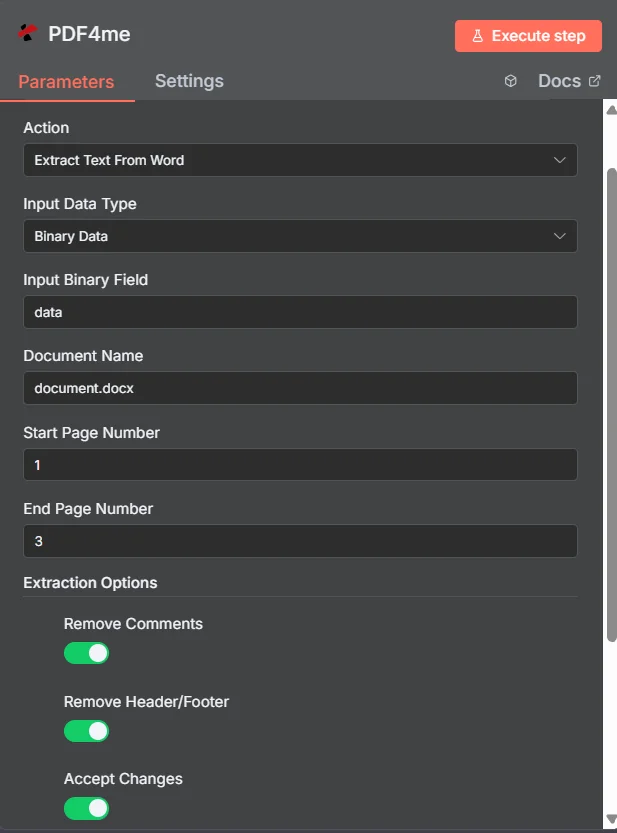
PDF4me 在“从 Word 节点参数面板中提取文本”中 n8n
从 Word 中提取文本需要哪些参数?
必需的: 输入数据类型和文档名称,以及与您选择的输入类型匹配的字段(输入二进制字段, Base64 单词内容(或单词 URL)。起始页码、结束页码、输出二进制字段名称以及三个提取选项开关均为可选。
| 范围 | 必需的 | 它的作用 | 例子 |
|---|---|---|---|
| Input Data Type | Required | Format of the source Word document. Choose Binary Data (from a previous node), Base64 String, or URL. | Binary Data |
| Input Binary Field | Conditional | Name of the binary property on the incoming n8n item that holds the Word file. Required when Input Data Type is Binary Data. | data |
| Base64 Word Content | Conditional | Base64-encoded Word content. Required when Input Data Type is Base64 String. | UEsDBBQAAAAIAA... |
| Word URL | Conditional | Publicly reachable HTTPS URL to the source Word file. Required when Input Data Type is URL. | https://example.com/document.docx |
| Document Name | Required | Filename of the input Word file, including the .docx extension, used for format detection. | document.docx |
| Start Page Number | Optional | First page to include in extraction. Leave unset to start from page 1. | 1 |
| End Page Number | Optional | Last page to include in extraction. Leave unset to extract through the last page. | 3 |
| Remove Comments | Optional | Strips reviewer comments from the extracted text when enabled. | true |
| Remove Header/Footer | Optional | Excludes running headers and footers when enabled, leaving only body content. | true |
| Accept Changes | Optional | Finalizes all tracked changes before extraction when enabled, so text reflects the edited version. | true |
| Output Binary Field Name | Optional | Name of the binary property the output item exposes. Default is data. | data |
高级选项
自定义配置文件(可选)
A JSON类似预定义参数块的专用提取配置,例如
{ "outputDataFormat": "json" }叠加在上面的各个字段之上。输出字段
| 场地 | 类型 | 它包含什么 |
|---|---|---|
success | Boolean | True when extraction succeeded. Use to route error-handling branches. |
fileName | String | Generated filename for the extracted content file, typically ending in .json. |
mimeType | String | MIME type of the output, typically application/json or text/plain. |
fileSize | Number | Size of the extracted content file in bytes. |
docName | String | Original filename of the input Word document, kept for audit and tracking. |
message | String | Human-readable status message for the extraction result. |
Binary (data) | Binary | The extracted text content under Output Binary Field Name (default data). Pass into a downstream node to read or store the text. |
如何在 Word 文档中设置“提取文本”功能 n8n?
- 添加 PDF4me 致你 n8n 工作流程并选择 从 Word 中提取文本 行动。
- 在 用于连接的凭证请选择您的 PDF4me 凭证或点击 创建新凭证 并粘贴你的 API 钥匙。
- 放 输入数据类型 到 二进制数据 (默认), Base64 细绳, 或者 URL 并提供匹配的源字段。
- 放 文档名称 和
.docx扩大。 - (可选) 起始页码 和 页码结束 将提取内容限制在指定的页面范围内。
- 放 删除评论, 移除页眉/页脚, 和 接受更改 根据需要提取干净版本或编辑版本。
- 执行该节点并将提取的文本路由到您的内容管道、搜索索引或分析工作流中。
典型配置
工作流程示例Common n8n workflow patterns using Extract Text From Word.
内容迁移到内容管理系统 (CMS)
- 当旧版 Word 文档添加到迁移文件夹时,Google 云端硬盘触发器会触发。
- PDF4me 从 Word 中提取文本时,启用“删除页眉/页脚”和“删除注释”功能,以便仅提取文本正文。
- 提取的文本将作为新的内容条目发布到无头CMS中。
审阅后的编辑清理
- 经过审阅并带有修订痕迹和批注的稿件通过表格上传。
- PDF4me “从 Word 中提取文本”功能启用了“接受更改”和“删除注释”选项,以获得干净的最终版本。
- 最终定稿的文本将被送至编辑或出版流程。
从文档库构建搜索索引
- “循环遍历项目”节点遍历来自某个文档的 Word 文档。 SharePoint 文档库。
- PDF4me 从 Word 中提取文本功能会使用默认提取选项对每个文件运行。
- 提取的文本会被索引到 Elasticsearch 或 Algolia 等搜索引擎中。
大型报告的章节级提取
- 工作流程只需要从冗长的报告中提取执行摘要即可。
- PDF4me 从 Word 中提取文本时,起始页码为 1,结束页码为 2,以将提取范围限制在摘要页。
- 提取出的摘要文本将被送入文本摘要或分析步骤。
实用技巧
Only Input and Document Name are required
Page range and the three cleanup toggles all have working defaults; set them only when your workflow needs the behavior to differ.
Use page range for large documents
Set Start Page Number and End Page Number to extract only the section you need instead of processing an entire long document.
Accept Changes changes the output text
With Accept Changes on, deleted text in tracked changes will not appear in the extraction; with it off, the pre-edit text may still be present.
Output is binary, read it downstream
The extracted text arrives as a binary file, not a plain n8n string field; use a node that reads binary content to access the actual text.
Document Name still matters with Binary Data
The extension drives format detection regardless of input type; keep it accurate even when the file itself comes from a previous node.
Remove Header/Footer helps content analysis
Running headers and footers (page numbers, document titles) can pollute text-mining results; strip them for cleaner analysis.
速查表
| 场地 | 价值 |
|---|---|
| Action | Extract Text From Word |
| Input Data Type | Binary Data |
| Input Binary Field | data |
| Document Name | document.docx |
| Start Page Number | 1 (optional) |
| End Page Number | (optional, defaults to last page) |
| Remove Comments | true |
| Remove Header/Footer | true |
| Accept Changes | true |
| Credentials | PDF4me API credential |
常见问题
相关操作
从PDF中提取表格
提取类别相同,但从结构化表格中提取数据。 PDF 文件而不是 Word 中的正文。
从 PDF 文件中提取表单数据
从 AcroForm 中提取已填充的字段值 PDF当您的源文档混合了 Word 和可填写文档时,此功能是互补的。 PDF 形式。
通过表达式提取文本
从文本中提取与模式匹配的文本 PDFs,可用于在提取完整文档文本后提取特定数据点。
在其他平台上执行相同任务
从 Word 中提取文本 Make
与以下情况相同的文本提取引擎 Make 模块,具有相同字段集的视觉场景。
从 Word 中提取文本 Zapier
从 6000 多个文本框中触发文本提取。 SaaS 应用程序和网络钩子。
从 Word 中提取文本 Power Automate
Microsoft 365 与……流动 SharePoint, OutlookTeams 和 Dataverse 集成。
从 Word 中提取文本 REST API
原始 PDF4me 用于自定义后端代码或 Postman 测试的端点。