从表单中提取数据 PDF 在 n8n
从表单中提取数据 PDF 是一个 PDF4me 节点操作 n8n 从可填写对象中读取已填写的值。 PDF 并以结构化的形式返回它们。 formData JSON 对象。用它来翻转已退回的申请表、已签名的登记表或调查问卷。 PDFs 无需任何人重新输入答案,即可将答案写入数据库行。
此节点的功能
PDF4me从表单中提取数据 PDF 需要填写完整的表格 PDF 来自二进制数据, Base64 String或者 URL读取其交互式表单层,并将每个字段作为名称和值对包含在单个对象中返回。 表单数据 对象。文本输入框、复选框、单选按钮和下拉列表选项全部汇集在一起,准备映射到电子表格行。 CRM 记录,或工作流中的条件分支。
相关博客文章(1)
验证您的身份 API 要求
每一个 PDF4me 节点 n8n 需要有效 用于连接的凭证创建或选择一个可以容纳您的 PDF4me API 关键在于确保工作流程能够安全地验证提取请求。
您不容错过的重要事实
这 PDF 必须有实际的表单字段
此节点读取交互式 AcroForm 图层。扫描页面或展平的页面。 PDF 没有剩余的字段对象要读取,因此将这些对象路由到 OCR 或者 AI 改为解析节点。
输出结果中仍然会出现空白字段。
未填充的字段会返回空字符串而不是被省略,因此应在下游检查空值,而不是假设键缺失。
字段名称来自表单作者
钥匙匹配任何 PDF 设计者为每个字段命名,复选框返回其导出值,而不是保证返回真或假。请先运行一个示例文件并检查实际输出。
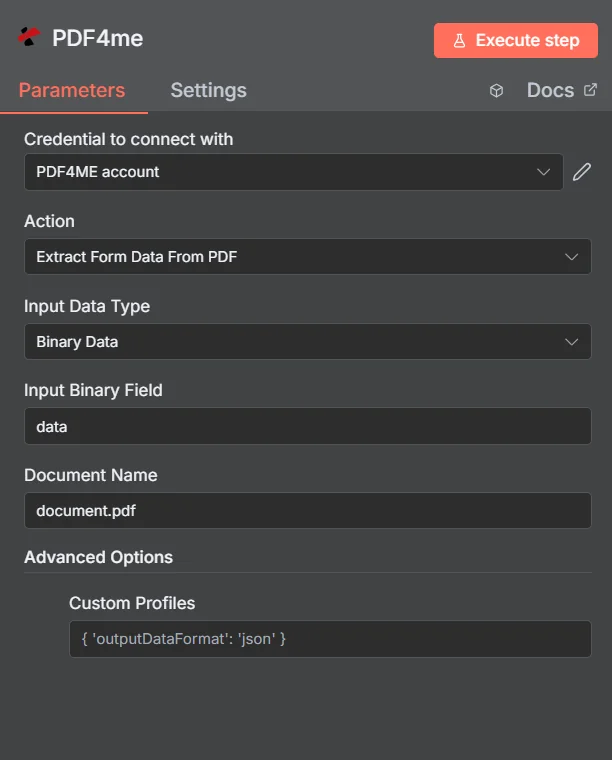
PDF4me 从表单中提取数据 PDF 参数面板 n8n
表单数据提取与纯文本提取
两种方法都从中提取内容 PDF但只有一种方法可以提供命名字段。这种区别决定了哪个节点应该属于你的工作流。
| 方法 | 你得到的回报 | 最佳匹配 |
|---|---|---|
| Extract Form Data From PDF | Named field and value pairs from the interactive form layer | Genuine fillable PDFs where every answer already sits in a named field |
| Plain text extraction | The visible page content as one flat string, with no field names | Static PDFs with no form layer, where you will parse the text yourself |
| AI document parsing | Model-inferred fields from any layout, including scans | Scanned, flattened, or wildly inconsistent documents with no usable form structure |
从哪些参数中提取表单数据 PDF 需要?
必需的: 操作、输入数据类型、与该输入类型匹配的字段以及文档名称。“高级选项”下的“自定义配置文件”是可选的。
| 范围 | 必需的 | 它的作用 | 例子 |
|---|---|---|---|
| Action | Required | Selects the PDF4me node action to run. Choose Extract Form Data From PDF. | Extract Form Data From PDF |
| Input Data Type | Required | Format of the source PDF input. Choose Binary Data (from a previous node), Base64 String, or URL. | Binary Data |
| Input Binary Field | Conditional | Name of the binary property on the incoming n8n item that holds the filled PDF. Required when Input Data Type is Binary Data. Defaults to data. | data |
| Base64 Document Content | Conditional | Base64-encoded content of the filled PDF. Required when Input Data Type is Base64 String. | JVBERi0xLjQK... |
| File URL | Conditional | Publicly reachable HTTPS URL to the filled PDF. Required when Input Data Type is URL. | https://example.com/application_form.pdf |
| Document Name | Required | Filename of the source PDF, used for reference and tracking in the extraction request. Include the .pdf extension. | application_form.pdf |
| Custom Profiles | Optional | Advanced Options field for extra processing settings, supplied in a JSON-like format. Leave blank unless you have a specific profile to apply. | { 'outputDataFormat': 'json' } |
输出字段
一次成功的运行返回一个 n8n 包含提取表单值的项 JSON。
| 场地 | 类型 | 它包含什么 |
|---|---|---|
formData | Object | Every form field read from the PDF, as a set of field name and field value pairs. |
formData.<fieldName> | String | The name of an individual field exactly as the PDF author defined it, for example name, email, or country. |
formData.<fieldValue> | String, Number, or Boolean | The value entered or selected for that field. Blank fields return an empty string, and checkboxes return their export value. |
典型的回复正文如下所示:
{
  "formData": {
    "name": "PDF4me",
    "email": "",
    "country": "USA"
  }
}
如何设置从表单提取数据 PDF 在 n8n?
- 添加 PDF4me 致你 n8n 工作流程并选择 从表单中提取数据 PDF 行动。
- 在 用于连接的凭证请选择您的 PDF4me 凭证或点击 创建新凭证 并粘贴你的 API 钥匙。
- 放 输入数据类型 到 二进制数据 (默认), Base64 String, 或者 URL 并提供配套的填充物 PDF 场地。
- 放 文档名称 例如,指向源文件名。
application_form.pdf。 - 离开 自定义配置文件 在下面 高级选项 除非您需要特定的处理配置文件,否则请留空。
- 执行该节点,然后映射返回值。
formData将对象放入工作流程的下一步。
典型配置
工作流程示例Common n8n workflow patterns using Extract Form Data From PDF.
通过电子邮件将申请表导入电子表格
- 当申请完成时,会触发电子邮件通知。 PDF 到达。
- 从表单中提取数据 PDF 将附件读取到 formData 对象中。
- Google 表格或 Excel 节点追加一行,将每个字段名称映射到一列。
CRM 通过问卷调查表获取潜在客户
- 云存储触发器会在新上传的数据到达时触发。 PDF。
- 从表单中提取数据 PDF 从表单层中提取联系信息。
- A CRM 节点使用提取的姓名、电子邮件和公司值创建或更新记录。
有条件批准流程
- webhook 会从外部门户接收已签名的请求表单。
- 从表单中提取数据 PDF 返回所请求的金额和部门字段。
- 根据这些值,IF 节点会分支到正确的审批人。
档案批量数字化
- “循环遍历项目”节点遍历已归档表单的列表 URLs。
- 从表单中提取数据 PDF 运行时输入数据类型设置为 URL 对每个文件。
- 每个 formData 对象都会被写入一个以源文档名称为键的数据库表中。
实用技巧
Run one sample file before you map anything
Field names and checkbox export values are set by whoever designed the form, so inspect the real formData output first instead of guessing the key names.
Test for empty strings, not missing keys
Unfilled fields are still present in the output with an empty value, so a simple key existence check will not tell you whether the user answered.
Check the PDF is not flattened
A form that looks fillable in a viewer may have been flattened on save, which strips the field layer. If formData comes back empty, that is usually why.
Send scans to an AI parser instead
Scanned paper forms have no interactive fields at all. Route those to Parse Document rather than expecting this node to read them.
Keep Document Name meaningful
It is used for reference and tracking on the request, so passing the real source filename makes execution logs far easier to audit later.
Validate before writing to a system of record
Add a check on required fields after extraction so an incomplete submission is flagged rather than silently creating a half-empty CRM record.
速查表
| 场地 | 价值 |
|---|---|
| Action | Extract Form Data From PDF |
| Input Data Type | Binary Data |
| Input Binary Field | data |
| Document Name | document.pdf |
| Custom Profiles | { 'outputDataFormat': 'json' } |
| Credentials | PDF4me API credential |
| Returns | formData object of field name and value pairs |
常见问题
相关操作
填写 PDF 形式
反向操作是将值写入可填充字段。 PDF 而不是把它们读出来。
解析文档
对于已扫描或已展平且没有交互式字段层的表单,此方法作为备选方案。
从表格中提取 PDF
用于以行和列形式排列的表格数据,而不是以命名表单字段形式排列的数据。
添加表单字段 PDF
首先构建可填充层,以便后续提取时可以读取命名字段。
在其他平台上执行相同任务
提炼 PDF 表单数据 Make
与……相同的萃取发动机 Make 模块,连接到 Make 场景。
提取表单数据 Power Automate
Microsoft 365 与……流动 SharePoint, OutlookTeams 和 Dataverse 集成。
提取表单数据 REST API
原始 PDF4me 用于自定义后端代码或 Postman 测试的端点。