增加边距 PDF 在 n8n
增加边距 PDF 是一个 PDF4me 节点操作 n8n 为图形添加左边、右边、上边距和下边距 PDF每个尺寸均以毫米为单位。可利用此功能为打印报告创建装订空间,为讲义留出注释空间,或自动将收到的文件调整为符合房屋布局标准。
此节点的功能
PDF4me添加边距 PDF 需要 PDF 来自二进制数据, Base64 String或者 URL 并返回一个新文件,其中应用了您指定的四个边距值(单位为毫米)。每一边都是独立设置的,因此非对称装订边距只是左侧边距值更大而已。由于它是作为工作流程步骤运行的,因此无需任何人打开桌面编辑器,即可将相同的边距标准应用于所有传入的文档。
相关博客文章
目前尚无关于此功能的博客文章——敬请期待。
在此期间,您可以浏览 PDF4me 博客,查看适用于各平台的教程和工作流程。
访问博客 →
验证您的身份 API 要求
每一个 PDF4me 节点 n8n 需要有效 用于连接的凭证创建或选择一个可以容纳您的 PDF4me API 关键在于确保工作流程能够安全地验证保证金请求。
您不容错过的重要事实
所有数值均以毫米为单位。
字段单位直接标注为 (毫米)。如果您的打印规格单位是英寸,请在输入前进行转换:1 英寸等于 25.4 毫米。
四方均独立
左、右、上、下是不同的字段,因此不对称装订边距只需要更大的左边数值即可。
印刷前先校对一份文件
结果的外观取决于源页面的几何形状,因此请先运行一个代表性文档并检查输出,然后再将一批文档发送到打印机。
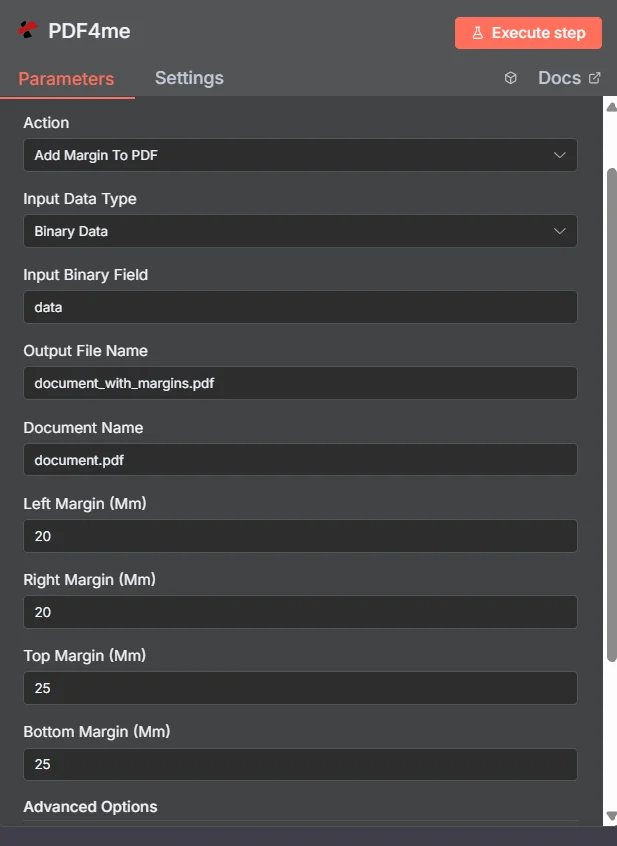
PDF4me 添加边距 PDF 参数面板 n8n
自动保证金(n8n) 与桌面 PDF 编辑
搜索结果大多是每次只能处理一个文件的编辑器。区别在于实际工作发生的地方。
| 方法 | 扳机 | 最佳匹配 |
|---|---|---|
| Desktop editor or online margin tool | A person opens and adjusts one file by hand | A single document you are already working on |
| PDF4me Add Margin To PDF in n8n | A generated report, an upload, or a scheduled batch | Applying one house margin standard to every document that arrives, unattended |
添加边距的参数有哪些? PDF 需要?
必需的: 操作、输入数据类型、与该输入类型匹配的字段、输出文件名、文档名称以及所有四个边距值。二进制数据输出名称和自定义配置文件具有可用的默认值。
| 范围 | 必需的 | 它的作用 | 例子 |
|---|---|---|---|
| Action | Required | Selects the PDF4me node action to run. Choose Add Margin To PDF. | Add Margin To PDF |
| Input Data Type | Required | Format of the source PDF input. Choose Binary Data (from a previous node), Base64 String, or URL. | Binary Data |
| Input Binary Field | Conditional | Name of the binary property on the incoming n8n item that holds the PDF. Required when Input Data Type is Binary Data. Defaults to data. | data |
| Base64 Document Content | Conditional | Base64-encoded content of the source PDF. Required when Input Data Type is Base64 String. | JVBERi0xLjQK... |
| File URL | Conditional | Publicly reachable HTTPS URL to the source PDF. Required when Input Data Type is URL. | https://example.com/report.pdf |
| Output File Name | Required | Filename for the PDF returned with margins applied. Include the .pdf extension. | document_with_margins.pdf |
| Document Name | Required | Filename of the source PDF, used for reference and tracking on the request. | document.pdf |
| Left Margin (Mm) | Required | Left margin width in millimetres. Set this larger than the other sides when you need binding space. | 20 |
| Right Margin (Mm) | Required | Right margin width in millimetres. | 20 |
| Top Margin (Mm) | Required | Top margin height in millimetres. Increase it when a printed header or letterhead needs clearance. | 25 |
| Bottom Margin (Mm) | Required | Bottom margin height in millimetres. Increase it when a footer or page number needs clearance. | 25 |
| Binary Data Output Name | Optional | Name of the binary property the output item exposes. Defaults to data. | data |
| Custom Profiles | Optional | Advanced Options field for extra processing settings, supplied in a JSON-like format. Leave blank unless you have a specific profile to apply. | { "preserveContentQuality": true } |
输出字段
一次成功的运行返回一个 n8n 携带物品 PDF 已添加边距。
| 场地 | 类型 | 它包含什么 |
|---|---|---|
Binary (data) | Binary | The PDF with the four margin values applied, under Binary Data Output Name (default data). |
fileName | String | Generated filename, matching Output File Name. |
mimeType | String | MIME type of the output, always application/pdf. |
fileSize | Number | Size of the returned PDF in bytes. |
pageCount | Number | Number of pages processed with margin adjustments. |
success | Boolean | True when the margin operation completed, false on failure. Use it to branch error handling. |
message | String | Human-readable status message, carrying success confirmation or error detail. |
如何设置添加边距 PDF 在 n8n?
- 添加 PDF4me 致你 n8n 工作流程并选择 添加边距 PDF 行动。
- 在 用于连接的凭证请选择您的 PDF4me 凭证或点击 创建新凭证 并粘贴你的 API 钥匙。
- 放 输入数据类型 到 二进制数据 (默认), Base64 String, 或者 URL 并提供匹配的来源 PDF 场地。
- 进入 左边距(毫米), 右边距(毫米), 上边距(毫米), 和 底部边距(毫米) 单位为毫米。
- 放 输出文件名 (必须以……结尾)
.pdf) 和 文档名称 针对源文件。 - 执行节点并路由返回结果 PDF 进入下一步,例如存储、电子邮件或打印队列。
典型配置
工作流程示例Common n8n workflow patterns using Add Margin to PDF.
打印报告的装订边距
- 系统会生成一份预定的报告。 PDF 过夜。
- 增加边距 PDF 应用较宽的左边距和较窄的右边距、上边距和下边距。
- 打印结果将进入打印队列,并预留螺旋装订或梳式装订的空间。
讲义上的注释空间
- 培训资料已上传至共享文件夹。
- 增加边距 PDF 加宽右侧页边距,以便读者有空间做笔记。
- 带注释的副本将分发给与会者。
房屋布局标准文件
- webhook 接收 PDFs 来自外部供应商,布局不一致。
- 增加边距 PDF 对每个文件应用相同的四个值。
- 文件以统一的页面格式进入档案馆。
页边距和页码
- 合并文档是由多个来源汇编而成。
- 增加边距 PDF 首先形成底部间隙。
- 添加页面 Number 到 PDF 然后将编号放置在新的页脚空间内。
实用技巧
Convert inches before you type
The fields only accept millimetres. A one inch margin is 25.4 and a half inch is 12.7, so convert a print spec once and reuse the numbers.
Add margin before adding page numbers
Creating the bottom clearance first gives a page number or footer stamp somewhere clean to sit, rather than crowding existing content.
Proof a representative file, not the simplest one
Pick a document with dense edge-to-edge content for the test run, since that is where a margin change is most visible.
Use an asymmetric left value for binding
Anything that will be bound, punched, or stapled needs more room on the binding edge than on the outer edge.
Split first if pages need different margins
The values apply across the document, so a mixed layout needs a split, per-part margin run, and merge back together.
Branch on the success field
Test the returned success boolean before sending the file onward so a failed run raises an alert instead of quietly forwarding the original.
速查表
| 场地 | 价值 |
|---|---|
| Action | Add Margin To PDF |
| Input Data Type | Binary Data |
| Input Binary Field | data |
| Output File Name | document_with_margins.pdf |
| Document Name | document.pdf |
| Left / Right Margin (Mm) | 20 / 20 |
| Top / Bottom Margin (Mm) | 25 / 25 |
| Binary Data Output Name | data |
| Credentials | PDF4me API credential |
常见问题
相关操作
添加页面 Number 到 PDF
底部边距创造出干净的页脚空间后,自然而然的下一步就是添加页脚。
添加 HTML 页眉页脚 PDF
利用顶部和底部空白区域填充品牌化的页眉和页脚内容。
添加文字图章 PDF
在您刚刚创建的页边空白区域放置一个文字图章。
旋转文档
首先调整页面方向,使左边距真正成为装订边缘。
在其他平台上执行相同任务
增加边距 PDF 在 Make
与 a 相同的利润率引擎 Make 模块,连接到 Make 场景。
增加边距 PDF 在 Zapier
从数千个 SaaS 应用和 Webhook 中触发利润率调整。
增加边距 PDF 在 Power Automate
Microsoft 365 与……流动 SharePoint, OutlookTeams 和 Dataverse 集成。
增加边距 PDF REST API
原始 PDF4me 用于自定义后端代码或 Postman 测试的端点。