添加附件 PDF 在 n8n
添加附件 PDF 是一个 PDF4me 节点操作 n8n 将一个或多个文件嵌入到 PDF所以可以是电子表格、图像、存档或第二个文件。 PDF 它随文件一起寄送,而不是放在文件旁边。可用于将佐证材料与合同捆绑在一起,将原始数据与报告一起寄送,或将证书与合规性文件一起打包。
此节点的功能
PDF4me添加附件 PDF 需要主机 PDF 来自二进制数据, Base64 String或者 URL然后将您列出的每个文件嵌入到以下位置 附件 附件作为单独的对象包含在其中。与合并不同,附加文件保留其自身的格式和文件名,接收者可以单独打开或保存每个文件。每个附件可以来自不同的来源,例如来自早期节点的二进制文件和从……获取的文件。 URL 可以嵌入到同一次运行中。
相关博客文章
目前尚无关于此功能的博客文章——敬请期待。
在此期间,您可以浏览 PDF4me 博客,查看适用于各平台的教程和工作流程。
访问博客 →
验证您的身份 API 要求
每一个 PDF4me 节点 n8n 需要有效 用于连接的凭证创建或选择一个可以容纳您的 PDF4me API 关键在于确保工作流程能够安全地验证附件请求。
您不容错过的重要事实
附加操作并不等同于合并操作
附件仍然是一个单独的对象,读者可以将其保存回去。而合并操作则会将页面内容合并成一个连续的文档。
附件是一个可重复的集合
点击 添加附件 每个文件一次。每个条目都有自己的内容类型、名称和来源,因此您可以混合使用二进制、base64 和 URL 一次运行即可获取所有来源。
文件扩展名很重要
附件名称告诉阅读器应用程序如何打开提取的文件,因此务必包含正确的扩展名,例如 .xlsx 或 .zip。
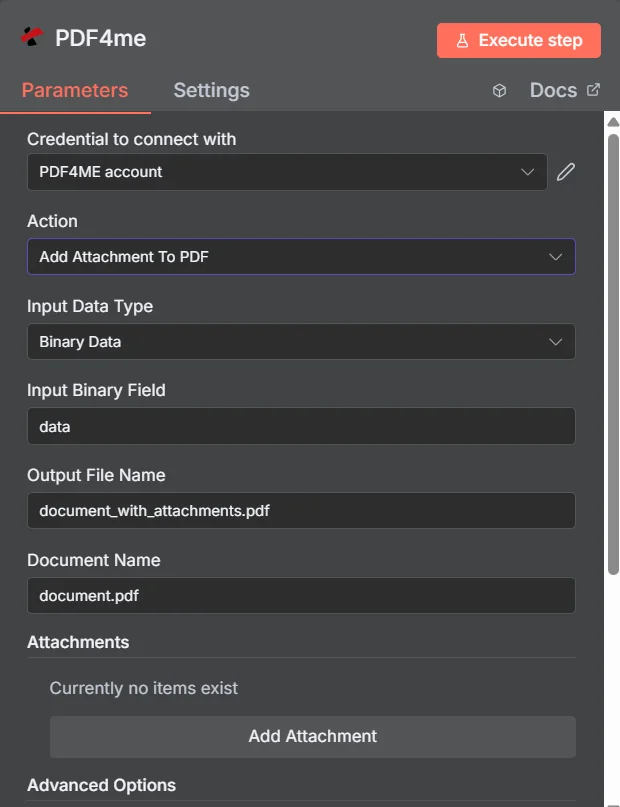
PDF4me 添加附件 PDF 参数面板 n8n在添加第一个条目之前,“附件”集合为空。
附加、合并与压缩
将多个文件合并为一个文件发送的三种方法,对收件人会产生不同的影响。
| 方法 | 收件人将获得 | 最佳匹配 |
|---|---|---|
| Add Attachment to PDF | One PDF that opens normally, with the extra files available in the attachments panel | Supporting material that must stay in its original format, such as a spreadsheet or an archive |
| Merge PDFs | One continuous document where all pages read in sequence | Content that genuinely belongs together as a single readable document |
| Zip the files together | An archive that must be unpacked before anything can be read | Bulk transfer where nothing needs to be readable without extracting first |
添加附件会考虑哪些参数? PDF 需要?
必需的: 操作、输入数据类型、与该输入类型匹配的字段、输出文件名、文档名称,以及附件下的至少一个条目。二进制数据输出名称和自定义配置文件具有可用的默认值。
| 范围 | 必需的 | 它的作用 | 例子 |
|---|---|---|---|
| Action | Required | Selects the PDF4me node action to run. Choose Add Attachment To PDF. | Add Attachment To PDF |
| Input Data Type | Required | Format of the host PDF input. Choose Binary Data (from a previous node), Base64 String, or URL. | Binary Data |
| Input Binary Field | Conditional | Name of the binary property on the incoming n8n item that holds the host PDF. Required when Input Data Type is Binary Data. Defaults to data. | data |
| Base64 Document Content | Conditional | Base64-encoded content of the host PDF. Required when Input Data Type is Base64 String. | JVBERi0xLjQK... |
| File URL | Conditional | Publicly reachable HTTPS URL to the host PDF. Required when Input Data Type is URL. | https://example.com/contract.pdf |
| Output File Name | Required | Filename for the PDF returned with the files embedded. Include the .pdf extension. | document_with_attachments.pdf |
| Document Name | Required | Filename of the source PDF, used for reference and tracking on the request. | document.pdf |
| Attachments | Required | Collection of files to embed. Click Add Attachment once per file, then fill in the per-attachment fields listed below. | One entry per embedded file |
| Binary Data Output Name | Optional | Name of the binary property the output item exposes. Defaults to data. | data |
| Custom Profiles | Optional | Advanced Options field for extra processing settings, supplied in a JSON-like format. Leave blank unless you have a specific profile to apply. | { "preserveMetadata": true } |
每个附件条目内的字段
您创建的每个条目 添加附件 它公开了自己的一组字段。
| 范围 | 必需的 | 它的作用 | 例子 |
|---|---|---|---|
| Attachment Content Type | Required | How this particular attachment is supplied. Choose Binary Data, Base64 Content, or File URL. Each entry can differ. | Binary Data |
| Attachment Name | Required | Filename the embedded file will carry inside the PDF. Include the correct extension so readers can open it after extraction. | supporting_data.xlsx |
| Binary Field Name | Conditional | Name of the binary property holding this attachment. Required when Attachment Content Type is Binary Data. | data |
| Base64 Content | Conditional | Base64-encoded content of this attachment. Required when Attachment Content Type is Base64 Content. | SGVsbG8gV29ybGQ= |
| File URL | Conditional | Publicly reachable HTTPS URL to this attachment. Required when Attachment Content Type is File URL. | https://example.com/certificate.pdf |
输出字段
一次成功的运行返回一个 n8n 携带物品 PDF 及其嵌入文件。
| 场地 | 类型 | 它包含什么 |
|---|---|---|
Binary (data) | Binary | The PDF with all listed files embedded, under Binary Data Output Name (default data). |
fileName | String | Generated filename, matching Output File Name. |
mimeType | String | MIME type of the output, always application/pdf. |
fileSize | Number | Size of the returned PDF in bytes, including the embedded files. |
attachmentCount | Number | Number of attachments successfully embedded. Compare it against your expected count to catch a silently skipped file. |
success | Boolean | True when the attachment operation completed, false on failure. Use it to branch error handling. |
message | String | Human-readable status message, carrying success confirmation or error detail. |
如何设置“添加附件” PDF 在 n8n?
- 添加 PDF4me 致你 n8n 工作流程并选择 添加附件 PDF 行动。
- 在 用于连接的凭证请选择您的 PDF4me 凭证或点击 创建新凭证 并粘贴你的 API 钥匙。
- 放 输入数据类型 到 二进制数据 (默认), Base64 String, 或者 URL 并提供匹配的主机 PDF 场地。
- 在下面 附件, 点击 添加附件 对每个文件执行一次,然后设置其 附件内容类型, 附件名称以及匹配的源字段。
- 放 输出文件名 (必须以……结尾)
.pdf) 和 文档名称 针对源文件。 - 执行节点并路由返回结果 PDF 继续,检查
attachmentCount文件数量与预期不符。
典型配置
工作流程示例Common n8n workflow patterns using Add Attachment to PDF.
附带收据的发票
- 发票 PDF 由账单数据生成。
- 添加附件 PDF 嵌入匹配的收据和审批记录。
- 一份文件连同所有证据记录一起提交给应付账款部门。
报告及其来源数据
- 已生成预定的分析报告 PDF。
- 添加附件 PDF 嵌入底层 CSV 导出为命名附件。
- 读者可以阅读叙述内容,并在需要验证时调出原始数据。
附附件的合同
- 合同是根据模板,在收到签字请求后生成的。
- 添加附件 PDF 嵌入从中提取的证书和时间表 URLs。
- 交易对方会收到一份单独的文件进行签署。
审计合规包
- “循环遍历项目”节点收集归档期间的证据文件。
- 添加附件 PDF 将每一项嵌入到封面归档文件中。
- 该软件包已归档,请从中提取附件 PDF 稍后可根据要求拆封。
实用技巧
Always include the file extension in Attachment Name
The extension is what tells a reader application how to open the extracted file. A name without one leaves the recipient guessing.
Check attachmentCount against what you sent
Comparing the returned count to the number of entries you configured is the quickest way to catch a file that failed to embed.
Mention the attachments in the document body
Not every viewer surfaces the attachments panel, so a line of visible text telling the reader that supporting files are embedded prevents them being missed.
Mix sources freely within one run
Each entry has its own content type, so a binary file from an earlier node and a URL-hosted certificate can be embedded together.
Attach when format must survive, merge when it should not
A spreadsheet stays usable as a spreadsheet only if it is attached. Merging would flatten it into page content.
Watch the total size on outbound email
Embedded files count toward the PDF size, so a bundle of large attachments can push the document past a mail gateway limit.
速查表
| 场地 | 价值 |
|---|---|
| Action | Add Attachment To PDF |
| Input Data Type | Binary Data |
| Input Binary Field | data |
| Output File Name | document_with_attachments.pdf |
| Document Name | document.pdf |
| Attachments | One entry per file, added with Add Attachment |
| Attachment Content Type | Binary Data |
| Attachment Name | supporting_data.xlsx |
| Binary Data Output Name | data |
| Credentials | PDF4me API credential |
常见问题
相关操作
从附件中提取 PDF
正好相反,就是从……中取出嵌入的文件。 PDF 你收到了。
叠加 PDFs
结合 PDF 将内容作为单独文件嵌入时,页面本身的内容并不是你想要的结果。
添加页面 Number 到 PDF
在将辅助文件打包到宿主文档之前,请先完成宿主文档的编写。
保护文档
将敏感支持文件嵌入到软件包中后,对软件包进行密码保护。
在其他平台上执行相同任务
添加附件 PDF 在 Make
与 a 相同的嵌入引擎 Make 模块,连接到 Make 场景。
添加附件 PDF 在 Zapier
从数千个 SaaS 应用和 Webhook 中触发文档打包。
添加附件 PDF 在 Power Automate
Microsoft 365 与……流动 SharePoint, OutlookTeams 和 Dataverse 集成。
添加附件 PDF REST API
原始 PDF4me 用于自定义后端代码或 Postman 测试的端点。