创造 PDF/A 在 n8n
创造 PDF/A 是一个 n8n 模块 PDF4me 将标准 PDF 一个 ISO符合 PDF/A 归档文件。发送 PDF 作为二进制数据, Base64或者 URL从以下选项中选择一个合规级别 PDF/A-1b 至 PDF/A-3a,并收到已验证的存档 PDF 适合长期储存。
此节点的功能
PDF4me: 创造 PDF/A 一个标准 PDF 并将其转换为 PDF/A 一份档案文件 n8n 步骤。从涵盖基本合规性的八个合规级别中进行选择(PDF/A-1b、2b、3b),可访问性标记一致性(PDF/A-1a、2a、3a),以及Unicode映射一致性(PDF/A-2u, 3u)。返回一个已验证的 PDF/A 文件包含嵌入式字体和保留的元数据,非常适合用于法律档案、政府文件、医疗记录和财务数据保存工作流程等。 ISO 符合 19005 标准。
相关博客文章(1)
验证您的身份 API 要求
每一个 PDF4me 节点 n8n 需要有效 用于连接的凭证创建或选择一个可以容纳您的 PDF4me API 关键在于工作流程能够进行身份验证 PDF/A 安全地处理转换请求。
您不容错过的重要事实
允许升级和允许降级控制回退
这些可选的高级选项允许 PDF4me 如果无法达到要求的合规级别,则可以应用高于或低于要求的合规级别,而不是直接判定为不合格。这两个选项都位于“高级选项”下,只有在点击“添加选项”后才会显示。
文档名称仅用于跟踪,并非输出文件名。
文档名称引用了来源 PDF 用于处理和审计跟踪。实际返回的文件名由“输出文件名”单独控制。
只有 PDF/A-3 系列允许嵌入文件
PDF/A-3b, PDF/A-3u,以及 PDF/A-3a 是唯一允许您嵌入其他文件的合规级别(XML, CSVCAD, Word)在档案馆内 PDF。 PDF/A-1 和 PDF/A-2 层不支持嵌入。
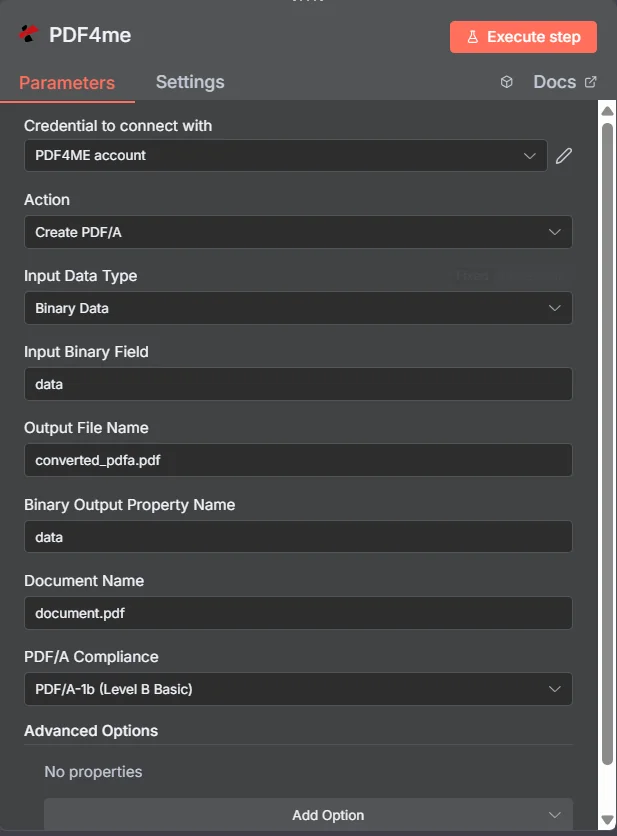
完整节点面板:源 PDF 通过二进制数据, PDF/A-1b 合规级别已选定
参数
必需 n8n 用户界面: 输入数据类型、文档名称和 PDF/A 合规性。输出文件名(默认值) 已转换的pdfa。pdf)和二进制输出属性名称(默认值) 数据)是可选的便捷字段,不会发送到 PDF4me REST API 直接设置。允许升级、允许降级和自定义配置文件位于可选的“高级选项”面板下。条件模板字段(输入二进制字段, Base64 文档内容,文件 URL)仅当选择与其匹配的输入数据类型时才会出现。
| 范围 | 必需的 | 它的作用 | 例子 |
|---|---|---|---|
| Input Data Type | Required | How the source PDF enters the node. Binary Data reads from a previous node (default, most common). Base64 String accepts an encoded PDF. URL downloads the PDF from a public link. | Binary Data |
| Input Binary Field | Conditional | Name of the binary property on the incoming n8n item that holds the PDF. Required when Input Data Type is Binary Data. Defaults to data. | data |
| Base64 Document Content | Conditional | Base64-encoded PDF content. Required when Input Data Type is Base64 String. | JVBERi0xLjQK... |
| File URL | Conditional | Publicly reachable URL to the PDF file. Required when Input Data Type is URL. | https://abc.com/sample.pdf |
| Output File Name | Optional | Filename of the converted PDF/A file returned by the node. Default is converted_pdfa.pdf. Not sent to the underlying REST API, applied by the n8n node. | converted_pdfa.pdf |
| Binary Output Property Name | Optional | Name of the binary property the output item exposes. Default is data. Use a different name when a downstream node expects it. | data |
| Document Name | Required | Name of the source PDF, used for reference and tracking. Maps to the REST API's required File Name field. | document.pdf |
| PDF/A Compliance | Required | The target archival compliance level. Options: PDF/A-1b, PDF/A-1a, PDF/A-2b, PDF/A-2u, PDF/A-2a, PDF/A-3b, PDF/A-3u, PDF/A-3a. | PDF/A-1b (Level B Basic) |
| Allow Upgrade | Optional | Advanced Option. When true, PDF4me may apply a higher compliance level than requested if the source PDF already qualifies. | true |
| Allow Downgrade | Optional | Advanced Option. When true, PDF4me falls back to a compatible lower compliance level instead of failing if the exact level cannot be met. | false |
| Custom Profiles | Optional | Advanced Option. JSON-like string for additional conversion settings, for specialized requirements only. | {"outputDataFormat":"base64","preserveMetadata":true} |
PDF/A 合规级别
根据归档要求的严格程度,这八种合规选项分为三类。
PDF/A-1b, PDF/A-2b, PDF/A-3b基本符合性可靠地再现文档的视觉外观。 PDF/A-1b 目标 PDF 最高可达1.4, PDF/A-2b 增加了透明度和数字签名支持 PDF 1.7, PDF/A-3b 还允许嵌入类似这样的文件 XML, CSVCAD 或 Word 文件。
PDF/A-1a, PDF/A-2a, PDF/A-3a无障碍合规性基本合规性加上文档结构、文本跨度标记和 language 屏幕阅读器兼容性规范。当存档文档必须符合无障碍标准时,此规范为必需项。
PDF/A-2u, PDF/A-3uUnicode映射一致性基本符合所有映射到 Unicode 的文本,以实现可靠的国际字符支持和跨平台文本提取。
输出结果包含哪些字段?
| 场地 | 类型 | 它包含什么 |
|---|---|---|
fileName | String | Filename of the generated PDF/A file, set from Output File Name (default converted_pdfa.pdf). |
mimeType | String | MIME type of the generated file, application/pdf. |
fileSize | Number | Size of the generated PDF/A file in bytes. |
success | Boolean | True when the conversion completed successfully. Use to route error-handling branches. |
inputDataType | String | Which input mode was used: binary, base64, or url. |
sourceFileName | String | The original Document Name that was processed, kept for audit trails. |
pdfaCompliance | String | The compliance level that was applied during conversion. |
isPdfaCompliant | Boolean | Whether the generated PDF meets the requested PDF/A compliance standard. |
complianceLevel | String | Detail on the specific compliance level achieved. |
Binary (data) | Binary | The generated PDF/A file under Binary Output Property Name (default data). Pass into Write Binary File, Email, or any storage upload. |
如何设置创建 PDF/A 在 n8n?
- 添加 PDF4me 致你 n8n 工作流程和设置 行动 到 创造 PDF/A。
- 在 用于连接的凭证请选择您的 PDF4me 凭证或点击 创建新凭证 并粘贴你的 API 钥匙。
- 放 输入数据类型 到 二进制数据 (默认), Base64 String, 或者 URL 并填写匹配字段。
- 放 文档名称 到源头 PDF供参考的姓名。
- (可选)更改 输出文件名 从默认值
converted_pdfa.pdf和 二进制输出属性名称 从默认值data。 - 选择一个 PDF/A 遵守 根据您需要的基本兼容性、可访问兼容性或 Unicode 映射兼容性来划分级别。
- (可选)点击 添加选项 在“高级选项”下进行设置 允许升级, 允许降级, 或者 自定义配置文件。
- 执行节点并路由归档 PDF 写入二进制文件、电子邮件或云存储。
典型配置
工作流程示例Common n8n workflow patterns using Create PDF/A.
已签署合同存档以符合存储要求
- Google 云端硬盘下载节点会提取一份已签署的合约。 PDF (二进制数据,属性)
数据)。 - PDF4me 创造 PDF/A 运行方式为输入数据类型为二进制数据 PDF/A 合规性设定为 PDF/A-2b。
- “写入二进制文件”节点保存归档文件。 PDF 使用以下方式保存到合规存档文件夹
$json。fileName。
无障碍政府表格提交
- webhook 会接收一份已填写的监管表格,该表格以 base64 编码的形式呈现。 PDF。
- PDF4me 创造 PDF/A 已配置输入数据类型 Base64 String 和 PDF/A 合规性设定为 PDF/A-1a 用于屏幕阅读器辅助功能。
- 档案 PDF 已上传至 SharePoint 待提交的文档库。
财务记录保存,并嵌入审计文件
- 一个 HTTP 请求节点下载生成的发票 PDF 公众 URL。
- PDF4me 创造 PDF/A 使用输入数据类型运行 URL 和 PDF/A 合规性设定为 PDF/A-3b,允许嵌入一个 CSV 审计跟踪 PDF。
- 结果将存储到长期财务记录档案中。
文件生成后的患者记录保存
- PDF4me 生成文档(单项)生成患者出院总结 PDF 使用模板。
- 输出直接链接到 PDF4me 创造 PDF/A 和 PDF/A 合规性设定为 PDF/A-2a 用于符合 HIPAA 标准的长期保存。
- 电子邮件节点发送存档 PDF 送交档案部门。
实用技巧
Allow Downgrade avoids hard failures
If the source PDF cannot fully meet the requested compliance level, enabling Allow Downgrade lets PDF4me fall back to a compatible lower level instead of erroring out the workflow.
Accessible levels need real document structure
PDF/A-1a, PDF/A-2a, and PDF/A-3a require tagged content and language specification. A scanned image-only PDF with no text layer will not gain accessibility from conversion alone.
Document Name is not the output filename
Document Name is a tracking reference for the source file. Set Output File Name separately to control what the returned PDF/A file is called.
Default to Basic unless you need more
PDF/A-1b, PDF/A-2b, or PDF/A-3b cover most archival requirements. Reach for the accessible (a) or Unicode (u) variants only when the recipient or regulation specifically requires them.
Only PDF/A-3 embeds extra files
If your workflow needs to bundle source data (XML, CSV, CAD, Word) inside the archival PDF, you must pick PDF/A-3b, PDF/A-3u, or PDF/A-3a. The 1 and 2 families do not support embedding.
Advanced Options are optional
Leave Allow Upgrade, Allow Downgrade, and Custom Profiles unset unless you have a specific reason to override the default conversion behavior.
速查表
| 场地 | 价值 |
|---|---|
| Action | Create PDF/A |
| Input Data Type | Binary Data |
| Input Binary Field | data |
| Document Name | document.pdf |
| Output File Name | converted_pdfa.pdf |
| Binary Output Property Name | data |
| PDF/A Compliance | PDF/A-1b (Level B Basic) |
| Allow Upgrade | true |
| Allow Downgrade | false |
| Credentials | PDF4me API credential |
常见问题解答
相关操作
转换为 PDF
转变 Word, Excel或图像文件 PDF 首先,如果源文档还不是 PDF然后链接到 Create PDF/A 仅供存档。
压平 PDF
在归档之前,将表单字段和注释扁平化为静态内容,以便 PDF/A 输出内容为锁定的视觉记录。
线性化 PDF
优化 PDF 用于快速网页浏览。请使用此功能分发副本,与存档副本分开。 PDF/A 主文件。
在其他平台上执行相同任务
创造 PDF/A 在 Make
与以下情况相同的转换 Make 模块,具有云存储触发器的可视化场景,与相同的合规级别相连。
创造 PDF/A 在 Zapier
扳机 PDF/A 通过 6,000 多个 SaaS 应用和 Webhook 进行转换 Zapier。
创造 PDF/A 在 Power Automate
Microsoft 365 与……流动 SharePoint, OutlookTeams 和 Dataverse 集成。
创造 PDF/A REST API
原始
POST /api/v2/PdfA 用于自定义后端代码或 Postman 测试的端点。用例
政府和监管合规
- 将文档转换为 PDF/A 适用于政府文件、监管备案和官方文件的格式,需要长期存档并符合法律效力。
- 通过将法律文件、合同和官方记录转换为以下格式来处理它们: PDF/A 法庭文件、法律程序和监管合规的格式
- 将历史文献、档案和官方记录转换为 PDF/A 适用于长期保存、数字化归档和符合归档标准的格式
财务和银行文件
- 将财务报表、审计报告和银行单据转换为 PDF/A 监管合规、财务报告和长期记录保存的格式
- 通过将税务文件、合规报告和财务记录转换为以下格式来处理它们: PDF/A 监管申报、审计追踪和财务合规的格式
- 将保险文件、理赔记录和财务合同转换为 PDF/A 用于长期存储、法规遵从和法律文件的格式
医疗保健和医疗记录
- 将医疗记录、病人档案和医疗保健文档转换为 PDF/A 符合 HIPAA 标准、医疗记录保存和长期患者数据保存的格式
- 处理临床报告、实验室结果和医学影像文档,并将它们转换为 PDF/A 医疗记录管理、合规和归档格式
- 将药品文档、临床试验记录和医学研究数据转换为 PDF/A 用于监管合规、研究文档和长期保存的格式