转变 PDF 到 PowerPoint 在 n8n
此节点的功能
PDF4me 转变 PDF 到 PowerPoint 变换 PDF 文件导入 完全可编辑的 Microsoft PowerPoint (PPTX演示文稿 在你里面 n8n 工作流程。每个 PDF 页面将转换为幻灯片,布局、图像、字体、对齐方式和颜色均保持不变。选择 草稿 快速原生 PDF 转换或 高的 为了准确 OCR 支持8种以上语言的扫描文档。用一个自动化节点取代手动上传SmallPDF、iLovePDF或Adobe Acrobat文件,该节点可链接到电子邮件中。 SharePoint谷歌云端硬盘 CRM或任何下游系统。
相关博客文章
目前尚无关于此功能的博客文章——敬请期待。
在此期间,您可以浏览 PDF4me 博客,查看适用于各平台的教程和工作流程。
访问博客 →
验证您的身份 API 要求
每一个 PDF4me 节点 n8n 需要有效 用于连接的凭证创建或选择一个可以容纳您的 PDF4me API 关键在于工作流程能够进行身份验证 PDF-到-PowerPoint 安全地处理转换请求。
您不容错过的重要事实
草稿模式与高质量模式,根据成本和准确性选择合适的模式
草稿使用 1 API 按文件调用,非常适合原生数字应用 PDF带有可选文本的 s(规模化生产成本降低 5-10 倍)。高使用量 2 API 每页调用次数(含完整内容) OCR 扫描后需要进行布局重建。 PDFs、多列布局或包含大量图像的文档。
输出是完全可编辑的。 PPTX不是平面图像幻灯片
文本变为可选择和可编辑;图像变为可调整大小的形状;对齐方式和颜色得以保留。与屏幕截图风格不同 PDF-到-PPT 转换器,结果是原生 PowerPoint 您的团队可以编辑、制作动画和重新设计样式的文件。
8岁以上 OCR 用于准确扫描的语言PDF 转换
OCR 支持英语、德语、法语、西班牙语、意大利语、葡萄牙语、荷兰语、波兰语等多种语言。为了获得最佳文本识别效果,请设置与源语言相匹配的语言。人工智能会使用语言提示来正确处理重音符号、变音符号和特定语言字符。
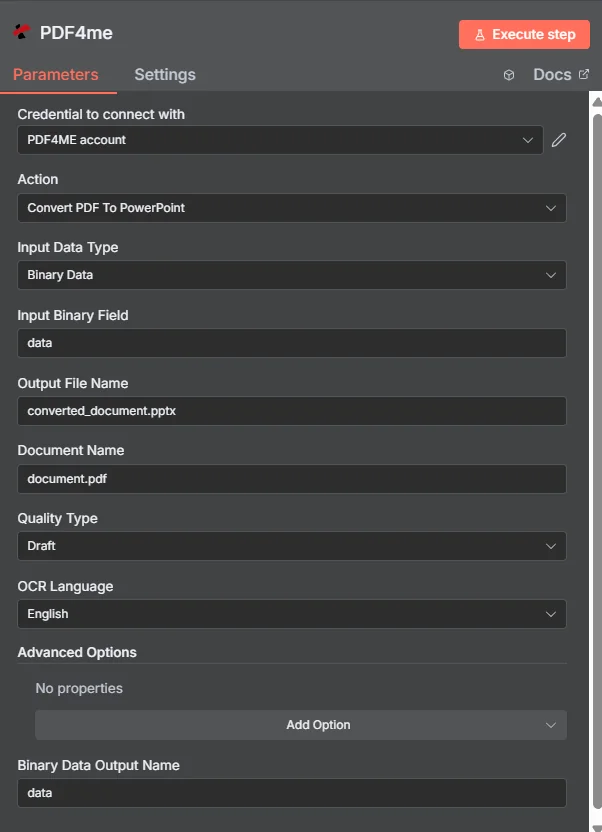
配置输入数据类型,选择质量类型(原生数据为草稿) PDFs(扫描高),设置 OCR 语言,并运行。
参数
必需的: 连接凭证、输入数据类型、质量类型 OCR 必须提供语言、文档名称、输出文件名和二进制数据输出名称。匹配的输入字段(输入二进制字段、Base64 文档内容或文件) URL根据所选的输入数据类型,需要提供以下信息。
| 范围 | 必需的 | 它的作用 | 例子 |
|---|---|---|---|
| Input Data Type | Yes | How the source PDF is supplied. Binary Data reads from a previous n8n node (most common). Base64 String accepts an encoded payload. URL downloads from a public link. | Binary Data |
| Input Binary Field | Conditional | Binary field from the previous node holding the PDF content. Required when Input Data Type is Binary Data. Wire from Google Drive, Dropbox, OneDrive, HTTP Request, or Read Binary File node. | {{ $binary.data }} |
| Base64 Document Content | Conditional | Base64-encoded PDF content. Required when Input Data Type is Base64 String. Useful for PDFs arriving via webhook or REST API payload. | JVBERi0xLjQK... |
| File URL | Conditional | Public URL to the source PDF. Required when Input Data Type is URL. Must not require authentication. | https://example.com/report.pdf |
| Quality Type | Yes | Draft (fast: 1 API call per file, native PDFs) or High (accurate, 2 API calls per page, scanned or complex PDFs with OCR + layout reconstruction). | Draft |
| OCR Language | Yes | Source PDF language hint for accurate text recognition. Options include English, German, French, Spanish, Italian, Portuguese, Dutch, Polish. Critical for scanned PDFs when Quality Type is High. | English |
| Output File Name | Yes | Filename for the generated PowerPoint presentation. Must include the .pptx extension. | converted_document.pptx |
| Document Name | Yes | Filename of the source PDF for reference and tracking in the response payload. Helps audit which output came from which input. | document.pdf |
| Binary Data Output Name | Yes | Name of the binary field in the n8n output that will hold the generated PPTX file. Used to reference the file in subsequent workflow nodes. | data |
高级选项
所有字段 高级选项 均为可选。
自定义配置文件JSON-用于高级转换调整的格式选项(输出格式、格式保留开关)。
最大重试次数临时故障的最大重试次数。默认值为 3。
合并所有工作表Boolean. true 将内容合并到一个演示文稿中;false 创建单独的幻灯片。默认值为 false。
保留输出格式Boolean. true 保持视觉保真度(默认值);false 创建仅具有基本格式的普通演示文稿。
重试延迟(秒)重试间隔时间。默认值为 5 秒。
质量类型选项
草稿默认,快速,1 API 每个文件的调用最适合本地居民 PDF带有可选文本(原生数字) PDF(来自 Word、Google Docs、浏览器打印、InDesign)。返回一个可用的 PPTX 只需几秒。规模化生产比高模式便宜 5-10 倍。
高的准确,2 API 每页调用次数扫描所需。 PDFs、照片页面、多栏学术版式,或 PDF草稿模式下,文本会错位。适用。 OCR + AI布局重建,实现生产级输出。
输出字段
| 场地 | 类型 | 它包含什么 |
|---|---|---|
fileName | String | Filename of the generated PowerPoint document (e.g. converted_document.pptx). |
mimeType | String | MIME type of the output file: always application/vnd.openxmlformats-officedocument.presentationml.presentation for PPTX. |
fileSize | Number | Size of the generated PPTX file in bytes. |
success | Boolean | True when conversion completed successfully; false on failure. |
inputDataType | String | Echoes which input method was used (binary, base64, or URL) for audit trail. |
sourceFileName | String | Echoes the Document Name input: useful for tracking source-to-output mappings. |
qualityType | String | Quality level applied (Draft or High). |
language | String | OCR language applied during conversion. |
快速设置
- 添加 PDF4me 致你 n8n 工作流程和选择 转变 PDF 到 PowerPoint 作为行动。
- 在 用于连接的凭证请选择您的 PDF4me 或使用您的凭证创建一个凭证 API 钥匙。
- 放 输入数据类型 到 二进制数据 (最常见:从前一个节点读取数据)。
- 地图 输入二进制字段 将源节点的二进制输出(例如 Google 云端硬盘下载、Dropbox、 HTTP 要求)。
- 放 文档名称 到 PDF 文件名(例如
report.pdf用于跟踪。 - 选择 质量类型: 草稿 本地 PDF(快速且便宜)或 高的 扫描 PDF秒。
- 放 OCR语言 与来源匹配 PDF (英语、德语、法语、西班牙语等)
- 放 输出文件名 到
converted_document.pptx和 二进制数据输出名称 到data。 - 将输出连接到下一个节点:电子邮件发送器, SharePoint 上传、OneDrive 或演示文稿审阅工作流程。
- 执行工作流程。输出包包含可编辑内容。 PPTX 已准备好进行下游自动化。
工作流程示例
工作流程示例Common n8n workflow patterns using Convert PDF to PowerPoint.
销售报告 PDF → 可编辑 PowerPoint → 发邮件给领导
- 每周一上午 9:00,系统会触发一个计划触发器,用于处理上周的销售报告。 PDF 由BI系统自动生成。
- 一个 SFTP 读取节点检索 PDF 从 BI 导出文件夹。
- PDF4me 转变 PDF 到 PowerPoint 进行转换。质量类型为草稿(原生) PDF 来自 BI 工具), OCR 语言为英语,输出文件名是
weekly_sales_{{ $today.weekNumber }}.pptx。 - Gmail 节点发送可编辑内容 PPTX 提交给销售领导团队。领导层可以直接编辑幻灯片,添加自己的分析,然后转发给高管,而无需手动从头开始重建。 PDF。
- 微软 SharePoint 上传存档 PPTX 在每周合规报告文件夹中。
扫描的研究论文 → OCR PPTX → 培训材料
- 当研究人员将扫描的学术论文上传到共享文件夹时,Dropbox Watch Files 触发器会触发。
- PDF4me 转变 PDF 到 PowerPoint 运行时质量类型设置为“高”(扫描源), OCR 与论文语言相匹配(欧洲研究通常使用英语或德语)。
- 输出 PPTX 包含可编辑、可选择的文本,通过以下方式提取 OCR 并以幻灯片的形式逐页呈现。研究人员现在可以将图表、段落和研究结果重复用作培训材料。
- Google 云端硬盘上传文件会存储以下内容 PPTX 在共享的培训资料文件夹中。
- Slack 通知会提醒培训团队有新的可编辑材料可用,与手动重新输入相比,每份文件可节省 4 个多小时。 PDF。
客户提案 PDF → 品牌化 PPTX → CRM 依恋
- 一个 HTTP 来自提案生成系统的 webhook 会发送最终版本 PDF 销售部门最终确定价格时。
- PDF4me 转变 PDF 到 PowerPoint 转换 PDF 可编辑 PPTX质量类型为草稿(原生) PDF), OCR 语言为英语。
- 销售代表现在可以打开 PPTX在交付给客户之前,无需从头开始重新创建演示文稿,即可添加公司品牌标识、自定义封面幻灯片并重新排列各个部分。
- Salesforce 更新记录步骤会附加可编辑记录。 PPTX 与原始记录一起记录机会 PDF。
- Slack 私信通知销售代表可编辑的演示文稿已准备就绪,并提供一个一键链接,可直接打开。 PowerPoint 在线的。
常见问题解答
相关操作
转变 PDF 到 Word
转变 PDF可编辑 DOCX与 PDF 到 PowerPoint 实现报告和提案中 Microsoft Office 输出的完全自动化。
转变 PDF 卓越
从表格中提取数据 PDF进入 XLSX当你的 PDF 包含更适合用电子表格而非幻灯片呈现的财务或统计表格。
转变 HTML 到 PDF
反向路径,生成 PDF来自 HTML 模板。使用上游创建 PDF然后将它们转换为 PPTX 用于演示文稿编辑。