读取条形码 PDF 在 n8n
读取条形码 PDF 是一个 n8n 模块 PDF4me 能够检测和解码嵌入在……中的条形码 PDF 文件。发送。 PDF 作为二进制数据, Base64或者 URL选择条形码类型和页面范围,并以结构化格式接收解码值。 JSON。
此节点的功能
PDF4me读取条形码 PDF 扫描 PDF 并解码任何条形码或 QR codes 它在一个地方找到了 n8n 步骤。选择 条形码类型 全部或特定格式(QR Code, Code 128, Data Matrix以及其他支持的类型),并针对特定目标 pages 或者整个文档 页返回解码后的值。 JSON 文件。非常适合用于自动化数据录入、发货标签处理、库存跟踪和合规性验证工作流程。
相关博客文章(1)
验证您的身份 API 要求
每一个 PDF4me 节点 n8n 需要有效 用于连接的凭证创建或选择一个可以容纳您的 PDF4me API 关键在于确保工作流程能够安全地验证条形码读取请求。
您不容错过的重要事实
缩小条形码类型范围可以加快扫描速度。
对所有支持的条形码格式进行扫描,虽然全面但速度较慢。如果您已经知道条形码格式,例如 QR Code 在货运标签上,直接选择它可以减少处理时间。
扫描分辨率会影响解码精度
低分辨率或高度压缩扫描的条形码 PDFs 如果条形或模块无法清晰区分,则可能无法解码。
输出结果为 JSON 文件,而不是源文件 PDF
该节点返回解码后的条形码数据。 JSON 文件位于“二进制数据输出名称”下,它不会返回或修改原始文件。 PDF。
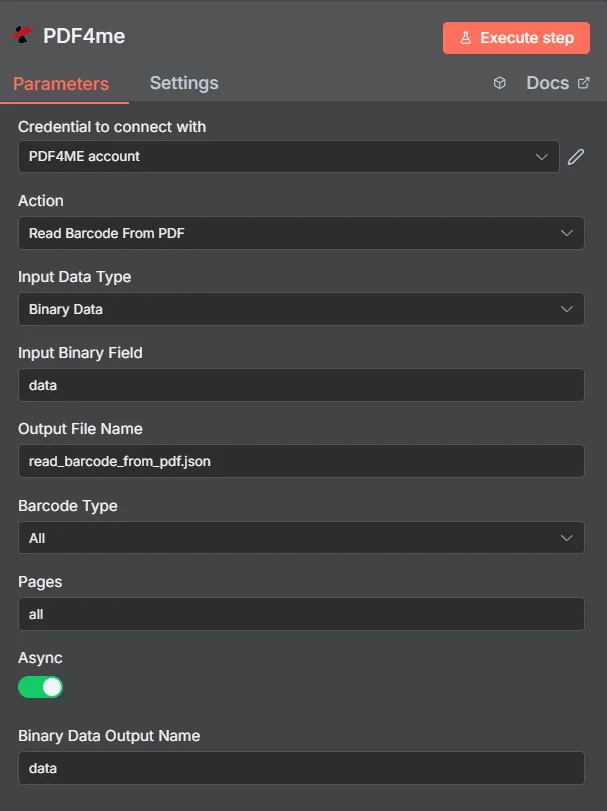
完整节点面板: PDF 通过二进制数据、条形码类型全部、页面全部
参数
必需 n8n 用户界面: 输入数据类型、条形码类型和页数。输出文件名(默认值) read_barcode_from_pdf.json), Async以及二进制数据输出名称(默认值) 数据)是可选的便捷字段。条件源字段(输入二进制字段, Base64 文档内容,文件 URL)仅当选择与其匹配的输入数据类型时才会出现。
| 范围 | 必需的 | 它的作用 | 例子 |
|---|---|---|---|
| Input Data Type | Required | How the source PDF enters the node. Binary Data reads from a previous node (default, most common). Base64 String accepts an encoded PDF. URL downloads the PDF from a public link. | Binary Data |
| Input Binary Field | Conditional | Name of the binary property on the incoming n8n item that holds the PDF. Required when Input Data Type is Binary Data. | data |
| Base64 Document Content | Conditional | Base64-encoded PDF content. Required when Input Data Type is Base64 String. | UEsDBBQABgAI... |
| File URL | Conditional | Publicly reachable URL to the PDF file. Required when Input Data Type is URL. | https://abc.com/xyz.pdf |
| Output File Name | Optional | Filename of the generated JSON file containing barcode data. Default is read_barcode_from_pdf.json. | read_barcode_from_pdf.json |
| Barcode Type | Required | The barcode format to scan for. All detects any supported type. A specific format speeds up processing when known in advance. | All |
| Pages | Required | Page indices to scan, as a string. Accepts all, a single index like 0, a comma-separated list, or a range like 1-5. | all |
| Async | Optional | Toggle background processing. On processes asynchronously for better throughput on larger jobs, off returns results synchronously. | On |
| Binary Data Output Name | Optional | Name of the binary property the output JSON file is exposed under. Default is data. | data |
输出结果包含哪些字段?
| 场地 | 类型 | 它包含什么 |
|---|---|---|
success | Boolean | True when barcode reading completed successfully. Use to route error-handling branches. |
message | String | Descriptive status message confirming success or describing an error. |
fileName | String | Filename of the generated JSON file, set from Output File Name. |
mimeType | String | MIME type of the generated file, application/json. |
fileSize | Number | Size of the generated JSON file in bytes. |
barcodeType | String | The barcode type that was scanned for during this run, for example all or QR Code. |
pages | String | The page range that was scanned during this run. |
Binary (data) | Binary | The JSON file containing decoded barcode values, under Binary Data Output Name (default data). |
如何设置读取条形码 PDF 在 n8n?
- 添加 PDF4me 致你 n8n 工作流程和设置 行动 到 读取条形码 PDF。
- 在 用于连接的凭证请选择您的 PDF4me 凭证或点击 创建新凭证 并粘贴你的 API 钥匙。
- 放 输入数据类型 到 二进制数据 (默认), Base64 String, 或者 URL 并填写匹配字段。
- 放 条形码类型 到 全部 或者某种特定格式,例如 QR Code 或者 Code 128。
- 放 页 到
all单个页面索引,或类似范围1-5。 - (可选)更改 输出文件名 从默认值
read_barcode_from_pdf.json和 二进制数据输出名称 从默认值data。 - (可选) Async 用于对较大批次进行后台处理。
- 执行节点并路由解码后的数据 JSON 将输出传递到下一个工作流程步骤。
典型配置
工作流程示例Common n8n workflow patterns using Read Barcode From PDF.
货运标签数据录入
- 电子邮件附件触发器会接收一份发货清单。 PDF (二进制数据,属性)
数据)。 - PDF4me 读取条形码 PDF 使用条形码类型运行 Code 128 解码跟踪号码。
- 集合节点解析 JSON 输出并将跟踪号码写入物流电子表格。
库存报告核对
- 系统会定期触发每周库存报告。 PDF 一个 URL。
- PDF4me 读取条形码 PDF 已配置输入数据类型 URL 选择“全部条形码类型”以捕获混合条形码格式。
- 将解码后的商品代码与库存数据库进行比对,以标记差异。
合规证书验证
- 文档管理系统上传合规证书 PDF 待批准。
- PDF4me 读取条形码 PDF 仅扫描第 1 页(页数设置为 0)以进行嵌入式验证 QR 代码。
- 将解码后的值与内部注册表进行比较,以确认证书的真实性。
实用技巧
Set Barcode Type when you know the format
All is thorough but scans for every supported format. Selecting the exact type, such as QR Code, speeds up processing on high-volume workflows.
Limit Pages on large documents
Scanning all pages of a long PDF is slower than targeting the specific page or range where the barcode actually lives.
Low-resolution scans can fail to decode
If a scanned PDF returns no barcode data, check the source scan resolution before assuming the barcode itself is invalid.
Enable Async for large batch jobs
Turning Async on lets PDF4me process larger or higher-volume barcode-reading jobs in the background instead of blocking the workflow synchronously.
Output is JSON, not the original PDF
Do not expect the node to return a modified PDF. It returns a separate JSON file with the decoded barcode values.
Multiple barcodes per page are all captured
The node is not limited to one barcode per page. Every detected barcode on the scanned pages is included in the JSON output.
速查表
| 场地 | 价值 |
|---|---|
| Action | Read Barcode From PDF |
| Input Data Type | Binary Data |
| Input Binary Field | data |
| Output File Name | read_barcode_from_pdf.json |
| Barcode Type | All |
| Pages | all |
| Async | On |
| Binary Data Output Name | data |
| Credentials | PDF4me API credential |
常见问题解答
相关操作
添加条形码 PDF
相反的操作。生成条形码并将其印制到…… PDF 而不是阅读已经存在的文章。
创建条形码
生成独立的条形码图像,可用于生成此操作稍后读取的标签。
阅读瑞士 QR Code
当需要时,请改用此特殊操作 PDF 包含一个瑞士 QR-账单支付代码,而不是通用条形码。
在其他平台上执行相同任务
读取条形码 PDF 在 Make
条形码解码逻辑与……相同 Make 模块,带有云存储触发器的可视化场景。
读取条形码 Zapier
通过 6000 多个 SaaS 应用和 Webhook 触发条形码提取 Zapier。
读取条形码 PDF 在 Power Automate
Microsoft 365 与……流动 SharePoint, OutlookTeams 和 Dataverse 集成。
读取条形码 PDF REST API
原始 REST 用于自定义后端代码或 Postman 测试的端点。
用例
文档处理和数据提取
- 自动从发票、发货单和库存报告中提取产品代码、序列号和跟踪信息,以简化数据录入并减少人工处理错误。
- 通过读取嵌入式条形码来处理扫描文档和数字档案,以识别文档类型、批号和参考代码,从而实现文档的自动分类和路由。
- 从中提取客户信息和订单详情 PDF 通过阅读来获取收据、发票和送货单。 QR codes 以及包含编码的客户和交易数据的条形码
质量控制和合规性验证
- 通过读取产品文档、证书和监管表格上的条形码,验证产品的真实性和合规性,确保产品符合行业标准和监管要求。
- 通过从生产和质量保证文件中嵌入的条形码中提取批号、有效期和生产代码,处理批次跟踪和质量控制文件。
- 通过读取安全条形码来验证文件的完整性和真实性; QR codes 包含用于文件安全的验证信息和防篡改标识符
库存管理和资产跟踪
- 通过读取条形码提取物品代码、位置信息和状态更新,处理库存报告和资产文档,以实现自动化库存管理和资产跟踪系统。
- 从货运标签、送货单据和物流报告中提取跟踪信息,以实现供应链管理的实时包裹跟踪和交付确认。
- 通过读取包含设备 ID、维护计划和服务历史记录的条形码,处理设备维护记录和服务文档,以进行预防性维护和资产管理。