创建瑞士二维码账单 n8n
此节点的功能
PDF4me创建瑞士二维码钞票 生成完全符合瑞士规定的二维码支付单,并嵌入其中 PDF 通过您的文件 n8n 提供自动化工作流程。 PDF 通过二进制数据(base64编码)开具发票 URL如果没有任何背景文件,或者根本没有背景文件,该节点将输出一张标准化的瑞士二维码钞票。 债权人和债务人详情 IBAN参考编号、多语言标签和可配置的输出格式 只需一步自动化操作即可完成。与所有瑞士银行完全兼容。 PostFinance以及瑞士支付标准(SPS) 规格。
验证您的身份 API 要求
每一个 PDF4me 节点 n8n 需要有效 用于连接的凭证创建或选择一个可以容纳您的 PDF4me API 关键在于确保工作流程能够安全地验证瑞士二维码账单生成请求。
您不容错过的重要事实
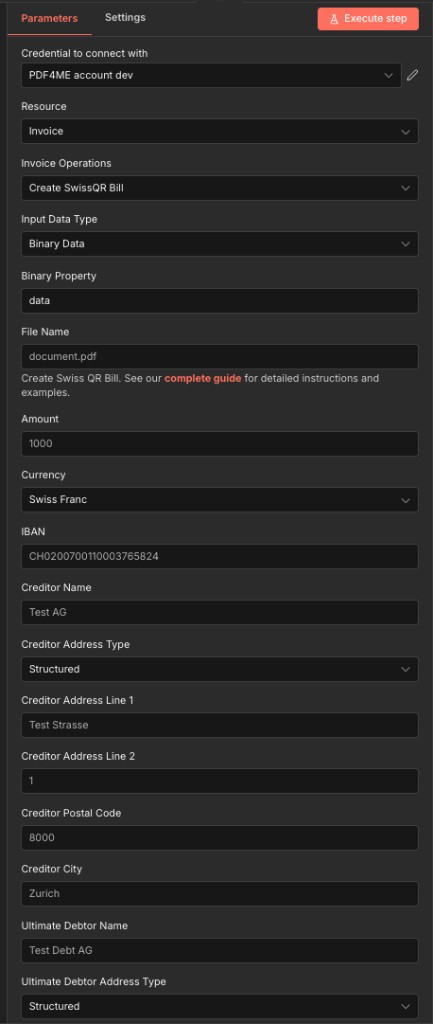
顶部面板、连接方式、输入类型、付款详情和债权人地址字段
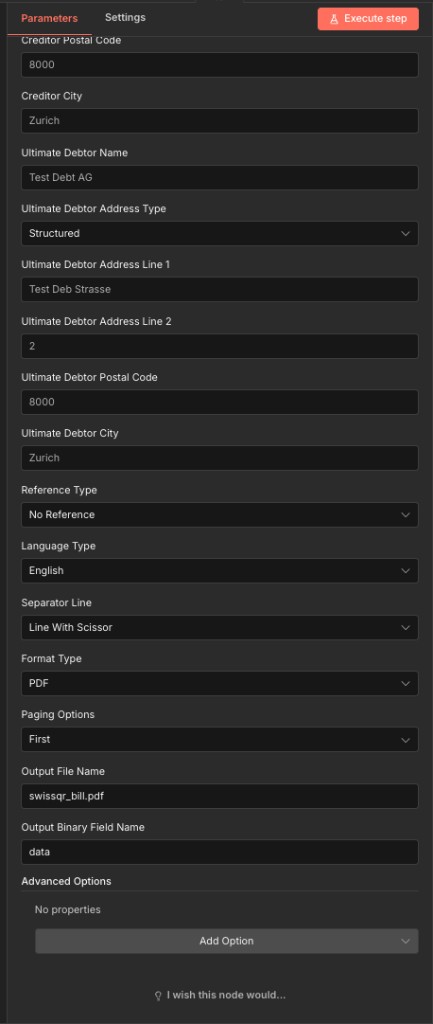
底部面板,包括债务人地址、参考类型、语言、格式、分页和输出配置
参数
必需 n8n UI: 连接凭证、输入数据类型、金额、货币 IBAN债权人名称、债权人地址类型、最终债务人地址类型、参考类型、语言类型、分隔符、格式类型,以及(当格式类型为) PDF分页选项。所有地址行、邮政编码和城市字段均标记为可选。 UI 但是是 强烈推荐用于有效的瑞士二维码钞票瑞士支付标准规范和 PDF4me API 请将它们视为生产环境必需品。执行有效负载始终会发送它们(如果为空,则发送空字符串)。
| 范围 | 必需的 | 它的作用 | 例子 |
|---|---|---|---|
| Input Data Type | Conditional | How the source PDF is supplied. None generates a standalone QR bill with no background document. Binary Data reads from a previous n8n node: the most common option. Base64 String accepts encoded file content. URL downloads from a public link. | Binary Data |
| Binary Property Name | Conditional | Name of the binary field from the previous node. Required when Input Data Type is Binary Data. Maps to the output binary field of a prior download or file node. | data |
| Base64 Content | Conditional | Base64-encoded PDF content. Required when Input Data Type is Base64 String. | JVBERi0xLjQK... |
| File URL | Conditional | Public URL to the source PDF file. Required when Input Data Type is URL. | https://example.com/invoice.pdf |
| File Name | Conditional | Filename of the source PDF input. Shown only when Input Data Type is Binary Data, Base64 String, or URL: hidden for None. Include the .pdf extension. | document.pdf |
| Amount | Yes | Payment amount for the Swiss QR bill. Enter without leading zeroes (per the node field description). Must be a positive number with up to two decimal places. | 1000 |
| Currency | Yes | Currency for the QR bill. Only two options accepted: CHF (Swiss Franc, standard for domestic Swiss payments) or EUR (cross-border transactions). | CHF |
| IBAN | Yes | Creditor's Swiss IBAN. Must start with CH followed by 19 digits and be linked to a valid PostFinance or Swiss bank account. An invalid IBAN halts the workflow. | CH0200700110003765824 |
| Creditor Name | Yes | Full name of the creditor company or individual as registered with the bank. Printed on the generated QR bill in the creditor section. | Test AG |
| Creditor Address Type | Yes | Address format for creditor information. Sent as code S (Structured: components stored separately for maximum SPS compliance) or K (Combined, two free-form lines). | Structured (S) |
| Creditor Address Line 1 | No | Street name for the creditor's address. Marked optional in the UI but required for valid Swiss QR bills: always provide it. When Address Type is Structured, enter the street name only. | Test Strasse |
| Creditor Address Line 2 | No | House number or secondary address detail. Used as the second address line when Creditor Address Type is Structured. | 1 |
| Creditor Postal Code | No | Swiss postal code for the creditor's address. Marked optional in the UI but required for valid Swiss QR bills. Must be a 4-digit Swiss postal code matching the creditor city. | 8000 |
| Creditor City | No | Swiss city name for the creditor's address. Marked optional in the UI but required for valid Swiss QR bills. Must correspond to the postal code entered above. | Zurich |
| Ultimate Debtor Name | No | Full name of the party who will pay the bill. Marked optional in the UI but required for valid Swiss QR bills with a known debtor. Appears in the payment section of the printed QR bill. | Test Debt AG |
| Ultimate Debtor Address Type | Yes | Address format for the ultimate debtor. Sent as code S (Structured: recommended for automated Swiss banking) or K (Combined, two free-form lines). | Structured (S) |
| Ultimate Debtor Address Line 1 | No | Street name for the debtor's address. Marked optional in the UI but required for valid Swiss QR bills with a known debtor. | Test Deb Strasse |
| Ultimate Debtor Address Line 2 | No | House number or secondary address line for the debtor. Used as the second line when Ultimate Debtor Address Type is Structured. | 2 |
| Ultimate Debtor Postal Code | No | Swiss postal code for the debtor's address. Marked optional in the UI but required for valid Swiss QR bills with a known debtor. | 8000 |
| Ultimate Debtor City | No | Swiss city name for the debtor's address. Marked optional in the UI but required for valid Swiss QR bills with a known debtor. | Zurich |
| Reference Type | Yes | Sent as code NON (No Reference: simple payments), QRR (QR Reference, 27-digit numeric for PostFinance/Swiss bank reconciliation), or SCOR (Creditor Reference, ISO 11649 for SEPA-compatible cross-border payments). | NON |
| Language Type | Yes | Display language for QR bill labels and printed text. Options: English, German, French, Italian. Choose the language matching the recipient's Swiss region. | English |
| Separator Line | Yes | Visual separator between the invoice body and the QR bill tear-off section. Note the node field name is spelled "seperatorLine". Options: Line With Scissor (Swiss standard), Simple Line, No Line. | Line With Scissor |
| Format Type | Yes | Output file format for the generated QR bill. PDF is recommended for print-ready documents. PNG and JPEG for digital delivery. TIFF for archival quality. Empty or null for raw data output. | PDF |
| Paging Options | Conditional | Controls where the QR bill slip is placed in the output document. Required when Format Type is PDF. Options: First, Last, Add Page At End, Custom. | First |
| Page Number | Conditional | Specific page index for placing the QR bill. Shown and required only when Format Type is PDF and Paging Options is Custom. | 3 |
| Output File Name | No | Filename for the generated Swiss QR bill document. Default value is provided by the node. Include the extension matching your chosen Format Type. | swissqr_bill.pdf |
| Output Binary Field Name | No | Name of the binary field in the n8n output that holds the generated QR bill file. Default is data. Used to reference the file in subsequent workflow nodes. | data |
高级选项
所有字段都位于 高级选项 收集功能是可选的,可提供对二维码账单有效载荷的额外控制。可通过以下方式添加: 添加选项 在节点用户界面中。
参考非结构化消息账单信息av1av2简介输入数据类型选项
选择来源方式 PDF 进入节点。每个选项都适用于不同的工作流程模式。
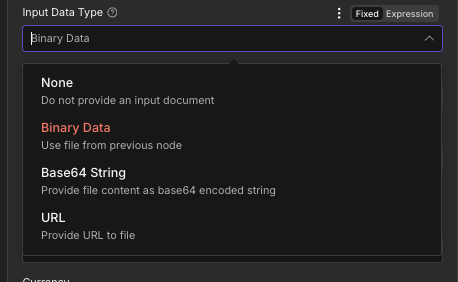
输入数据类型下拉菜单,四个选项控制数据源的来源。 PDF 提供给节点
没有任何无背景文件二进制数据来自前一个节点的文件,最常见的数据)。Base64字符串Base64编码的文件内容URL从公共链接下载地址类型选项
适用于两者 债权人地址类型 和 最终债务人地址类型选择地址组成部分在二维码数据中的存储方式。
结构化建议使用单独的地址字段合并两条自由格式地址线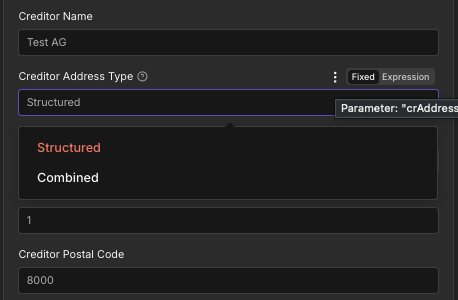
债权人地址类型,结构化地址与组合地址
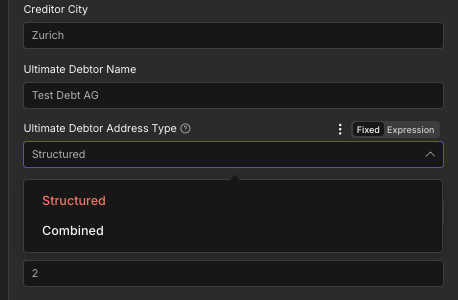
最终债务人地址类型,与债权人地址类型相同。
参考类型选项
控制二维码中嵌入的付款参考标准。这会影响银行系统中付款与发票的匹配方式。
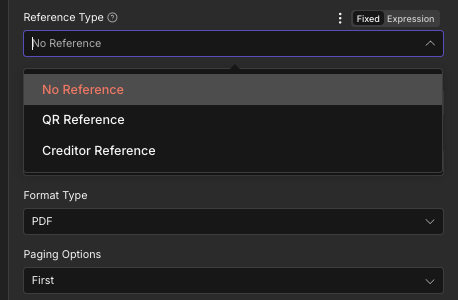
参考类型:无参考、二维码参考或债权人参考
无参考默认情况下,无结构化引用二维码参考27位数字瑞士银行对账单债权人参考ISO 11649跨境 SEPA 付款格式类型选项
控制生成的二维码账单输出的文件格式。
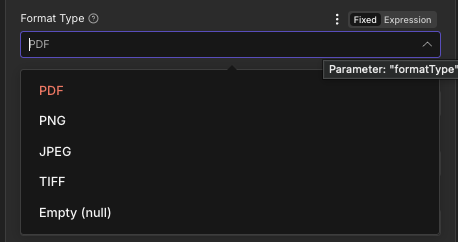
格式类型下拉菜单, PDF, PNG, JPEG, TIFF或空(null)
PDF默认,可直接打印PNG网络和数字交付JPEG适合电子邮件发送的图片多伦多国际电影节档案级品质空(null)原始数据输出分页选项
控制二维码账单在输出文档中相对于现有发票页面的位置。
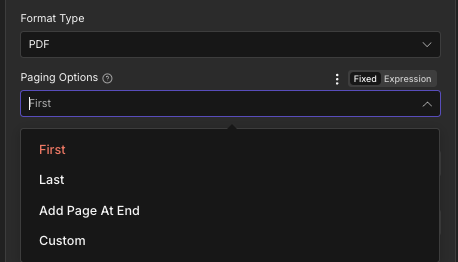
分页选项:首页、末页、页尾添加或自定义
第一的默认设置,二维码账单位于第 1 页。最后的最后一页有二维码账单在末尾添加页面最常见的专用二维码账单页面风俗特定页面定位输出字段
| 场地 | 类型 | 它包含什么 |
|---|---|---|
fileName | String | Filename of the generated Swiss QR bill document, for example swissqr_bill.pdf. Map into an upload or email node as the destination filename. |
mimeType | String | MIME type of the output file, for example application/pdf. Useful for content type validation in downstream HTTP or storage nodes. |
fileSize | Number | Size of the generated QR bill file in bytes. Useful for storage planning, bandwidth monitoring, and conditional routing in the workflow. |
success | Boolean | True when the Swiss QR bill was created successfully. False if an error occurred during generation. Use this field to route error handling branches in your workflow. |
message | String | Human-readable status message confirming success or describing the error encountered. Useful for logging and error notification steps. |
快速设置
- 添加 PDF4me 致你 n8n 工作流程。设置 资源 到 发票 和 发票操作 到 创建 SwissQR 账单。
- 在 用于连接的凭证请选择您的 PDF4me 凭证或点击 创建新凭证 并粘贴你的 API 钥匙。
- 放 输入数据类型连接前一个节点的二进制输出(二进制数据),并提供一个 Base64 字符串,提供一个公共 URL或者选择“无”以生成独立的二维码单。
- 进入 数量, 货币 (瑞士法郎用于支付瑞士法郎), IBAN (有效的瑞士瑞士法郎) IBAN 以 CH 开头)。
- 请填写所有内容 债权人 字段:姓名、地址类型(建议使用结构化格式)、地址行 1、地址行 2、邮政编码和城市。
- 请填写所有内容 最终债务人 填写付款方全名和地址详细信息的字段。
- 放 参考类型 (默认情况下不引用) 语言类型 (英语、德语、法语或意大利语),以及 分离线 (剪刀线是瑞士标准)。
- 配置 格式类型 (PDF (推荐)和 分页选项 (在末尾添加页面,将二维码账单页附加到现有发票。)
- 放 输出文件名 到
swissqr_bill.pdf和 输出二进制字段名称 到data。 - 将输出连接到下一个节点:电子邮件发送器、云存储上传、数据库写入,并执行工作流。
工作流程示例
工作流程示例Common n8n workflow patterns using Create Swiss QR Bill.
- 每个月的第一天都会触发计划触发器,以开始计费运行。
- Google 云端硬盘节点列出了所有发票 PDF每月账单文件夹中,每位客户一份。
- “循环遍历项目”节点会遍历每个文件。对于每个文件,“Google 云端硬盘下载”节点会检索其二进制内容。
- PDF4me Create Swiss QR Bill 会使用客户的金额,在每张发票上附加一个符合规定的二维码付款单。 IBAN地址映射自 Google Sheets 客户记录。语言类型设置为德语。分页选项设置为“页末添加页”。
- Gmail节点发送二维码账单 PDF 以电子邮件附件的形式发送给每位客户。文件名使用客户 ID,以便于识别。
- 当电子商务平台确认订单时,Webhook 触发器就会触发。
- 一个 HTTP 请求节点生成发票 PDF 一个 HTML 使用订单数据创建模板。
- PDF4me 创建瑞士二维码账单会将符合规定的二维码单据附在发票上。 PDF金额和债务人详细信息均来自 webhook 有效负载。参考类型设置为“债权人参考”,用于对账。语言类型设置为法语,适用于瑞士法语区。
- 微软 SharePoint 节点上传已完成的二维码账单 PDF 移至订单存档文件夹。
- 一个 HTTP 请求节点将订单状态更新为“发票已发送”。 CRM 系统。
- 系统会在每周一早上触发计划触发器,检查是否有逾期订阅帐户。
- PostgreSQL 节点查询所有超过 14 天未结清余额的账户。
- 循环遍历项目节点处理每个订阅者。 PDF4me 创建瑞士二维码账单的调用中,输入数据类型设置为“无”,没有后台运行。 PDF生成一张清晰独立的二维码账单。债务人姓名和地址均来自数据库记录。参考类型为“无参考”。语言类型为“意大利语”(适用于瑞士意大利语区)。
- 微软 Outlook 节点会向每位订阅者发送包含独立二维码账单的付款提醒邮件。 PDF 随附的。
- PostgreSQL 节点会记录提醒发送时间戳,并增加每个帐户的提醒计数。