从 Word 中提取文本 Make:使用 Clean Text 进行检索 PDF4me
PDF4me 从 Word 中提取文本 是一个 Make 该模块可从 Word 文档中提取文本内容,并支持页面范围控制,以及去除注释、页眉、页脚和先清除修订痕迹等选项。无需打开 Word,即可使用此功能将干净的文本导入搜索引擎索引、翻译服务或文本挖掘流程。
本模块的功能
PDF4me 从 Word 中提取文本 将 .docx 文件的文本内容以单个“提取文本”字段的形式返回,可以选择限定页面范围,并进行清理,例如移除注释、页眉/页脚或先接受修订痕迹。此操作取代了手动打开文档复制文本。
相关博客文章
目前尚无关于此功能的博客文章——敬请期待。
在此期间,您可以浏览 PDF4me 博客,查看适用于各平台的教程和工作流程。
访问博客 →
我如何验证我的身份 Make 设想?
每一个 PDF4me 模块 Make 需要有效 联系创建或选择一个可以容纳您的 PDF4me API 关键在于确保该方案能够安全地验证文本提取请求。
您不容错过的重要事实
“接受更改”操作在提取之前运行,而不是之后运行。
启用“接受更改”选项会首先最终确定文档中的所有跟踪更改,因此提取的文本反映的是编辑后的版本。如果您需要保留源文本中逻辑上存在的修订标记,请禁用此选项。
页码范围是可选的,并非必需。
起始页码和结束页码用于缩小提取范围,仅提取部分页面。如果将这两项都留空,则一次调用即可提取整个文档。
文档缓冲区字段标记为 JSON 文件
尽管名称如此,Json 文件保存的是 Word 文档映射后的二进制内容,而不是其他内容。 JSON 文本。将其映射得与任何其他格式的文件缓冲区完全相同。 PDF4me 模块。
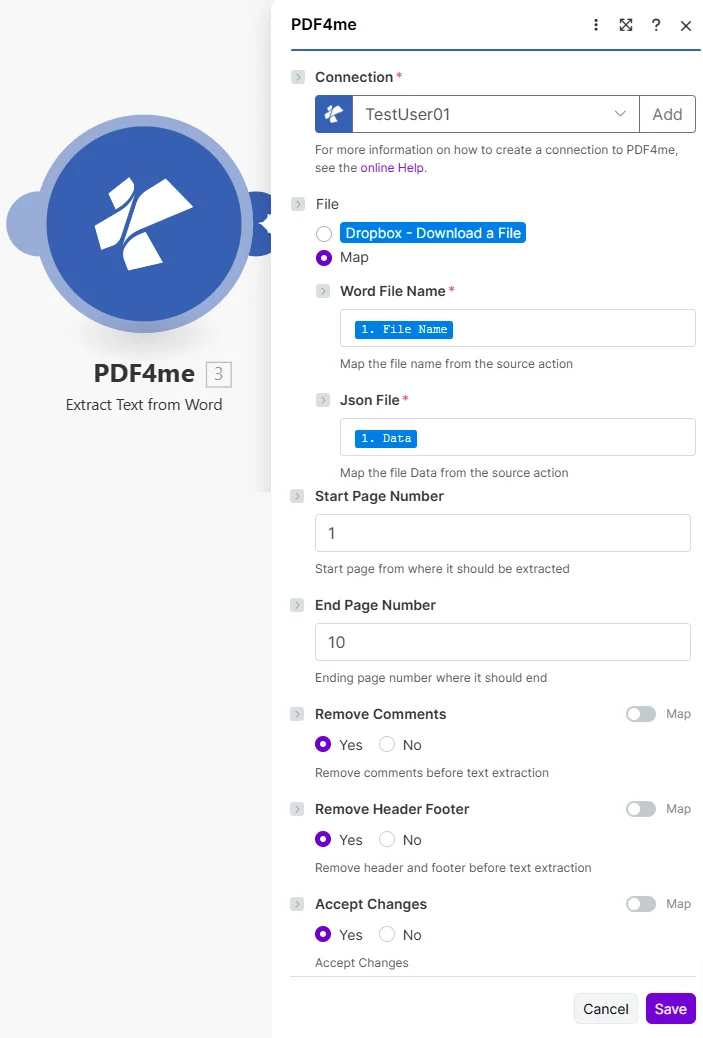
将文件设置为映射,连接上一个模块中的 Word 文件名和 Json 文件,然后设置可选的页面范围和清理开关。
参数
必需的: 必须始终提供连接和文件信息。当文件类型为“映射”时,需要提供 Word 文件名和 JSON 文件名。页面范围和清理开关是可选的。
| 范围 | 必需的 | 它的作用 | 例子 |
|---|---|---|---|
| Connection | Required | PDF4me API connection. Click Add and paste your API key if connecting for the first time. | TestUser01 |
| File | Required | Radio button picking how the source Word document arrives. Pick a quick storage option (Dropbox - Download a File) or choose Map to bind Word File Name and Json File from any prior module. | Map |
| Word File Name | Conditional | Sub-field of File, shown when Map is selected. Filename of the source document including its .docx extension. | annual_report.docx |
| Json File | Conditional | Sub-field of File, shown when Map is selected. Binary content of the Word document, mapped from the prior module Data output despite the Json label. | [Word Buffer] |
| Start Page Number | Optional | 1-based page number where extraction begins. Leave blank to start from the first page. | 1 |
| End Page Number | Optional | 1-based page number where extraction ends. Leave blank to extract through the last page. | 10 |
| Remove Comments | Optional | Strips reviewer comments from the extracted text when enabled. | Yes |
| Remove Header Footer | Optional | Excludes running headers and footers from the extracted text when enabled, leaving only body content. | Yes |
| Accept Changes | Optional | Finalizes all tracked changes before extraction when enabled, so the text reflects the edited version. | Yes |
输出字段
| 场地 | 类型 | 它包含什么 |
|---|---|---|
Extracted Text | String | Complete text content from the Word document, filtered by the page range and cleanup options selected. |
如何在 Word 中设置“提取文本”? Make?
- 添加 PDF4me → 从 Word 中提取文本 致你 Make 设想。
- 选择 联系 (或点击) 添加 用你的 PDF4me API 钥匙)。
- 在下面 文件, 选择 地图 电线 Word 文件名 和 JSON 文件 来自之前的模块(Dropbox、Google Drive 或电子邮件附件)。
- (可选) 起始页码 和 页码结束 将提取内容限制在指定的页面范围内。
- 切换 删除评论, 移除页眉页脚, 和 接受更改 根据需要运行该方案,提取的文本将返回如下内容。 提取的文本。
典型配置
工作流程示例Common Make scenario patterns using Extract Text from Word.
合同条款检索索引
- 当已签署的合约进入存储库时,触发器就会触发。
- 获取文件功能会下载已执行的 Word 合同。
- 从 Word 中提取文本时,启用“接受更改”和“删除注释”功能,以获得干净的最终版本。
- 提取的文本将被写入可搜索的数据库或全文索引。
- 下游正则表达式或自然语言处理步骤提取关键术语、日期和参与方。
翻译准备
- 项目跟踪系统中已将文档标记为待翻译。
- 获取文件功能检索源 Word 文件。
- 从 Word 中提取文本时,启用“删除页眉页脚”功能,以提取正文内容。
- 清理后的文本被发送给翻译人员。 API。
- 翻译后的文本将被重新构建成一个新文档,并与原文一起存档。
旧内容迁移
- 从存档文件夹中提取旧版 Word 文档进行迁移。
- 从 Word 中提取文本,一次调用即可检索完整的文本内容。
- 该方案解析返回文本中的标题和段落。
- CMS 创建条目步骤会将内容导入到新平台中。
- 原始文档在存档中被标记为已迁移。
实用技巧
Enable Accept Changes for a final-version extract
If the source document still has open tracked changes, leaving Accept Changes off can pull ambiguous or duplicated text. Turn it on whenever you want the clean, finalized wording.
Use the page range for large documents
Setting Start Page Number and End Page Number avoids pulling an entire multi-hundred-page manual when you only need a specific section.
Remove Header Footer before search indexing
Repeated headers and footers pollute keyword frequency in search indexes and NLP pipelines. Strip them for cleaner downstream analysis.
Map Json File like any other buffer
The label is misleading, it is not a JSON string. Map the binary Data output from the prior module the same way you would for any PDF4me file input.
Pair with Parse JSON only after your own restructuring
Extracted Text is plain text, not structured JSON. If you need individual fields, run your own regex or AI parsing step against Extracted Text first.
速查表
| 场地 | 价值 |
|---|---|
| Module | Extract Text from Word |
| Connection | PDF4me API key |
| Document source | File = Map (Word File Name + Json File) |
| Page range | Start Page Number / End Page Number (optional) |
| Cleanup toggles | Remove Comments / Remove Header Footer / Accept Changes |
| Output | Extracted Text (String) |
常见问题
行业应用案例及应用
- Legal & Compliance
- Content Management
- Translation & Localization
- Research & Analytics
- 合同分析提取合同分析文本
- 法律研究挖掘法律文件中的先例
- 合规性审查提取文本以进行合规性检查
- 发现提取内容以用于电子取证
- CMS迁移:提取内容管理系统的文本
- 知识库构建可搜索的知识库
- 档案数字化从旧文档中提取文本
- 内容再利用:检索内容以供重新利用
- 翻译准备提取文本以进行翻译服务
- 多语言内容准备本地化文本
- 语言处理提取文本以进行自然语言处理分析
- 内容全球化:国际市场流程文本
- 文本挖掘提取文本以进行数据挖掘
- 情感分析分析文档情感
- 内容分析研究文件主题和议题
- 研究数据提取研究内容进行分析
相关操作
提取元数据
提取文档属性(作者、标题、日期)以及提取的正文文本。
比较文档
直接比较两个 Word 版本之间的差异,当您需要进行更改而不是比较全文时,这是一种可行的替代方案。
通过表达式提取文本
只提取符合特定模式的文本,而不是整个文档内容。
在其他平台上执行相同任务
n8n从 Word 中提取文本
相同的文本提取节点 n8n 工作流程,将其连接到自托管或云平台 n8n 实例而不是 Make。
Power Automate从 Word 中提取文本
微软也采用相同的文本提取操作 Power Automate 流动,契合 SharePoint 以及 OneDrive 工作流程。
Zapier从 Word 中提取文本
相同的文本提取步骤 Zapier将其连接到 Google Sheets、Airtable 或 CRM Zap 中已包含触发器。
PDF4me API从 Word 中提取文本
直接通过以下方式调用相同的文本提取端点 REST 对于外部的自定义集成 Make。