使用以下方法从 Word 中提取元数据 Make
提取元数据 是一个 Make 模块 PDF4me 读取 Word 文档的内置属性和自定义属性,包括标题、作者、主题、关键字、创建日期和修改日期,并以结构化形式返回这些信息。 JSON可用于文档编目、合规性审计跟踪,或无需手动打开每个文件即可填充内容管理系统。
本模块的功能
PDF4me 从 Word 中提取元数据 读取 Word 文件中的内置属性(标题、作者、主题、关键词、公司、创建日期、修改日期、页数、字数)和任何自定义文档属性,并将它们作为结构化数据返回。 JSON 你里面的对象 Make 设想。
相关博客文章
目前尚无关于此功能的博客文章——敬请期待。
在此期间,您可以浏览 PDF4me 博客,查看适用于各平台的教程和工作流程。
访问博客 →
我如何验证我的身份 Make 设想?
每一个 PDF4me 模块 Make 需要有效 联系创建或选择一个可以容纳您的 PDF4me API 关键在于确保该方案能够安全地验证元数据提取请求。
您不容错过的重要事实
内置属性和自定义属性均包含在内
标准字段(例如标题、作者和主题)以及您组织添加的任何自定义文档属性都会显示在同一个文档中。 JSON 回复。
支持 .doc 和 .docx 文件
文件名必须带有正确的扩展名,以便模块能够正确地从旧版 .doc 格式或现代 .docx 格式中读取属性。
空属性返回空值,而不是错误。
从未填写过的文档属性(例如未使用的“公司”字段)返回的是空字符串,而不是导致模块失败。
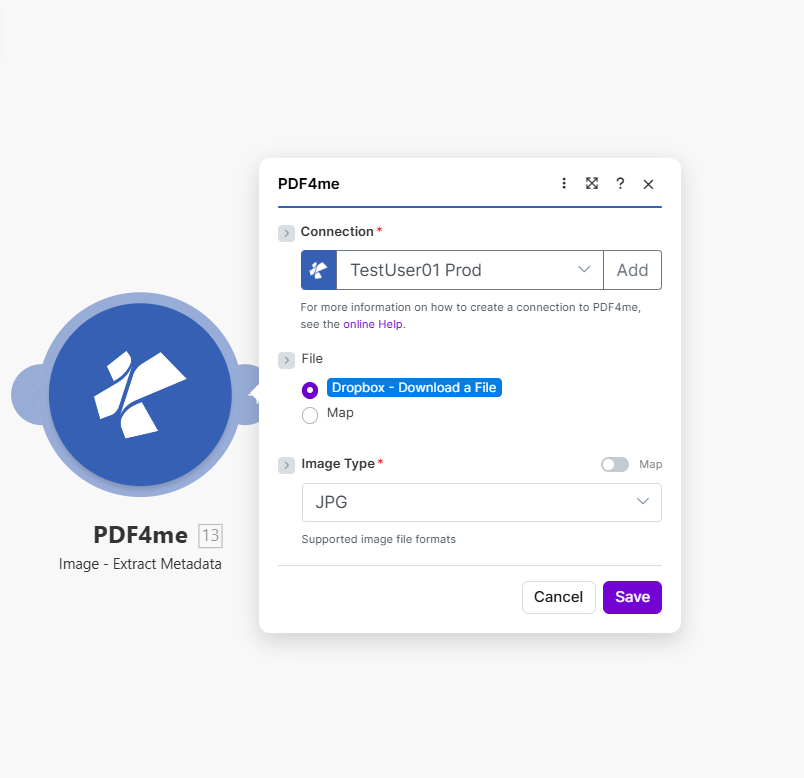
映射文件名和文档,然后运行该方案以接收内置和自定义的 Word 文档属性。 JSON。
参数
必需的: 必须提供连接号、文件名和文档。
| 范围 | 必需的 | 它的作用 | 例子 |
|---|---|---|---|
| Connection | Required | PDF4me API connection. Click Add and paste your API key if connecting for the first time. | My PDF4me connection |
| File Name | Required | Filename of the Word document with proper extension (.doc or .docx), used for processing identification. | document.docx |
| Document | Required | Word file buffer mapped from a preceding module such as Dropbox, Google Drive, or SharePoint. | [Buffer from Get File] |
输出字段
| 场地 | 类型 | 它包含什么 |
|---|---|---|
Metadata | Object | Container object with all extracted document properties, both built-in and custom. |
Title | String | The document title property. |
Author | String | The document author property. |
Subject | String | The document subject property. |
Keywords | String | The document keywords/tags property. |
CreatedDate | String | The document creation timestamp. |
ModifiedDate | String | The document last-modified timestamp. |
PageCount | Number | Total number of pages in the document. |
WordCount | Number | Total word count in the document. |
Success | Boolean | True if metadata extraction completed successfully; false if it failed. |
如何在设置中提取元数据中 Make?
- 添加 PDF4me → 提取元数据 致你 Make 设想。
- 选择 联系 (或点击) 添加 用你的 PDF4me API 钥匙)。
- 地图 文件名 文件名(带扩展名)
.doc或者.docx)。 - 地图 文档 从源模块获取二进制内容:Dropbox、Google Drive 或 SharePoint。
- 运行该场景。
Metadata对象出现在输出中,可以映射到目录、合规日志或内容管理系统 (CMS)。
典型配置
工作流程示例Common Make scenario patterns using Extract Metadata.
文献库编目
- 当新的 Word 文档上传到 Dropbox 库时,Dropbox 监视文件夹触发器会触发。
- 提取元数据从文件中读取标题、作者、关键词和日期。
- Airtable 的“创建记录”步骤会使用提取的属性对文档进行索引,以便进行搜索和筛选。
- 标签是根据文档目录的关键字属性自动生成的。
合规审计跟踪
- 计划触发器会列出合规文件夹中的所有受控文档。
- 迭代器遍历每个文件,获取文件→提取元数据。
- 过滤器会标记出以下文档: ModifiedDate 超出预期审查期限。
- 被标记的文件及其元数据将被记录到合规性审计报告中。
CMS 上传文档中的人口统计数据
- 文档落入与以下位置相连的暂存文件夹中: Make。
- 提取元数据读取标题、作者、主题和关键词。
- 一个 HTTP 模块 POST将提取的属性传递给 CMS API 创建新的内容记录。
- 原始文档一旦被移至存档文件夹,就会立即被删除。 CMS 记录已确认创建。
实用技巧
File Name extension must match the real format
A .docx file mapped with a .doc extension (or vice versa) can cause the module to misread properties. Map the source filename directly rather than hardcoding an extension.
Empty properties are normal, not errors
Documents created without filling in Title, Subject, or Company return those fields as empty strings. Handle empty values in downstream Filters rather than assuming every field is populated.
CreatedDate reflects the file, not the content
CreatedDate and ModifiedDate come from the document's file-level properties, they can differ from dates mentioned inside the document body itself.
Custom properties depend on the template
Only documents built from templates with custom document properties will return them. A plain Word file created without a template typically has none.
This module reads properties, it does not edit them
Extract Metadata is read-only. To change a document's title or author property, use a Word editing module instead.
Pair with an Iterator for folder-wide audits
To audit an entire folder of documents, loop the module inside a Make Iterator rather than calling it once per manually selected file.
速查表
| 场地 | 价值 |
|---|---|
| Module | Extract Metadata (Word) |
| Connection | PDF4me API key |
| Supported extensions | .doc, .docx |
| Key output fields | Metadata.Title, Author, Subject, Keywords, CreatedDate, ModifiedDate |
| Empty property behavior | Returns empty string, not an error |
| Custom properties | Included when present in the source template |
常见问题
行业应用案例及应用
- Compliance & Audit
- Content Management
- Legal & Professional
- Publishing & Documentation
- 文档审计跟踪提取修改日期和作者信息,以作合规性审计证据。
- 版本控制跟踪:利用创建和修改时间戳监控文档版本
- 作者验证验证文档作者是否与授权人员名单相符
- 保留政策执行:对照保留期限表检查创建日期,以做出归档决定。
- 受控文档管理跟踪文档属性,以确保符合 ISO/质量管理规范
- CMS 一体化将文档标题、作者和关键词填充到内容管理系统中
- 搜索索引提取关键词和主题以进行全文搜索引擎索引
- 文件分类根据主题和关键词元数据对文档进行分类
- 图书馆编目:使用提取的属性对公司文档库进行索引
- 标签生成:根据关键词和主题字段自动生成文档标签
- 案件文件跟踪提取法律事务文档管理系统的元数据
- 发现文档索引按作者、日期、主题对目录检索文档进行审核
- 合同管理提取合同当事方、日期、标的物,以填充合同数据库
- 特权日志生成使用文档元数据自动生成权限日志条目
- 文件制作:跟踪诉讼数据库系统中的生产文档元数据
- 稿件跟踪提取作者、标题和字数,用于稿件管理系统
- 发布工作流程:根据作者和修改日期元数据路由文档
- 风格指南合规性检查文档属性是否符合发布样式指南要求
- 内容分析分析文档统计数据(字数、页数)以进行内容规划
- 多作者协调在协作项目中跟踪文档作者和修改日期
相关操作
比较文档
比较两个 Word 文档的内容差异,与基于元数据的版本跟踪配合使用效果更佳。
合并文档
将多个 Word 文档合并为一个文档,然后提取元数据以对合并后的结果进行编目。
更新目录
刷新文档目录,这在跟踪文档元数据的发布工作流程中非常有用。
在其他平台上执行相同任务
n8n从 Word 文档中提取元数据
相同的元数据提取节点 n8n 工作流程,将其连接到自托管或云平台 n8n 实例而不是 Make。
Power Automate提取元数据
微软也采用了相同的元数据提取操作。 Power Automate 流动,契合 SharePoint 文档库工作流程。
Zapier提取元数据
相同的元数据提取步骤 Zapier将其连接到 Zap 中已有的 Google Drive 或 Dropbox 触发器。
PDF4me API提取元数据
直接通过以下方式调用相同的元数据提取端点 REST 对于外部的自定义集成 Make。