从密码中移除 PDF 在 Make
从密码中移除 PDF 是一个 Make 模块 PDF4me 永久解密受密码保护的文件 PDF 给定正确的密码,即可在编辑、合并或提取内容之前使用此功能解锁文件,只需一步即可自动清除打开密码和权限锁定限制。
本模块的功能
PDF4me从 PDF 永久解密并解锁受密码保护的 PDFs 在你里面 Make 提供场景。 PDF 如果缓冲区中包含正确的密码,该模块将返回一个不受限制的缓冲区。 PDF 准备好了 编辑、合并、拆分或内容提取 在您场景的后续模块中。它同时支持用户密码(开放式保护)和所有者密码(权限限制),因此只需一个模块即可一步清除所有访问障碍。
相关博客文章
目前尚无关于此功能的博客文章——敬请期待。
在此期间,您可以浏览 PDF4me 博客,查看适用于各平台的教程和工作流程。
访问博客 →
我如何验证我的身份 Make 设想?
每一个 PDF4me 模块 Make 需要有效 联系创建或选择一个可以容纳您的 PDF4me API 关键在于该场景能够进行身份验证 PDF 安全地解锁请求。
您不容错过的重要事实
密码必须完全匹配,模块不会猜测。
该模块要求在“密码”字段中输入正确的密码。如果密码错误,模块将返回错误,并且场景停止。请将密码安全地存储在…… Make数据存储、环境变量或连接的密钥管理器,切勿将它们硬编码到场景配置中,以免它们以明文形式显示。
输出是普通的未锁定输出。 PDF 缓冲,无需额外步骤
该模块返回文档数据(已解锁) PDF 缓冲区)和名称(文件名)。将文档数据输出直接映射到下游 PDF4me 模块、转换为 Word、添加水印、合并 PDFs提取页面,无需任何额外的转换步骤。输出结果 PDF 所有限制已永久解除,可立即使用。
使用迭代器批量解锁多个 PDFs
解锁多个受密码保护的 PDFs 在一个场景运行中,在此模块之前使用 Repeater 或 Iterator。每次迭代传递一个 PDF 以及它的密码。解锁后的输出可以路由到云存储(Dropbox、Google Drive、 SharePoint或者在同一场景下使用另一个处理模块,从而实现批量解锁的完全自动化。
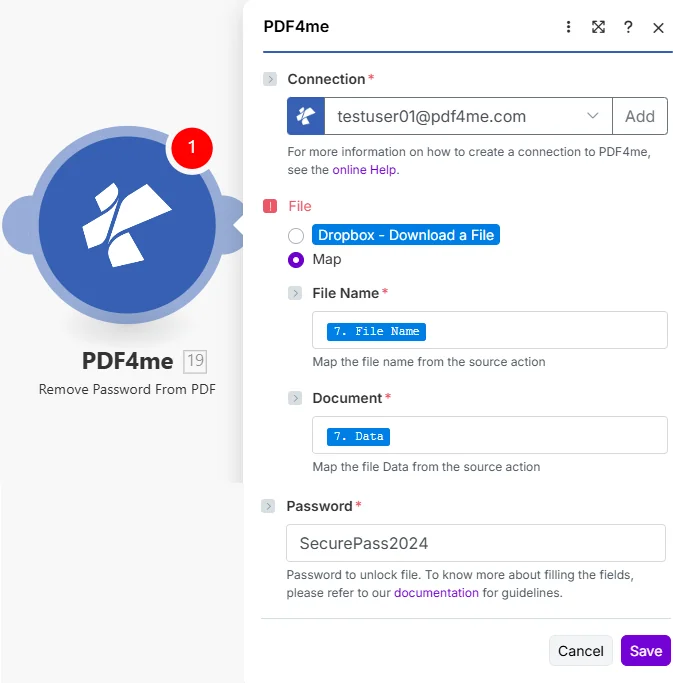
将文件设置为映射,从上一步下载中获取文件名和文档,然后输入密码。输出的文档数据是完全解锁的。 PDF 可与任何下游模块兼容。
移除密码需要哪些参数? PDF 需要?
必需的: 必须提供连接号、文件名、文档名称和密码。该模块无法解密。 PDF 没有正确的密码。
| 范围 | 必需的 | 它的作用 | 例子 |
|---|---|---|---|
| Connection | Required | PDF4me API connection. Click Add and paste your API key if connecting for the first time. Reused automatically across all PDF4me modules in your scenarios. | My PDF4me connection |
| File | Required | How the protected PDF is supplied. Choose Map to wire File Name and Document from a prior module. Choose Dropbox, Download a File to pull directly from Dropbox without a separate download step. | Map |
| File Name | Required | Filename of the password-protected PDF including .pdf extension. Map from the filename output of your source module: e.g. the Name field of a Dropbox or Google Drive download step. | protected_document.pdf |
| Document | Required | Binary content of the password-protected PDF. Must be raw file bytes from a download or upload module: the Data field in Dropbox, Google Drive, or OneDrive. Do not pass a URL string or filename here. | 1. Data |
| Password | Required | The exact password needed to unlock the PDF. Accepts both user passwords (open protection) and owner passwords (permission lock). Retrieve from a Make Data Store or environment variable rather than hardcoding. | SecurePass2024 |
输出字段
| 场地 | 类型 | 它包含什么 |
|---|---|---|
Name | String | Output filename with password removed. Map into an upload module as the destination filename. |
Doc Data | Buffer | Unlocked PDF document as a binary buffer with all password restrictions permanently removed. Map directly into any downstream PDF4me module or cloud storage upload step. |
如何设置删除密码 PDF 在 Make?
- 添加 PDF4me → 从密码中移除 PDF 致你 Make 设想。
- 选择 联系 (或点击) 添加 用你的 PDF4me API 钥匙)。
- 在下面 文件, 选择 地图 显示文件名和文档字段。
- 地图 文件名 将源步骤的输出文件名添加到文件中(包括)
.pdf扩大)。 - 地图 文档 到同一步骤的二进制数据字段:通常命名为 数据 在 Dropbox、Google Drive 或 OneDrive 模块中。
- 进入 密码为了安全起见,请从……中检索。 Make 数据存储查找步骤,而不是在这里硬编码。
- 点击 节省 并运行该场景。绘制地图 文件日期 输出到下一个模块:上传、合并、转换或归档已解锁的文件 PDF。
典型配置
工作流程示例Common Make scenario patterns using Remove Password from PDF.
受保护的归档批处理 → 解锁 → 转换为 PDF/A → 商店
- 当有新的受保护文件夹时,监视文件夹触发器会触发。 PDFs 落入 Dropbox 存档收件箱。
- 数据存储搜索步骤根据文件名检索文档的正确密码。
- 从密码中移除 PDF 使用获取到的密码解密锁定的文件。
- A PDF4me 创造 PDF/A 模块转换已解锁的 PDF 到档案馆 PDF/A 记录系统要求的格式。
- 合规 PDF/A 上传到长期存档文件夹 SharePoint在 Google Sheets 中追加一条索引记录,其中包含文件名和处理日期。
受保护的发票电子邮件 → 解锁 → 提取数据 → 过账至会计系统
- 当收到来自已知供应商地址的新邮件时,Gmail 会触发。 PDF 发票附件。
- 数据存储查找通过发件人电子邮件地址检索供应商发票密码。
- 从密码中移除 PDF 解锁加密发票。
- A PDF4me 提取文本或 AI-发票解析器模块从已解锁的系统中读取发票编号、金额和到期日。 PDF。
- 一个 HTTP 该模块会在会计系统中创建发票记录。已解锁 PDF 上传至 Dropbox 中的“已处理发票”文件夹,以供审计参考。
混合文档包 → 逐个解锁 → 合并 → 编号页码 → 交付
- 当通过表单提交请求文档包组装时,将触发 webhook。
- Google 云端硬盘列出了所有内容 PDF 项目文件夹中的文件,有些受保护,有些未受保护。
- 迭代器遍历每个文件。路由器检查文件是否受保护;如果受保护,则移除密码。 PDF 使用数据存储中的项目密码解锁。
- PDF4me 合并 PDFs 将所有未解锁的文件合并到一个单独的软件包文档中。
- 添加页码会在合并后的文档上添加页码标记。Gmail 会将最终邮件包连同确认邮件一起发送给请求者。
实用技巧
Wrong password fails the whole step, not partially
There is no partial-unlock or password-guessing behavior. If the Password field does not match exactly, the module errors and the scenario stops at that step, so validate passwords upstream when processing a batch.
Never hardcode the password in the module
Anyone who can view the scenario configuration can see a hardcoded password field in plain text. Retrieve it at runtime from a Data Store, environment variable, or secrets manager instead.
Document must be raw binary, not a URL or filename
The Document field expects actual file bytes, typically the Data field from a Dropbox, Google Drive, or OneDrive download step. Passing a URL string or bare filename here will fail.
This clears both user and owner passwords in one pass
You do not need to run separate operations for open-password removal versus permission-restriction removal. A single correct password clears whichever restriction type protects the file.
The source file in storage is never touched
PDF4me processes a copy and returns the unlocked result in Doc Data. Your original protected file in Dropbox, SharePoint, or Google Drive stays exactly as it was unless you explicitly overwrite it downstream.
Different passwords per file need a lookup step
When a batch of PDFs each has a different password, add a Data Store Search keyed by filename or document ID before this module so each iteration supplies the correct password automatically.
速查表
| 场地 | 价值 |
|---|---|
| Module | Remove Password from PDF |
| Connection | PDF4me API key |
| File (from previous step) | Map |
| File (direct from Dropbox) | Dropbox, Download a File |
| File Name format | filename.pdf |
| Document | Binary content from a previous module |
| Password source (recommended) | Make Data Store or environment variable |
| Output fields | Name, Doc Data |
常见问题解答
相关操作
添加密码 PDF
反向操作,即对某个对象应用用户或所有者密码保护。 PDF 在处理后分发或存档之前。
转变 PDF 到 Word
解锁后的常见下一步是转换不受限制的 PDF 可编辑 DOCX 文件用于内容更新或重新格式化。
合并多个 PDFs
合并多个已解锁项 PDFs 将混合保护的文档包组装成单个文档,并与迭代器中的“删除密码”功能配合使用。
在其他平台上执行相同任务
n8n解锁 PDF
相同的密码删除节点 n8n 工作流程,将其连接到自托管或云平台 n8n 实例而不是 Make。
Power Automate解锁 PDF
微软也采用了相同的密码删除操作。 Power Automate 流动,契合 SharePoint 以及 Teams 文档工作流程。
Zapier解锁 PDF
解锁步骤相同 Zapier将其连接到 Zap 中已有的 Google Drive、Dropbox 或 Gmail 触发器。
PDF4me API解锁 PDF
直接通过以下方式调用相同的密码删除操作 REST API 用于在无代码平台之外进行自定义集成。