AI处理顺序 Make
人工智能处理订单 是一个 PDF4me 用于人工智能模块 Make 从采购订单或销售订单中提取结构化数据 PDF 或以图像形式返回。它返回订单号、客户、完整的商品明细数组、总计、货币和收货地址。 ERP 摄入和 采购到付款 自动化。
本模块的功能
PDF4me 人工智能处理订单 从中提取结构化数据 PDF 或者在您的图像采购订单和销售订单中 Make 使用人工智能的场景。提供采购订单或销售订单,模块返回 订单号、订单日期、客户姓名、完整商品明细、小计、总计、货币和收货地址 作为可单独映射的字段,准备就绪 ERP 支持数据导入(NetSuite、SAP、Microsoft Dynamics、Odoo)、采购到付款自动化、订单到收款工作流程,以及发票和收据的三方匹配。无需模板设置;可跨采购系统运行,并通过电子邮件附件发送。 PDFs以及扫描的纸质订单。
相关博客文章
目前尚无关于此功能的博客文章——敬请期待。
在此期间,您可以浏览 PDF4me 博客,查看适用于各平台的教程和工作流程。
访问博客 →
验证您的身份 API 要求
每一个 PDF4me 模块 Make 需要有效 联系创建或选择一个可以容纳您的 PDF4me API 关键在于确保该场景能够安全地验证 AI 订单提取请求。
您不容错过的重要事实
采购订单和销售订单采用相同的模式
从客户处收到的采购订单 (PO) 和内部创建的销售订单 (SO) 都返回相同的提取模式。将两者都导入到同一个下游。 ERP 或者,无需条件分支的分析工作流可以节省场景复杂性和运营成本。
使用迭代器循环遍历所有行项目数组
这 lineItems 输出结果是一个数组,每行包含描述、数量、单价和总计。添加一个 Make 解析器之后的迭代器用于遍历每一行并创建单独的 ERP 下达订单行、运行库存检查或将货物分批运送到各个仓库。
ISO 4217 用于清晰对账的货币代码
货币字段始终以规范化形式返回。 ISO 4217 代码 (USD, EUR, GBP, INR等等)无论订单上的源语言或货币符号如何。发票和收据的三方匹配直接生效,无需符号解析或特定于区域设置的逻辑。
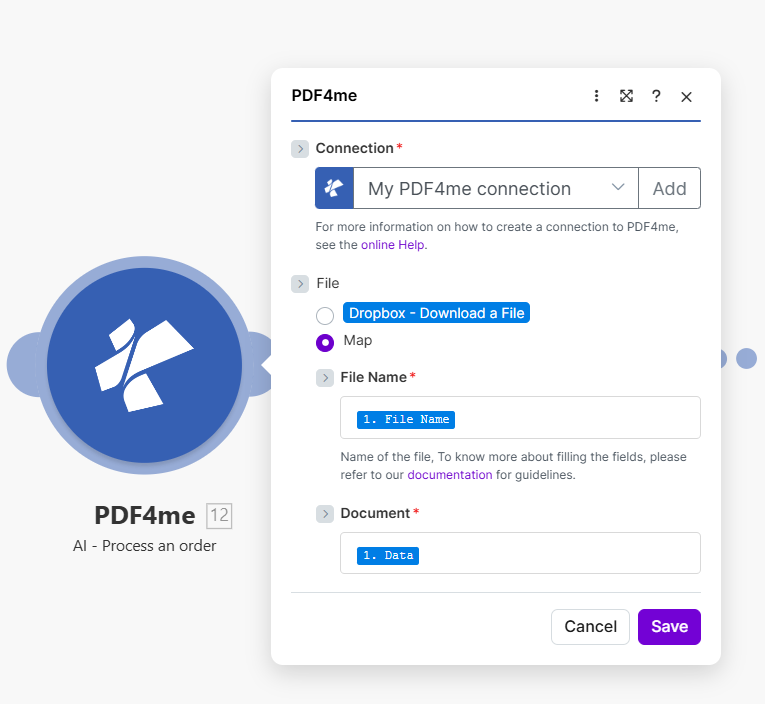
将文件设置为映射,并从上一个模块连接订单名称和文档。输出公开。 orderNumber, customerName, lineItems 数组、总计、货币和 shippingAddress 为了 ERP 以及履行工作流程。
AI流程订单使用哪些参数? Make?
必需的: 必须始终提供“连接”、“订单名称”和“文档”。匹配的输入字段(二进制属性, Base64 内容或订单 URL根据所选的输入数据类型,需要提供以下信息。
| 范围 | 必需的 | 它的作用 | 例子 |
|---|---|---|---|
| Connection | Required | PDF4me API connection. Click Add and paste your API key the first time. Reused automatically across all PDF4me modules in your scenarios. | My PDF4me connection |
| Input Data Type | Required | How the order file is supplied. Binary Data reads from a previous module (most common). Base64 String accepts encoded payloads. URL downloads from a public link. | Binary Data |
| Input Binary Field | Conditional | Binary content of the order file. Required when Input Data Type is Binary Data. Wire from Dropbox, Google Drive, OneDrive Data field, or any email/HTTP module that returns file bytes. | 1. Data |
| Base64 Order Content | Conditional | Base64-encoded order content. Required when Input Data Type is Base64 String. Useful when the order arrives from a webhook or API integration that delivers encoded content. | JVBERi0xLjQK... |
| Order URL | Conditional | Public URL to the order file. Required when Input Data Type is URL. The URL must not require authentication. | https://example.com/po-2024.pdf |
| Order Name | Required | Filename of the order with proper extension (.pdf, .png, .jpg, .jpeg). Used for format detection and AI processing optimization. | po-2024.pdf |
输出字段
| 场地 | 类型 | 它包含什么 |
|---|---|---|
orderNumber | String | Extracted order number or reference identifier (e.g. PO-2024-001 or SO-78423). |
orderDate | String | Order date in ISO 8601 format (YYYY-MM-DD). |
customerName | String | Customer or vendor name printed on the order document. |
lineItems | Array | Array of line items with description, quantity, unitPrice, and total per row. Loop with a Make Iterator for one ERP line per row. |
subTotal | Number | Subtotal amount before taxes, shipping, and discounts. |
total | Number | Final total amount including all charges. |
currency | String | Currency code in ISO 4217 format (USD, EUR, GBP, INR, JPY, etc.). |
shippingAddress | String | Shipping or delivery address printed on the order. |
jobId | String | PDF4me job identifier for audit trail and support tickets. |
success | Boolean | True if the AI extraction completed successfully; false if it failed. |
message | String | Human-readable status message confirming success or describing the error. |
如何在AI流程中设置订单? Make?
- 添加 PDF4me → 人工智能处理订单 致你 Make 设想。
- 选择 联系 (或点击) 添加 用你的 PDF4me API 钥匙)。
- 选择 输入数据类型:来自先前模块的文件的二进制数据, Base64 字符串,或 URL。
- 在下面 文件, 选择 地图 显示订单名称和文档字段。
- 地图 订单名称 文件名(带扩展名)
.pdf,.png,.jpg, 或者.jpeg)。 - 地图 文档 从源模块获取二进制内容:通常是 数据 Dropbox、Google Drive、Gmail 或 HTTP 模块。
- 点击 节省 并运行该场景。将输出包连接到 NetSuite、SAP、Microsoft Dynamics、Odoo、Salesforce 或您的仓库管理系统。使用迭代器。
lineItems创建一个 ERP 每行订单行数。
工作流程示例
工作流程示例Common Make scenario patterns using AI-Process Order.
客户采购订单电子邮件 → AI 提取 → NetSuite 销售订单
- 当收到来自已知客户域且包含采购订单 (PO) 的电子邮件时,Gmail 会触发通知。 PDF 随附的。
- AI处理订单提取 orderNumber, customerName, orderDate, lineItems总计,以及 shippingAddress。
- NetSuite 搜索客户步骤使用 customerName 查找现有客户记录(如果找不到,则跳转到“创建客户”)。
- NetSuite 的“创建销售订单”模块会记录订单表头。 Make 迭代器循环 lineItems 并将每个产品作为销售订单行添加,包括数量和单价。
- Slack 通知会告知履行团队新订单,包括总金额和收货地址;Airtable 日志会记录 PO 到 SO 的映射关系以供审核。
供应商采购订单 PDF → 三方匹配 → 批准
- 当采购部门上传新的供应商采购订单时,SharePoint 监视文件触发器会触发。
- AI处理订单提取 orderNumber, 全部的, lineItems以及货币信息。稍后,AI发票解析器会单独运行,提取匹配的发票字段。
- Google Sheets 查找结果与 PO 匹配。 orderNumber 到收货单(GRN)从仓库。所有三份文件,采购订单, GRN发票,已连接 orderNumber。
- “工具集变量”步骤对数量和总计执行三方匹配。匹配的采购订单自动批准;不匹配的采购订单将路由到 Slack 审批频道,并进行并排比较。
- 已批准的订单会将付款指示发布到应付账款系统;已拒绝的订单会在 Jira 中创建一个异常工单,供采购部门与供应商协商解决。
EDI 备用方案 → AI 订单解析 → 仓库履行
- 一个 HTTP webhook 会接收来自无法发送订单的客户的订单。 EDI 850 条消息,通常是使用电子邮件附件的小买家 PDF 采购订单。
- AI流程顺序规范化 PDF 将您的模式整合到相同的结构化模式中 EDI 管道生产, orderNumber, lineItems, shippingAddress。
- 标准化后的有效载荷被发布到仓库管理系统(WMS) API 就像一个 EDI 订单触发相同的拣货-包装-发货流程。
- 系统会向客户发送确认邮件,其中包含订单号、预计发货日期和商品明细。拣货完成后,系统会自动生成发货标签。
- Airtable 的客户入职记录行跟踪非EDI 客户数量和交易量 PDF 每月收到的订单数量,有助于确定优先级 EDI 推广宣传。
常见问题解答
相关模块
AI发票解析器
提取发票字段并与采购订单进行匹配 orderNumber 对于采购订单间的三方匹配, GRN以及发票,这是自动化采购到付款的基础。
AI处理收据
解析零售和费用收据,与销售订单进行匹配,以进行收入核对和报销工作流程。
人工智能流程合同
从供应合同中提取参与方、条款和期限,并将其链接到订单工作流程,以进行合规性验证和价格验证。