AI处理健康卡 Make
AI处理健康卡 是一个 PDF4me 用于人工智能模块 Make 从健康保险卡图像中提取结构化字段 PDF它返回会员姓名、会员ID、团体编号、计划类型、保险公司以及 ISO 8601 将承保日期作为可映射的输出,用于资格审核、注册和理赔工作流程,具体流程如下: HIPAA 处理规则。
本模块的功能
PDF4me人工智能处理健康卡 读取健康保险卡图像或 PDF 并以可单独映射的字段形式返回结构化的保险数据,包括会员 ID、团体编号、计划类型、保险提供商、会员姓名、出生日期、承保日期、处方 BIN、PCN、团体和自付额信息(按服务类型划分)。无需创建模板,也无需配置字段位置。人工智能可自动识别任何保险公司的卡片布局,使其适用于患者信息录入门户、保险验证工作流程和福利预授权等场景。 Make 这里会收到来自多家不同发卡机构的卡片。
相关博客文章
目前尚无关于此功能的博客文章——敬请期待。
在此期间,您可以浏览 PDF4me 博客,查看适用于各平台的教程和工作流程。
访问博客 →
验证您的身份 API 要求
每一个 PDF4me 模块 Make 需要有效 联系创建或选择一个可以容纳您的 PDF4me API 关键在于确保场景能够安全地调用 AI 健康卡服务。
您不容错过的重要事实
无需模板设置,AI 可处理任何卡片布局
与……不同 OCR 对于需要字段坐标或保险公司模板的解决方案,此模块使用经过训练的 AI 模型自动识别卡片布局。您提供卡片图像或 PDF 人工智能无需任何配置即可定位会员 ID、团体编号、处方字段和共同支付详情,开箱即用,支持数百种保险公司卡格式。
支持 PDF, PNG, JPG, 和 JPEG 输入
传递来自任何来源的二进制内容,例如患者门户网站文件上传、电子邮件附件等。 Dropbox 下载,或 Google Drive 直接将文件添加到文档字段。无需转换图像。 PDF 或者执行任何预处理步骤。将文件名映射为正确的扩展名(.pdf、.png、.jpg 或 .jpeg),以便模块能够正确检测文件格式。
每个输出字段都是一个单独的可映射标记。
该模块将所有提取的字段作为单独的标记返回到输出包中,包括 memberId、groupNumber、planType、insuranceProvider、memberName、dateOfBirthStr、effectiveDateStr、rxBin、rxPcn、rxGroup 和 copayInfo。 JSON 解析,无自定义函数。点击任意标记 Make的映射面板,可将其直接连接到 Airtable 字段、路由条件、电子邮件正文或 EHR API 称呼。
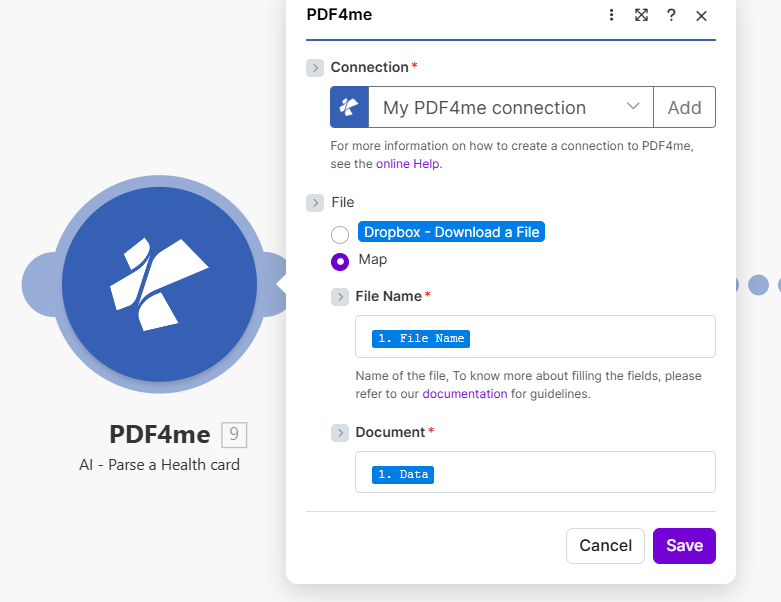
放 文件 到 地图然后接线 文件名 和 文档 从下载或接收健康卡文件的步骤开始。
AI-Process 健康卡使用哪些参数? Make?
必需的: 联系, 文件名, 和 文档。 放 文件 到 地图 首先,这会在模块面板中显示“文件名”和“文档”字段。
| 范围 | 必需的 | 它的作用 | 示例映射 |
|---|---|---|---|
| Connection | Required | PDF4me API connection that authenticates the AI health card request. Click Add to create one by pasting your PDF4me API key: reused automatically across all PDF4me modules in your scenarios. | My PDF4me connection |
| File | No | How the health card file is supplied to the module. Choose Map when passing binary content from a prior download step. Choose Dropbox, Download a File to pull directly from a Dropbox trigger without a separate download step. | Map |
| File Name | Required | Filename of the health card including extension (.pdf, .png, .jpg, or .jpeg). Used by the AI to detect the input format. Map from the filename output of your source module: e.g. the File Name field of a Dropbox or Google Drive download step. | 1. File Name |
| Document | Required | Binary content of the health card file. Must be raw file bytes from a download or upload module: the Data field in Dropbox, Google Drive, or OneDrive. Do not pass a URL string or filename here; the module requires actual binary to run AI processing. | 1. Data |
输出字段
| 场地 | 类型 | 它包含什么 |
|---|---|---|
memberId | String | Unique member identification number printed on the card. Map into patient records or use in a Router to look up existing members. |
groupNumber | String | Group or policy number. Used in insurance verification API calls and claims submissions. |
planType | String | Type of health plan: PPO, HMO, EPO, Medicare, Medicaid, etc. Use in a Router to branch scenario logic per plan type. |
insuranceProvider | String | Name of the insurance company (e.g. Blue Cross Blue Shield, Aetna, UnitedHealth). Map into EHR or billing records. |
memberName | String | Full name of the insured member as printed on the card. |
dateOfBirthStr | String | Member date of birth in ISO 8601 format. Use to cross-verify against registration data. |
effectiveDateStr | String | Date when coverage became or becomes effective. Use in a Filter to reject expired coverage before scheduling. |
rxBin | String | Prescription BIN number for drug coverage routing through pharmacy networks. |
rxPcn | String | Prescription PCN (Processor Control Number) for pharmacy claims. |
rxGroup | String | Prescription group identifier for pharmacy benefit management. |
copayInfo | Array | Array of copay entries: each with a service type (e.g. Primary Care, Specialist, Emergency) and copay amount. Map into a Slack notification or patient-facing email. |
如何在AI流程健康卡中设置AI流程健康卡 Make?
- 添加 PDF4me → AI处理健康卡 致你 Make 设想。
- 选择 联系 (或点击) 添加 用你的 PDF4me API 钥匙)。
- 在下面 文件, 选择 地图 显示文件名和文档字段。
- 地图 文件名 在源步骤的文件名输出中:包含扩展名(
.pdf,.png,.jpg, 或者.jpeg)。 - 地图 文档 到同一步骤的二进制数据字段:通常命名为 数据 在 Dropbox, Google Drive, 或者 OneDrive 模块。
- 节省 点击 运行一次展开输出包:每个提取的字段都是一个单独的可映射令牌,随时可以连接到 EHR APIs数据库或通知模块。
工作流程示例
工作流程示例Common Make scenario patterns using AI-Process Health Card.
患者门户上传 → AI提取 → 创建 EHR 记录
- 新患者通过以下方式上传其健康卡图像: Typeform 或者 JotForm 入口门户。
- AI处理健康卡 从上传的图片中提取 memberId、planType、insuranceProvider 和 copayInfo。
- 路由器按计划类型分支,PPO 患者路由到其中一个 EHR 工作流程,从 HMO 到另一个。
- 一个 HTTP 该模块会在系统中创建一个新的患者记录。 EHR 系统已预先填充所有提取的保险字段。
- Gmail 向患者发送确认信息,其中包含常见服务的自付费用金额。
电子邮件附件 → AI解析 → 福利核实 → 预约准备
- Gmail 当患者在预约前通过电子邮件以附件形式发送其健康卡图像时触发。
- AI处理健康卡 提取 memberId、groupNumber、effectiveDateStr 和 rxBin。
- 如果 effectiveDateStr 是过去的日期,过滤器会阻止这种情况,并自动发送电子邮件要求患者提供更新的保险信息。
- 一个 HTTP 模块调用保险公司的资格 API 使用 memberId 和 groupNumber 确认有效权益。
- A Slack 在患者到达之前,消息会将自付费用金额和计划类型发布到前台渠道。
年度复核批次 Dropbox 文件夹 → 重新提取 → 更新记录
- 计划场景会列出所有健康卡图像。 Dropbox “年度复核”文件夹。
- 迭代器遍历每个文件并将其传递给 AI处理健康卡。
- 该模块重新提取每张卡的 insuranceProvider、planType、effectiveDateStr 和 groupNumber。
- 一个 Airtable 或者 Google Sheets 该模块使用更新后的保险数据更新患者记录。
- 第二个筛选器会标记出保险公司或团体编号自去年以来发生变更的记录,以便进行人工审核。
常见问题解答
相关模块
AI发票解析器
从发票中提取字段,包括供应商、金额、明细项目和到期日。 PDF 采用相同的AI技术生成发票。与健康卡结合使用,简化患者计费流程。
人工智能流程合同
从合同中提取结构化数据,包括合同方、日期、条款,用于供应商协议和保险合同管理工作流程。
人工智能处理订单
从采购订单和供应单据中提取订单数据,这在医疗保健采购和医疗用品订购工作流程中非常有用。