AI流程合同 Make
人工智能流程合同 是一个 Make 模块 PDF4me 读起来像一个 PDF 或者,您可以将法律合同图像转换为结构化元数据,包括:当事人、签署日期、生效日期、到期日期、期限和管辖地。您可以利用这些数据来构建合同生命周期管理系统、自动发送到期提醒,或者无需编写提取代码即可将合同发送给法律顾问。
本模块的功能
PDF4me 人工智能流程合同 从中提取结构化元数据 PDF 或者在您的图片中显示法律合同 Make 使用人工智能的场景。提供一份主服务协议 (MSA)、保密协议 (NDA)、工作说明书 (SOW)、雇佣协议或任何商业合同,模块将返回结果。 所有当事方(包括姓名、地址和职务)、签署日期、生效日期、到期日期、合同期限和管辖法律合同生命周期管理所需的确切字段(CLM)、到期跟踪、自动续约提醒、合同库索引和合规性报告。无需模板设置。适用于全球普通法和大陆法系合同起草惯例。
相关博客文章
目前尚无关于此功能的博客文章——敬请期待。
在此期间,您可以浏览 PDF4me 博客,查看适用于各平台的教程和工作流程。
访问博客 →
我如何验证我的身份 Make 设想?
每一个 PDF4me 模块 Make 需要有效 联系创建或选择一个可以容纳您的 PDF4me API 关键在于确保该场景能够安全地验证 AI 合约提取请求。
您不容错过的重要事实
Parties 的输出结果是一个数组,支持多方合同。
双边协议、三方联合合同以及复杂的经销网络均使用相同的结构化参与方数组。每个条目都包含名称、地址和参考标识(买方、卖方、许可方、披露方等):无需对多方场景进行特殊处理。
ISO 8601 日期字符串驱动过期跟踪
executionDateStr、effectiveDateStr 和 expirationDateStr 都返回 in ISO 8601 (YYYY-MM-DD)格式。安排每日 Make 场景为查询 30/60/90 天内到期的合同,并触发续约提醒,从而减少错过续约和意外自动续约。
管辖权对象涵盖适用法律和审判地。
管辖权输出是一个结构化对象,包含适用法律、约定的法院或仲裁地点以及所在地区。可将其用于合规性仪表板、制裁筛查,并根据适用的管辖权将合同分配给合适的法律顾问。
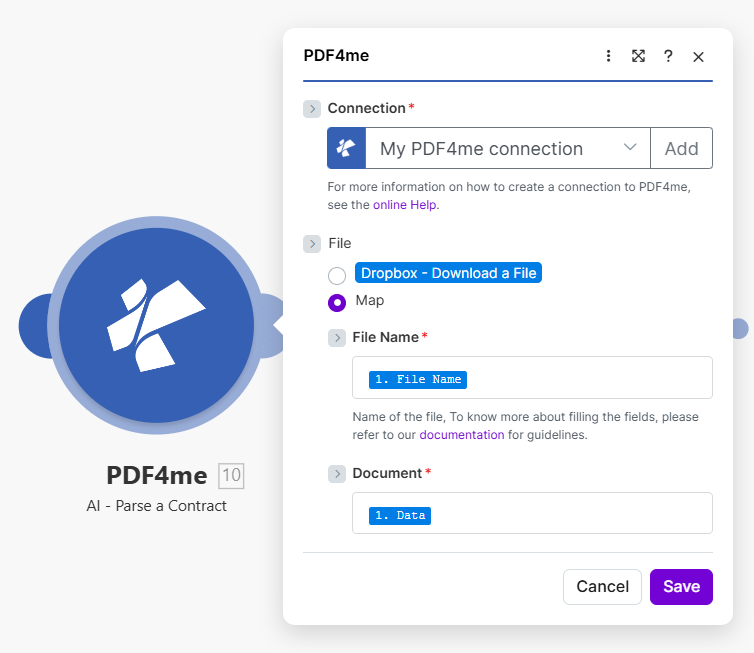
将文件设置为映射,并从上一个模块导入合同名称和文档。输出结果包含参与方、关键日期、期限和管辖区信息,这是合同生命周期管理 (CLM) 和合规工作流程的基础。
参数
必需的: 必须始终提供连接、合同名称和文档。匹配的输入字段(二进制属性, Base64 内容或合同 URL根据所选的输入数据类型,需要提供以下信息。
| 范围 | 必需的 | 它的作用 | 例子 |
|---|---|---|---|
| Connection | Required | PDF4me API connection. Click Add and paste your API key the first time. Reused automatically across all PDF4me modules in your scenarios. | My PDF4me connection |
| Input Data Type | Required | How the contract file is supplied. Binary Data reads from a previous module (most common for DocuSign/Adobe Sign integrations). Base64 String accepts encoded payloads. URL downloads from a public link. | Binary Data |
| Input Binary Field | Conditional | Binary content of the contract file. Required when Input Data Type is Binary Data. Wire from DocuSign, Adobe Sign, SharePoint, Dropbox, or any document-source module. | 1. Data |
| Base64 Contract Content | Conditional | Base64-encoded contract content. Required when Input Data Type is Base64 String. Useful when the contract arrives via secure API or e-signature webhook. | JVBERi0xLjQK... |
| Contract URL | Conditional | Public URL to the contract file. Required when Input Data Type is URL. The URL must not require authentication. | https://example.com/msa.pdf |
| Contract Name | Required | Filename of the contract with proper extension (.pdf, .png, .jpg, .jpeg). Used for format detection and AI processing optimization. | msa-2024.pdf |
输出字段
| 场地 | 类型 | 它包含什么 |
|---|---|---|
parties | Array | Array of contract parties. Each entry has name, address, and a reference designation (Disclosing Party, Receiving Party, Buyer, Seller, Licensor, Licensee, etc.). Supports two-party and multi-party contracts. |
executionDateStr | String | Date when the contract was executed or signed, in ISO 8601 format (YYYY-MM-DD). |
effectiveDateStr | String | Date when the contract becomes effective, in ISO 8601 format. May differ from the execution date. |
expirationDateStr | String | Date when the contract expires, in ISO 8601 format. Use for renewal reminders and expiration tracking. |
contractDuration | String | Duration or term of the contract as stated in the document (e.g. "3 years", "12 months", "perpetual until terminated"). |
jurisdiction | Object | Jurisdiction object containing the governing law, the agreed court or arbitration venue, and the region. Use for compliance routing and sanctions screening. |
success | Boolean | True if the AI extraction completed successfully; false if it failed. |
message | String | Human-readable status message confirming success or describing the error. |
如何在人工智能流程中设置合同 Make?
- 添加 PDF4me → 人工智能流程合同 致你 Make 设想。
- 选择 联系 (或点击) 添加 用你的 PDF4me API 钥匙)。
- 选择 输入数据类型:来自文件的二进制数据 DocuSign, Adobe Sign, SharePoint或任何文档模块。
- 在下面 文件, 选择 地图 显示合同名称和文档字段。
- 地图 合同名称 文件名(带扩展名)
.pdf,.png,.jpg, 或者.jpeg)。 - 地图 文档 从源模块获取二进制内容: 数据 领域 DocuSign, Adobe Sign, SharePoint, OneDrive, 或者 Dropbox 模块。
- 点击 节省 并运行该场景。将输出包连接到 CLM 平台 (Ironclad, ContractWorks, DocuSign CLM),合约库(SharePoint, Airtable),或合规性仪表板。
典型配置
工作流程示例Common Make scenario patterns using AI-Process Contract.
签名 DocuSign 信封 → AI提取 → CLM 仓库
- A DocuSign 当合同由所有各方完全签署后,完成信封触发器就会触发。
- 已签署 PDF 传递给 AI 流程合约。输出包返回参与方、执行日期字符串、生效日期字符串、到期日期字符串和管辖权信息。
- A SharePoint 上传步骤会存储已签名的内容。 PDF 在合同库中,以主要当事人和执行年份命名的文件夹下。
- 一个 Airtable 创建记录步骤会将合同与所有提取的元数据建立索引,以便进行搜索、筛选和报告。
- A Slack 通知将向法律运营渠道宣布新合同,其中包含所有关键日期和当事方名称。
定期扫描 → 即将到期的合同 → 续约提醒
- 每个工作日早上 9:00 都会触发预定事件。
- 一个 Airtable 搜索步骤查询到期日在未来 30、60 或 90 天内的合同。
- A Make 迭代器处理每个到期合约。对于90天到期的合约, Slack 消息会发送给合同所有者,提示需要续约;60 天后,会发送后续电子邮件;30 天后,会升级处理并提交给法律顾问。
- 每份通知都包含当事方、到期日期字符串以及指向已签署合同的直接链接。 SharePoint。
- 一个 Airtable 更新操作会将合同行标记为“已发送提醒”,并带有时间戳,以便下次计划运行不会重新发送相同的提醒。
供应商合同上传 → 管辖权核查 → 律师路由
- A SharePoint 当采购部门上传供应商合同草案以供法律审核时,监视文件会触发警报。
- AI-Process 合同提取当事人、管辖对象、适用法律、法院所在地、地区。
- 路由器根据管辖区域进行分支。美国合同路由至美国律师,欧盟合同路由至欧盟律师,亚太地区合同路由至亚太地区律师,每个分支发送一份 Asana 将任务分配给合适的法律团队成员。
- “工具集变量”步骤会将参与方数组与制裁筛查列表进行比对。任何被标记的参与方都会中止工作流程,并立即通过以下方式通知合规部门: Slack。
- 合约元数据已记录到日志中 Airtable 已指定审阅人、管辖范围和“审阅中”状态,待审阅人完成分析后即可更新。
实用技巧
Match Input Data Type to your actual field
If Input Data Type is set to Binary Data but you map a value into Base64 Contract Content instead, the module returns an error. Set the type first, then fill only the matching field.
Contract Name needs the real extension
The module uses the filename extension to route the document to the right parser. A file mapped as "contract" with no extension can fail; always map the source filename or add one explicitly, e.g. msa-2024.pdf.
jurisdiction can return partial data
If a contract omits an explicit governing-law clause, the jurisdiction object may return null or partial fields. Add a Router branch to flag contracts missing jurisdiction data for manual legal review.
Scanned contracts need legible resolution
For scanned paper contracts, low-resolution or skewed scans reduce field-extraction accuracy. Scan at 300 DPI or higher and keep pages flat before uploading.
parties array order is not signature order
Do not assume parties[0] is always the first signatory. Match on the reference designation (Buyer, Seller, Disclosing Party, etc.) rather than array position when routing logic depends on a specific role.
Public URL contracts must be unauthenticated
When Input Data Type is URL, the link must be reachable without login or token. Contracts behind SharePoint or Google Drive sharing permissions will fail; download and re-upload as Binary Data instead.
速查表
| 场地 | 价值 |
|---|---|
| Module | AI-Process Contract |
| Connection | PDF4me API key |
| Input Data Type (from previous step) | Binary Data |
| Input Data Type (Base64 payload) | Base64 String |
| Input Data Type (public link) | URL |
| Contract Name format | filename.pdf / .png / .jpg / .jpeg |
| Key output fields | parties, executionDateStr, effectiveDateStr, expirationDateStr, contractDuration, jurisdiction |
| Date format | ISO 8601 (YYYY-MM-DD) |
常见问题解答
相关操作
人工智能处理订单
提取采购订单和销售订单数据,链接到父级供应合同进行合规性验证、价格验证和三方匹配。
AI发票解析器
提取发票字段,根据母合同的定价、付款条款和应付账款义务验证发票。
人工智能处理抵押贷款文件
专门用于抵押贷款和贷款文件的合同提取器,与通用合同解析器配合使用,可实现贷款文件的完全自动化。
在其他平台上执行相同任务
n8n人工智能流程合同
同一个合约解析AI节点 n8n 工作流程,将其连接到自托管或云平台 n8n 实例而不是 Make。
Power AutomateAI合约解析器
相同的合约提取操作 Microsoft Power Automate 流动,契合 SharePoint 和 Dynamics 365 法律行动场景。
ZapierAI合约解析器
相同的合约提取步骤 Zapier将其连接到 DocuSign, Google Drive, 或者 Dropbox Zap 中已包含触发器。