AI - Make 中的文档解析器
本模块的功能
PDF4me AI - 文档解析器 通过运行已保存的脚本,从任何文档类型中提取结构化字段。 分析器模板 与文件对接。选择内置的 默认发票提取 可以使用模板或在模板中创建自定义模板 PDF4me 用于管理收据、合同、采购订单、化验结果、身份证件或任何自定义表单的仪表盘。该模块会将提取的数据返回到单个窗口中。 文档文本 输出已准备好输入到 Parse 中 JSON, Airtable, Google Sheets或任何下游 Make 模块。一个模板驱动的操作即可涵盖您处理的所有文档类型。
相关博客文章(1)
验证您的身份 API 要求
每一个 PDF4me 模块 Make 需要有效 联系创建或选择一个可以容纳您的 PDF4me API 关键在于确保该场景能够安全地验证 AI 提取请求。
首先设置分析器
本指南中将使用的仪表盘网址:
- 分析器列表(步骤 1–2):
https://dev.pdf4me.com/dashboard/#/ai-document-parser/ - 分析器详细信息(步骤 3–5):
https://dev.pdf4me.com/ai-document-parser/?id=<analyzer-guid>
首先创建您的分析器(所有平台均需此步骤)
AI - 文档解析器会在 PDF4me 开发者仪表盘中运行一个已保存的分析器。 选择“解析”可处理单一文档模式,或选择“分类”可在单次调用中对多种变体(如客户ABC、客户XYZ、通用发票)进行路由。同一分析器ID可在Make、Zapier、Power Automate、n8n以及REST API中使用。
您不容错过的重要事实
AI 分析器 ID 从您的仪表板中选择解析或分类分析器
输出结果为 JSON 在单个文档文本字段中
提取的数据落到
文档文本 输出为 JSON 字符串。添加一个 JSON → 解析 JSON 模块紧随其后,点 JSON 字符串 在 文档文本并且每个字段都会在下游成为一个可单独映射的标记。智能重命名模式:将解析后的字段传递给“上传文件名”
解析后 JSON 公开字段,丢弃已解析的标记(例如)
供应商名称)进入 文件名 下游领域 Dropbox / Google Drive / OneDrive 上传模块。输出文件将使用提取的值自动重命名,采用最简洁的 AP 自动化模式。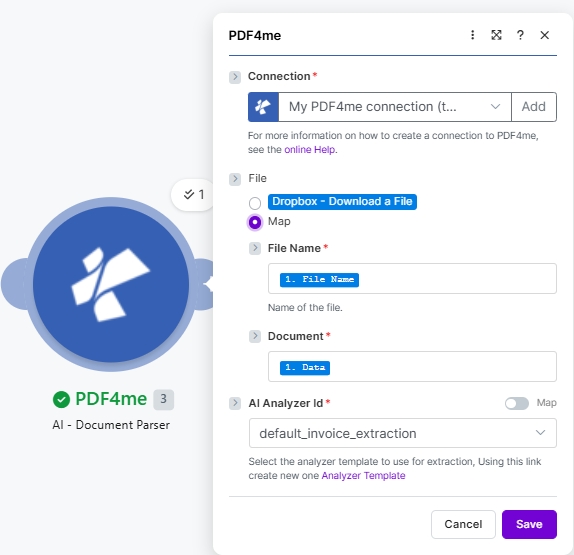
放 文件 到 地图, 金属丝 文件名 和 文档 从上一个模块中选择 AI 分析器 ID (这里是内置的) 默认发票提取)。 点击 分析器模板 提示:创建自定义模板。
参数
本指南中将使用的仪表盘网址:
- 分析器列表(步骤 1–2):
https://dev.pdf4me.com/dashboard/#/ai-document-parser/ - 分析器详细信息(步骤 3–5):
https://dev.pdf4me.com/ai-document-parser/?id=<analyzer-guid>
必需的: 连接、文件名(当文件为 Map 时)、文档(当文件为 Map 时)和 AI 分析器 ID。
| 范围 | 必需的 | 它的作用 | 例子 |
|---|---|---|---|
| Connection | Yes | PDF4me connection. Click Add and paste your API key the first time, then reuse the connection across every PDF4me module. | My PDF4me connection |
| File | Yes | Radio button picking how the source document arrives at the module. Pick a quick storage option (Dropbox - Download a File) or choose Map to bind File Name and Document from any prior module. | Map |
| File Name | Conditional | Sub-field of File, shown when Map is selected. Filename of the source document including its extension (.pdf, .png, .jpg, .jpeg). Map from the prior module File Name output. | 1. File Name |
| Document | Required | Sub-field of File, shown when Map is selected. Binary content of the document to be parsed. Map from the prior module Data / binary output. | 1. Data |
| AI Analyzer Id | Yes | Dropdown picking the Analyzer the AI runs against the document. Create Analyzers at the https://dev.pdf4me.com/dashboard/#/ai-document-parser/ list (+ Add), then edit schemas on the https://dev.pdf4me.com/ai-document-parser/?id=<analyzer-guid> detail page. Use default_invoice_extraction for invoices or a custom Parse / Classify Analyzer. | default_invoice_extraction |
输出
| 场地 | 类型 | 它包含什么 |
|---|---|---|
Doc Text | String (JSON) | The full extracted JSON payload. Field names match what the chosen Analyzer Template returns (vendorName, invoiceNumber, totalAmount, lineItems, etc for default_invoice_extraction). Always wire into a JSON Parse JSON module to expose every field as an individually mappable Make token. |
示例文件
使用真实的供应商发票完整地尝试此操作。将其拖放到您的…… Dropbox 从文件夹导入并运行场景。
快速设置
- 添加 PDF4me 到 AI - 文档解析器 你的 Make 设想。
- 选择 联系 (或点击) 添加 用你的 API 钥匙)。
- 放 文件 到 地图。 地图 文件名 (
1. File Name) 和 文档 (1. Data)来自前一个模块。 - 选择一个 AI 分析器 ID:
default_invoice_extraction用于发票,或来自分析器的 分析器列表 和 分析器详情 页数(解析 或者 分类 设置指南)。 - 保存并运行。管道传输 文档文本 输出到 JSON → 解析 JSON 该模块可将每个字段作为可向下游映射的令牌公开。
工作流程示例
常见场景模式Three common ways to chain AI - Document Parser into a Make flow.
供应商发票 Airtable 使用智能重命名
- Dropbox 下载文件 提取新的供应商发票。
- AI - 文档解析器运行
默认发票提取模板。 - JSON 解析 JSON 揭露
供应商名称,发票号,总金额行项目等。 - Airtable 创建记录 将解析后的字段写入 AP 寄存器。
- Dropbox 上传文件 将发票归档,文件名设置为
{{vendorName}}.pdf为了便于归档。
自定义合同条款提取
- 构建自定义 合同条款 分析器模板 PDF4me 仪表盘(生效日期、终止条款、适用法律、当事人、合同金额)。
- 当合约生效时,触发器会触发。 PDF 着陆 SharePoint。
- AI - 文档解析器运行自定义模板。
- 解析 JSON + Google Sheets 添加行会将合同摘要写入法务团队跟踪表。
电子邮件附件 Slack 赞同
- Outlook 收到新邮件时触发 PDF 依恋。
- AI - 文档解析器运行
默认发票提取。 - 解析 JSON 显示总金额。
- Make 筛选 将超过 5,000 美元的发票路由至 Slack 已批准;其余的直接进入 Airtable。
常见问题解答
相关模块
解析设置指南
在选择 AI 分析器 ID 之前,请先在开发者控制面板中构建解析分析器。
分类设置指南
在一个分析器中将混合文档变体路由到正确的模式。
AI - 文档解析器 Zapier
6000 多个应用程序中的 Zap 使用了相同的分析器 ID。
AI - 文档解析器 Power Automate
Microsoft 365 与……流动 SharePoint, Excel数据宇宙。
AI - 文档解析器 n8n
通过 AI 分析器 ID 下拉菜单选择相同的分析器 ID。
AI发票解析器
固定格式发票解析器。适用于仅处理发票且需要开箱即用的各字段置信度评分的情况。
解析文档(正则表达式/JS模板)
模式匹配替代方案。适用于字段每次都位于固定位置的情况(相同的表单,布局没有变化)。
AI处理收据
专为零售/费用收据(商家、商品、税金、总额)调整的收据专用 AI 解析器。