保存元数据 PDF 在 Make
保存元数据 PDF 是一个 PDF4me 模块 Make 编辑 PDF 元数据:它写入 Title, Author, Creator, Producer, Subject, 和 Keywords 进入一个领域 PDF 根据您的描述,所有字段均为可选字段,因此任何留空的字段都将保留其现有值。您可以使用它来标记文档以便搜索、规范归档或在生成的报告上加盖标记,而无需打开任何文件。
本模块的功能
PDF4me, PDF - 保存 PDF 的元数据 将标题、作者、创作者、制片人、主题和关键词字段直接写入 PDF 一个 Make 场景:所有字段均为可选字段,留空任何字段都将保留文档中的现有值。将先前步骤中的值映射到整个文档库,无需手动打开任何文件即可自动添加元数据标签。
验证您的 API 请求
每一个 PDF4me 模块 Make 需要有效 联系创建或选择一个可以容纳您的 PDF4me API 关键在于使场景能够安全地调用元数据写入服务。
您不容错过的重要事实
您无需每次都重新输入所有元数据。任何留空的字段都将被忽略,其值已存储在数据库中。 PDF 保持不变。仅更新您需要更改的内容。
谷歌读取 PDF 爬取元数据。已填充 Title 字段可以出现在搜索结果标题中。 Keywords 有助于产生相关性信号。在发布前设置这些信号。 PDFs 访问您的网站是直接的 SEO 行动。
元数据存在于文档信息字典中,与页面内容完全分离。更改这些字段不会影响读者打开文件时看到的内容。
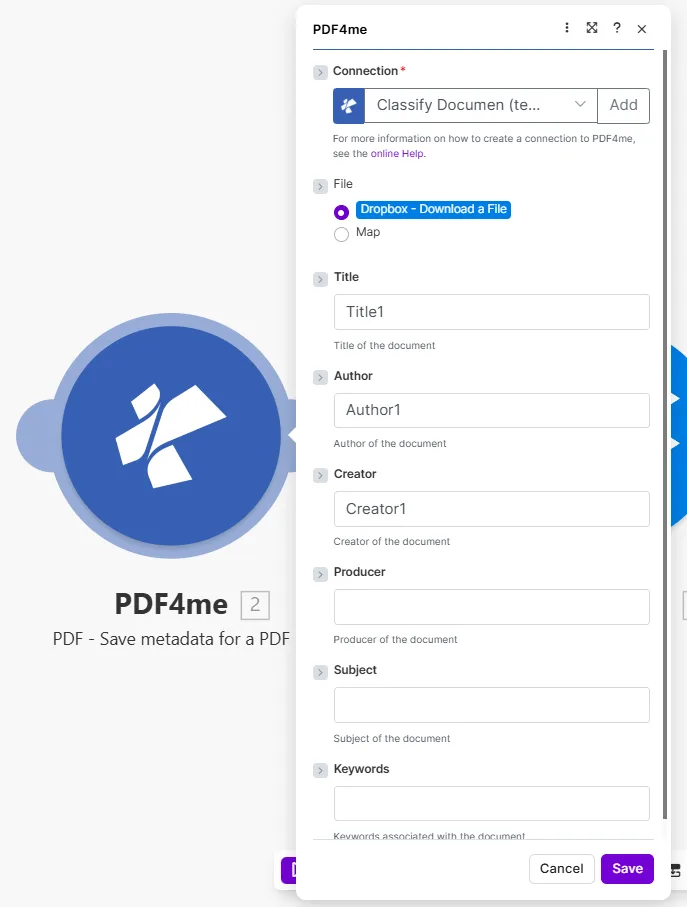
仅填写您想要更新的字段。空字段将保留原值。 PDF 已经有了。
什么 PDF 我可以在元数据字段中设置什么? Make?
该模块编写六个标准 PDF 文档信息字段。所有字段均为可选,只有您提供的值才会写入文档。有关底层规范,请参阅[此处]。 PDF 文档信息字典 PDF 1.7 / ISO 32000 规范 和 Google 搜索中心指南 PDF 最佳实践。
必需的: Connection 和 File所有元数据字段都是可选的(取决于您想要更改的内容),只有您提供的值才会写入文档。
| 范围 | 必需的 | 它的作用 | 例子 |
|---|---|---|---|
| Connection | Required | PDF4me API connection used to authenticate metadata write requests. | Your PDF4me connection |
| File | Required | Source PDF. Choose Dropbox - Download a File for a direct Dropbox trigger, or Map to supply filename and binary content from a prior module. | Dropbox - Download a File |
| Title | Conditional | Document title written into the PDF info dictionary. Appears in viewer title bars and is indexed by Google when the PDF is published on the web. | Q4 Financial Report 2025 |
| Author | Conditional | Name of the person or team that created the document. Used for attribution in viewers and document management systems. | Finance Department |
| Creator | Conditional | The application that originally authored the document, for example Microsoft Word or Adobe InDesign. | Microsoft Word |
| Producer | Conditional | The tool that generated the final PDF bytes, for example a PDF library or a print-to-PDF driver. | PDF4me |
| Subject | Conditional | Short description of the document subject. Visible in the document properties dialog and used by some search systems. | Quarterly earnings summary |
| Keywords | Conditional | Comma-separated keyword tags associated with the document. Contributes to Google indexing and internal search when the PDF is hosted online. | finance, Q4, 2025, earnings |
如何编辑 PDF 元数据 Make 设想?
- 添加 PDF4me 并选择 PDF - 保存 PDF 的元数据。
- 选择 Connection (或点击) 添加 用你的 API 钥匙)。
- 放 File 到 Dropbox - 下载文件 或者 地图 来自之前的模块。
- 请填写您要更新的元数据字段: Title, Author, Creator, Producer, Subject, Keywords将任何字段留空以保留其当前值。
- 要实现值的自动化,请从之前的模块映射它们:从 Airtable 字段中提取标题,或从文件名中推导出标题。
- 节省 点击 运行一次输出结果包含 Document Name 和 Document Data: 这 PDF 包含更新后的元数据属性。
输出
| 场地 | 类型 | 它包含什么 |
|---|---|---|
Document Name | String | Filename of the output PDF with updated metadata. |
Document Data | Buffer | Binary content of the PDF with the new metadata written in. Map this into an upload, archive, or email module. |
工作流程示例
工作流程示例Common Make scenario patterns that use PDF - Save metadata for a PDF to tag, standardize, and optimize document properties.
- 一份新的白皮书 PDF 已上传至受监控的 Google 云端硬盘文件夹。
- Google 表格中的一行,包含文档标题、作者姓名和 SEO 关键词是通过文件名查找的。
- 保存 PDF 的元数据 写道 Title, Author, 和 Keywords 将表格中的字段导入到数据表中。 PDF。
- 被标记的 PDF 文件已上传到公共网站文件夹,Google 现在有了正确的元数据进行索引。
- Slack 通知确认了这一点 PDF 已上线并应用元数据。
- 计划场景会遍历所有场景 PDFs 在旧版存档文件夹中。
- 获取文档信息 检查是否 Author 该字段已填写内容。
- 过滤器会跳过已有作者的文件;其余文件继续处理。
- 保存 PDF 的元数据 将组织名称写入 Author 以及一个标准关键字集 Keywords。
- 更新后的文件已保存回存档,准备进行合规的搜索索引。
- 月度报告 PDF 由数据模板自动生成。
- 该方案将当前月份和年份映射到 Title 字段(例如:销售报告,2026 年 4 月)。
- 部门名称映射到 Author;相关产品关键词 Keywords。
- 保存 PDF 的元数据 一次性写入所有三个字段。
- 带有元数据标签的报告已存档。 SharePoint 并通过电子邮件发送至邮件列表。