调整大小 PDF 在 Make
本模块的功能
PDF4me调整 PDF 文件大小 改变页面尺寸 PDF 在 Make 无需桌面软件即可实现此功能。您可以调整页面大小。 A4可以是 US Letter、Legal 或任何自定义毫米尺寸,可以指定特定页面或所有页面,并且可以在两种模式之间进行选择:重新缩放页面画布本身,或者保持页面大小不变,并在现有内容周围添加内边距。
验证您的 API 请求
每一个 PDF4me 模块 Make 需要有效 联系创建或选择一个可以容纳您的 PDF4me API 关键在于确保场景能够安全地调用调整大小服务。
您不容错过的重要事实
IsPageSizeRequested 是 将实际页面画布更改为目标大小。 不 保持页面大小不变,并在内容周围添加空白边距。选错选项,会得到意想不到的结果。
Page Sequence 接受单个数字、逗号分隔的列表、类似 2-4 的范围,或者仅仅是 全部序列之外的页面将按其原始尺寸返回。
Custom Width, Custom Height所有四个填充字段的值均以毫米为单位。 A4 = 210 x 297 毫米,美国信纸 = 215.9 x 279.4 毫米,法律文件 = 215.9 x 355.6 毫米。
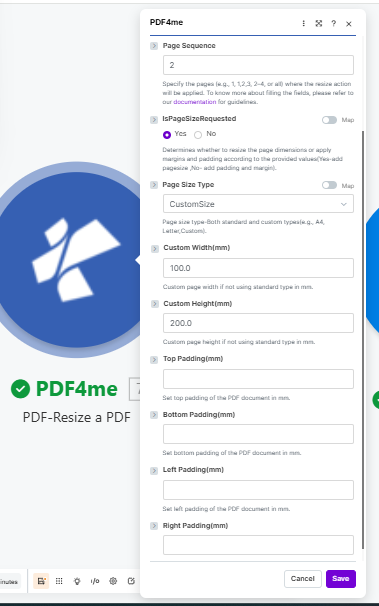
放 IsPageSizeRequested 选择“是”以重新缩放画布,然后选择标准尺寸或以毫米为单位输入自定义尺寸。
参数
必需的: Connection 和 File。 Custom Width 和 Custom Height 需要 Page Size Type 设置为 CustomSize填充字段仅在以下情况下适用: IsPageSizeRequested 设置为编号。
| 范围 | 必需的 | 它的作用 | 例子 |
|---|---|---|---|
| Connection | Yes | PDF4me API connection used to authenticate resize requests. | Your PDF4me connection |
| File | Yes | Source PDF. Choose Dropbox - Download a File for a direct Dropbox trigger, or Map to wire filename and binary content from a prior module. | Dropbox - Download a File |
| Page Sequence | No | Pages to resize. Accepts a single number, a comma-separated list (1,3,5), a range (2-4), or all. Unspecified pages keep their original size. | all |
| IsPageSizeRequested | No | Yes rescales the page canvas to your target size. No leaves the canvas as-is and adds padding margins around the content instead. | Yes |
| Page Size Type | No | Target paper format. Choose from standard sizes like A4, Letter, or Legal, or select CustomSize to enter exact dimensions. | A4 |
| Custom Width (mm) | If CustomSize | Page width in millimeters when Page Size Type is set to CustomSize. | 210 |
| Custom Height (mm) | If CustomSize | Page height in millimeters when Page Size Type is set to CustomSize. | 297 |
| Top Padding (mm) | No | White-space margin added to the top of the page. Only relevant when IsPageSizeRequested is set to No. | 10 |
| Bottom Padding (mm) | No | White-space margin added to the bottom of the page. Only relevant when IsPageSizeRequested is set to No. | 10 |
| Left Padding (mm) | No | White-space margin added to the left of the page. Only relevant when IsPageSizeRequested is set to No. | 10 |
| Right Padding (mm) | No | White-space margin added to the right of the page. Only relevant when IsPageSizeRequested is set to No. | 10 |
快速设置
-
添加 PDF4me → PDF 文件大小调整 针对你的情况。
-
选择 Connection (或点击) 添加 用你的 API 钥匙)。
-
放 File 到 Dropbox - 下载文件 如果你的数据源是 Dropbox,或者 地图 从任何先前的模块中提取数据。
-
输入 Page Sequence: 类型
all调整每个页面的大小,或针对特定页面进行调整,例如1,3或者2-4。 -
放 IsPageSizeRequested: 是的 更改页面画布, 不 在不改变页面大小的情况下增加内边距。
-
如果 是的选择一个 Page Size Type (A4信函,法律, CustomSize)。 为了 CustomSize, 进入 Custom Width 和 Custom Height 单位为毫米。
如果 不请填写所需的填充字段。 顶部, 底部, 左边, 正确的 单位为毫米。
-
节省 点击 运行一次输出包包含 Document Name 和 Document Data 准备顺流而下。
输出
| 场地 | 类型 | 它包含什么 |
|---|---|---|
Document Name | String | Filename of the resized PDF, based on the source filename. |
Document Data | Buffer | Binary content of the resized PDF. Map this into an upload, send, or further processing module. |
工作流程示例
工作流程示例Real Make scenario patterns that use PDF-Resize a PDF to solve format inconsistency, print prep, and archiving.
- 新的 PDFs 一些文件从多个来源到达共享的 Dropbox 文件夹。 A4部分为标准信纸尺寸,部分为定制尺寸。
- PDF 文件大小调整 对每个传入的文件运行 Page Sequence 设置为 all 和 Page Size Type 设置为 A4。
- 所有文件离开模块时画布大小都相同。
- 合并 PDF 模块可以将它们合并在一起,而不会出现页面边界不匹配的情况。
- 合并后的文档将保存到存档文件夹并通过电子邮件发送给团队。
- 一份报告 PDF 生成的页面内容会铺满整个页面。
- PDF 文件大小调整 跑步 IsPageSizeRequested 设置为“否”,四边均有 10 毫米衬垫。
- 页面画布会扩展以适应边距,现有内容不会移动或重新缩放。
- 带衬垫的 PDF 发送到打印模块,现在每页都有安全边距。
- 预定的场景从美国格式模板(215.9 x 279.4 毫米)中提取每周报告。
- PDF 文件大小调整 将所有页面转换为 A4 (210 x 297 毫米)适用于欧洲收件人。
- 调整大小 PDF 已上传至特定区域 SharePoint 文件夹。
- 一封包含以下内容的通知邮件 A4 版本已发送至区域分发列表。